Waste Computer Recycling: A Business Guide for 2026

That back room cleanout starts the same way. A facilities manager needs space back, IT has a stack of retired desktops and failed drives, and someone asks whether the equipment can just go on the next surplus run.
For regulated organizations, that is where routine disposal turns into a security and compliance problem. Hospitals, research labs, universities, and government offices do not only need old machines removed. They need waste computer recycling handled in a way that protects data, documents custody, and keeps the project from disrupting active operations.
Generic electronics recycling advice does not go far enough for environments with patient records, research data, controlled devices, or lab shutdown schedules. The practical standard is higher. You need a process that accounts for inventory accuracy, data-bearing media, de-installation, pickup coordination, downstream handling, and documentation you can hand to compliance, legal, or procurement later.
The End-of-Life IT Challenge for Modern Businesses
A storage room full of old towers, monitors, docking stations, and rack hardware looks harmless until someone asks a simple question: Which of these still contains data?
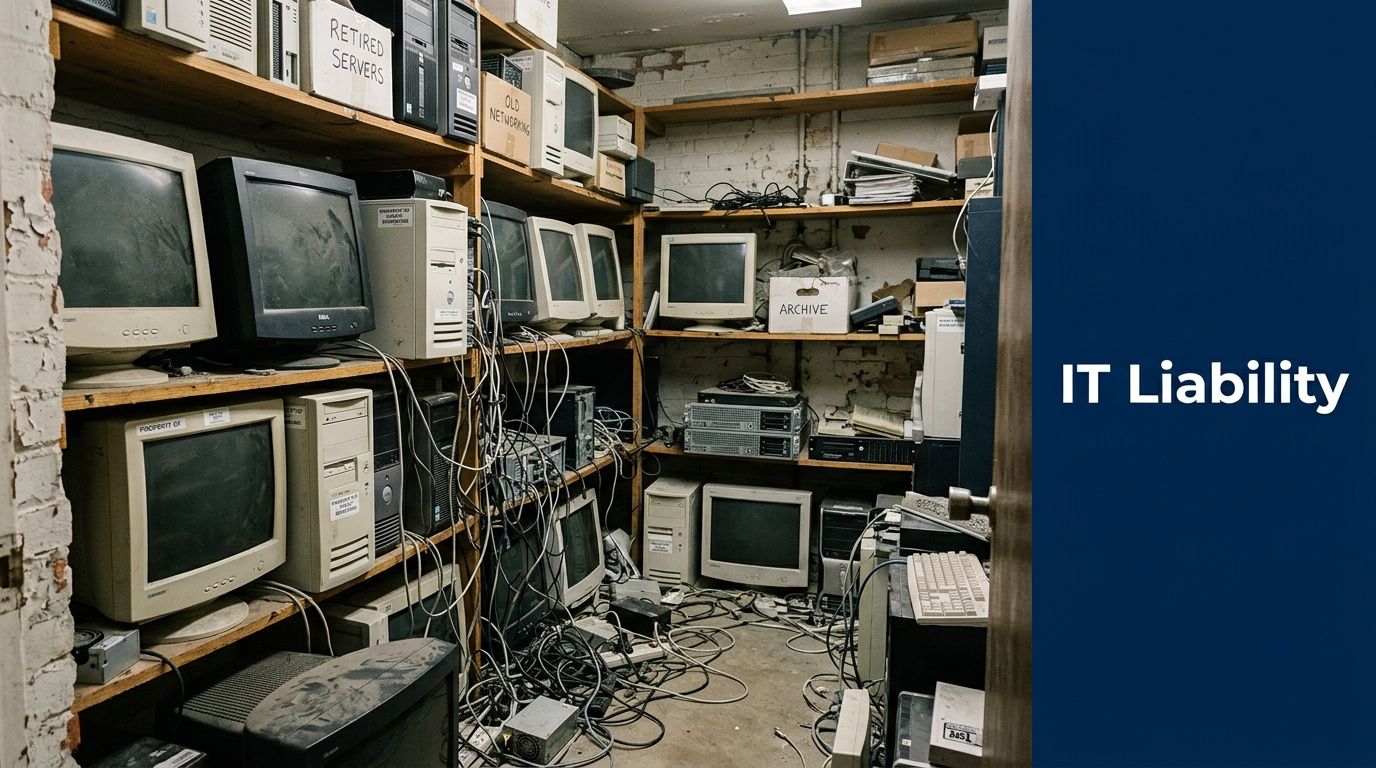
In many businesses, retired equipment sits for months because nobody owns the final step. IT already replaced the hardware. Facilities wants the floor space. Compliance assumes disposal is documented. Procurement may still have asset records that were never closed out. That gap is where risk builds.
For healthcare and research organizations, the issue is not just clutter. A powered-down server can still hold regulated data. A desktop moved into storage can still contain local files, cached credentials, or removable media tucked into a drive bay. An untracked pickup can break the audit trail before the first box leaves the building.
Reasons for Heightened Compliance Requirements
The environmental side alone is hard to ignore. In 2022, the world generated 62 million tonnes of e-waste, but only 22.3% was formally collected and recycled, and the raw materials in unrecycled waste were valued at over $70 billion according to global e-waste statistics.
That matters to businesses for two reasons. First, old equipment has genuine residual material value. Second, informal or poorly controlled disposal creates unnecessary exposure for the organization that owned the devices.
What usually goes wrong
The biggest failures are rarely technical. They are procedural.
- Assets are moved before being logged. Once machines leave their original rooms without inventory control, serial matching becomes harder.
- Data-bearing devices are mixed with scrap. A pile of keyboards and cable bundles can hide SSDs, backup drives, or access control hardware.
- Pickup is treated like junk removal. That mindset works for broken furniture, not for end-of-life IT.
- Nobody verifies final documentation. If certificates and serialized records are incomplete, the file is weak even if the recycler handled the material properly.
Tip: If your team cannot answer who had possession of each data-bearing device from removal through destruction, the process is not complete enough for a regulated environment.
The practical goal is simple. Remove equipment fast, keep chain of custody intact, and close the project with defensible records. That is the standard facilities managers and IT directors should expect from any waste computer recycling program.
Building Your IT Asset Disposition Plan and Inventory
The cleanest projects start before a single pallet is wrapped. A solid inventory turns a vague cleanout into a controlled disposition event.
Most failed recycling jobs begin with a rough estimate. “About fifty desktops, some monitors, maybe a few servers” is not enough. Your recycler, your compliance team, and your own staff need a documented asset picture that tells them what exists, where it is, and what requires secure handling.
Build the inventory around risk, not convenience
A spreadsheet is fine if it is accurate. What matters is the fields you capture.
Include, at minimum:
- Asset identity: make, model, serial number, and internal asset tag.
- Device type: desktop, laptop, server, monitor, thin client, storage array, networking gear, printer, or lab-connected workstation.
- Location details: building, floor, room, closet, rack, or department.
- Data status: whether the item contains a hard drive, SSD, removable media, or embedded storage.
- Condition: working, failed, obsolete, damaged, or incomplete.
- Disposition path: reuse, remarket, wipe and redeploy, shred, or recycle.
That list sounds basic, but it solves several downstream problems at once. It tells the pickup crew what needs tamper-evident handling. It tells IT which machines can be wiped instead of destroyed. It tells accounting which assets may still have residual value.
Separate three categories early
Do not treat all end-of-life equipment the same. In practice, waste computer recycling works better when you sort assets into three buckets before scheduling removal.
Assets with potential reuse value
Functional laptops, servers, networking gear, and newer business desktops often belong here. If a drive can be sanitized and the hardware still has a secondary market or internal redeployment use, preserve that option.
Assets that must be recycled
This includes obsolete systems, broken monitors, damaged chassis, mixed peripheral lots, and machines that are no longer worth repair. These should move into a certified recycling stream with documented downstream processing.
Assets requiring immediate secure destruction
Failed drives, highly sensitive devices, systems from regulated departments, and unknown media should be isolated. If your team cannot verify data status, assume the device needs secure handling.
Tie the inventory to broader facility planning
End-of-life IT should not live in its own silo. It affects moves, renovations, lab shutdowns, and refresh cycles. Facilities teams that already track equipment from procurement through retirement usually handle disposition with fewer surprises. If you are tightening that process, this overview of Asset Lifecycle Management is a useful framework because it connects purchasing, use, maintenance, and retirement into one operational model.
A detailed inventory also makes vendor conversations faster. Instead of asking for a generic quote, you can define scope. That helps when requesting services such as on-site de-installation, serialized reporting, secure media handling, or IT asset disposal.
What facilities and IT should verify together
A short internal review avoids a lot of friction on pickup day.
| Inventory check | Why it matters |
|---|---|
| Data-bearing devices flagged | Determines wiping or shredding workflow |
| Equipment still mounted or networked | Affects labor, access windows, and downtime planning |
| Assets in clinical or lab areas | May require escort, scheduling controls, or special handling |
| Ownership records matched | Supports final reconciliation and certificates |
Key takeaway: The inventory is not paperwork for the recycler. It is the first compliance document in your chain of custody.
Common inventory mistakes
Some errors appear in almost every rushed project.
- Listing quantities without identifiers. “Twenty laptops” is not auditable.
- Ignoring embedded storage. Copiers, lab workstations, and specialty devices may contain data even when they are not managed like computers.
- Skipping condition notes. A failed drive changes the destruction method.
- Leaving room-level details out. Pickup teams lose time when they have to hunt for assets across multiple departments.
Good disposition planning does not require fancy software. It requires discipline. When the inventory is right, every later step gets easier. When it is sloppy, every later step gets more expensive and less defensible.
Data Sanitization Wiping versus Physical Shredding
The most important decision in waste computer recycling is often not where the machine goes. It is how the data is destroyed before anything else happens.
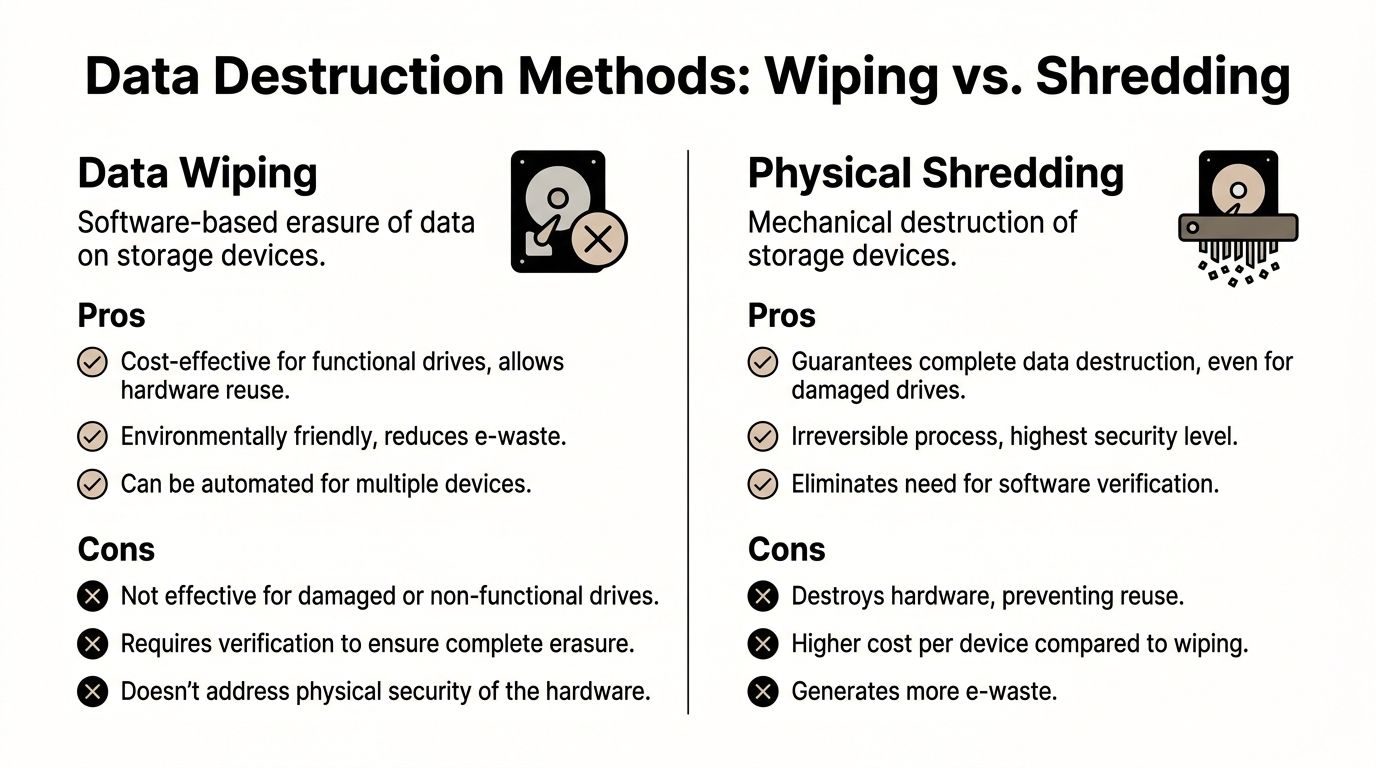
Teams usually ask one question first. “Should we wipe the drives or shred them?” The right answer depends on the condition of the media, the sensitivity of the data, and whether the hardware has reuse value.
When data wiping makes sense
For functional drives, software sanitization is often the practical choice. The verified standard in expert e-waste recycling includes DoD 5220.22-M 3-pass wiping for functional drives, achieving 100% data destruction efficacy per NIST standards, according to this review of the effectiveness of e-waste recycling with EPR implementations.
That matters because wiping preserves the hardware. If the device can be reused internally, remarketed, or sent through an ITAD stream with value recovery, wiping keeps those options open.
Wiping is a good fit when:
- The drive is functional
- The system still has reuse potential
- You need serialized reporting tied to a specific asset
- Your policy allows sanitization rather than physical destruction
The operational advantage is straightforward. You destroy the data without destroying the device.
When physical shredding is the safer call
Some media should never be routed into a wipe-first workflow. Failed drives, damaged SSDs, obsolete backup media, and assets from highly sensitive environments often belong in a destruction stream from the start.
The same verified source notes that for nonfunctional media, physical shredding reduces particles to less than 2mm, with success rates over 99.9% in certified ITAD operations. That is the clean answer when the drive cannot be reliably read, tested, or verified.
Shredding is usually the better option when:
- The drive is dead or unstable
- The media is too old or too damaged for consistent wiping
- The data sensitivity warrants irreversible destruction
- The organization wants the strongest possible end state
For many hospitals and research settings, shredding is also simpler from a governance standpoint. There is less room for ambiguity once the media is physically destroyed.
Side-by-side decision criteria
| Method | Best use case | Main benefit | Main trade-off |
|---|---|---|---|
| Data wiping | Functional drives with reuse value | Preserves hardware for reuse or resale | Requires verification and process control |
| Physical shredding | Failed, obsolete, or highly sensitive media | Irreversible destruction | Hardware cannot be reused |
Compliance is about proof, not preference
Many teams treat wiping and shredding as a technical debate. It is a documentation issue. If you wipe drives, you need clear records showing which media was processed, under which standard, and with what outcome. If you shred drives, you need destruction records that match the inventory and custody trail.
That is why specialized services such as secure hard drive recycling matter more than generic haul-away. The true deliverable is not the truck. It is the evidence that each data-bearing item was handled under a defined, auditable method.
What works in practice
A mixed-method approach often works best.
Use wiping for equipment with legitimate reuse value and functioning storage. Use shredding for failed media, unknown drives, and assets from departments with tighter security expectations. Trying to force every device into a single method usually creates unnecessary cost or unnecessary risk.
Practical rule: If the drive cannot be consistently read and verified, stop treating wiping as the primary plan.
Mistakes that create exposure
The process breaks down when organizations make one of these calls:
- They assume deletion is the same as sanitization. It is not.
- They wipe drives without capturing asset-level reporting.
- They send failed drives into bulk recycling before isolating them.
- They let convenience decide the method instead of sensitivity and condition.
The strongest waste computer recycling programs do not ask which destruction method is “better” in the abstract. They match the method to the asset, document the decision, and make sure the final record can survive scrutiny from compliance, legal, or procurement.
Coordinating Logistics for On-Site De-Installation and Pickup
Most disposal plans look clean on paper until someone has to remove gear from active rooms, disconnect equipment without disrupting operations, and move it through public corridors or loading docks without losing control of the assets.
That is where many internal teams underestimate the job. A hospital closet cleanout is one thing. A rack de-installation in a server room, a university lab transition, or a multi-floor office refresh is different.
The EPA-related guidance in the verified data makes the distinction clear. The operational complexity of laboratory decommissioning is far greater than consumer e-waste. Specialized equipment like centrifuges and specialized servers, which standard recyclers cannot handle, requires unique on-site logistics and coordination to manage downtime and compliance risk, as noted on the EPA’s page about electronics donation and recycling.
Why DIY removal creates avoidable problems
Internal teams can move equipment. That does not mean they should run the entire decommissioning process alone.
A DIY approach often creates these issues:
- Improvised packaging: loose drives, open carts, and unlabeled gaylords create custody gaps.
- Incomplete de-installation: rack equipment, cable bundles, and peripherals get left behind.
- Scheduling conflict: pickup shows up before assets are disconnected, staged, or approved for release.
- Operational disruption: staff get pulled away from core work to supervise removal.
The result is usually delay, confusion, or weak documentation.
What a controlled pickup should include
A professional on-site process is more than loading boxes. It starts with access planning and ends with documented transfer.
Look for a provider that can handle:
- On-site de-installation: removing servers from racks, breaking down workstations, and disconnecting related equipment safely
- Secure staging: separating data-bearing devices from standard peripherals before transport
- Tamper-evident handling: especially for drives, servers, and media containers
- Chain-of-custody paperwork: signed handoff records at pickup
- Coordinated routing: sequencing pickups so active departments are disrupted as little as possible
For multi-site programs, transport planning matters more than many buyers realize. Even a basic understanding of route optimization helps facilities teams evaluate whether a vendor’s pickup model is likely to reduce delays and unnecessary handling.
Atlanta-area projects need local operational detail
The Atlanta metro adds its own practical constraints. Parking access, loading dock rules, traffic windows, building security, and campus-style layouts all affect how long a job takes and how much internal coordination is needed.
That is why many organizations prefer a recycler that can provide pickup and removal services directly rather than outsourcing transport in pieces. For example, recycle electronics free pick up is the kind of service model facilities teams often look for when they want one coordinated handoff instead of separate labor, trucking, and recycling vendors.
A better way to stage the job
Use a short pre-pickup checklist.
| Task | Owner |
|---|---|
| Approve release of assets | IT or department lead |
| Confirm room access and dock instructions | Facilities |
| Isolate data-bearing media | IT or compliance |
| Mark items for wipe, shred, or recycle | Joint review |
| Verify escort requirements | Security or site admin |
Tip: The smoothest pickups happen when IT defines what leaves, facilities defines how it leaves, and the recycler documents who accepted it.
In regulated environments, logistics is not background work. It is part of the control system. If the pickup is rushed or loosely managed, the rest of the compliance file gets weaker.
Proving Compliance with Certificates and Chain of Custody
A recycler can say the right things and still leave you exposed if the documentation is thin. In regulated sectors, disposal is only defensible when the paperwork ties each asset to a clear end result.
That is where chain of custody matters. It links the inventory, the pickup, the data destruction method, and the final disposition into one auditable record.

The compliance gap in the verified data is important here. General recycling guidance often does not address the needs of regulated sectors. Organizations handling HIPAA or classified research data need certified recyclers that can meet sector-specific obligations for auditable certificates of destruction, as described in this overview of the e-waste recycling compliance gap.
What your records should show
A strong documentation package usually includes at least two final records.
Certificate of Destruction
This should confirm that data-bearing media was destroyed or sanitized under the agreed method. It should align with the serialized inventory or other asset identifiers captured at intake.
Certificate of Recycling
This documents that non-reusable equipment entered an appropriate recycling stream rather than informal disposal. It matters for internal sustainability reporting and vendor oversight.
Just as important are the in-between records. Pickup manifests, custody logs, and itemized receiving reports are what make the final certificates credible.
The audit trail regulators care about
A practical chain of custody answers these questions:
- What was removed
- Where it came from
- Who transferred it
- How data was handled
- What happened to each item at the end
If one of those links is missing, your record is weaker than it should be.
That is why organizations often request a formal certificate of destruction for data-bearing assets instead of relying on an invoice or pickup receipt. A receipt proves a truck came. It does not prove what happened to the drives.
Warning signs in vendor documentation
Do not accept paperwork that is too vague to defend later.
| Weak documentation | Strong documentation |
|---|---|
| Broad item categories only | Itemized records tied to serials or asset tags |
| One generic completion note | Separate destruction and recycling confirmation |
| No custody signatures | Clear transfer points with named parties |
| No method listed | Wipe or shred method identified |
Documentation is legal protection in operational form
Facilities teams often see certificates as a final administrative step. They are more than that. They convert a physical removal event into evidence.
Key takeaway: If a regulator, auditor, or internal investigator asks what happened to a specific retired server, your file should answer that without guesswork.
This is the true standard. Not “we believe it was recycled.” Not “the vendor told us they handle that.” A complete chain-of-custody file turns waste computer recycling into a process your organization can prove.
Understanding the Costs and Benefits of Secure Recycling
Secure recycling costs money. So does poor disposal. The difference is that one of those costs is planned and controllable.
Most organizations evaluating waste computer recycling focus first on pickup charges, de-installation labor, and whether data destruction is included. Those are reasonable questions. But the larger financial picture is usually broader than the line-item quote.
Where the costs typically come from
A project can involve several cost drivers:
- Labor for de-installation: especially for server rooms, multi-floor removals, or lab-connected equipment
- Packaging and transportation: more involved when sensitive media needs segregated handling
- Data destruction: wiping, shredding, or both
- Recycling fees: some materials are straightforward, while others require more specialized processing
The right comparison is not “free disposal” versus “paid disposal.” It is controlled disposition versus unmanaged risk.
Where value can offset the work
Not every retired asset is pure scrap. Functional business hardware may still support reuse, refurbishment, or resale. That is one reason many organizations route projects through a structured ITAD program rather than treating everything as junk.
Environmental value also translates into business value, even when it is not booked as direct resale. The verified EPA-based figures are a strong reminder. Recycling 1 million laptops saves energy equivalent to powering over 3,500 US homes for a year, while recovering materials from 1 million cell phones saves over 35,000 pounds of copper and 75 pounds of gold, according to these EPA e-waste facts and statistics.
For a business buyer, the point is not that your project will match those exact scales. The point is that responsible processing recovers genuine value from devices that would otherwise be treated as waste.
How to evaluate a quote correctly
Do not just ask, “What is the pickup fee?” Ask:
- Is data destruction included, and by what method?
- Will the provider de-install equipment on-site or only collect staged items?
- Are serialized reports and certificates included?
- Can reuse value offset part of the project?
- Who controls downstream recycling?
If those answers are weak, the low price is less attractive.
For companies looking at broader programs rather than one-time cleanouts, corporate e-waste solutions can make budgeting easier because they combine recurring pickup, secure processing, and documentation into one operating workflow.
The hidden financial benefit
The biggest return often comes from avoiding the expensive mess that follows poor disposal. A mishandled server, undocumented hard drive, or untracked lab workstation creates legal, operational, and reputational cost far beyond a standard recycling invoice.
In practice, secure recycling is a risk-control purchase with material recovery upside. That is why experienced facilities and IT leaders do not evaluate it as a commodity hauling service.
Atlanta Business Computer Recycling FAQs
Below are three questions that come up often from Atlanta-area facilities managers, IT teams, and lab administrators.
FAQ on Business Computer Recycling
| Question | Answer |
|---|---|
| Do we need to remove hard drives before pickup? | Not always. If the recycler offers documented wiping and shredding, keeping drives in place can preserve chain of custody and reduce handling errors. What matters is identifying which devices contain storage before pickup. |
| Can one vendor handle both office IT and lab-related electronics? | Sometimes, but not every recycler is equipped for that scope. Ask whether the provider can manage standard computers, servers, and specialized equipment removal in the same project without handing parts of the job to unrelated subcontractors. |
| What should we have ready before scheduling a pickup in Atlanta? | Prepare an inventory, confirm building access rules, identify data-bearing assets, and decide which items need wiping, shredding, resale review, or recycling. For active hospitals and campuses, also confirm dock access and any escort requirements. |
If your organization is dealing with a server room cleanout, a department refresh, or a lab shutdown, the safest approach is a controlled process from inventory through final certificate. Scientific Equipment Disposal works with Atlanta-area businesses, hospitals, schools, and labs on pickups, de-installation, hard drive handling, and compliant recycling workflows that fit regulated environments. You can review service options at Scientific Equipment Disposal.