Top Cloud Security Trends for Atlanta Organizations in 2026

You're probably living this already. Your clinicians, faculty, researchers, and administrators use a mix of Microsoft 365, cloud file sharing, specialized SaaS platforms, and one or more major cloud providers. Meanwhile, your organization still keeps some systems on premises because they're tied to medical devices, research instruments, legacy applications, or procurement cycles that don't move at cloud speed.
That mix creates a dangerous illusion. Teams think “cloud” means someone else is handling security. In reality, most Atlanta hospitals, universities, logistics operators, and corporate IT departments are managing a fragmented estate with inconsistent controls, overlapping identities, and aging hardware still holding sensitive data.
The cloud security trends for Atlanta organizations that matter most aren't abstract. They show up in very practical places: a researcher with broad access to a storage bucket, a third-party vendor integrated into your identity stack, a retired virtualization host sitting in a back room, or an old laptop from a remote employee that still contains cached data. Atlanta's operating environment makes this more urgent, not less. Healthcare, education, logistics, and regional enterprise all depend on distributed access, outside collaborators, and constant system availability.
Navigating the New Cloud Complexity in Atlanta
An Atlanta hospital CIO might have patient data in a private environment, imaging workflows tied to on-site infrastructure, a research unit running workloads in AWS, finance in Azure-connected systems, and dozens of SaaS applications spread across departments. A university looks similar. Central IT governs some of it, colleges and labs govern the rest, and everyone expects smooth access from campus, home, clinic, and mobile device.
That's not a temporary transition state. That's the operating model now.
The security problem isn't just that there are more systems. It's that every platform introduces its own access model, logging conventions, retention settings, vendor dependencies, and blind spots. Add remote work, departmental purchasing, and mergers of old and new infrastructure, and your team ends up defending a patchwork.
Where Atlanta teams get exposed
The biggest gap I see is governance lag. The business adopts cloud services faster than security architecture catches up. Hospitals do it to support care delivery. Universities do it to support collaboration and grant-funded research. Corporate teams do it because the business wants speed.
That leaves security teams chasing three problems at once:
- Fragmented visibility: Security logs, identity events, and configuration data sit in different places.
- Inconsistent controls: One platform has strong conditional access. Another relies on weak local admin habits.
- Forgotten endpoints and infrastructure: Retired servers, storage arrays, and user devices still hold regulated or confidential data.
If your organization also relies on regional connectivity providers and distributed communications infrastructure, the operational sprawl only gets worse. Many Atlanta teams dealing with distributed telecom and network dependencies run into the same challenge described in this overview of local telecom companies in Atlanta. More providers and more interconnections usually mean more security coordination work, not less.
Your attack surface isn't just your cloud tenant. It's every identity, integration, endpoint, backup target, appliance, and retired device that touches the same data lifecycle.
What requires attention now
The priority list is straightforward. First, get control of identity. Second, automate cloud-native security checks. Third, tighten vendor and regulatory governance. Fourth, stop treating hardware decommissioning as an unrelated facilities task. It's a security control.
That last point gets ignored too often. Cloud data still has a physical footprint at the beginning and end of its life.
The Reality of Multi-Cloud and Hybrid Cloud Risk
Most organizations no longer operate in a single environment. 88% of organizations now operate in hybrid or multi-cloud environments, and multi-environment breaches cost an average of $5.05 million, about 26% more than on-premises breaches at $4.01 million, according to StationX cloud security statistics. For Atlanta organizations, that should end the debate. Hybrid and multi-cloud complexity is standard, and it's expensive when security breaks.
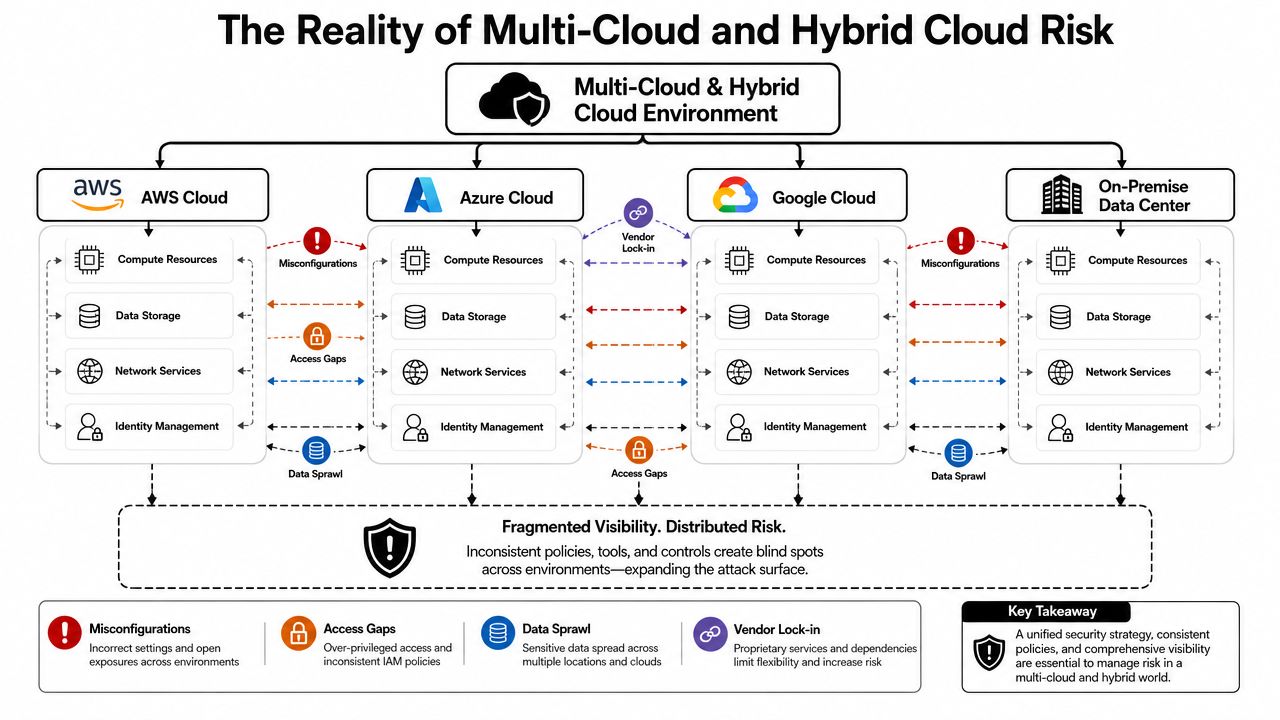
A good analogy is corporate banking. Managing one bank account is simple. Managing funds across several banks, each with different permissions, controls, statements, and fraud processes, creates operational drag and more room for mistakes. Cloud works the same way. AWS, Azure, Google Cloud, on-prem virtualization, and SaaS platforms all have different security assumptions.
Why hybrid risk keeps growing
The issue isn't that multi-cloud is bad in itself. It's that security teams rarely get a clean, centralized operating model when it's adopted. Departments choose platforms based on application fit, procurement history, or existing vendor relationships. The result is a distributed estate where one team manages IAM well, another overuses privileged roles, and a third assumes the provider handles more than it covers.
For Atlanta hospitals and universities, this often creates these failure points:
| Risk area | What it looks like in practice | Why it matters |
|---|---|---|
| Identity spread | Separate admin roles across cloud providers and SaaS | Compromised accounts move farther than expected |
| Configuration drift | Security settings differ by platform and by team | Small mistakes become systemic exposure |
| Data sprawl | Copies of research, HR, patient, or student data live in multiple tools | Governance and retention become harder to prove |
| Visibility gaps | Logs and alerts remain siloed | Response slows down when teams need clarity fast |
What CIOs should do about it
Don't try to force every business unit into one giant standard overnight. That usually fails. Instead, impose control layers across the environments you already have.
Focus on these moves:
- Build a real asset inventory: Include cloud accounts, subscriptions, SaaS apps, storage repositories, and shadow IT where possible.
- Standardize identity policy: One identity strategy must govern all major platforms.
- Map regulated data flows: Know where patient, student, legal, financial, and research data lands.
- Set decommission triggers: When workloads move, old infrastructure must be wiped or destroyed on a schedule.
Practical rule: If your security team can't answer where sensitive data is stored, who can access it, and what hardware previously held it, your cloud program isn't under control.
Adopting Zero Trust and SASE Security Frameworks
Perimeter thinking is obsolete. If your users authenticate from clinic floors, research labs, home offices, branch locations, and unmanaged networks, the old model of “inside equals trusted” is useless.
That's why identity-centric Zero Trust needs to be a default decision, not a roadmap slogan. 81% of businesses experienced at least one cloud security incident in the last year, and the average multi-environment breach took 283 days to identify and contain, according to SentinelOne's cloud security trends overview. If incidents are common and containment takes that long, your controls need to assume compromise and limit movement immediately.
What Zero Trust means in plain terms
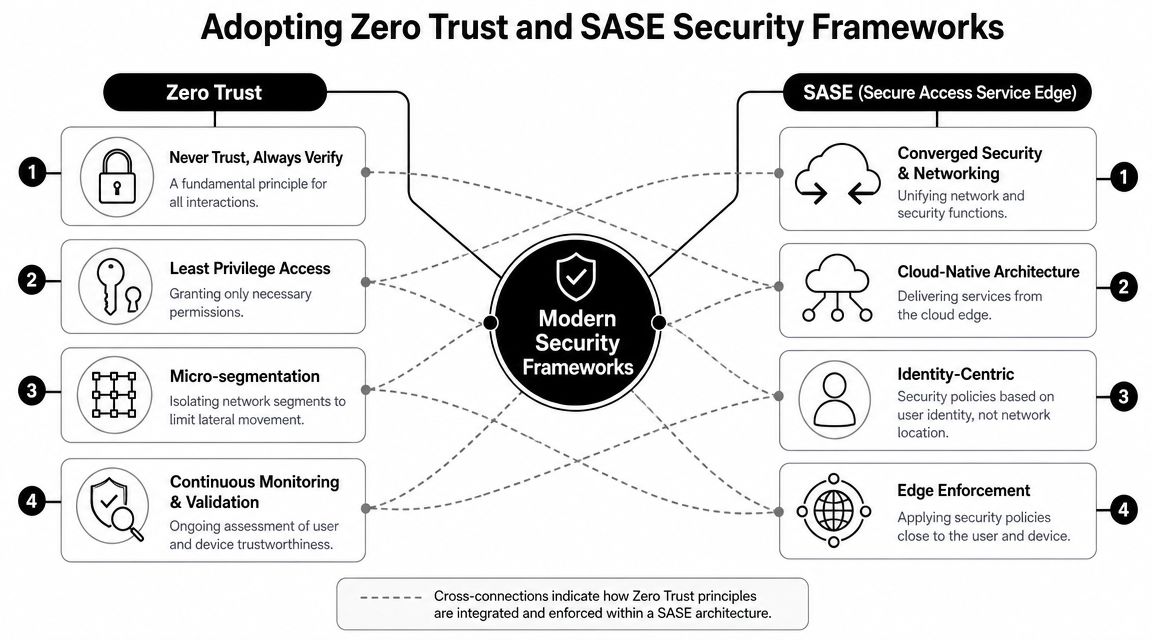
Zero Trust is simple. Check identity and context at every step, not just at initial login. A badge gets someone into the building. It shouldn't automatically get them into the pharmacy system, student records, research repository, and cloud admin console.
For an Atlanta university or hospital, that means:
- Continuous verification: Re-authenticate based on risk, device state, and session behavior.
- Least privilege: Users get the access they need for the role they hold now, not the broad access they accumulated over time.
- Segmentation: A stolen credential shouldn't provide a clean path into unrelated systems.
- Policy consistency: The same user shouldn't face strict controls in one app and weak ones in another.
Where SASE fits
SASE turns that identity-first model into an access architecture. Instead of backhauling every connection through a traditional data center stack, you enforce policy closer to the user and device through cloud-delivered security and networking services. That matters when your workforce is spread across the Atlanta metro, supporting clinics, classrooms, research sites, and hybrid work.
A practical way to evaluate SASE is to ask whether it helps you do three things better than your current setup:
- Inspect traffic consistently across remote and on-site users.
- Apply identity-based policy regardless of location.
- Reduce dependence on brittle VPN sprawl and exceptions.
Many teams start this journey when they're already rethinking carrier, connectivity, and remote access architecture. If that's your situation, this overview of managed telecom services near me is useful context because the networking side of the house often drives or blocks SASE adoption.
What to implement first
Don't launch Zero Trust as a branding exercise. Pilot it in one high-value area.
Start with:
- Administrative accounts: Put your cloud admins, system admins, and privileged researchers behind your strongest controls first.
- Core SaaS platforms: Enforce stronger sign-in and session policies for Microsoft 365, Google Workspace, and critical departmental apps.
- Third-party access: Vendors should never inherit broad trust because they're “known partners.”
A Zero Trust program succeeds when access becomes narrower, cleaner, and easier to explain to an auditor.
Combating AI-Powered Threats and Evolving Ransomware
Attackers don't need spectacular innovation to hurt you. They need one convincing phishing message, one exposed secret, one over-permissioned account, or one unmonitored workload. AI makes that easier. It improves phishing quality, speeds up recon, and helps attackers test variations fast enough to exploit weak operational habits.
Ransomware has matured in the same direction. It's not just an encryption problem anymore. It's a data exposure problem, an outage problem, and a negotiation problem all at once. If an Atlanta healthcare system or university gets hit, the question won't be only whether backups exist. The question will be what data left the environment before the disruption was visible.
Why the threat feels local
The Colonial Pipeline incident changed how executives in the Southeast think about cyber risk. It made operational disruption tangible. That matters in Atlanta because many local organizations support critical regional functions, including healthcare delivery, transportation, education, research, and logistics.
For a hospital or university, the lesson is direct. Your cloud systems can be technically “up” while your identity layer, endpoint fleet, or integrated vendors create the actual point of failure.
If your leadership team needs a concise primer that frames the issue clearly, Bridge IT Solutions published a practical overview on what you need to know about ransomware. It's useful for board and operations conversations because it focuses on business impact rather than jargon.
Why manual defense won't keep up
A key technical trend is cloud-native security automation. 76% of companies already use multicloud or hybrid cloud, increasing configuration drift and risk that can only be managed at scale through automation, according to Cymulate's summary of cloud security trends. That matters because modern estates change too fast for periodic human review to serve as the primary defense.
You need controls embedded into delivery pipelines and runtime operations.
That means:
- Policy-as-code in CI/CD: Block unsafe deployments before they reach production.
- Secrets detection: Catch exposed credentials in code, containers, templates, and build workflows.
- Runtime monitoring: Watch for suspicious process activity, privilege escalation, and anomalous service behavior.
- Container and serverless review: Don't let “ephemeral” become a synonym for “ignored.”
What a practical defensive model looks like
Use a layered model.
First, tighten identity. Second, automate checks in development and deployment. Third, harden backup and recovery workflows. Fourth, rehearse the messy parts, including legal escalation, system isolation, communications, and physical asset handling.
That last item matters more than organizations typically acknowledge. During incident response, organizations often forget about retired laptops, staging servers, failed drives, and old storage media that may still contain credentials, patient files, exported reports, or cached research data. Atlanta legal teams and regulated organizations run into this often enough that it's worth reviewing how Atlanta law firms manage IT security when building chain-of-custody discipline into broader cyber operations.
The ransomware conversation shouldn't begin with payment. It should begin with exposure paths, containment discipline, and whether old hardware is still carrying live risk.
Managing Supply Chain Risk and Regulatory Pressures
Your cloud posture includes vendors whether you like it or not. SaaS platforms, managed service providers, identity integrations, analytics tools, cloud marketplaces, and developer dependencies all become part of your attack surface. If one trusted provider gets compromised, your environment can inherit the problem quickly.
Software supply chain risk is especially uncomfortable because it bypasses the old instinct to distrust outsiders. In these cases, the “outsider” already has a contract, an API integration, or an approved procurement path. That's why security reviews can't stop at onboarding.
What Atlanta organizations need to govern
Hospitals, universities, and public institutions in Atlanta usually face a dense mix of external obligations. HIPAA affects healthcare environments. FERPA affects educational records. Contractual obligations from grant programs, research sponsors, insurers, and state agencies add another layer. Georgia breach obligations and internal legal review shape response timelines and documentation requirements.
Compliance doesn't equal security. But if your cloud program can't produce evidence, your controls won't stand up under pressure.
Review these areas aggressively:
- Vendor access rights: Remove broad standing access and review service accounts.
- Contract language: Make sure security obligations, notice requirements, and disposal expectations are explicit.
- Evidence retention: Preserve logs, approvals, wipe records, and decommission documentation.
- Data location and duplication: Understand where vendors store, process, and replicate your information.
What mature programs do differently
Mature teams ask harder questions before an incident.
They don't just ask, “Is this vendor secure?” They ask:
| Question | Why it matters |
|---|---|
| How does the vendor authenticate privileged access? | Weak access controls can undermine your own identity strategy |
| What data does the vendor retain after contract end? | Residual data creates compliance and litigation risk |
| How are backups and failed media handled? | Disposal practices can expose regulated data |
| What proof can the vendor produce? | Auditability matters when regulators or counsel get involved |
If your organization struggles to align cloud operations with documented controls, this review of IT compliance challenges for Atlanta companies is worth reading. It reflects a problem many local teams have: policy exists, but operational follow-through is uneven.
The Final Step Data Lifecycle and Secure Asset Disposition
Most cloud security programs stop too early. They focus on access, monitoring, encryption, and backups, then ignore the hardware that created, processed, cached, or stored the same data. That's a mistake.
Cloud data still touches physical devices. Private cloud hosts, storage arrays, endpoint laptops, lab systems, backup appliances, and removable media all leave residue behind. If you migrate workloads but leave old equipment untouched, you haven't finished the security job. You've just shifted where the risk sits.
Why disposal belongs in the security program
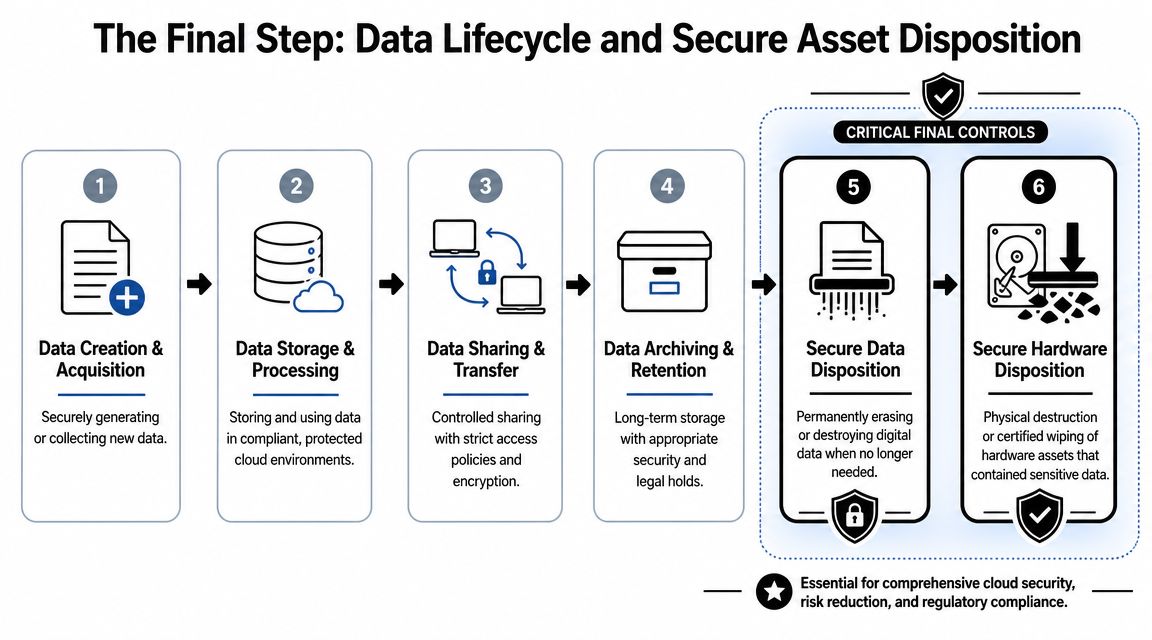
Think of hardware disposal as the final lock on the data lifecycle. You can enforce strong IAM, segment networks, and monitor cloud workloads, but if an old SAN shelf or retired laptop still contains recoverable data, your controls have a hole in them.
This matters in Atlanta environments where organizations often keep mixed fleets for long periods. Hospitals retain specialized systems because replacement cycles are slow. Universities carry aging research hardware because grants don't always cover refresh timing. Corporate IT departments inherit old equipment after consolidations, office moves, and application migrations.
The result is predictable. Sensitive data survives longer than the policy intended.
What secure disposition should include
A defensible disposition program needs more than pickup and recycling.
It should include:
- Inventory reconciliation: Match retired assets to system records before they leave controlled custody.
- Data sanitization or destruction: Use certified wiping for reusable media and physical destruction for obsolete or failed media.
- Chain of custody: Document who handled each device, when, and under what control.
- Certificates and records: Keep destruction or sanitization records for audit, legal, and compliance purposes.
One Atlanta-area option for this part of the lifecycle is IT asset disposal services. Scientific Equipment Disposal handles business electronics and lab assets, offers DoD 5220.22-M 3-pass hard-drive wiping, and provides shredding for obsolete or nonfunctional media. That's the kind of capability regulated organizations should evaluate when they need physical disposition aligned with security requirements.
Good cloud governance ends with proof that the old server, failed drive, retired workstation, or decommissioned lab system no longer carries recoverable data.
Where security teams go wrong
They treat disposal as procurement cleanup or facilities work. It isn't. It belongs in the same governance conversation as incident response, retention, legal hold, and vendor management.
If your team can't answer these questions, fix that now:
- Where do retired devices wait before pickup?
- Who approves wipe versus shred decisions?
- How do you document media that failed before sanitization?
- How do you tie disposal records back to data governance policy?
Your Action Plan for Cloud Security in Atlanta
Most organizations don't need another strategy deck. They need a short list of actions with owners and deadlines. If you're responsible for cloud security in an Atlanta hospital, university, or distributed enterprise, start here.
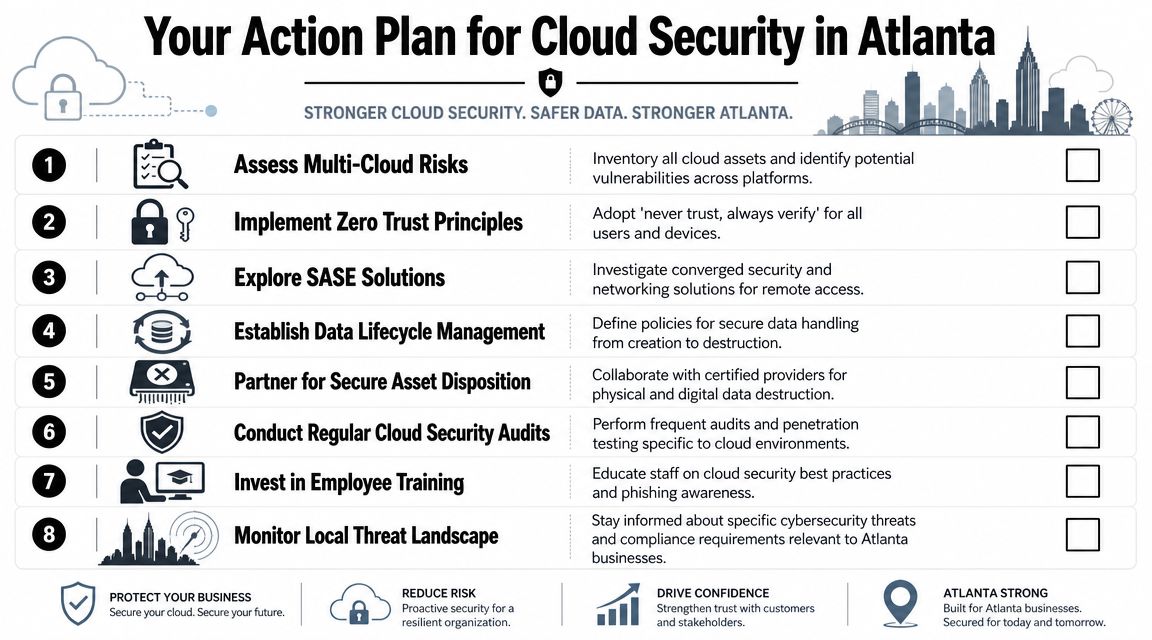
Technical priorities
- Inventory the full estate: Include cloud tenants, SaaS platforms, backup targets, admin tools, endpoints, and retired but not yet disposed assets.
- Reduce identity sprawl: Review privileged roles, shared accounts, stale access, and third-party logins.
- Pilot Zero Trust in one critical area: Administrative access or a high-value application is the right starting point.
- Automate policy checks: Put guardrails into CI/CD, infrastructure provisioning, and runtime monitoring.
- Test data recovery and containment together: Recovery without containment just restores you into the same exposure.
Operational priorities
The operational side is where many programs break. Technical teams deploy controls, but governance around vendors, assets, and documentation stays loose.
Fix that with a short operating checklist:
| Action | Owner focus |
|---|---|
| Review vendor access and retention terms | Security, legal, procurement |
| Update incident response for cloud and hardware events | Security operations, infrastructure, legal |
| Set a formal decommission workflow | IT operations, asset management, compliance |
| Document disposal evidence requirements | Compliance, records, audit teams |
What to do this quarter
If you want momentum, assign these now:
- Week one: Launch a cross-functional review of identity, vendor access, and legacy hardware exposure.
- This month: Choose one Zero Trust pilot and one cloud automation gap to fix.
- This quarter: Audit your decommission process from ticket closure to final wipe or destruction certificate.
- Before your next audit or board briefing: Make sure cloud risk reporting includes physical asset disposition, not just digital controls.
That's the practical core of cloud security trends for Atlanta organizations. Identity is the new perimeter. Automation is mandatory. Vendor risk is part of your own risk. And hardware disposition is the last control in the chain, not an afterthought.
If your organization is retiring servers, storage, laptops, lab systems, or other electronics that may still contain sensitive data, Scientific Equipment Disposal provides Atlanta-area business services for compliant equipment pickup, data sanitization, media shredding, and electronics recycling. For hospitals, universities, corporate IT teams, and agencies, that helps close the loop between cloud security policy and physical asset disposition.