How Atlanta Law Firms Manage IT Security in 2026


At 9 PM, a managing partner in Midtown is still revising a merger document, answering client email on a phone, and approving invoices from a laptop that also connects to the firm's document system. That's normal law firm work in Atlanta. It's also the exact kind of routine that creates security exposure when access controls are loose, devices aren't tracked, or a single stolen password opens everything.
That's why how Atlanta law firms manage IT security has changed. Strong firms don't treat cybersecurity as an IT side project anymore. They treat it like conflicts, trust accounting, and malpractice prevention. It's an operating discipline tied directly to confidentiality, uptime, client trust, and the firm's ability to keep practicing when something goes wrong.
The firms that handle this well usually do three things at once. They build governance before buying tools. They enforce a short list of technical controls consistently. And they manage the full asset lifecycle, including what happens when old laptops, drives, and servers leave service.
The High Stakes of Client Data Security in Atlanta
A breach at a law firm rarely starts with a dramatic movie moment. It usually starts with something ordinary. An attorney reuses a password. A former employee still has access to a cloud folder. A file gets downloaded from an unmanaged device before anyone notices.
For Atlanta firms, the business risk is substantial. In a 2026 survey of 500 U.S. law firms, 20% reported being targeted by cyberattacks in the past year and 8% said they lost or exposed sensitive data, while the average cost of a law-firm data breach reached $5.08 million, up 10% year over year. The same reporting says Atlanta law firms lost over $220 million to confirmed cyber losses in 2024. Those figures come from law firm cyberattack statistics and breach cost reporting.
That's the financial side. The legal side is often worse. M&A files, litigation strategy, medical records, trade secrets, settlement drafts, and billing records all move through the same firm systems. When access to those systems is interrupted or data is exposed, the damage isn't confined to one department. It affects client relationships, court deadlines, insurance conversations, and partner confidence in the firm's operations.
What clients actually feel
Clients don't experience a breach as a technical event. They experience it as a trust failure.
They want to know who had access, what was exposed, whether the firm can still work the case, and whether the problem is contained. If your answer is vague because your systems are disorganized, the reputational damage starts before the forensic review does.
Security in a law firm is client service in operational form.
Physical records still matter too. Many firms have digitized heavily but still keep signed originals, archived personnel files, and matter binders onsite. That's one reason firms reviewing office operations often end up also finding the right secure file storage for sensitive paper records that don't belong in open shelving or unsecured cabinets.
The practical takeaway
Treat IT security like a revenue-protection function. If a partner can't open matter files, if a paralegal can't trust email instructions, or if clients think your controls are loose, the firm has an operations problem, not just an IT problem.
Building Your Security Governance Framework
Most firms want to start with software. That's backwards.
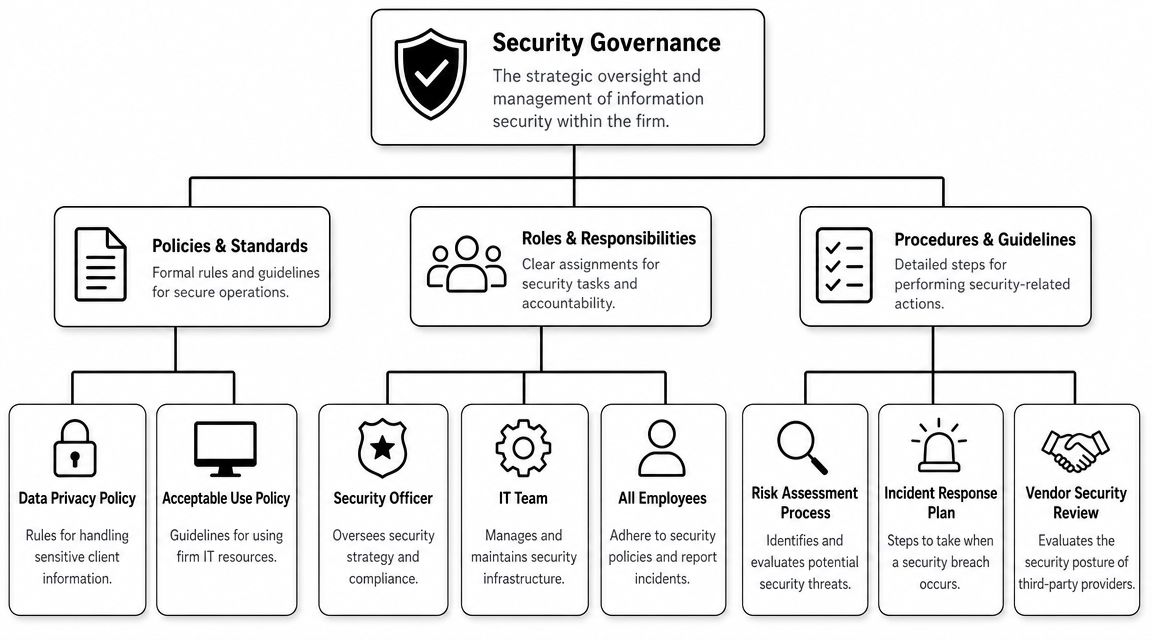
Security starts with governance, which means the rules, owners, and workflows that decide who can access what, how decisions get made, and what happens when something breaks. Without that layer, even good tools get deployed inconsistently.
Start with asset inventory and ownership
Atlanta law firm guidance is unusually practical on this point. Firms are advised to catalog every phone, tablet, and laptop, restrict each device to the appropriate user, and terminate access immediately when staff leave, paired with written breach protocols. That approach reduces two common attack paths: unmanaged endpoints and stale credentials, according to guidance on data security and professional liability for lawyers.
That means your inventory shouldn't be a spreadsheet someone updates twice a year. It should answer basic management questions in real time:
| Governance question | What the firm should know |
|---|---|
| Who owns the device | Named user, role, and department |
| What data it can reach | Email, billing, DMS, cloud storage, remote desktop |
| Whether it is approved | Managed, encrypted, monitored, and current |
| What happens on exit | Access revoked immediately, device returned, credentials disabled |
If you can't answer those four points quickly, your governance layer is thin.
Define who does what
Law firms get into trouble when everyone assumes “IT handles security.” IT doesn't own partner behavior. IT doesn't decide client notification language. IT doesn't approve vendor contracts alone.
A workable governance model usually assigns responsibilities like this:
- Managing partner or executive sponsor: Sets risk tolerance, funding, and final accountability.
- Firm administrator or operations lead: Coordinates policy enforcement, onboarding, and offboarding.
- Internal IT or MSP: Implements controls, monitoring, and response actions.
- Practice leaders: Approve access by matter, role, and confidentiality need.
- All staff: Follow policy, report suspicious activity, and use firm systems correctly.
Firms can learn from peers outside Atlanta as well. Regional providers that focus on legal operations often publish useful examples of service expectations and support structure, such as this overview of IT services for legal firms in Dallas. The value isn't the geography. It's seeing how mature firms formalize accountability instead of relying on ad hoc support.
Put core procedures in writing
Policies don't need to be long. They do need to be enforceable.
A solid baseline includes:
- Acceptable use policy for devices, email, remote access, and document handling.
- Access control policy defining least privilege and matter-based access.
- Incident response playbook with decision-makers, containment steps, and notification workflow.
- Vendor review procedure for cloud tools, consultants, and software providers.
- Offboarding checklist that revokes access immediately and recovers devices.
Practical rule: If a policy can't be turned into a checklist for onboarding, access review, or incident handling, it's probably too abstract to protect the firm.
Firms that want a broader local business view of how managed services and external support models are evolving can review IT outsourcing trends among Atlanta businesses. It's useful context when deciding what stays in-house and what needs outside expertise.
Implementing Essential Technical Controls
Once governance is set, the technical controls become much easier to enforce. At this juncture, firms either reduce risk quickly or waste money on disconnected tools.
The best-performing legal environments usually focus on a small number of controls and run them consistently across every office, practice group, and remote user.
MFA first, not last
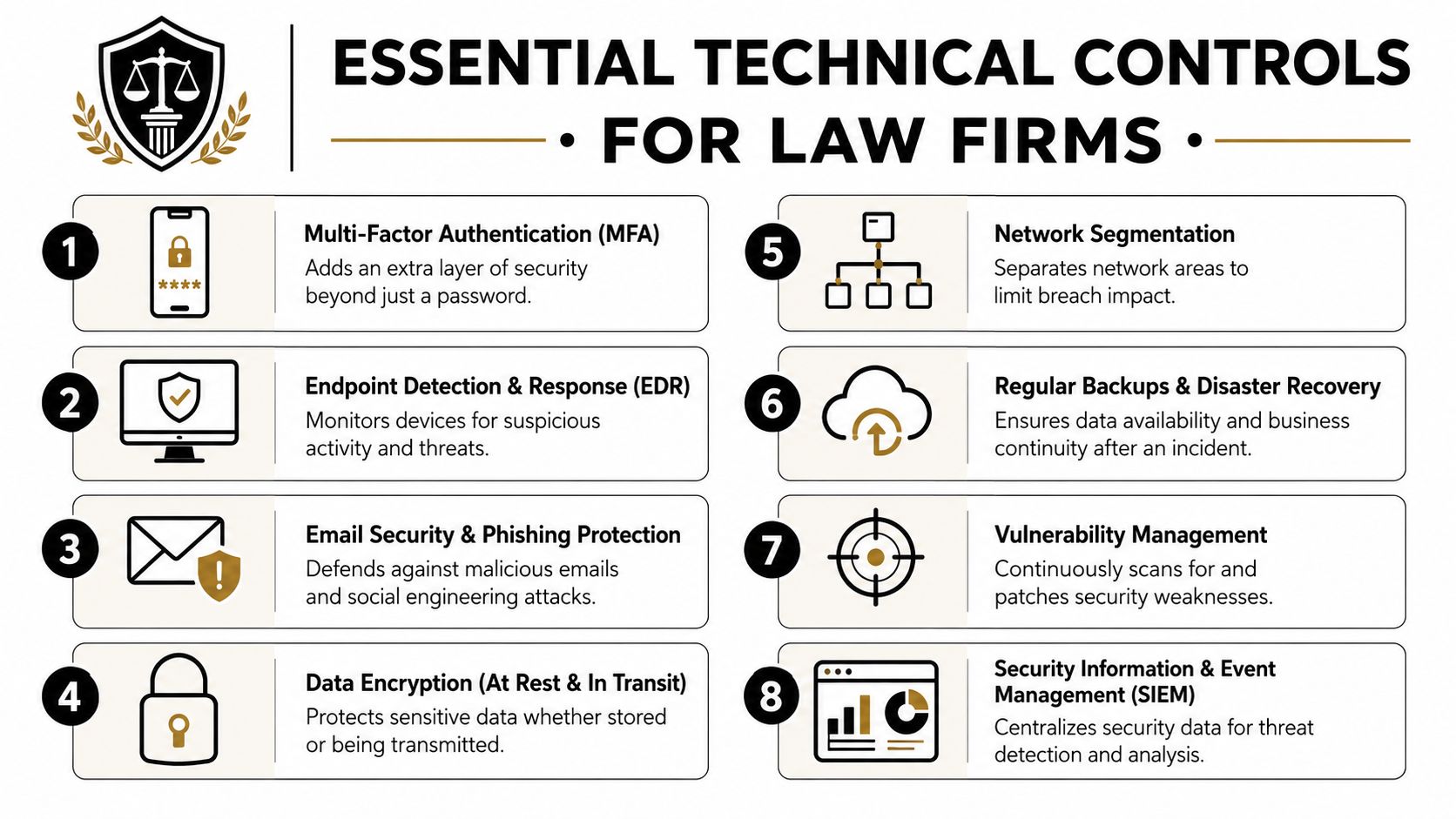
For Atlanta firms, multi-factor authentication is one of the clearest high-value controls. Security guidance for local firms recommends enabling MFA across email, case-management software, and cloud storage, and notes that this single step can block the majority of password-based attacks. The same guidance says the American Bar Association expects lawyers to make reasonable efforts to continuously monitor networks, often supported by quarterly training. That comes from Atlanta cybersecurity guidance for law firms.
If I were prioritizing rollout for a managing partner, I'd do MFA in this order:
- Email and Microsoft 365 or Google Workspace first: Email is still the easiest route into approvals, invoices, and password resets.
- Document and case systems next: If a password alone opens client files, your exposure is too high.
- Remote desktop, VPN, and billing after that: Financial systems and remote access are common targets because they affect continuity fast.
What doesn't work is optional MFA. If partners can bypass it because it feels inconvenient, the control is largely cosmetic.
Monitoring, encryption, and backups
Law firms need technical controls that do more than prevent login abuse. They also need to spot unusual behavior, protect stored data, and recover operations when prevention fails.
Three controls matter most in day-to-day legal operations:
- Endpoint monitoring and response: Every laptop and desktop that touches client data should be monitored for suspicious behavior. This is especially important for attorneys who travel, work from home, or use multiple devices.
- Encryption: Data should be protected both at rest and in transit. That matters for laptops, mobile devices, cloud storage, and file transfers.
- Backups with tested recovery: A backup is only useful if the firm can restore clean data quickly and confidently.
A lot of firms say they have backups when what they really have is a backup job that hasn't been tested under pressure.
If your team has never walked through restoring a matter file, email history, and line-of-business system together, don't assume recovery will be smooth.
For leadership teams reviewing resilience planning, this outside piece on ransomware defense strategies is a useful companion because it frames backup and containment decisions in operational terms rather than product marketing.
Zero Trust for sensitive matters
The more advanced model is Zero Trust. In practical terms, it means the firm stops assuming that anything inside the network is automatically safe. Access gets checked continuously based on user, device, role, and behavior.
For a law firm, that usually means:
| Area | Weak setup | Stronger Zero Trust setup |
|---|---|---|
| Matter files | Broad shared drive access | Access segmented by matter and role |
| Devices | Any logged-in device allowed | Device trust state checked before access |
| Sessions | Login trusted until logout | Ongoing validation for anomalies |
| Third parties | Vendor access left open | Explicit approval, narrow scope, monitoring |
What fails in practice is partial Zero Trust. Firms lock down remote users but leave internal file shares wide open. Or they remove broad access for associates while old partner service accounts stay active for years. That's not Zero Trust. That's selective inconvenience.
One often-overlooked part of technical control is storage media leaving service. If a drive once held client files, billing records, or email archives, the disposal step is part of your security program. This guide on how to wipe a hard drive completely is worth reviewing alongside your backup and endpoint standards.
Managing Vendor and Cloud Service Risks
Most law firms now depend on vendors for email, practice management, document storage, e-signature, billing, remote access, and phone systems. That means your attack surface includes companies you don't manage directly.
A common mistake is assuming a recognizable product name equals a secure deployment. It doesn't. Microsoft 365, Dropbox, and legal SaaS platforms can all be configured well or badly. The issue isn't just the vendor's reputation. It's the combination of the vendor's controls and your firm's administration.
What to review before signing
When I advise firms on vendor risk, I focus less on marketing claims and more on contract language, access design, and operational fit.
Ask vendors questions that expose how they handle legal data:
- Who can access firm data on the vendor side? You want defined support access and logging, not broad internal visibility.
- How is customer data separated? Shared environments aren't automatically unsafe, but the separation model should be clear.
- What happens after termination? Data return, deletion timing, and residual access should be documented.
- How are incidents communicated? Notification language matters. “Without undue delay” is less useful than a defined process.
- Can access be segmented by matter, user role, and device context? If not, the tool may force bad security habits.
Where firms get exposed
Vendor risk usually enters through convenience decisions. Someone buys a niche app for case collaboration. A practice group starts storing documents in an unsanctioned cloud folder. A phone vendor gets broad admin access because setup was rushed.
Those choices create hidden dependencies. Then, when a user leaves or a system changes, no one knows exactly where client data lives.
Vendors should get the minimum access needed to perform a defined function, for a defined period, with review built in.
Telecom is a good example. Voice systems now connect with mobile apps, voicemail-to-email, call recordings, and softphone platforms. That makes communications vendors part of your security scope, not just your operations budget. Firms evaluating providers can use this review of local telecom companies as a starting point for asking better diligence questions.
A workable vendor standard
Don't create separate review standards for every product. Create one vendor intake process and use it every time. It should cover security contacts, admin access, data handling, offboarding, and legal terms. That discipline matters more than having a longer questionnaire.
Planning Your Incident Response and Breach Notification
No firm gets credit for being surprised by an incident. The only useful question is whether the response is organized.
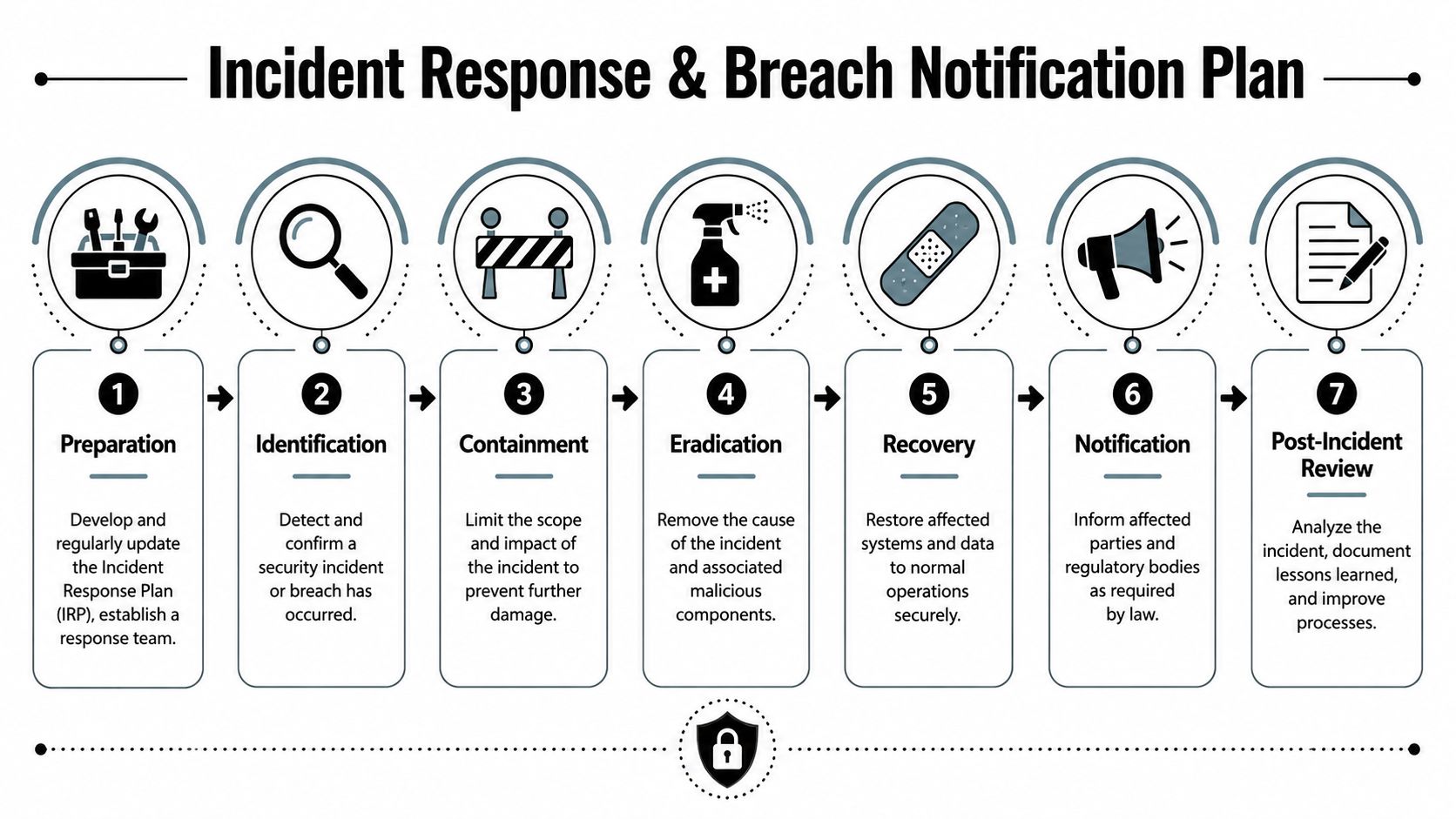
The strongest law firm incident response plans are short, specific, and assigned to named people. They don't sit in a binder waiting for a crisis. Staff can readily use them.
The first hour matters most
In the early stage of an incident, firms often lose time arguing about whether the event is “serious enough” to activate the plan. That hesitation expands damage.
Your first-hour priorities should be plain:
- Confirm the signal. Is this a suspicious login, malware event, data download anomaly, or account takeover?
- Contain access. Disable affected accounts, isolate impacted devices, and stop lateral movement.
- Preserve evidence. Don't wipe machines or delete logs before your security team reviews them.
- Escalate internally. Managing partner, administrator, IT lead, and legal decision-makers should know fast.
A breach playbook should also define who talks to clients, who talks to insurance, and who approves outside forensic help. If those roles aren't predetermined, response turns into committee work.
Notification and documentation
Notification decisions have legal and ethical weight. The exact timing and recipient list depend on the incident facts, the data involved, and applicable obligations. That's why the plan needs legal review before an event occurs, not during it.
The practical side is straightforward. The firm should be able to answer:
| Question | Why it matters |
|---|---|
| What data was involved | Drives legal review and communication scope |
| Which clients were affected | Determines outreach and confidentiality concerns |
| When did access begin and end | Helps assess material exposure |
| What systems are restored | Supports business continuity and client guidance |
This is also where records management intersects with response. When firms destroy retired media or obsolete hardware, they need proof that the destruction was completed properly. A certificate of destruction becomes part of the audit trail that helps show the firm handled data-bearing assets responsibly.
After containment, fix the root cause
Recovery isn't “systems are back online.” Recovery means the original weakness has been addressed. That may involve tighter access rules, new MFA enforcement, vendor changes, or staff retraining after a phishing-driven compromise.
Run the incident review like a malpractice debrief. Focus on sequence, decisions, controls, and what must change before the next matter opens.
Securing the Asset Lifecycle from Training to Disposal
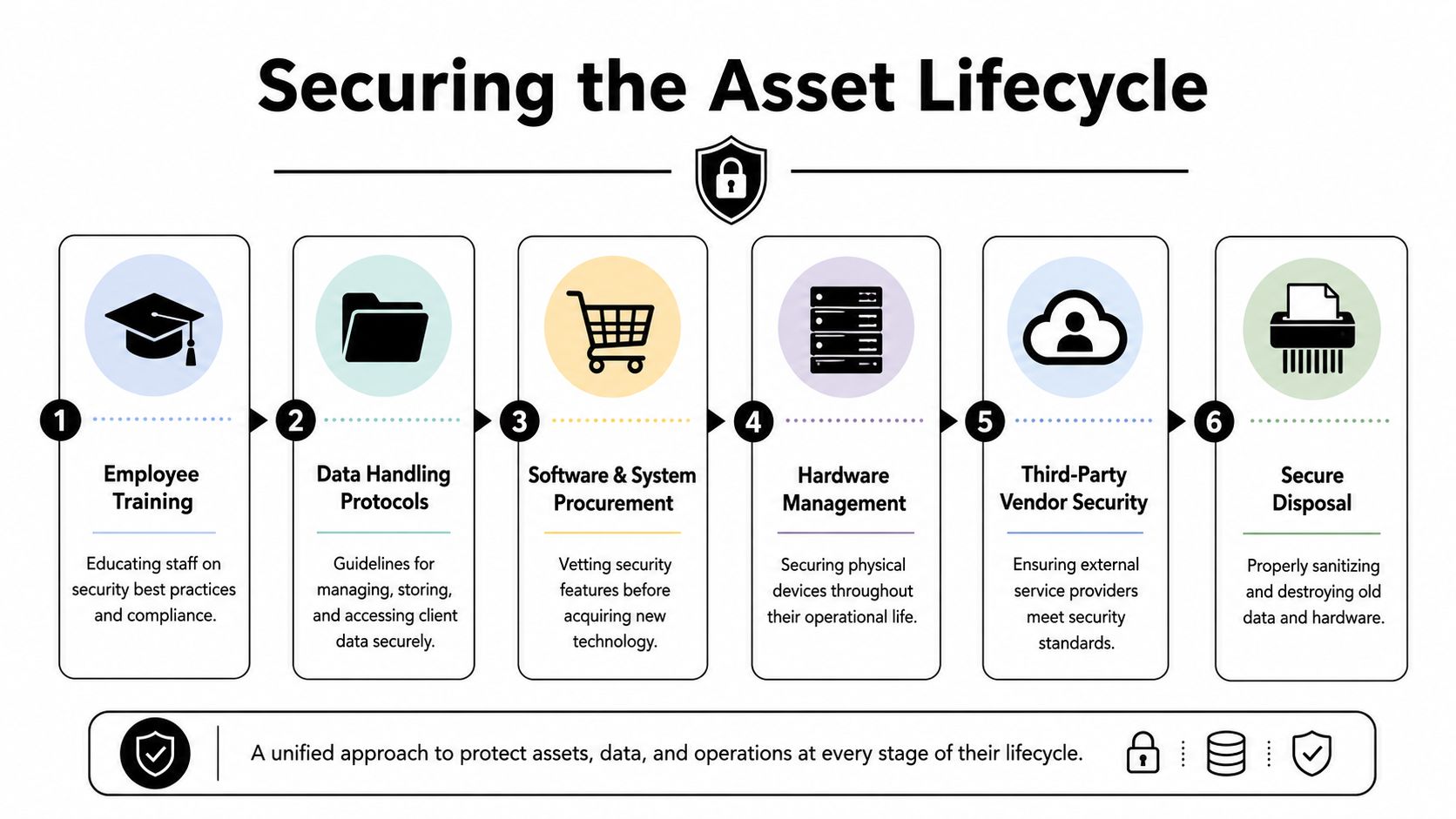
Most firms think about security during procurement and during incidents. The stronger ones think about security from the day a device enters service until the day the last storage chip is wiped or destroyed.
That lifecycle view is the difference between isolated controls and a durable program.
Training that reflects legal work
Quarterly training is useful when it matches how lawyers and staff work. Generic awareness modules don't go far enough. Law firms need examples tied to invoice fraud, client impersonation, wire instructions, shared documents, mobile access, and urgent deadline pressure.
Good training also changes by role.
- Partners need executive-targeted scenarios: fake client requests, spoofed approvals, and high-value document access.
- Accounting and billing teams need payment fraud training: especially around account changes and urgent remittance requests.
- Paralegals and assistants need document-sharing discipline: who can send what, through which platform, and with what approval.
- IT and operations staff need escalation drills: not just policy awareness.
What doesn't work is one annual session followed by silence. People forget. Staff changes. Threats change. Workflow changes too.
Procurement, use, and retirement
Every device and platform should move through the same stages:
| Lifecycle stage | Security question |
|---|---|
| Procurement | Does the tool support least privilege, logging, and secure administration? |
| Deployment | Is it configured to the firm standard before users touch it? |
| Operations | Is it monitored, patched, and reviewed regularly? |
| Reassignment | Was access cleaned up before the asset changed hands? |
| Retirement | Was data sanitized or destroyed before disposal? |
Many legal environments leave a gap. They buy secure tools, but they don't retire them securely. An old laptop in a storage closet, an untracked USB drive, or a server sent out without verified sanitization can create a future breach from past data.
Disposal is a security control
Secure disposal isn't housekeeping. It's a control.
For firms handling confidential client material, every retired hard drive, SSD, server, phone, and copier storage component should be treated as if it still contains live matter data until proven otherwise. That means documented sanitization for reusable media and physical destruction for media that can't be reliably wiped or shouldn't be reused.
A sound disposal process includes:
- Chain of custody: Know who handled the asset from pickup to final processing.
- Media decisioning: Separate devices that can be sanitized from media that requires shredding.
- Documentation: Keep records of serial numbers, pickup lists, and destruction outcomes.
- Policy alignment: Tie disposal procedures back to your written governance and incident documentation.
For firms tightening this final stage, it helps to review a dedicated framework for IT asset disposal and make sure the legal, operational, and environmental pieces all line up.
The firms that manage this well don't treat disposal as an afterthought. They treat it as the last checkpoint in the confidentiality chain.
If your firm needs a practical, compliant way to retire laptops, servers, storage arrays, or other data-bearing electronics in the Atlanta area, Scientific Equipment Disposal is worth contacting. They provide business-focused pickup, de-installation, secure drive sanitization, shredding for obsolete media, and documented disposal support that fits the needs of organizations managing sensitive data.