Telecom Infrastructure Services Dallas: Fiber & 5G Solutions


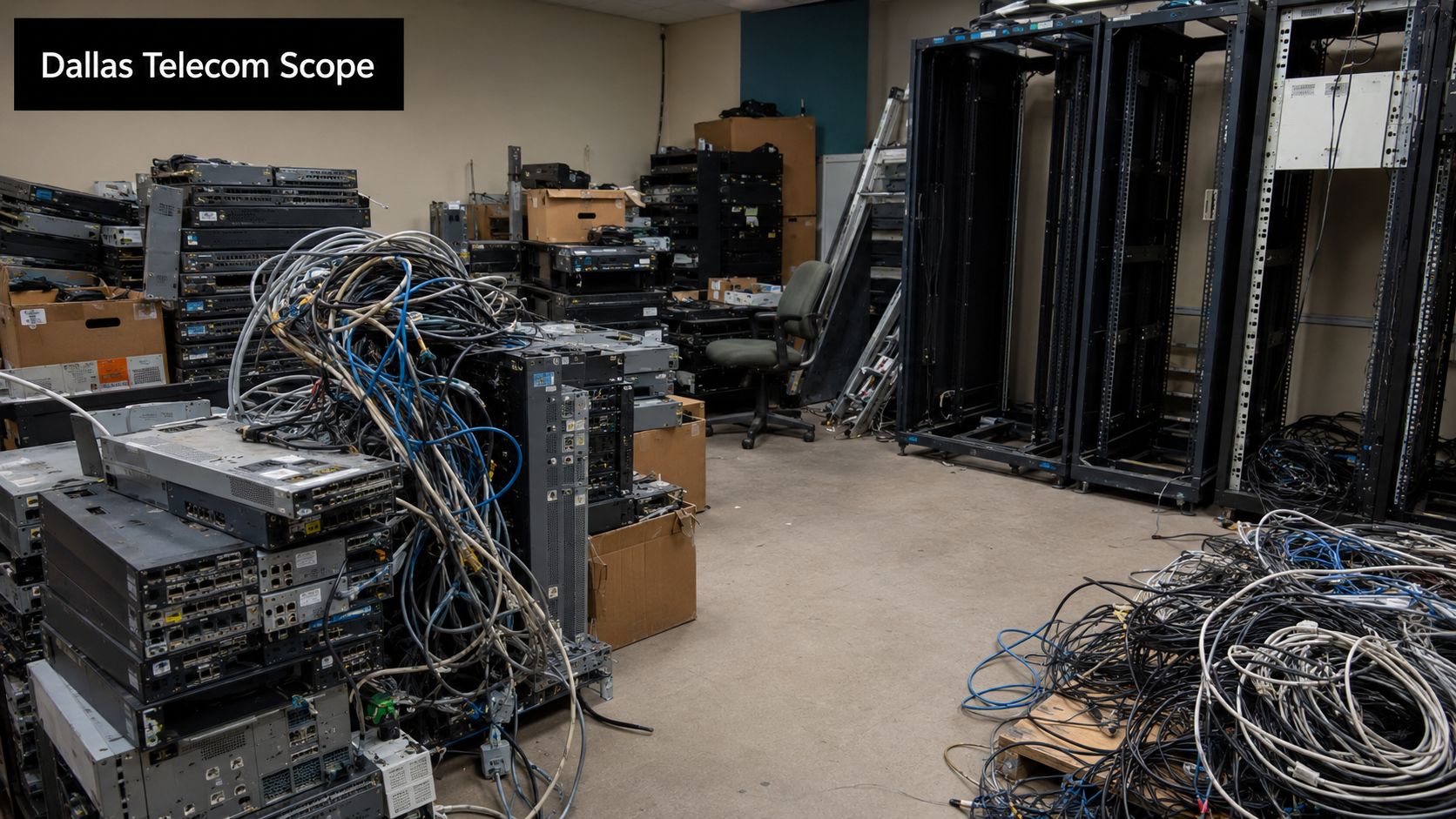
A Dallas network upgrade rarely ends when the new circuit goes live. The switches are labeled, the fiber is tested, the wireless coverage is stable, and then someone opens a back room and finds the part nobody planned for. Old routers on shelves. Rack servers that still hold configs and logs. UPS units, patch panels, power supplies, retired access points, and bins of cabling with no clean chain of custody.
That's the point where telecom infrastructure stops being an abstract IT project and becomes a facility, compliance, and logistics problem. If you're responsible for a hospital campus, university building, carrier hotel presence, corporate office, or distributed field site in North Texas, you're not just buying connectivity. You're managing hardware from install to retirement, and the retirement phase is where expensive mistakes tend to happen.
The Full Scope of Dallas Telecom Infrastructure Projects
Dallas sits in a market where telecom infrastructure is constant, physical, and capital-intensive. The U.S. telecom infrastructure services market was valued at USD 91.5 billion in 2025, according to this U.S. telecom infrastructure services market report. In practice, that scale shows up as recurring refresh cycles for routers, switches, servers, storage, backup systems, and site electronics. For a Dallas facility manager, that means decommissioning isn't a side task. It's part of the operating model.
What most teams include and what they miss
The term Telecom infrastructure services Dallas usually refers to some combination of:
- Carrier and fiber work: Entrance facilities, backbone cabling, splice work, cross-connects, and demarc extensions.
- Wireless deployment: DAS, small cells, rooftop gear, IDF upgrades, and edge cabinet support.
- Network hardware rollout: Routers, switches, firewalls, appliances, and rack integration.
- Site support: Power cleanup, grounding, battery removal coordination, labeling, and documentation.
What gets missed is the reverse path. Once the new hardware is in, somebody still has to remove the old hardware, verify whether it contains storage, separate reusable assets from scrap, package it safely, transport it securely, and document where it went.
Practical rule: A telecom project isn't complete until the retired equipment is inventoried, removed, sanitized if data-bearing, and handed off with documentation.
Full lifecycle thinking prevents messy handoffs
Teams that treat deployment and retirement as one lifecycle usually avoid three common failures. First, they don't leave retired equipment stranded in closets and MDF rooms. Second, they don't mix telecom scrap with general facilities waste. Third, they don't force IT, facilities, and procurement to reconstruct asset history weeks later.
That's why a full-lifecycle partner matters as much as an installation partner. If you're evaluating local options, Dallas telecommunications service support for removal and disposition should sit in the same conversation as buildout planning. New gear creates immediate pressure on floor space, audit readiness, and disposal workflow. In Dallas, where upgrades are frequent, those pressures arrive faster than many teams expect.
Decoding the Layers of Local Telecom Infrastructure
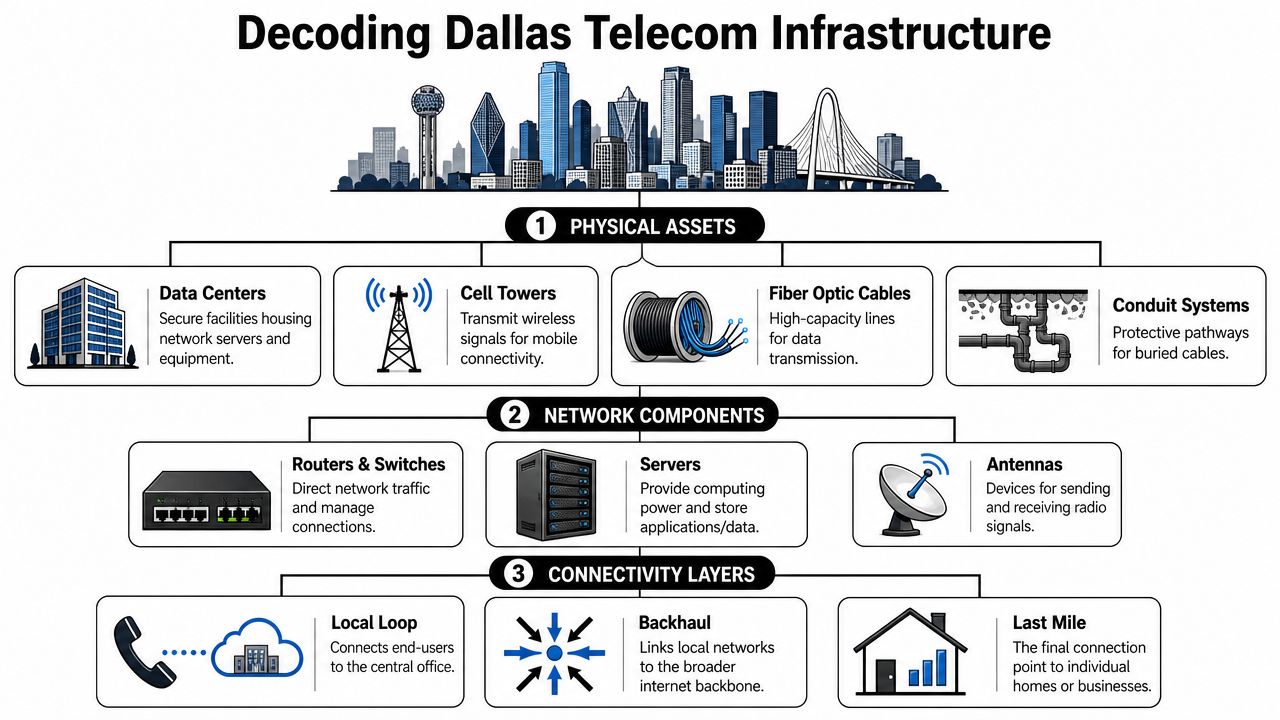
Telecom infrastructure in Dallas isn't one thing. It's a stacked system of outside plant, in-building distribution, wireless coverage, edge electronics, and data-center-adjacent hardware. If you manage facilities or IT, it helps to view it as transportation.
Fiber is the highway.
Backhaul is the interchange.
Small cells and indoor systems are the neighborhood streets.
That simple model makes it easier to decide what equipment sits where, who owns it, and what happens when it's replaced.
Fiber and conduit form the base layer
The base layer is physical path. That includes conduit, handholes, risers, cable trays, vault access, building entries, and fiber routes between rooms or sites. For most Dallas campuses, this layer determines future flexibility more than the electronics do. If the pathing is poor, every later change costs more.
A lot of trouble starts here. Teams install enough cable for today's need, but not enough labeling, slack management, separation, or spare pathway capacity for the next change. Then a later migration forces after-hours tracing, partial rip-and-replace work, or unsafe overcrowding in racks and trays.
A useful reference for the facility side is this guide for infrastructure protection, especially if your telecom rooms overlap with security, access control, or data center operations.
Wireless infrastructure adds density fast
Wireless infrastructure is where the asset count expands. The U.S. had over 248,000 macrocell sites and nearly 1 million indoor and outdoor small cells in 2024, according to Wireless Infrastructure by the Numbers 2024. In a metro like Dallas, that density translates into a large installed base of radios, antennas, power systems, controllers, cabling, and support hardware that gets refreshed, relocated, or removed over time.
That matters because wireless projects create hidden retirement work. A single coverage improvement can retire ceiling-mounted units, wall hardware, mounting brackets, coax jumpers, DC plant components, and local network gear. Those parts don't always look like “IT assets” to facilities staff, but they still require controlled handling.
Data centers and network rooms hold the most sensitive gear
Inside buildings, the highest-risk assets are usually in MDFs, IDFs, and server rooms. These spaces contain the routers and switches everyone remembers, but also console servers, storage arrays, backup devices, blades, appliances, and management systems that may still hold credentials, logs, or customer data.
A clean turnover depends on disciplined cabling and hardware mapping. That's one reason structured network cabling support in Dallas matters beyond aesthetics. Good cabling records make later removals safer, faster, and less disruptive.
Retired telecom hardware often leaves the room long before anyone confirms what data was on it. That's backwards.
Managing Telecom Deployment Projects in Dallas
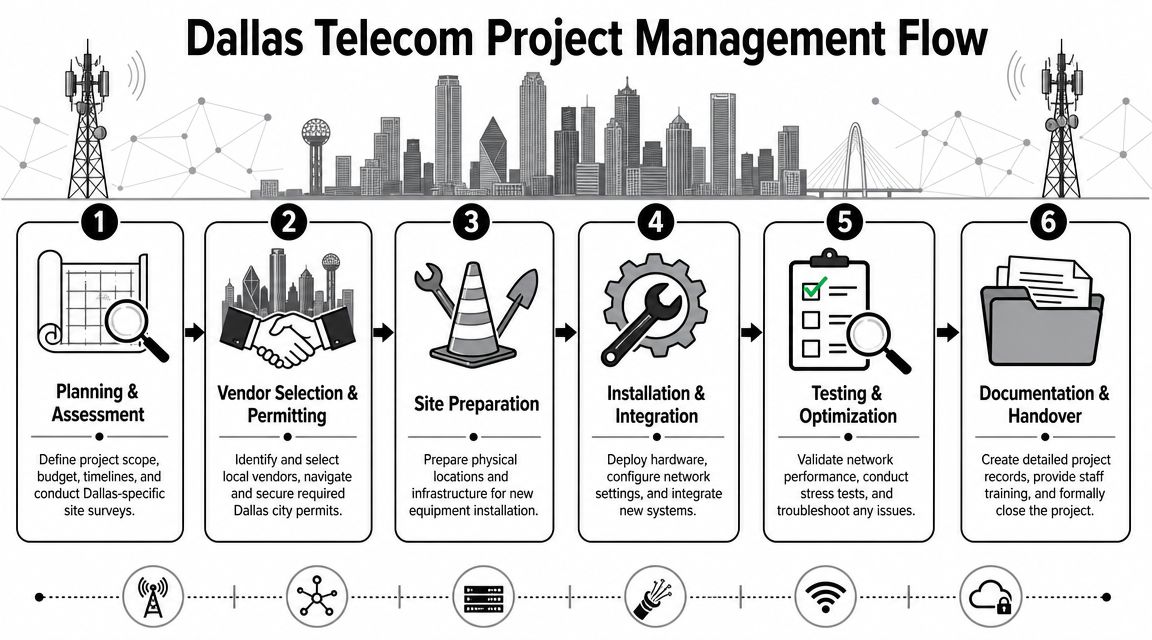
The most reliable telecom deployments in Dallas don't begin with equipment orders. They begin with scope discipline. Before anyone pulls fiber or mounts a cabinet, the project team needs a clear answer to a simple question: what problem is the site solving? More capacity, better resilience, cleaner carrier diversity, campus expansion, or wireless coverage in a dead zone all lead to different designs.
Dallas adds its own constraints. Downtown work often means access windows, congested pathways, loading limits, and tight coordination with building management. Fringe-area growth creates a different challenge. You may have plenty of demand but less straightforward economics for the last connection into the site.
Start with site reality, not vendor slides
A practical kickoff should produce four outputs:
Asset baseline
Identify what's already installed, what's leased, what's owned, and what can't be touched without service impact.Pathway map
Confirm risers, conduit, tray space, roof rights, room dimensions, grounding conditions, and power availability.Operational constraints
Spell out access hours, infection control rules for healthcare sites, noise restrictions, escort requirements, and cutover windows.Retirement plan
Mark which assets will be removed, who approves removal, and where retired equipment will stage before pickup.
When teams skip that last item, they create an avoidable scramble during turnover. Old gear ends up in hallways, temporary cages, or untracked pallets.
Design choices depend on location and use case
Not every Dallas-area project should default to the same architecture. The right mix depends on density, distance, and uptime requirements.
For urban and campus environments, fiber usually delivers the cleanest long-term path if the civil work and building entry are workable. For edge-of-metro sites, resilience may depend on a different balance. As noted in this analysis of underserved-area telecom expansion, fixed wireless and GIS-based planning play an important role in overcoming last-mile economics and terrain constraints. That's highly relevant to the outer parts of the Dallas metro where growth can outpace traditional build patterns.
A few trade-offs show up repeatedly:
- Fiber-first deployments: Strong for bandwidth and long-term scale, but route construction and permitting can slow timelines.
- Fixed wireless overlays: Useful where speed to service matters or trenching is difficult, but site line-of-sight and environmental conditions need close review.
- Private in-building wireless: Effective for hospitals, warehouses, and campuses with coverage or mobility demands, but hardware density increases support and retirement obligations.
Procurement should include the exit path
Vendor selection often focuses on install capability, carrier relationships, and support response. Those matter. But a serious telecom project should also ask what happens on day one of retirement.
Ask vendors to define:
- Removal scope: Will they de-rack, disconnect, label, and palletize retired assets?
- Data handling: How do they identify data-bearing devices inside telecom gear?
- Chain of custody: Who signs at removal, transit, and final processing?
- Environmental handling: How are batteries, mixed metals, and electronics separated?
I've seen projects where a flawless cutover was followed by weeks of uncertainty because nobody owned the old hardware. That's not a technical failure. It's a planning failure.
For builds that begin with outside plant and fiber expansion, it helps to coordinate installation planning with fiber optic installation support early, while also reserving a downstream disposition path for what comes out.
Handover should include more than network acceptance
A real handover package should include as-builts, labeling standards, pathway records, test results, room photos, and retired asset logs. If the deployment displaced legacy equipment, handover should also document where that equipment went next. Storage, resale review, secure sanitization, or recycling all need a named owner.
That single step saves painful backtracking later, especially during lease exits, audits, campus consolidations, or incident reviews.
Navigating Dallas Permitting and Right-of-Way Rules
Dallas telecom work often stalls for reasons that have nothing to do with signal quality or equipment lead time. The issue is access. You can have approved design drawings and ready hardware, then lose days or weeks because the route crosses controlled property, utility corridors, or public areas that require the right permit sequence.
What right-of-way means in practice
Right-of-way usually refers to land or public access corridors where utilities, streets, sidewalks, and related infrastructure are placed and maintained. For telecom work, that affects trenching, conduit placement, pole access, street cuts, bore paths, vault work, and sometimes traffic control.
For a facility manager, the key point is simple. If your project extends beyond the building envelope, municipal review often becomes a schedule driver. Even a modest extension can trigger documentation needs that weren't obvious in the early scoping meeting.
A few examples that commonly create friction:
- Street or sidewalk disruption: Even temporary work can require traffic coordination and restoration requirements.
- Shared utility space: Telecom routes may intersect with water, electric, or other buried services, which raises review complexity.
- Building frontage issues: Entry paths, easements, and urban frontage conditions can affect where service can enter.
The paperwork that saves time
The best Dallas project teams assemble permit packages as if they expect questions. Because they should.
A solid package usually includes a defined route, site drawings, contractor details, restoration responsibilities, access windows, and a clear statement of ownership for the work area. If the project affects occupied space, add internal approvals from facilities, security, and building management before the city asks for them indirectly through revised plans.
Field note: Delays often come from mismatched assumptions between the telecom contractor, the building owner, and the city reviewer. Put route ownership and restoration responsibility in writing early.
Building permits and telecom permits aren't the same thing
One common mistake is assuming a general construction permit covers telecom-specific work. It may not. In-building low-voltage changes, exterior penetrations, rooftop equipment, generator or UPS support work, and utility-adjacent modifications can fall under different review paths.
That's why permit tracking should live in the project schedule, not in someone's email folder. Assign one owner to maintain the status log, required revisions, contact names, and approval dates. When multiple vendors are involved, make one party accountable for the master permit matrix.
Don't ignore closeout obligations
Permitting doesn't end when the equipment is installed. Restorations, inspections, final signoffs, and updated drawings can all remain open. If the project also removed legacy equipment, closeout should capture whether pads, mounts, conduit segments, rooftop penetrations, and abandoned cabling were removed, capped, labeled, or left in place by agreement.
That matters later. Lease transitions, property sales, and future upgrades often expose unresolved legacy work long after the original team has moved on. Clean records are what separate a manageable next project from a forensic exercise.
Choosing Vendors and Setting Service Level Expectations
A Dallas telecom project can fail with a technically competent vendor if the service boundaries are vague. Many disputes don't come from bad installation. They come from unclear ownership over response times, spare parts, after-hours support, documentation, and retired hardware handling.
The right vendor conversation starts with accountability, not branding. Ask who owns each phase, who signs off each milestone, and who physically controls removed equipment once it leaves the rack.
What a strong vendor review looks like
Procurement teams often compare proposals line by line on cost and scope. That's necessary, but it's not enough. Two vendors may promise similar installation work while handling security, closeout, and disposal very differently.
Here's a practical checklist to use during vendor review:
| Evaluation Criterion | Why It Matters | Red Flags to Watch For |
|---|---|---|
| Local project experience | Dallas access rules, building coordination, and site logistics are easier for teams that have done similar work locally | Generic references with no comparable site type |
| Scope clarity | Clear scope reduces change-order fights and handoff confusion | Proposal language that leaves removal, labeling, or testing “as needed” |
| Documentation discipline | As-builts, labeling, inventory logs, and closeout records support future changes and audits | Weak sample deliverables or no mention of final documentation |
| Safety and site conduct | Telecom work touches roofs, risers, energized spaces, and occupied facilities | No clear site safety process or vague subcontractor oversight |
| Decommissioning capability | Retired routers, switches, and servers need controlled removal and downstream handling | Vendor treats removed equipment as the customer's problem after disconnect |
| Data-bearing asset awareness | Some telecom gear contains storage, logs, credentials, and management data | Team assumes only servers need sanitization |
| Logistics chain of custody | Pickup, staging, palletization, and transport must be documented | Informal removal practices or no custody records |
| SLA transparency | Support terms should define response, escalation, exclusions, and onsite obligations | Marketing-heavy SLA language with few concrete responsibilities |
Service levels should be written for real incidents
An SLA is only useful if it answers the questions people ask during an outage or turnover. Who responds first? What's covered after hours? What parts are stocked locally? Who approves emergency changes? What happens if the issue involves third-party carrier handoff equipment?
Good SLAs usually define:
- Response windows: Different expectations for outage, degradation, and non-critical issues.
- Escalation path: Named roles, not generic help desk references.
- Maintenance coordination: Notice requirements and blackout periods for healthcare, education, or production environments.
- Asset handling boundaries: Whether the vendor disconnects and stages retired equipment or only installs replacement gear.
End-of-life support separates serious partners from installers
A vendor that stops caring once the new equipment is live creates hidden cost. You may still need de-racking, packing, haul-away coordination, data sanitization for storage-bearing devices, or certified recycling for mixed electronics. Those tasks need to be priced, scheduled, and documented.
For organizations that want a managed approach, managed telecom service support options are worth evaluating alongside deployment vendors, especially when the project includes refreshes across multiple sites.
If the contract describes installation in detail but says almost nothing about removed assets, the customer is probably carrying more risk than the proposal suggests.
The Overlooked Final Step Secure Asset Decommissioning
Most telecom guides stop at deployment. That's a problem. A project can be perfectly designed, installed on time, and still create security and compliance exposure if retired hardware is handled casually.
That gap shows up often in local search results and provider pages. This telecom infrastructure overview points to the broader buildout environment while leaving room for the practical question many teams still face after upgrades: how to decommission retired routers, servers, storage arrays, and related network equipment compliantly. In Dallas, where refresh cycles are constant, that omission matters.
What actually belongs in a decommissioning plan
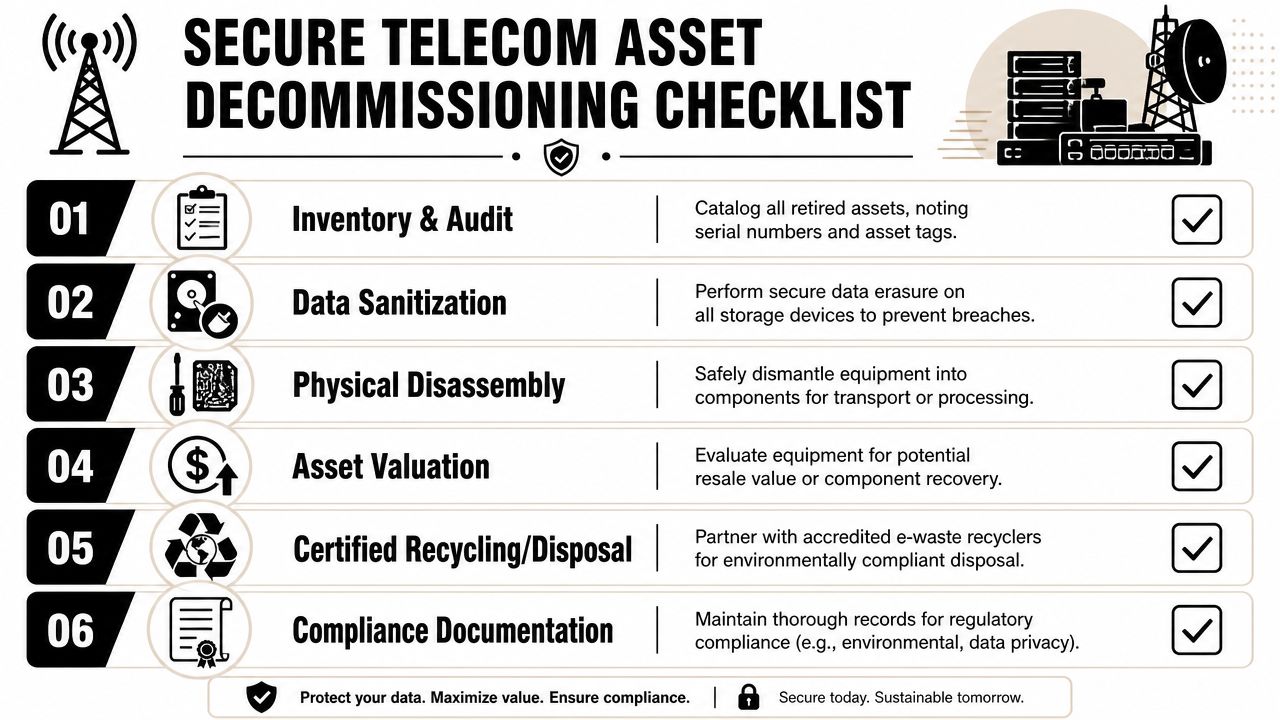
A secure decommissioning process is straightforward, but it must be disciplined.
Inventory every asset
Record asset tag, model, serial number, site location, rack position, and condition. Don't rely on old CMDB entries alone.Identify data-bearing components
Telecom teams often remember server drives and forget embedded storage in appliances, firewalls, management modules, and certain network devices.Approve service separation
Confirm the hardware is no longer active, no monitoring dependencies remain, and no leased equipment is being removed by mistake.Perform controlled de-installation
Remove cabling, rails, mounts, power feeds, and accessories in a way that preserves room safety and future reuse.Sanitize or destroy storage media
If a device holds data, sanitization or shredding must happen before downstream resale, recycling, or scrap processing.Document final disposition
Keep pickup records, weight or manifest records if provided, and final disposition documentation tied back to the original asset list.
What doesn't work
Several shortcuts create unnecessary risk:
- Leaving equipment in staging rooms indefinitely: That breaks chain of custody and invites accidental reuse or loss.
- Sending mixed pallets without review: Batteries, electronics, metal scrap, and reusable gear shouldn't be thrown together.
- Assuming telecom gear holds no data: Modern network environments rarely justify that assumption.
- Treating removal crews as disposal specialists: Disconnecting hardware and processing it compliantly are different tasks.
Why specialized disposition matters
The decommissioning phase sits between IT security, facilities operations, and environmental responsibility. That's why many organizations use a dedicated disposition provider rather than expecting the installer or in-house staff to improvise. One option is telecom equipment removal and disposition support. Scientific Equipment Disposal states that it handles on-site de-installation, packing, pickup logistics, and offers DoD 5220.22-M 3-pass hard-drive sanitization with shredding for obsolete media. For projects that retire network-adjacent servers, storage, and electronics, that kind of scope fits the actual problem.
The checklist facilities teams should keep
Use this quick review before any Dallas telecom refresh closes out:
- Asset list complete: Every retired unit is logged before it leaves the room.
- Data review finished: Someone has confirmed which devices contain storage or sensitive configuration data.
- Ownership confirmed: Leased, customer-owned, and vendor-owned equipment are separated.
- Pickup scheduled: Gear won't sit unmonitored after cutover.
- Documentation requested: Final records are part of the work order, not an afterthought.
Secure decommissioning isn't a cleanup task. It's the control that closes the lifecycle.
FAQ Your Telecom Infrastructure Questions Answered
How early should decommissioning be planned in a telecom project
At the same time the replacement hardware is scoped. If you wait until after cutover, the project team is already focused on stabilization, invoice review, and handoff. That's when retired equipment gets parked in the nearest available space and forgotten.
A better approach is to assign ownership during planning. Decide who inventories the old gear, who signs release for pickup, and where the custody record lives.
Do routers and switches really need the same caution as servers
Sometimes yes. It depends on the device and how it was used. Many telecom and network devices store configurations, credentials, logs, firmware packages, certificates, or other operational data.
That means you shouldn't assume “network gear” is automatically low risk. Review each retired asset class before it leaves controlled space.
What should a facility manager ask for after equipment pickup
Ask for disposition records tied back to your asset list. The exact paperwork may vary by provider and project scope, but the principle is consistent. You need evidence showing what was removed and what happened next.
For sensitive environments, keep those records with project closeout files, lease records, and any internal compliance documentation.
Can old telecom equipment have resale or recovery value
Sometimes it can, especially if the gear is relatively current, complete, and in working condition. But recovery value shouldn't drive the first decision. Security, ownership, and compliance come first.
If equipment is still under lease, subject to return conditions, or contains storage, those issues need resolution before anyone talks about remarketing.
Who usually owns retired equipment after an upgrade
That depends on the contract. Some hardware is customer-owned. Some is leased from carriers or service providers. Some may be vendor-supplied with return obligations. The mistake is assuming ownership without checking the agreement.
This is one reason inventory review matters before de-installation starts. The wrong removal decision can create billing disputes and service issues.
What's the biggest operational mistake after a telecom refresh
Letting old hardware sit without a documented plan. Once retired gear is stacked in a room with no inventory, no sanitization decision, and no pickup date, accountability drops quickly. Items get moved, mixed, or lost. Weeks later, nobody is fully sure what left the building.
That's avoidable if decommissioning is treated as a formal project phase rather than leftover labor.
Does disposal belong to IT or facilities
Usually both have a role. IT or network operations should identify data-bearing devices and approve service retirement. Facilities often controls room access, loading, staging, and vendor coordination. Procurement or compliance may also need to review chain-of-custody and final records.
The handoff works best when one person owns coordination, even if multiple departments approve parts of the process.
If your Dallas team is planning a telecom refresh, site closure, lab-adjacent network cleanup, or multi-location equipment removal, Scientific Equipment Disposal can be part of the disposition side of that project. The company works with electronics and equipment removal, on-site pickup logistics, and data-bearing asset handling, which makes it relevant when retired telecom hardware, servers, storage, and related infrastructure need a documented path out of service.