Network Cabling Services Dallas: A Facility Guide 2026

Your switch closets are full, users keep adding devices, the wireless complaints never really stop, and someone just approved another application rollout that assumes the network can handle it. That’s the point where many Dallas teams start searching for network cabling services dallas and realize the hard part isn’t pulling cable. It’s scoping the job correctly, choosing a contractor who won’t create downstream problems, and keeping operations stable while the work happens.
In labs, hospitals, offices, and data centers, cabling projects fail for predictable reasons. Teams undercount drops, ignore future growth, treat documentation as optional, and wait too long to deal with old hardware that blocks pathways and rack space. Good projects look boring from the outside. They’re well planned, fully labeled, tested, documented, and coordinated with facilities, IT, security, and operations before the first ladder goes up.
Why Your Dallas Facility's Network Backbone is Mission-Critical
An aging network rarely fails all at once. It shows up as patchwork adds, crowded racks, unlabeled runs, and a steady rise in tickets that look unrelated until you walk the floor. In Dallas facilities, that usually means the infrastructure was built for yesterday’s device count and yesterday’s application load.
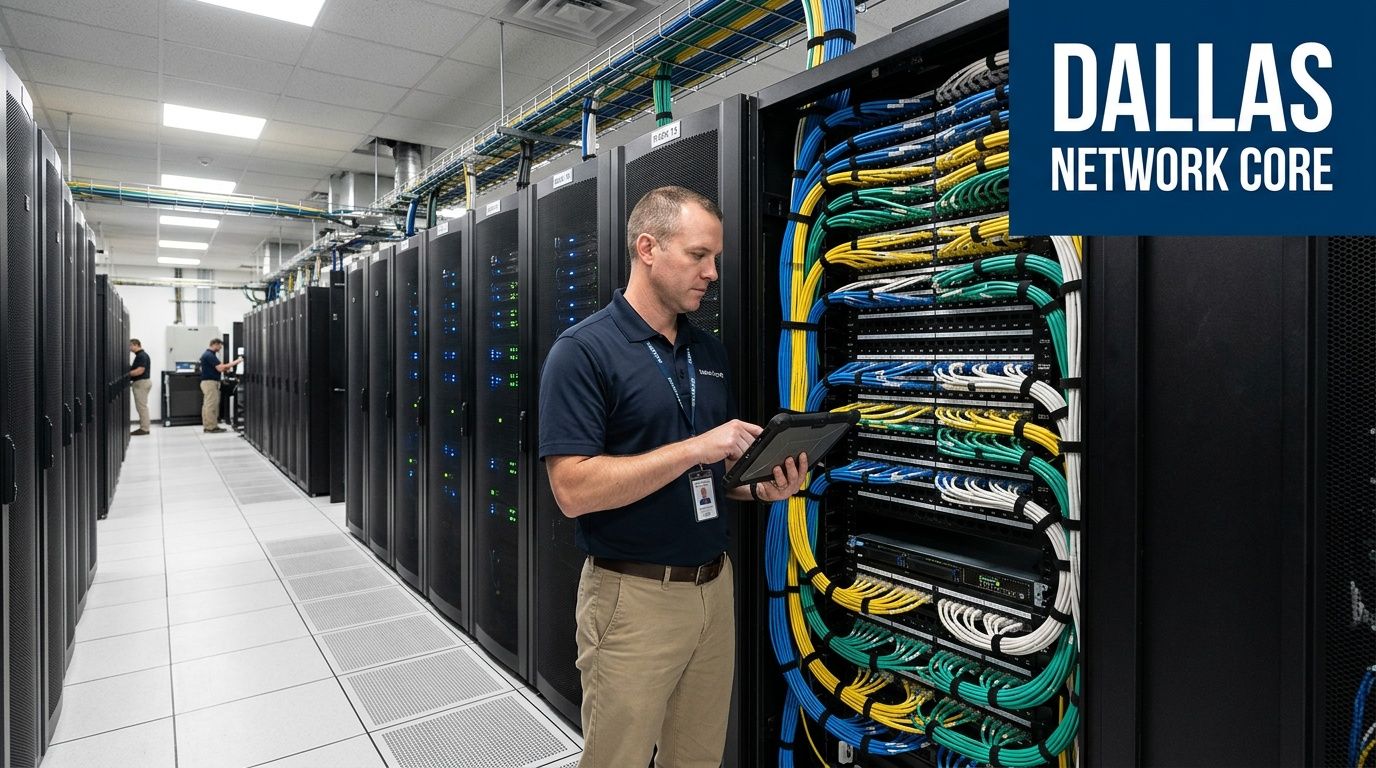
The local backdrop matters. The Dallas-Fort Worth data center market inventory expanded by 47 percent in recent years to nearly 870 megawatts and is projected to double by the end of 2026, which is one reason demand for high-performance cabling keeps rising across the region, especially around cloud, AI, and high-density infrastructure needs, according to DFW network cabling trends.
That pressure doesn’t stay inside hyperscale campuses. It spills into medical buildings, manufacturing sites, regional offices, and mixed-use commercial facilities that now need stronger backbone capacity, cleaner pathways, better wireless support, and room to expand without another full rip-and-replace.
Cabling now drives uptime, not just connectivity
A structured cabling system affects more than internet access. It supports badge access, IP cameras, VoIP, wireless access points, AV systems, building controls, and the applications your teams depend on to do basic work. When the physical layer is sloppy, every upper-layer problem takes longer to diagnose.
Practical rule: If your team can’t identify a circuit path, rack ownership, and spare capacity quickly, the issue isn’t just documentation. It’s operational risk.
Facility leaders also have to think past the install itself. If a refresh includes retired servers, storage, UPS-adjacent accessories, or obsolete rack gear, that disposal work has to be planned at the same time as the cutover. Teams handling decommission work often need a parallel process for data center equipment recycling and removal coordination so old assets don’t slow the new build.
For industrial operators trying to connect plant-floor systems to enterprise IT, this broader view lines up with Sheridan Technologies’ guide to smarter factory IT. The common theme is simple. The network backbone isn’t a utility line item anymore. It’s the layer that determines whether expansion is orderly or chaotic.
How to Find and Vet Dallas Network Cabling Providers
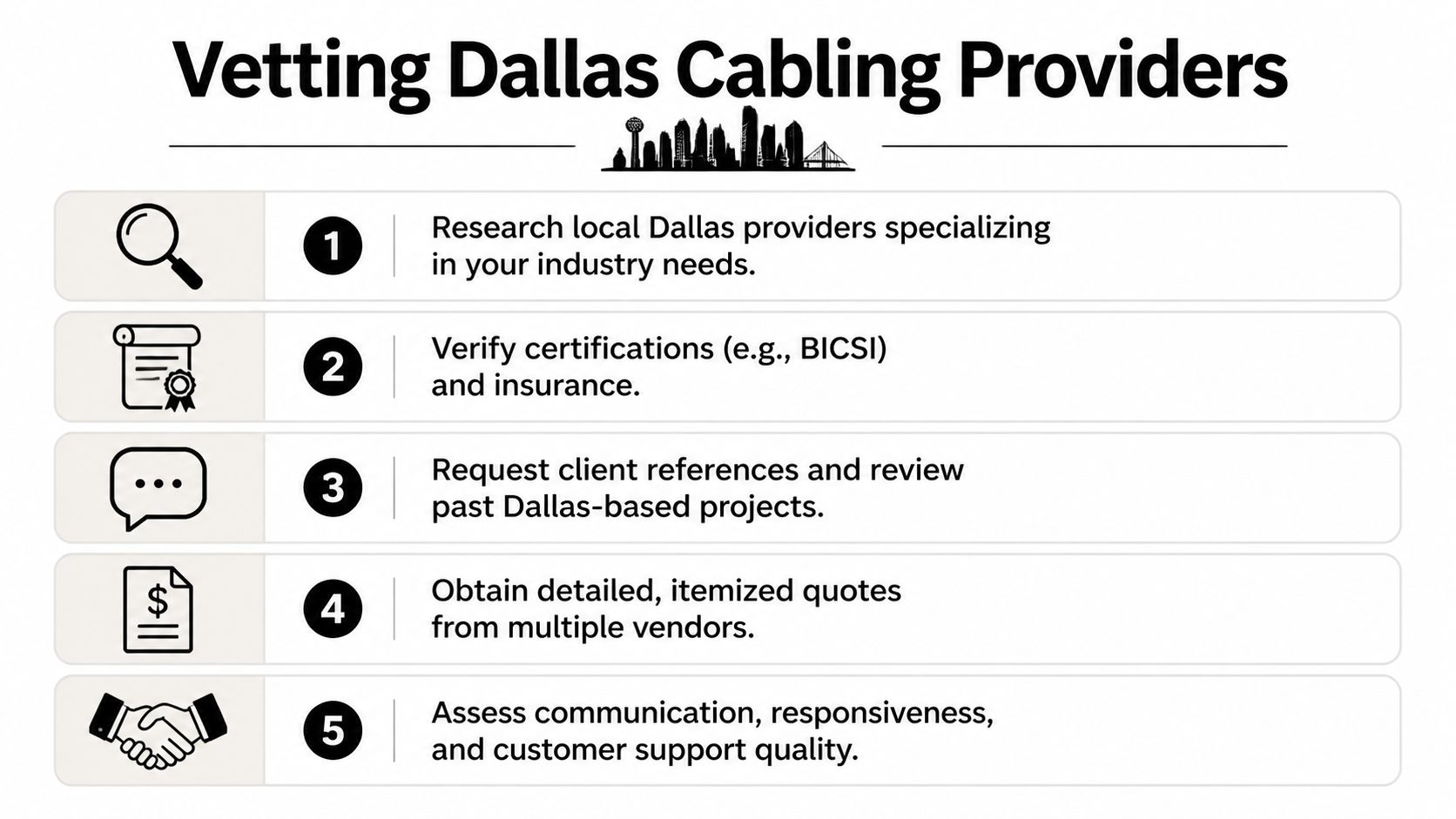
Most provider shortlists are built the wrong way. Teams start with price, not fit. For office moves, that can be survivable. For hospitals, labs, and data centers, it usually creates change orders, rework, and schedule pain.
Start with firms that regularly handle your environment. A contractor who’s competent in tenant office build-outs may still struggle inside an occupied clinical space or a live MDF serving critical systems.
What strong providers tend to have
Established providers like Network Cabling Services show the traits that usually matter on larger projects. NCS was founded in 1981 in Houston, has grown to over 400 professionals across six Texas locations, and offers 24/7 emergency support, which is especially relevant for healthcare and data center clients, as described on the company’s Texas technology integrator profile.
That doesn’t mean one company is automatically right for every project. It does mean you should look for the same signals:
- Longevity in the market means the firm has likely worked through warranty calls, schedule conflicts, and turnover in standards and materials.
- Enough field staff to scale matters when your project spans multiple floors, buildings, or cities.
- Local operational coverage matters if you need follow-up support after occupancy.
- Emergency response capability matters when your facility can’t wait until next week for a repair crew.
Questions that reveal whether a vendor is solid
Ask direct questions. Vague answers are useful. They tell you what the vendor doesn’t control.
Who designs the pathways and labeling scheme?
You want a clear owner, not “the team handles that.”What experience do you have in occupied critical environments?
Hospitals, clean labs, and active data rooms require different work practices than empty shell space.How do you handle testing and as-builts?
If the answer is thin, expect trouble at turnover.What’s excluded from your quote?
Firestopping, coring, lift access, after-hours work, cleanup, and patching often hide here.Who coordinates with facilities, security, and IT?
Good providers have one point of contact who can run a meeting and close action items.
The cheapest quote often assumes the most favorable site conditions. Your building rarely cooperates.
What to review before award
Use a simple evaluation grid instead of comparing bids line by line in email threads.
| Review area | What to confirm | Red flag |
|---|---|---|
| Scope clarity | Every room, pathway, rack, and device type is accounted for | Lump-sum language with little detail |
| Testing | Cable certification, punch list process, turnover package | “We test as needed” |
| Documentation | Labeling standard and as-built delivery | No sample documents |
| Staffing | Named PM, lead tech, escalation path | Sales-only contact |
| Post-install support | Service response and warranty process | No support plan after closeout |
If your project also includes end-of-life IT or lab hardware, it helps to line up a separate stream for business e-waste recycling services before the install window begins. That keeps contractors from staging around obsolete gear that should’ve left the site first.
Defining Your Technical Needs and Cabling Standards
Bad scopes create bad installs. Most overspending in cabling doesn’t come from buying high-quality materials. It comes from unclear requirements, late adds, and trying to retrofit capacity after walls are closed and users have moved in.
The first decision is functional, not brand-based. What are you connecting, where does it terminate, how critical is uptime, and how much growth are you trying to absorb without another major project?
Start with pathways, density, and device count
Professional installation guidance sets a 100-meter maximum distance for Ethernet runs, recommends crossing intersecting cable paths at 90-degree angles to reduce interference, and advises planning at least two data drops per workstation plus dedicated drops for wireless access points and IP devices. That same guidance also notes that adding drops during construction is more cost-effective than retrofitting later, as outlined in this structured cable installation reference.
Those details sound basic, but they drive the entire layout. If you ignore workstation density, ceiling-mounted devices, and future room use, the project looks cheaper on paper and costs more once people occupy the space.
A practical way to compare cable options
The exact product choice depends on application, pathway conditions, rack density, and budget. The right discussion with your vendor isn’t “What’s the best cable?” It’s “What supports this use case cleanly without forcing a rebuild too soon?”
| Cable Type | Max Speed | Max Distance | Best Use Case |
|---|---|---|---|
| Cat6 | Varies by deployment | Up to the Ethernet distance limit used in compliant horizontal runs | Standard office workstations and general network drops |
| Cat6A | Varies by deployment | Up to the Ethernet distance limit used in compliant horizontal runs | Higher-performance office environments, denser device areas, and stronger headroom for future needs |
| Fiber optic | Depends on optic and design | Depends on fiber type and design | Backbone links, inter-room connections, and higher-capacity uplinks |
The table stays qualitative because performance depends on the full design. That’s exactly the point. If a contractor pushes a category without asking about switch plans, uplinks, wireless density, PoE loads, or rack strategy, they’re selling material, not solving the facility problem.
Standards and documentation matter more than most buyers expect
Structured cabling only pays off if the system is maintainable. That means labeling at both ends, consistent naming, sensible color coding, updated floor plans, and organized patching. I’ve seen buildings with acceptable cable plant quality become operational headaches because nobody could trust the documentation.
A useful companion read for non-specialist stakeholders is IT Cloud Global’s essential network guide for businesses. It helps frame the broader business network decisions around the physical layer, especially when facilities and IT are trying to align on the same project.
Buy enough cabling for the facility you’ll be operating, not the one shown on today’s seating chart.
When you define technical needs well, you avoid two common failures. One is getting oversold on infrastructure you won’t use. The other is getting a low bid that leaves no room for the access points, cameras, AV endpoints, and spare capacity the building needs.
The Pre-Installation Checklist for Hospitals and Data Centers
Mission-critical cabling jobs aren’t hard because of cable pulls. They’re hard because the environment punishes poor coordination. In hospitals, infection control, access restrictions, and patient operations shape every work hour. In data centers, cutovers, security controls, rack availability, and uptime windows do the same.
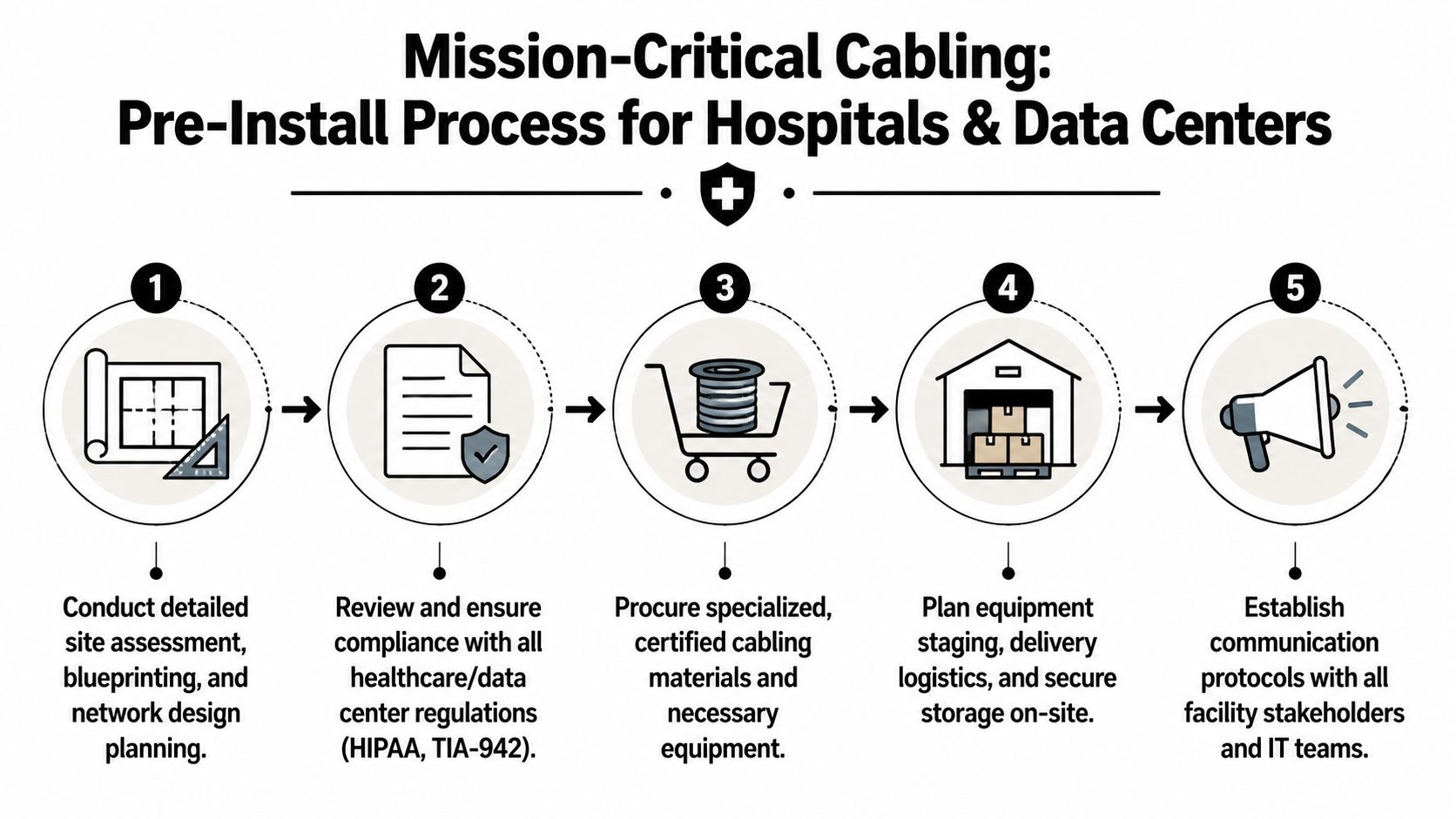
Successful installations follow a three-phase approach of design, installation, and testing, beginning with site surveys and floor plans. For scalability, Dallas commercial standards advise planning for three to five years of organizational growth, not just current headcount, according to this structured cabling installation planning guide.
What must be locked down before work starts
In critical environments, these items should be resolved before material hits the dock:
- Access rules by area. Define who can enter telecom rooms, treatment areas, clean spaces, and secure equipment zones.
- Work-hour restrictions. Some spaces can only be touched after clinical hours, during maintenance windows, or under escort.
- Infection and contamination controls. Hospitals and some lab environments need containment, cleaning protocols, and route planning that typical office projects don’t.
- Cutover ownership. Someone has to approve outages, sequence migrations, and verify service restoration.
- Material staging. Don’t let reels, ladders, racks, and carts become a safety issue in active corridors.
The checklist I use to prevent ugly surprises
A clean pre-install plan usually includes the following:
Walk every route physically
Don’t trust old drawings alone. Ceiling congestion, abandoned cabling, duct conflicts, and inaccessible wall paths change the actual route.Map dependencies by system
Separate user data, wireless, cameras, access control, AV, and specialty equipment. Mixing these in a vague scope creates turnover problems later.Confirm room readiness
IDFs and MDFs need power, cooling, access control, rack space, and patching strategy before new terminations start.Define testing deliverables
Require the format for test results, labeling schema, and as-built markups in writing.Plan the decommission path
Old servers, patch panels, racks, and peripheral equipment need a removal schedule that doesn’t conflict with the install crew.
In occupied hospitals, the best cabling crew is the one clinicians barely notice because the project manager handled the disruption before it reached the floor.
Downtime planning is part of the installation, not an afterthought
For hospitals and data centers, every cut should have a rollback path. If the vendor can’t explain the fallback sequence for patching changes, room migrations, or backbone transitions, the plan isn’t ready.
Use a cutover worksheet that lists:
| Cutover item | Required owner | Why it matters |
|---|---|---|
| Service being touched | IT or application owner | Prevents “surprise” impact to dependent systems |
| Approved maintenance window | Facilities and operations | Keeps work inside an accepted outage period |
| Validation step | End-user or system owner | Confirms service actually returned |
| Rollback decision point | Project lead | Prevents long, improvised outages |
In healthcare projects especially, obsolete equipment can block pathways, occupy staging rooms, and complicate infection-control planning. If the job includes room conversions or equipment removal, coordinate that work separately through hospital equipment cleanout services so the cabling contractor isn’t improvising around items that should already be gone.
The best Dallas cabling projects in critical facilities share one trait. The field crew arrives to a site that already knows the rules, the sequence, and who makes decisions.
Calculating ROI on Your Dallas Network Cabling Investment
Most buyers still evaluate cabling like a commodity. That’s how they end up comparing line items instead of business impact. A low quote can still be the expensive choice if it produces change orders, weak documentation, slower cutovers, or another upgrade far sooner than expected.

A real gap in this market is the lack of transparent pricing models and ROI case studies from Dallas cabling providers, which makes payback and capital-justification work harder than it should be, as noted in this Dallas cabling services overview.
Build the business case around operational outcomes
Use four buckets when you justify the spend:
Downtime avoidance
Count the business processes that stall when users lose connectivity, phones fail, cameras drop, or access systems become unstable.Labor efficiency
Measure the time your IT staff spends chasing undocumented circuits, moving users, or troubleshooting poor patching and labeling.Growth enablement
A clean build supports expansions, room reassignments, added devices, and future technology rollouts without immediate rework.Risk reduction
Code-compliant installation, better cable management, and documented testing lower the chance of failure during moves or audits.
What to compare in proposals
Don’t reduce the review to cost per drop. That number hides too much.
Look at:
- pathway work
- rack cleanup
- labeling detail
- testing scope
- after-hours premiums
- patch cords and accessories
- firestopping responsibilities
- documentation package
- support after closeout
If one proposal is far lower than the rest, check what it leaves to your internal team. That missing work still has a cost.
A simple ROI worksheet for internal approval
You don’t need invented benchmark numbers to make the case. You need disciplined assumptions that your finance and operations teams recognize as real.
| ROI input | What to ask |
|---|---|
| Current support burden | How much staff time goes into recurring physical-layer issues? |
| Business interruption exposure | Which operations stop when network service drops in affected areas? |
| Move-add-change frequency | How often do teams request new ports, relocations, or room changes? |
| Expansion horizon | Will the facility add users, devices, or systems during the planned lifecycle? |
| End-of-life equipment | Can hardware removal be bundled into the project timeline to avoid duplicate labor? |
If the project also retires old user devices, servers, storage, or electronics, separate that stream early with corporate e-waste solutions. That keeps cabling spend focused on infrastructure while still accounting for the total facility refresh.
The strongest ROI argument is usually operational, not theoretical. A documented, scalable cabling plant reduces friction every time your team adds a user, troubleshoots an outage, opens a room, or supports a new system.
Conclusion Building a Future-Proof Network Foundation
A cabling project isn’t just an IT task hiding in the ceiling. In Dallas facilities, it’s a long-lived infrastructure decision that affects uptime, moves, compliance, physical security, wireless coverage, and how easily the building can absorb change.
The projects that hold up over time are usually the ones with disciplined scoping, realistic vendor vetting, and clear turnover requirements. They also account for what happens around the install. Staging, access control, downtime windows, rack readiness, and removal of obsolete equipment all shape the result as much as the cable category printed on the box.
That’s why the best planning conversations include facilities, IT, operations, security, and finance at the same table. If your leadership team is also evaluating broader modernization priorities, NineArchs LLC has a useful perspective on optimizing your IT infrastructure that complements the facility-level planning discussed here.
A future-proof network foundation also means closing the loop on retired assets. During upgrades, many organizations uncover years of accumulated electronics, abandoned peripherals, and decommissioned hardware that no one formally owned. Building a responsible process for managing e-waste alongside infrastructure work keeps the site cleaner, safer, and easier to support.
Good network cabling services dallas projects don’t call attention to themselves after closeout. The network performs, the documentation is usable, and the next expansion doesn’t start with a demolition plan. That’s the standard worth paying for.
Frequently Asked Questions About Dallas Cabling Projects
What’s the difference between structured cabling and older point-to-point wiring
Structured cabling is organized around standardized pathways, termination points, labeling, and documentation. Older point-to-point wiring often grows organically, with direct runs added whenever a device appears. The first approach is easier to maintain, test, and scale. The second usually becomes expensive once the site changes hands, departments move, or troubleshooting gets urgent.
How long does a typical Dallas office cabling project take
It depends on occupancy, pathway access, permit requirements, after-hours restrictions, and how complete the design is before mobilization. A small office refresh can move quickly. A hospital floor, lab suite, or active data room takes longer because access windows, contamination controls, and cutover planning drive the schedule more than the pull itself. Ask vendors for a task-based schedule, not a rough verbal estimate.
What building issues most often slow projects down
Three issues show up constantly: congested ceilings, incomplete drawings, and hidden responsibilities around patching, coring, and firestopping. If the quote doesn’t define those items, the project team ends up settling them in the field under schedule pressure.
Should you install only what you need today
Usually no. Most regret comes from underbuilding, especially for wireless access points, cameras, AV, badge readers, and future user growth. Overbuilding in a controlled construction phase is often cleaner than reopening ceilings and disrupting occupied space later.
What should you require at project closeout
Require test results, as-builts, a labeling map, rack elevations if applicable, and a clear list of any punch items that remain open. If you don’t receive usable documentation, your internal team inherits the cost later.
If your cabling upgrade also means clearing out retired servers, lab equipment, storage arrays, PCs, or other electronics, Scientific Equipment Disposal can help you handle that side of the project with compliant pickup, secure data destruction support, and practical logistics planning. That’s especially useful when a facility refresh involves both new infrastructure and a backlog of obsolete assets that need to leave the site cleanly.