Fiber Optic Installation Near Me: 2026 Guide for Businesses


Your team usually starts searching for fiber optic installation near me when the network has already become a constraint. A hospital imaging department can't move files fast enough between systems. A university lab is adding instruments that generate more data than the existing backbone can handle. A corporate IT group is planning a server room refresh and realizes the cabling plant is the weak link.
In those environments, fiber isn't a convenience upgrade. It's infrastructure. The installation has to fit around shutdown windows, compliance requirements, active clinical spaces, research continuity, and other trades working in the same building. That's why the local installer search matters less than the project strategy behind it.
Why Your Facility Needs a Professional Fiber Optic Strategy
If you manage a medical, research, or data-heavy facility, the decision isn't just whether fiber is available. The essential question is whether the install is being scoped like a mission-critical project.
Fiber has become the preferred upgrade path in dense metro areas because it supports multi-gigabit capacity, stronger upload performance than legacy cable, and low latency for environments that rely on cloud backups, fast synchronization, and real-time applications. In Fort Worth, for example, fiber is available to 74.21% of the city with an average attainable speed of 4,013 Mbps, according to local fiber availability data. That kind of deployment shows how mainstream fiber has become in major U.S. markets.
For a hospital, that matters because uploads matter. For a lab, that matters because data replication matters. For an enterprise campus, that matters because backbone congestion spreads problems across multiple departments at once.
Fiber is a facilities decision, not only an IT decision
The biggest mistake I see is treating commercial fiber work like a simple provider activation. In a business setting, the network path crosses telecom rooms, risers, ceilings, conduits, utility entry points, and occupied work areas. It often intersects with remodels, lab moves, decommissions, and equipment replacement schedules.
That's why facility leaders should pair cabling work with other site changes when possible. If you're already planning a shutdown, swing-space move, or asset transition, that's often the cleanest time to address structured cabling and pathway access. Teams evaluating adjacent operational needs often also look at broader telecom services near me so the fiber build aligns with the rest of the communications environment.
Practical rule: If your network upgrade affects critical workflows, treat fiber like a capital project with operational dependencies, not like a simple service call.
A good outside perspective also helps when the work extends beyond the server room and into civil paths, maintenance access, and long-term serviceability. Resources on fiber construction and maintenance are useful because they frame fiber as an asset that has to be built, documented, and maintained over time.
Finding and Vetting Local Fiber Optic Installers
A local search will give you plenty of names. It won't tell you which contractor can work inside an active clinic, coordinate with facilities, protect sterile or controlled areas, and hand over clean test documentation at the end.
That screening work is yours.
Start with commercial qualifications, not consumer reviews
For business and institutional projects, ask each bidder who designs the route, who supervises field crews, and who signs off on testing. A polished website doesn't answer those questions. Neither do residential review sites.
If your project touches medical suites, labs, campuses, or data rooms, ask for experience in occupied commercial environments. The skill set is different from routine drop installations. The contractor should be comfortable with access control, after-hours work, pathway congestion, patch panel labeling standards, and coordination with building management.
Some teams also widen their search process by using contractor-selection checklists outside telecom. A practical example is Richmond Tree Experts' guide, which is useful for thinking through license checks, communication habits, and how a vendor handles site risk before work starts.
Ask for proof, not promises
A serious installer should be ready to provide documentation that shows they can carry risk appropriately and control quality on site. That usually includes:
- Insurance documentation: Request a current Certificate of Insurance and confirm the named insured matches the company signing your agreement.
- Project supervision details: Ask who the field lead is, who the project manager is, and who your escalation contact will be.
- Reference projects: Request commercial references that resemble your environment, not just any satisfied customer.
- Testing deliverables: Ask what final test package they provide and in what format.
- Change control approach: Find out how they handle route conflicts, blocked pathways, and owner-requested changes.
For larger or more sensitive jobs, it also helps to involve a neutral planning resource before bids are finalized. A separate telecom consulting services team in Los Angeles may seem geographically specific, but the broader point applies anywhere: independent technical review can sharpen scope and reduce bid ambiguity.
Use references the right way
Don't ask, “Were you happy with them?” Ask questions that reveal how the company behaves when conditions change.
Try questions like these:
- What happened when the installer found an unexpected route issue?
- Did they protect occupied spaces and clean up daily?
- Were labels and as-builts usable, or did your team have to reconstruct the record later?
- Did the final invoice track the original scope, or were there repeated surprises?
- Would you trust the same team in a critical area again?
The best reference calls don't confirm that a project was easy. They show whether the installer stayed organized when the project stopped being easy.
Installer vetting checklist
| Criterion | What to Look For | Why It Matters |
|---|---|---|
| Commercial project history | Experience in hospitals, labs, campuses, industrial sites, or enterprise offices | These sites require tighter coordination and cleaner execution than basic residential work |
| Insurance and risk controls | Current COI, clear safety practices, defined supervision | Protects your organization if work affects occupied or sensitive areas |
| Reference quality | Clients with similar building types and operational constraints | A retail fit-out reference won't tell you much about a medical or research environment |
| Documentation standards | Sample labels, as-builts, test result package, cable ID format | Good records reduce confusion at turnover and during future repairs |
| Change management | Clear process for route changes, access problems, and owner approvals | Prevents field improvisation from becoming a permanent network problem |
| Communication discipline | One accountable PM, regular updates, site coordination habits | Fiber jobs often slip when nobody owns scheduling across trades |
Defining Your Project Scope and Technical Requirements
Most bad fiber projects don't start with bad labor. They start with a vague scope.
If you ask for a quote before defining the network purpose, route, environment, handoff point, and testing standard, you'll get pricing that looks comparable on paper but isn't comparable in practice.
Start with the business use case
A campus backbone, a lab renovation, and a data room cross-connect don't need the same design. Your scope should identify where the fiber starts, where it terminates, what equipment it must support, and what operational constraints apply during installation.
For many organizations, the first useful split is between backbone cabling and horizontal cabling. Backbone fiber links telecom rooms, buildings, and major distribution points. Horizontal cabling serves local areas such as labs, workspaces, control rooms, or device clusters. Those aren't interchangeable scopes, and mixing them in one vague bid package usually creates confusion.
This is also the point where many teams bring in related site specialists. If your project includes room turnover, bench removal, or shutdown planning, a partner that already understands facility transition work can help sequence the network portion more cleanly. That's one reason some organizations reviewing network cabling services in Dallas also map fiber work against broader move, deinstall, or renovation activity.
Singlemode and multimode solve different problems
The cable choice should match the distance, equipment plan, and expected growth path. A short in-building connection may point one way. A building-to-building or future expansion scenario may point another.
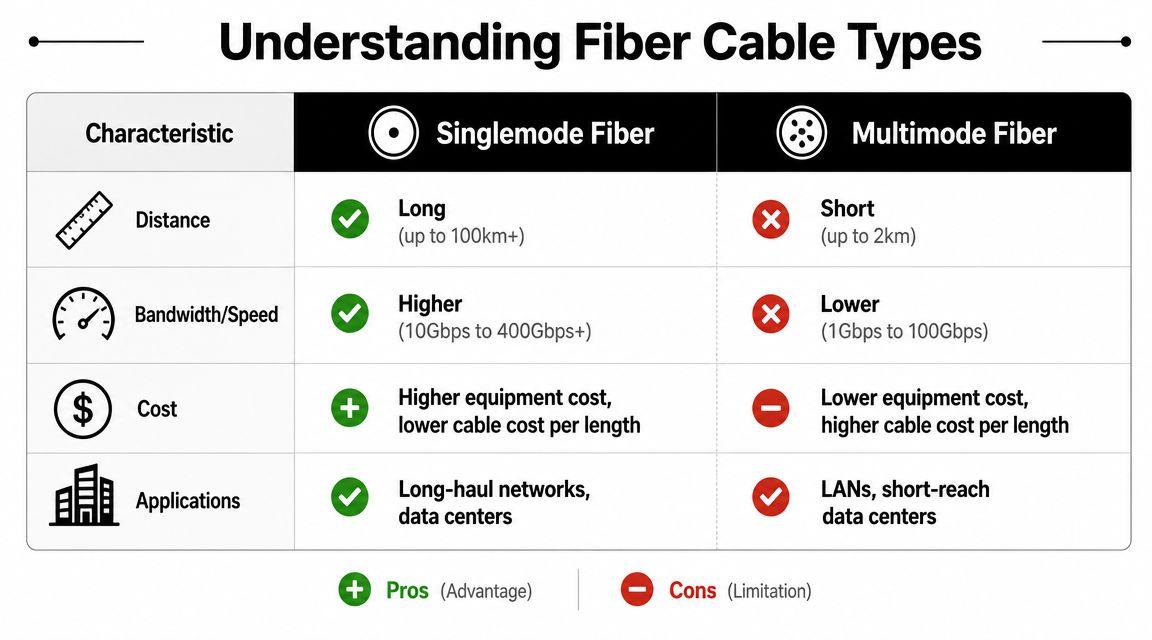
In practice, I'd frame it this way for non-specialists:
- Singlemode fiber: Best when you need longer reach, a stronger long-term growth path, or interbuilding connectivity.
- Multimode fiber: Often suitable for shorter in-building runs where the electronics strategy supports it.
- The real decision point: Not the cable alone, but the full channel design, including optics, patching, pathway conditions, and expansion plans.
The most expensive mistake isn't always choosing the “wrong” fiber type. It's choosing without documenting the assumptions behind the choice.
Indoor, outdoor, aerial, or underground
Route method matters as much as cable type. Outdoor and indoor environments have different handling requirements, support requirements, and code considerations. When a path crosses from outside plant to interior telecom spaces, the design has to reflect that transition.
Underground deployment often sounds like the safest answer, but it isn't automatically the best one. Industry guidance notes that underground fiber is less exposed to weather, but it's significantly more expensive and complex to install because it requires excavation, and buried networks are also commonly damaged by construction dig-ups, as explained in this analysis of aerial vs. underground fiber deployment.
That trade-off matters on campuses, medical complexes, and urban sites where future construction is likely.
If your block gets rebuilt often, “buried” doesn't always mean “protected.” It may just mean the next repair takes longer to locate.
Scope details that should be written down before bidding
- Pathway conditions: Existing conduit, new conduit, riser access, ceiling congestion, roof transitions, or exterior wall penetrations.
- Building constraints: Infection-control procedures, after-hours access, security escorts, noisy-work limits, and shutdown windows.
- Termination plan: Patch panel locations, enclosure types, connector standard, and labeling format.
- Growth allowance: Spare strands, spare pathway capacity, and reserved rack space.
- Coordination points: Lab decommission timing, equipment moves, room clear-outs, and trade sequencing.
A clear scope lowers procurement risk. It also keeps the installer from making field decisions that should have been owner decisions.
Estimating Costs Timelines and Planning Site Prep
The on-site install window is only one piece of the schedule. Most commercial delays happen earlier, when surveys are incomplete, permits lag, pathways are blocked, or nobody has coordinated building access.
That's why budgeting for fiber optic installation near me should focus less on a single line-item price and more on the drivers behind the quote.
What actually drives cost
Labor changes based on route difficulty, occupied conditions, cable handling requirements, and the amount of splicing and termination involved. Civil work can outweigh everything else if the path requires excavation, restoration, or traffic and access controls. Documentation and final testing also matter, especially in a commercial handover where records need to be usable later.
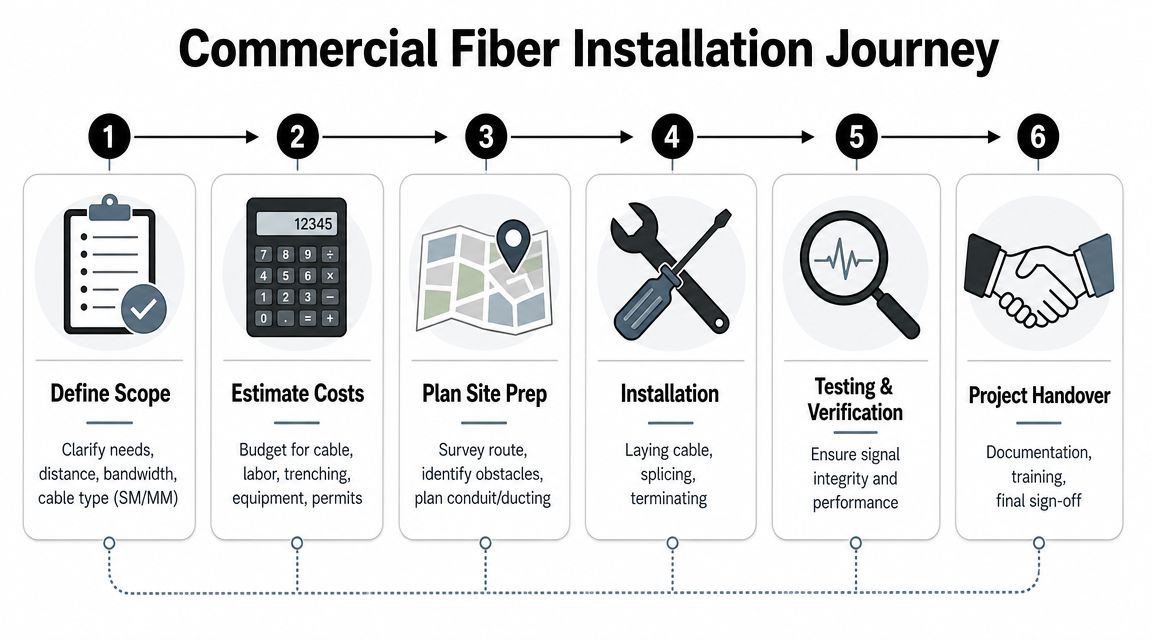
A professional installation follows a staged workflow that includes pre-installation survey, permitting, route selection, outside-plant construction, cable placement, splicing, termination, and acceptance testing, according to the Fiber Optic Association installation guidance. That same guidance notes the customer-side appointment may only take about 2 to 3 hours, while the full process is much longer.
Build your timeline around constraints, not optimism
A realistic project plan accounts for approvals, access, material lead times, and shared spaces. In an active hospital or lab, the installer may only get narrow windows for ceiling access, corridor work, or telecom room entry.
Here's a practical planning sequence:
- Site survey first. Confirm actual paths, not assumed ones.
- Permitting next. Don't schedule crews before approvals are in motion.
- Route confirmation. Resolve ceiling, conduit, and penetration questions before materials arrive.
- Installation window. Sequence field work around occupants and other trades.
- Acceptance testing and punch list. Leave time for corrections before turnover.
If trenching or utility crossing is involved, civil coordination becomes its own project stream. Even region-specific resources can be useful for understanding that work. For example, guidance on utility trenching and digging in NSW is a good reminder that excavation work is never just “dig a path and lay cable.” It involves utility conflicts, safety controls, restoration, and access planning.
Site prep that prevents rework
Before the crew arrives, the owner should clear obstacles that don't require telecom expertise but can still derail the job.
- Telecom room readiness: Make sure racks, wall space, power availability, and room access are confirmed.
- Pathway access: Remove stored items from closets, corridors, and ceiling-adjacent work areas.
- Decision authority: Identify who can approve route changes the same day if conditions differ from the survey.
- Operational windows: Confirm when noisy, dusty, or disruptive work can happen.
- Cross-trade coordination: Align electricians, facilities staff, general contractors, and any decommissioning team.
Coordinate low-voltage crews with electricians, HVAC teams, and decommissioning partners before the first cable pull. If one group blocks access to a riser or telecom room, everyone else waits.
That coordination is especially important in smaller distributed sites, branch facilities, and mixed-use campuses where the network refresh may happen alongside a broader provider review. In those cases, buyers often compare small business telecom providers in Houston or similar local options while also trying to stage construction work. Keep those decisions connected. Vendor selection and site readiness affect each other.
Managing Installation Quality and Project Handover
A fiber link isn't finished because someone plugged it in and saw service come up. For commercial work, that standard is too low.
A marginal route can still light up on day one. It may fail later because of hidden stress, poor splicing, avoidable bends, or bad documentation.
What good field quality looks like
You don't have to be a fiber technician to spot warning signs. Watch how the crew handles cable, secures slack, labels terminations, and protects installed paths. Over-tight fasteners, messy routing, unlabeled panels, and unsupported transitions usually signal bigger issues behind the scenes.
Quality also shows up in discipline. A good crew keeps route records, updates the owner when conditions change, and doesn't improvise permanent solutions because a pathway was inconvenient.
Demand instrument-based testing
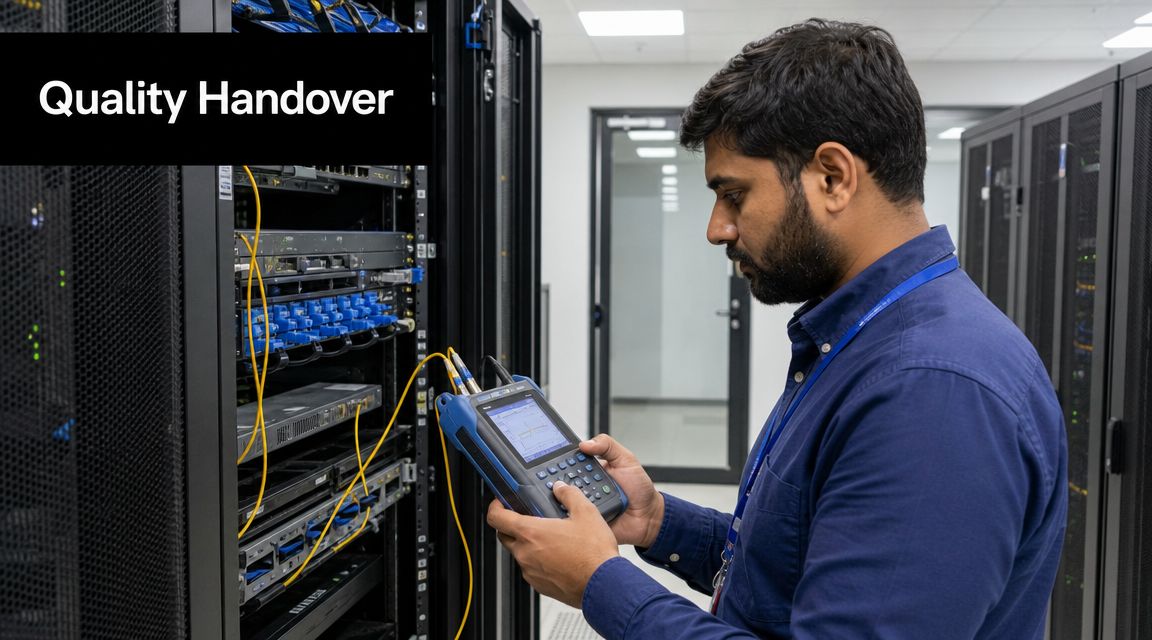
Expert practice is to validate the link with OTDR and power-meter testing, not just a live internet check. Post-install testing should include OTDR scans to detect bends and faults, plus light-source/power-meter tests to quantify optical loss, as detailed in this fiber installation testing guide.
That distinction matters in mission-critical environments. A service-light check tells you the circuit works at a basic level. It does not tell you whether splice loss is acceptable, whether attenuation is within design limits, or whether a hidden stress point is waiting to cause an outage.
What to insist on: Every installed link should have recorded test results that your team can keep, review, and use later for troubleshooting.
For organizations with multiple facilities, this is also where long-term support planning starts. If the same provider or partner will be involved after turnover, compare the installer's handoff against what strong telecom maintenance services in Chicago or elsewhere typically require: traceable records, clear labels, and usable baseline data.
Handover documents that actually matter
A proper closeout package should include more than a signed completion notice. At minimum, ask for:
- As-built route diagrams: Show the path as installed, not just as designed.
- Cable IDs and labeling schedule: Match physical labels to documents.
- Termination records: Identify panel, enclosure, and strand assignments.
- Test results: Include OTDR traces and optical loss measurements.
- Open items list: Document any punch-list items and the date for correction.
If your team can't answer “where does this strand run?” without calling the installer back, handover wasn't complete.
Essential Contract Items for a Bulletproof Installation
Many buyers still compare fiber bids as if the winner is the one with the lowest install price. That's a risky way to buy network infrastructure.
The hidden cost usually shows up later, when a break happens and nobody has the records needed to restore service efficiently.

Put the technical details into the contract
A serious agreement should include a detailed Statement of Work with the route intent, material expectations, installation environments, testing requirements, labeling rules, and handover deliverables. If the scope only says “install fiber from point A to point B,” you're leaving too much to field interpretation.
Spell out who owns permit coordination, patching and painting after penetrations, cleanup, after-hours premiums, and change-order approval. If a hospital unit, lab suite, or secured room requires escorts or restricted work windows, write that into the contract instead of assuming the installer will absorb it.
Make documentation a deliverable, not a favor
The FOA emphasizes that effective fiber troubleshooting depends on having GIS maps, route photos, cable IDs, and test data from the original installation, and that without those records, locating and repairing faults becomes much slower, especially after events like construction dig-ups, as explained in the FOA's guidance on fiber restoration planning and troubleshooting.
That should change how you negotiate.
Include these items explicitly:
- As-built documentation: Final installed routes, penetrations, and termination locations.
- Cable identification records: Strand counts, cable IDs, panel assignments, and splice references.
- Photo documentation: Pathway conditions, entry points, enclosures, and major transitions.
- Test package: Final acceptance results in a format your IT or facilities team can archive.
- Restoration support terms: Response expectations, documentation access, and post-install support responsibilities.
The cheapest installer may still cost the most if they leave you with a network nobody can repair quickly.
Protect workmanship and future operations
Ask for separate clarity on workmanship warranty and material warranty. Those aren't the same. Also define what counts as project completion. If test results, labels, or as-builts are missing, the project shouldn't be considered finished.
When you buy fiber this way, you're not just purchasing an installation. You're buying recoverability, maintainability, and a cleaner path to future adds, moves, and repairs.
If your fiber project is tied to a lab shutdown, hospital equipment refresh, server room cleanout, or broader facility transition, Scientific Equipment Disposal can help coordinate the surrounding operational work. Their team supports compliant lab equipment and electronics removal, secure data-bearing asset handling, and on-site logistics that often need to happen before cabling crews can work efficiently.