Secure Recycling of Computer Waste in Atlanta

A lot of computer waste projects start the same way. A storage room fills up with retired laptops, failed desktops, loose hard drives, old monitors, decommissioned servers, and a few mystery boxes nobody wants to claim. In a hospital or university, that pile usually includes devices with patient records, research files, licensed software, and asset tags that still map back to a department.
That’s when the risk becomes real. Old equipment isn’t just clutter. It’s a mix of data-bearing assets, regulated material, and chain-of-custody liability. If your team is planning a relocation, tech refresh, lab shutdown, or data center cleanup in Atlanta, you need a process, not a junk haul.
The scale of the problem is bigger than most organizations realize. In 2022, the world generated 62 million tonnes of electronic waste, an 82% increase from 2010, and that figure is projected to reach 82 million tonnes by 2030. Only 22.3% is formally collected and recycled, with US$62 billion in recoverable resources lost in the process, according to the World Health Organization’s e-waste fact sheet). Those numbers matter locally because the same pattern shows up inside businesses that postpone disposal until the backlog becomes a facility problem.
In practice, the hardest part is usually the first move. Teams know they need recycling of computer waste, but they’re trying to balance uptime, HIPAA exposure, internal approvals, and pickup logistics at the same time. That’s why it helps to approach the project as asset disposition, not trash removal.
If your equipment list includes computers, servers, storage devices, or mixed electronics in the Atlanta area, start with a provider that understands business-grade e-waste recycling in Atlanta. The environmental piece matters. The data security piece matters more. For regulated organizations, both have to happen together.
Setting the Stage for Responsible E-Waste Management
Most facilities and IT directors don't call about computer waste when the first laptop fails. They call when a manageable pile has turned into a room full of equipment that can no longer sit there.
A finance office may have old desktops from a workstation refresh. A clinic may be holding nursing station PCs and retired printers while waiting for compliance signoff. A university may have faculty laptops, server gear, and lab-adjacent electronics mixed together with no clean inventory. By the time the project reaches the top of the list, several departments already have a stake in it.
What makes computer waste different
Computer waste carries three separate burdens at once:
- Security exposure. Hard drives, SSDs, backup media, and embedded storage can hold sensitive data long after a device is out of service.
- Operational friction. Equipment is often spread across closets, offices, labs, racks, and off-site storage.
- Disposal risk. Electronics contain materials that require controlled downstream handling.
That combination is why casual disposal fails. The "just clear the room" approach usually breaks at the first audit question.
Practical rule: If an asset ever touched patient data, employee records, financial files, research, or network credentials, treat it as sensitive until documented destruction says otherwise.
Why delay creates bigger problems
When organizations wait too long, the project gets harder in predictable ways. Asset records get weaker. Ownership gets blurry. Equipment gets moved without logs. Drives fail while sitting in storage, which can remove reuse as an option and push you toward physical destruction.
The strongest projects start when someone says: we need a documented chain from pickup through final disposition, and every device has to be accounted for. That’s the right starting point for recycling of computer waste in any regulated environment.
Developing Your IT Asset Disposition Strategy
Before anyone unplugs a server or rolls a cart into a hallway, build the project on paper. That saves time on pickup day and prevents the usual disputes over ownership, budget, and approval.

The national backdrop shows why planning matters. The US generated over 6.9 million tons of e-waste in one recent year and recycled just 15%. Only 25 states mandate e-waste recycling laws, which leaves states such as Georgia relying heavily on responsible organizations and specialized providers for proper handling, as summarized by Business Waste’s e-waste facts.
Start with an asset inventory that reflects reality
A useful inventory does more than count devices. It separates assets by risk and handling method.
For a first major disposition project, capture at least these fields:
- Device type. Desktop, laptop, thin client, server, array, switch, monitor, printer, lab-connected workstation, or peripheral.
- Data status. Known data-bearing, possible embedded storage, no storage, or unknown.
- Physical condition. Working, damaged, incomplete, nonfunctional, or locked.
- Location. Building, floor, room, closet, rack, or off-site storage.
- Department owner. IT, facilities, lab operations, radiology, finance, research, or administration.
- Disposition path. Reuse candidate, resale candidate, wipe and recycle, shred and recycle, or hazardous review.
If you skip this step, your project becomes reactive. Teams start making destruction decisions on the loading dock, and that’s where mistakes happen.
Separate computer waste from everything else
Many Atlanta institutions have mixed streams. A room labeled "electronics" can hold computers, UPS units, network gear, test equipment, old analyzers, cables, and batteries all together.
That mix creates problems fast. Computer waste should be grouped by handling needs, especially if your project also includes scientific equipment. Lab devices may contain specialty components or regulated materials that call for different de-installation and downstream processing than standard office IT.
Create separate categories early:
| Asset group | What to include | Why it matters |
|---|---|---|
| User devices | Laptops, desktops, tablets, docking stations | Often high volume and easier to stage |
| Infrastructure | Servers, storage arrays, rack gear, telecom hardware | Usually needs coordinated shutdown and de-racking |
| Peripherals | Monitors, keyboards, mice, cables, printers | Lower data risk, but still part of reconciliation |
| Mixed lab and IT | Instrument PCs, embedded controllers, connected analyzers | Requires both data review and specialized handling |
Define what success means before pickup
Every organization says it wants secure recycling. That’s too broad to run a project.
Choose the primary driver first. Usually it’s one of these:
Security first
Best for healthcare, government, legal, and research environments. Data-bearing media gets the strictest handling and documentation.Speed first
Best for moves, closures, and urgent space recovery. This can work, but only if inventory discipline stays intact.Value recovery first
Best when newer equipment may retain resale or reuse value. This requires stronger testing and sorting before destruction decisions.Operational simplicity
Best when multiple departments are involved and the organization wants one controlled process instead of piecemeal pickups.
A lot of projects fail because different stakeholders are optimizing for different outcomes without saying so. IT wants controlled destruction. Finance wants credits. Facilities wants the room cleared. Compliance wants documentation. Put those priorities in writing.
Decide who signs off on what
The approval chain should be clear before the first cart moves.
Use a simple responsibility split:
- IT approves data handling rules and asset scope.
- Compliance or privacy confirms requirements for sensitive media.
- Facilities manages access, elevators, dock scheduling, and staging areas.
- Finance or procurement reviews any reuse, resale, or recycling credit process.
- Department leaders confirm ownership of orphaned devices.
If you need a starting point for the workflow itself, review a dedicated IT asset disposal process and adapt it to your internal signoff path.
Projects move faster when one person owns the master list and one person owns day-of-site access. When five people partially own both, assets get missed.
Build your Atlanta project around site conditions
An urban office tower, suburban hospital campus, and university science building all create different constraints. Freight elevator access, loading dock windows, patient traffic, chain-of-custody routing, and after-hours entry all matter.
That’s why experienced teams do a walkthrough or at least a scoped pre-pickup review. The problem usually isn't the number of computers. It’s the layout.
Executing Ironclad Data Destruction
Data destruction is the part of recycling of computer waste that can't be treated as a secondary service. If your vendor talks mostly about landfill diversion and only briefly mentions hard drives, that's the wrong order.
For hospitals, universities, labs, finance teams, and government offices, a key issue is the overlap between secure data destruction and material recovery. The EPA-focused guidance in the source material makes that gap clear. Decision-makers need vendor clarity on R2 certification, chain-of-custody documentation, and liability frameworks so disposal doesn't create a compliance hole, as noted in the EPA electronics management background material.
Wiping and shredding are not interchangeable
A common mistake is asking for "data destruction" as if it always means one thing. It doesn't.
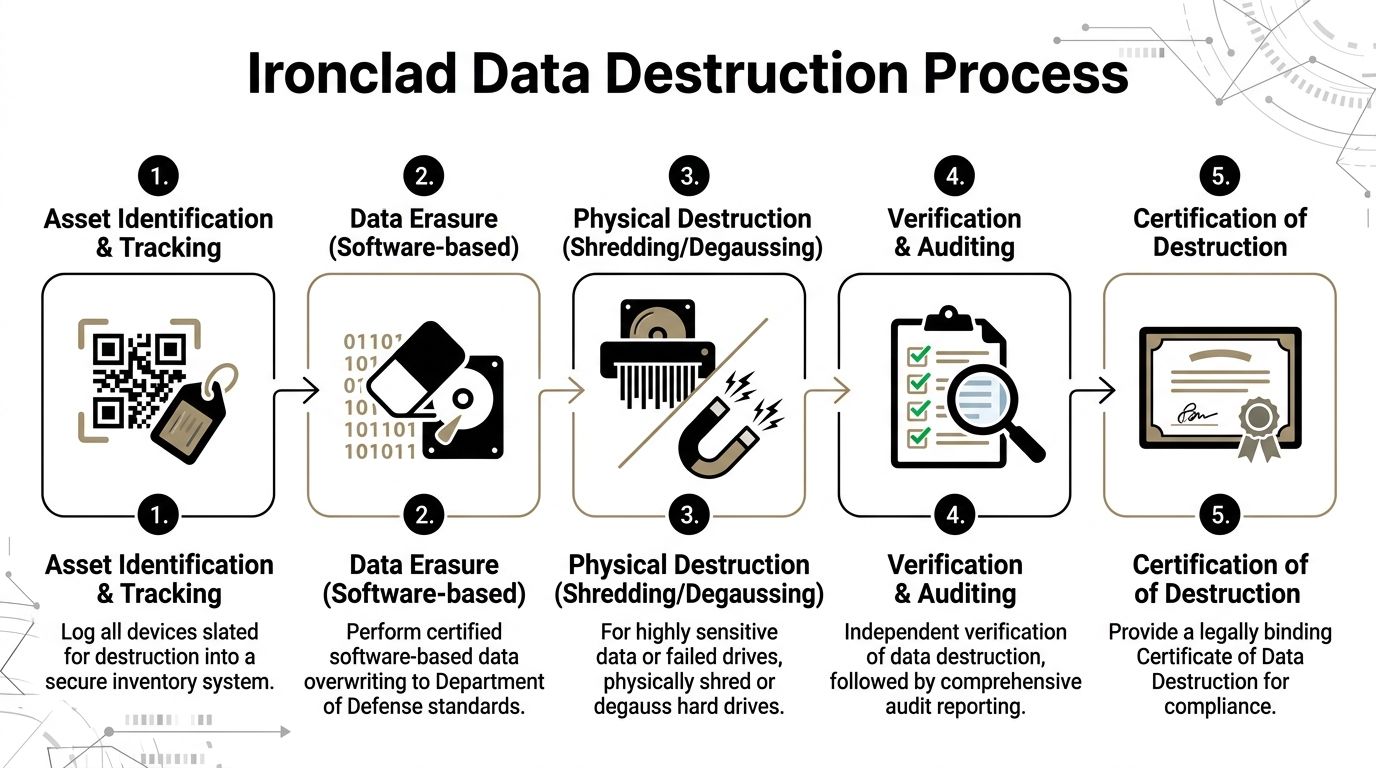
Software-based wiping is typically used when a drive is functional and the organization wants a documented sanitization path that may preserve downstream reuse or resale value. In the scenario described for this article, that means DoD 5220.22-M 3-pass sanitization.
Physical shredding is the better option when media is failed, obsolete, highly sensitive, or unsuitable for reuse. It also makes sense when chain-of-custody simplicity matters more than residual asset value.
Here’s the practical comparison.
| Factor | Data Wiping (DoD 5220.22-M) | Physical Shredding |
|---|---|---|
| Best use case | Functional drives that may be reused or remarketed | Failed, obsolete, or highly sensitive media |
| Asset value | Preserves potential reuse value | Eliminates reuse value |
| Verification | Requires documented overwrite and verification records | Requires destruction log and certificate |
| Media condition | Needs a drive that can be accessed and processed | Works even when media is damaged |
| Security posture | Strong when properly executed and documented | Highest finality for end-of-life media |
| Typical decision driver | Balance of security and recovery | Maximum certainty and simplified liability |
When wiping makes sense
Wiping works best when the drive is alive, readable, and worth keeping in circulation. That often applies to newer laptops, desktops, and some server drives.
Wiping also helps organizations that want to avoid unnecessary destruction of recoverable assets. If the hardware still has market or reuse life, sanitization can be the cleaner business decision.
Use wiping when:
- The drive is functional
- The device may be remarketed or redeployed
- You need a documented software sanitization path
- The risk profile allows reuse after verified erasure
When shredding is the better call
Shredding is the right answer more often than some organizations expect. If the media is dead, partially failed, encrypted but unmanaged, or tied to especially sensitive records, don't force a wipe workflow just because it sounds cleaner.
Shred when:
- The drive has failed and can't be verified
- The media is too old to justify processing for reuse
- The data sensitivity is extreme
- The organization wants direct, auditable final destruction
A drive that can't complete verification shouldn't stay in the "maybe reusable" pile. Move it to destruction and close the loop.
Chain of custody matters before destruction starts
Data destruction doesn't begin when the drive reaches a machine. It starts when the asset is identified, tagged, and tied to a log.
That chain should include:
- device identification
- pickup or collection record
- transfer into secure handling
- sanitization or shredding event
- final certificate tied back to the asset list
If any of those points are informal, your audit trail is weak even if the destruction itself was done properly.
For readers managing server rooms and colocation environments, physical access controls matter too. The same discipline used in disposal should exist in production environments, which is why guidance on security for data centers is worth reviewing alongside your disposition plan.
What to ask your recycler before signing
Ask these questions plainly:
- How do you document each data-bearing asset from pickup to final disposition?
- When do you wipe, and when do you shred?
- What happens to failed drives?
- What certificate do you issue, and how is it tied to inventory?
- What certifications support your process?
One Atlanta-area option is a provider offering secure data destruction with DoD 5220.22-M 3-pass sanitization for working drives and shredding for obsolete or nonfunctional media. The key isn't the marketing language. It's whether the process is documented, repeatable, and appropriate for your risk profile.
Coordinating Onsite De-installation and Secure Logistics
Pickup day is where a good plan either holds or falls apart. Most problems at this stage aren't technical. They're physical.
The failures are familiar. The freight elevator isn't reserved. A rack can't be accessed because another team stored boxes in front of it. Someone assumed monitors had no tags and moved them off-list. A clinic asks to postpone hallway movement because patient traffic is heavy. None of that is unusual. It just needs to be managed.
Prepare the site before the truck arrives
The smoothest projects have a staging plan.
That usually means:
- Clear access routes. Hallways, loading paths, and dock access need to be usable for carts and equipment movement.
- Mark pickup zones. Separate wiped assets, shred-designated media, and non-IT electronics if multiple streams are leaving the building.
- Confirm shutdown authority. No one should be deciding in real time whether a server is still needed.
- Reserve building logistics. Freight elevators, dock windows, badging, and after-hours access should already be approved.
For office cleanouts, that may be enough. For data centers, research buildings, and hospitals, more structure is usually needed.
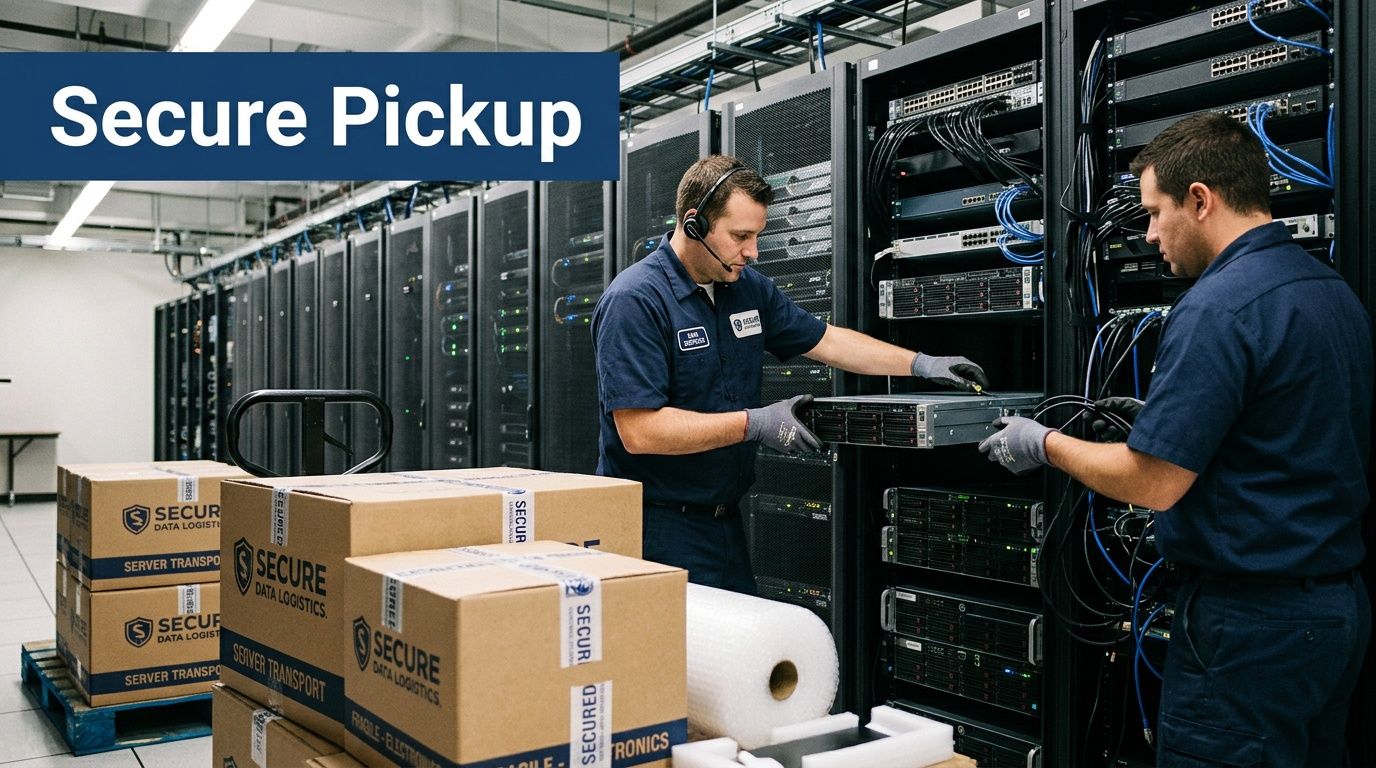
De-racking and removal require sequence
Servers and storage gear shouldn't be pulled in random order. Removal should follow the same discipline used during installation.
A controlled sequence often looks like this:
- Identify the rack assets slated for removal
- Confirm they've been decommissioned by the client team
- Tag or reconcile serials against the inventory
- Remove equipment in stable order
- Pack by asset type and risk category
- Load against the manifest, not against memory
Chain-of-custody discipline becomes visible at this stage. The right team doesn't just remove equipment quickly. They remove it in a way that preserves accountability.
If a device leaves a room without being tied to the asset list, you now have an exception to explain later.
Mixed environments need better packing discipline
Computer waste often sits next to more delicate gear. A standard office move cart approach doesn't work for fragile electronics, rack components, or lab-connected systems.
For that reason, onsite crews should know the difference between:
- stackable office hardware
- loose drives and small media
- rack-mounted infrastructure
- fragile or specialized devices needing protective handling
That distinction matters because a damaged asset can turn a wipe candidate into a shred candidate. It can also disrupt final reconciliation if labels are lost during rough handling.
Secure logistics start at your door
A lot of organizations think logistics begins once the truck departs. It begins at the first handoff.
The minimum expectation is a documented transfer from your site into secure transport. For large projects, that usually includes serialized tags, pickup manifests, and controlled loading.
If your team needs a service model built around direct collection instead of employee drop-off, review options for electronics recycling with free pickup. For institutional projects, scheduled pickup is usually the only workable format because custody has to be documented from the first move.
Reduce disruption without losing control
The best onsite projects are quiet. Clinical operations continue. Offices stay usable. Building management isn't surprised. IT isn't fielding calls about missing equipment.
That doesn't happen by accident. It happens when the pickup team, facilities contact, and IT owner all know the same sequence before the day starts.
Understanding the Certified Recycling Journey
Once the truck leaves, many clients still have one question: where does the equipment go?
That's a fair question, because a lot of bad outcomes in electronics disposal happen after pickup, not before it. A legitimate recycling of computer waste process should be traceable, technically sound, and designed to recover materials without creating downstream environmental or legal problems.
What happens inside a certified process
Industrial e-waste processing follows a sequence that matters. According to the cited processing methodology, the workflow includes manual sorting of hazardous components, dismantling for high-value parts, and shredding electronics to centimeter-sized pieces. That preparation supports mechanical sorting that can achieve 85 to 92% material recovery efficiency for metals and plastics. This is particularly important because complex scientific and electronic equipment can contain 40 to 50+ distinct materials, as described in Sensoneo’s overview of e-waste recycling processes.
That sequence isn't just operational detail. It's the difference between proper recycling and a vague promise that equipment will be "handled responsibly."
Why manual sorting still matters
Some clients assume modern recycling is fully automated. It isn't, and it shouldn't be.
Manual sorting at the front end is where crews remove batteries, capacitors, bulbs, and other components that shouldn't go directly into shredding. For computer waste, this is especially important when loads are mixed, poorly labeled, or pulled from years of storage.
If those items are missed, downstream contamination becomes more likely. For complex IT and lab-related electronics, that front-end discipline protects both worker safety and material quality.
Certifications are not just logos
R2 and e-Stewards matter because they signal that a recycler is operating within recognized controls for environmental handling, downstream accountability, and responsible material management.
What those certifications should mean to a facilities or IT director is simple:
- You want documented process controls
- You want restricted downstream risk
- You want confidence the material isn't disappearing into an opaque export chain
- You want the recycler's environmental claims tied to an actual operating standard
A provider doesn't become compliant because its website uses the word "green." The standard has to show up in intake, handling, destruction, reporting, and downstream partners.
Certified recycling should answer the question "what happened to this asset?" without guesswork.
Material recovery is an industrial workflow
After sorting and dismantling, shredding and separation turn mixed electronics into recoverable streams such as metals and plastics. That's the point where computer waste stops being a disposal problem and starts becoming feedstock.
Organizations that want to understand the economics behind this side of the industry may find it useful to look at how firms finance processing infrastructure, including options like recycling equipment financing. The takeaway isn't that clients need to finance machinery. It's that serious recycling depends on serious equipment and disciplined plant operations.
For regulated institutions, that matters. You aren't looking for a hauler. You're selecting a downstream process.
Finalizing Your Project with Documentation and Cost Insights
The project isn't done when the equipment leaves your site. It's done when your records can stand up to an audit, an internal review, or a leadership question six months later.
That final package is where many organizations discover whether they hired a true disposition partner or just arranged a pickup.
The documents you should expect
For business and institutional projects, the closeout file should be specific.
Look for these deliverables:
Inventory reconciliation report
This should show what was received and how it matched the approved pickup scope.Certificate of Data Destruction
This is the record tied to sanitized or physically destroyed media.Certificate of Recycling
This confirms the downstream disposition path for assets processed as recyclable material.Exception reporting
If anything was missing, unreadable, damaged, or handled outside the expected path, it should be documented.
If a vendor can't clearly explain its documentation set before pickup, expect trouble after pickup.
Cost depends on the mix, not just the volume
Clients often ask for a flat price before anyone has reviewed the asset list. That's understandable, but it rarely reflects reality.
Computer waste projects are usually shaped by a mix of factors:
- volume and spread across the site
- amount of de-installation work
- number of data-bearing devices
- whether wiping or shredding is required
- presence of servers, storage arrays, or mixed scientific equipment
- staging difficulty and loading access
A simple office laptop pickup is one thing. A hospital basement with mixed desktops, rack gear, loose drives, and instrument-connected computers is another.
Value recovery can offset part of the disposal cost
Institutions often leave money on the table at this point. Some retired equipment still has reuse, resale, or material value if it is sorted correctly and handled through a compliant process.
Discarded electronics contain materials worth an estimated $62.5 billion annually, and for organizations with specialized lab equipment there is an underserved opportunity to work with certified recyclers that may offset some project cost through value recovery, as noted by the World Economic Forum’s discussion of e-waste recycling value.
That doesn't mean every project generates credits. Many don't. But newer business-class laptops, working infrastructure equipment, and some specialized devices may have residual value if they are identified before rough handling or blanket destruction.
Documentation is what closes the liability loop
A cost discussion without documentation is incomplete. A recycling claim without documentation is weaker still.
That’s why the certificate package matters as much as the truck and labor. Your team should know what it will receive and when. If destruction certificates are part of your compliance record, review what a proper certificate of destruction should include before the job starts.
The strongest closeouts do two things at once. They show regulators and leadership that the assets were handled properly, and they give internal teams a clean end point so those devices don't keep reappearing on old asset lists.
Atlanta-Specific Computer Waste Recycling FAQs
Atlanta organizations usually aren't asking abstract recycling questions. They're asking how to get a real project done without disrupting operations or creating compliance problems.
Does Georgia require e-waste recycling?
Georgia doesn't have a specific statewide e-waste mandate in the way some other states do. That doesn't reduce your internal obligations around data security, environmental handling, records management, or sector-specific compliance. It means your organization needs to choose a process deliberately instead of relying on a state rule to define it for you.
Should Atlanta pickups be scheduled around traffic and building access?
Yes. In metro Atlanta, route timing matters, but building timing matters more. Freight elevator reservations, dock access, security badging, and campus delivery windows usually create bigger delays than highway traffic alone.
For hospitals and universities, after-hours or low-traffic windows are often the cleanest option for larger removals.
What if our equipment is spread across multiple buildings?
That's common. The fix is a location-based manifest before pickup day.
List the building, room, asset type, and whether the device is data-bearing. That lets the removal team sequence the work and helps your staff verify that nothing was skipped.
Can we mix computers with scientific or lab equipment in one project?
You can, but don't treat them as one undifferentiated pile. Computer waste, instrument controllers, standalone lab devices, and hazardous components may need different handling paths. A mixed project works best when the inventory separates those categories early and the pickup team is prepared for both IT and lab-side logistics.
What's the biggest mistake Atlanta institutions make on first-time projects?
They wait until the backlog is too mixed to sort easily. Once working assets, dead drives, monitors, peripherals, servers, and specialty devices are all stacked together, every later step gets slower.
The second biggest mistake is assuming data destruction can be handled informally by internal staff without full reconciliation.
What should we have ready before requesting service?
Keep it simple:
- a rough asset list
- pickup addresses
- whether hard drives need wiping or shredding
- any loading dock or elevator restrictions
- your target timeline
- the name of the person who can approve final scope onsite
That is usually enough to start a serious conversation and avoid the usual first-project confusion.
If you're planning a computer, server, or mixed lab asset disposition project in Atlanta, Scientific Equipment Disposal handles business-to-business pickups, onsite removal, DoD 5220.22-M 3-pass wiping for working drives, shredding for obsolete or nonfunctional media, and documentation for compliant recycling workflows.