Recycling Computer Waste: An Atlanta Org’s Playbook

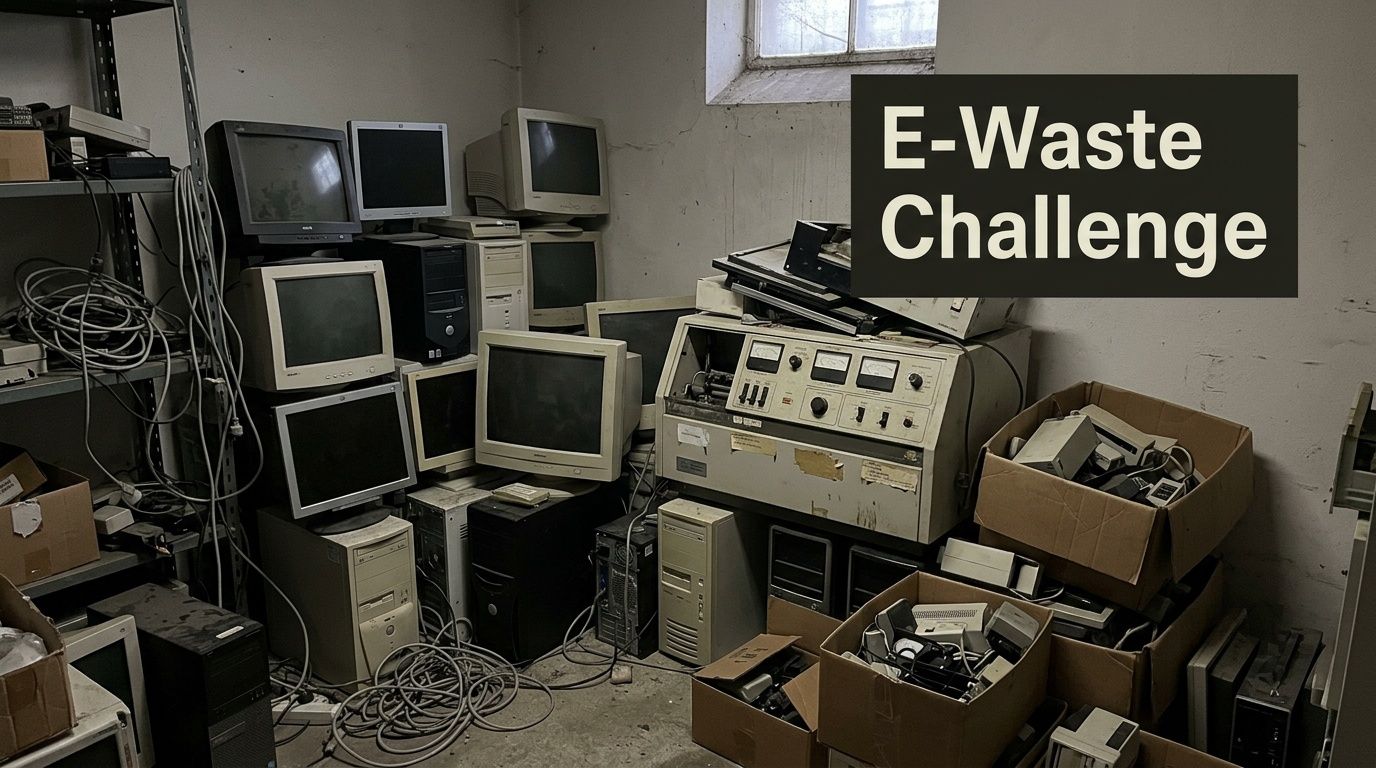
That room of retired desktops, failed laptops, old switches, backup drives, and lab-side workstations usually starts as a temporary holding area. Then it becomes permanent. Asset tags fade, staff changes, and nobody wants to touch it because every device might hold data, contain regulated components, or still belong on a depreciation schedule.
For hospitals, universities, research labs, school systems, and corporate IT teams, recycling computer waste isn't a housekeeping task. It's an operational project with compliance, logistics, and security consequences. Once the volume is big enough, consumer drop-off advice stops being useful. You need a controlled process that handles servers and storage arrays the same way it handles monitors, analyzers, and bench equipment that happen to have embedded drives.
The Challenge of Managing End-of-Life IT and Lab Assets
A facility manager usually sees the problem first. A closet is full. A server room has decommissioned hardware stacked on the floor. A department keeps old towers because someone might need a cable, a hard drive, or a serial number later. Lab managers add another layer. Their retired instruments often look like equipment disposal, but they function like IT disposal because they may store user credentials, test data, patient information, or configuration files.
The scale outside your building explains why this keeps getting harder. In 2022, the world generated a record 62 million tonnes of electronic waste, an 82% increase from 2010. Projections show this will rise to 82 million tonnes by 2030, yet only 22.3% of the 2022 e-waste was formally collected and recycled according to the Global E-waste statistics summary.
Why old equipment becomes a business risk
Stored devices create risk in three ways.
- Data exposure: A powered-off computer can still hold recoverable data.
- Compliance gaps: If chain of custody is weak, your audit trail is weak.
- Operational drag: Space used for retired assets is space you can't use for active operations.
A lot of organizations underestimate the mixed nature of the stream. It isn't just PCs. It can include thin clients, network gear, UPS units, freezers with control boards, HPLC workstations, imaging systems, printers, labelers, tablets, and external media.
Practical rule: If a device can store, transmit, or process data, treat it like an information asset before you treat it like scrap.
Why generic cleanout advice falls short
A large electronics project often overlaps with furniture removal, shelving removal, and department shutdown work. That's why some teams start by reviewing broader logistics resources like this advanced guide to full service junk removal for large cleanouts. It helps frame sequencing, access, labor coordination, and site prep. But once computers, servers, and lab systems are involved, junk removal alone isn't enough. You need disposition controls.
What works is planned separation. Keep regulated electronics, data-bearing assets, reusable equipment, and general facility debris on different tracks. What doesn't work is throwing everything into one pickup request and hoping the vendor sorts it out later.
The first mistake to avoid
The biggest early error is calling for pickup before anyone has defined scope. That creates bad estimates, rushed handling, and missing records. The second error is assuming your team can identify all data-bearing devices by sight. They usually can't. Lab analyzers, copiers, firewalls, and badge systems are the common misses.
Recycling computer waste at an organizational level works when IT, facilities, compliance, and department owners all sign off on one removal plan. If any one of those groups is missing, the project slows down or gets riskier than it needs to be.
Start with a Strategic Asset and Data Inventory
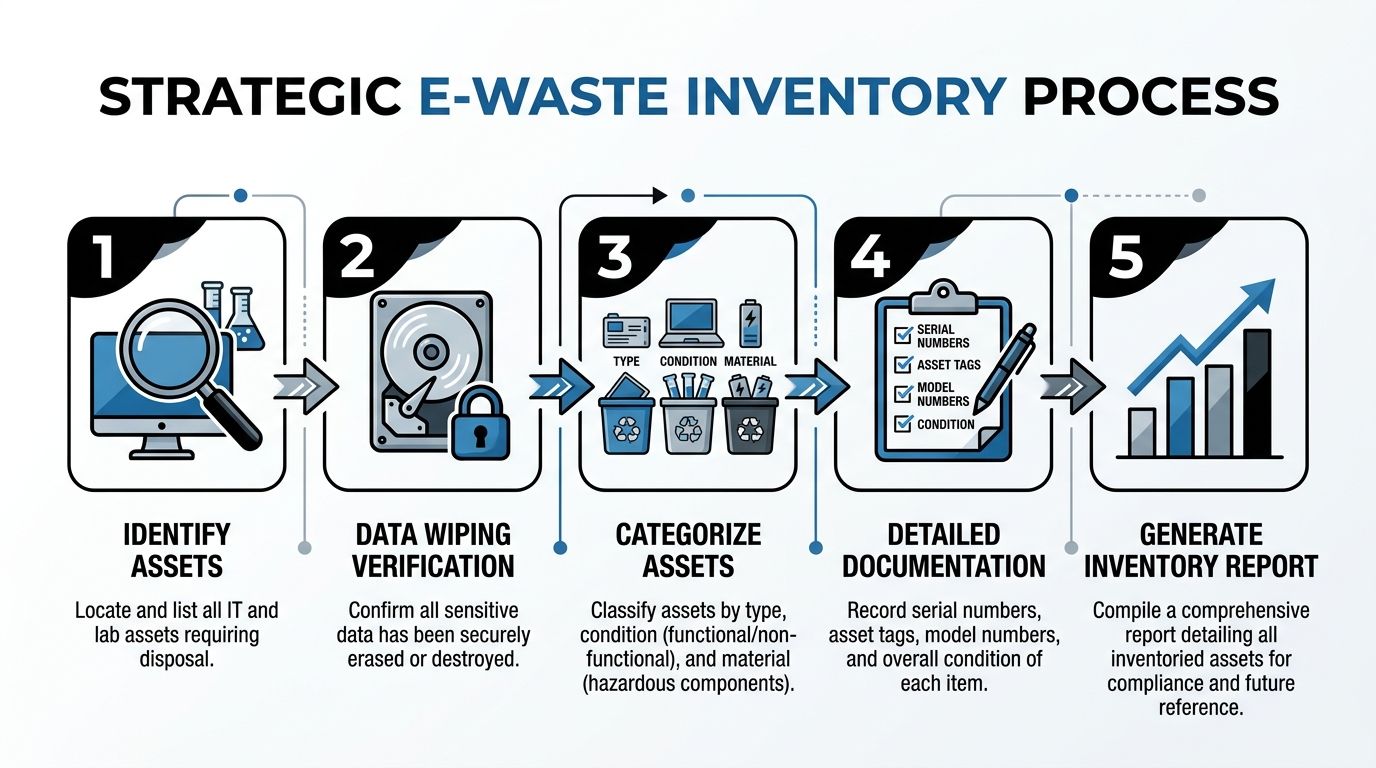
A pickup date should be one of the last things you decide. First, build an inventory that tells you what you have, what condition it's in, what data risk it carries, and what handling path it needs. That's the difference between a manageable project and a rushed purge.
Build the inventory around risk, not just quantity
Most first-time projects begin with a simple count. Ten desktops, four servers, thirty monitors, two carts of accessories. That list helps with labor planning, but it doesn't tell you enough to manage security or compliance.
A strategic inventory should capture:
Asset type
Desktop, laptop, server, switch, storage array, instrument controller, analyzer PC, printer, tablet, mobile cart, external drive.Location
Building, floor, room, department, rack, lab, storage cage.Condition
Working, partially working, damaged, obsolete, or unknown.Data sensitivity
PHI, PII, financial records, research data, student records, credentials, or low-risk administrative use.Required disposition path
Reuse, remarket, parts harvest, wipe and recycle, shred and recycle.
That structure gives procurement, IT, and compliance teams something they can approve.
What to document on every item
Don't wait until loading day to hunt for identifiers. Capture them while the equipment is still where it sits.
- Serial numbers: These tie the device to internal records and later certificates.
- Asset tags: Internal accounting often depends on them.
- Model information: Useful for determining whether reuse is realistic.
- Drive presence: Note whether the device contains HDDs, SSDs, flash media, or removable storage.
- Power status: If it won't power on, software wiping may not be possible.
A good inventory also flags awkward logistics. Wall-mounted monitors, under-bench CPUs, rack-mounted hardware, and lab systems with attached peripherals take more time than loose floor items.
Separate equipment into four practical buckets
Not every retired device belongs in the same stream.
Assets with reuse value
Working laptops, desktops, and some network devices may be suitable for wiping and reuse. If the device can be sanitized properly and still has functional life left, keeping it intact preserves value and can support refurbishment.
Data-bearing assets headed for destruction
If a drive is damaged, encrypted with unknown keys, failed, or tied to a strict internal destruction policy, route it to shredding. Don't waste time trying to recover operational value from media that your policy already disqualifies.
Mixed lab and IT equipment
This category creates the most confusion. A centrifuge with embedded controls, a freezer with a touchscreen interface, or a chemistry analyzer with an internal PC often gets overlooked. Treat these items as equipment plus electronics, not one or the other.
Low-risk peripherals and scrap electronics
Cables, keyboards, mice, broken monitors, and docking stations still need responsible processing, but they don't drive the same data decisions.
If your inventory spreadsheet doesn't have a field for "contains storage media," you're missing the most important sorting line in the project.
Why teams stall on this step
Uncertainty is the primary blocker. The Yale sustainability summary notes that 31% of Americans admit to having electronic clutter, and about 80% of unused electronic devices end up in storage or landfills, often because people aren't sure what to do with them. It also notes that laptop ownership can be as low as 59% for low-income households, which matters because refurbishment can extend value when assets are still functional. That context appears in Yale's overview of disposing of technological waste sustainably.
Organizations do the same thing at a larger scale. They postpone decisions, then the backlog grows until disposal feels like a major event.
A workable inventory workflow
Use a staged approach instead of trying to solve everything in one pass.
| Step | What the team does | What you learn |
|---|---|---|
| Scope review | Walk all known storage and use areas | Where assets sit |
| Tagging pass | Mark items by department and risk class | Who owns the decision |
| Device audit | Record serials, models, media presence | What can be wiped or shredded |
| Disposition review | Assign reuse, recycle, or destroy path | How pickup should be planned |
| Approval | Get sign-off from IT, facilities, compliance | Whether the plan is defensible |
If your team needs a reference point for service expectations around institutional IT disposition, review this page on IT asset disposal. It reflects the kind of scope definition and handling categories organizations should expect before scheduling removal.
What works and what doesn't
What works is a spreadsheet that prioritizes risk, not perfection. You don't need every cable counted. You do need every data-bearing asset identified.
What doesn't work is letting each department create its own list in its own format. Standardize the fields early. One master inventory beats five partial inventories every time.
Ensuring Total Data Security Before Disposal
Data destruction decisions should be made before anyone touches a pallet jack. If you wait until pickup day to decide which drives get wiped and which get shredded, you've already lost control of the project.
A recurring problem in recycling computer waste guidance is that it focuses on environmental handling and barely addresses institutional data risk. The Arkansas electronics guidance highlights that gap directly. It notes that details such as DoD 5220.22-M wiping and HIPAA-compliant shredding are rarely addressed, leaving hospitals and universities exposed when unused computers are disposed of without proper data management, as summarized in the state resource on electronics recycling guidance.
Wiping and shredding solve different problems
These are not interchangeable methods. They serve different goals.
Software wiping is for data-bearing assets that still function and may be reused, resold, or redeployed. In the verified methodology, DoD 5220.22-M 3-pass sanitization overwrites data three times to NIST 800-88 standards before downstream recycling or reuse.
Physical shredding is for failed drives, damaged devices, media with higher sensitivity, and situations where your policy requires irreversible destruction. It sacrifices any reuse value in the media itself, but it removes ambiguity.
Data Sanitization Methods Compared
| Criteria | DoD 5220.22-M Wiping | Physical Shredding |
|—|—|
| Primary purpose | Erase data while preserving the asset for reuse | Destroy the media so data can't be recovered |
| Best fit | Working desktops, laptops, servers, and removable drives | Failed drives, damaged media, high-sensitivity data, unknown media state |
| Reuse potential | Yes. Device or drive may remain in serviceable condition | No. Media is destroyed |
| Operational requirement | Device must be accessible and functional enough to sanitize | Can be used when the drive won't power on or can't be accessed |
| Compliance value | Supports controlled sanitization when documented properly | Supports highest-assurance destruction when documented properly |
| Downstream effect | Preserves more remarketing or refurbishment options | Simplifies risk decisions but eliminates media recovery value |
When wiping is the right call
Wiping makes sense when the equipment works, the drive is readable, and you want to preserve reuse options. That commonly includes office desktops, newer laptops, and servers leaving a data center refresh.
The upside is straightforward. You reduce data risk while keeping more of the asset intact. The trade-off is process control. Wiping only works when you can verify the device, the media, the method, and the outcome.
Use wiping when:
- The device powers on: You can access the drive and complete the sanitization process.
- The asset still has reuse value: Keeping it intact matters.
- You need serial-level reporting: Wiped devices can be tracked individually through the process.
- Your policy allows sanitization in place of destruction: Many do, but not all.
When shredding is the safer path
Shredding is the better option when the drive has failed, the device is badly damaged, the asset class is highly sensitive, or internal policy doesn't want any debate about recoverability.
For healthcare environments, that often applies to mixed fleets where some drives are operational and others are not. Standardizing on shredding for a narrow class of especially sensitive media can simplify internal approval.
A formatted drive isn't a sanitized drive. Deleting files isn't disposal. If your process can't be documented, it won't hold up under review.
Chain the security decision to the asset class
A practical framework looks like this:
- Clinical and patient-facing systems: Lean toward shredding unless there's a clear approved wiping standard for that specific class.
- General office systems: Wiping is often appropriate if the device is functional and accounted for.
- Research systems: Decide based on the sensitivity of stored results, intellectual property, and sponsor obligations.
- Failed or partially disassembled devices: Route to shredding. Don't improvise.
Vendor capability also matters here. Some providers handle pallets of generic electronics well but struggle when a project includes rack servers, instrument controllers, and sensitive drives that need separate disposition paths. If you're comparing vendors, their secure handling process should be clear before you sign anything. One reference point is this page on secure data destruction, which outlines the kinds of wiping and shredding options organizations commonly ask for in business-to-business projects.
A useful comparison from outside e-waste
The same privacy logic shows up in consumer device servicing. This piece on phone repair data security and privacy is helpful because it reinforces a simple truth. Once a third party touches a device, documented controls matter more than assumptions. That applies even more when you're disposing of institutional assets at scale.
What usually goes wrong
The biggest failures aren't technical. They're procedural.
- No media audit: The team assumes all drives are accounted for.
- Mixed pallets: Sanitized and unsanitized devices get staged together.
- Unclear exceptions: Failed drives don't have a preapproved destruction path.
- Weak records: The organization can't match devices to destruction outcomes later.
Good data security before disposal comes from a controlled decision tree. Identify the media. Classify the risk. Choose wiping or shredding. Document the result. Then move the asset.
How to Select a Certified E-Waste Recycling Partner
The vendor choice determines whether your internal policy survives contact with reality. A recycler that understands institutional assets will ask about drives, access constraints, certificates, serial tracking, and downstream handling before they talk about load volume. A scrap hauler usually won't.

The market is large, but that doesn't make every provider equivalent. The U.S. electronic waste recycling industry is projected to reach $28.1 billion by 2024. Yet only 15% of the 6.9 million tons of U.S. e-waste generated in 2019 was recycled, and e-waste accounts for 70% of toxic waste in landfills, according to the industry summary from IBISWorld's electronic goods recycling overview. In practice, that means formal handling standards matter.
What a qualified partner should prove
Start with process evidence, not marketing language.
A serious e-waste partner should be able to explain:
- How assets are received and tracked
- How data-bearing devices are separated
- Whether on-site deinstallation is available
- What chain-of-custody documents are issued
- How downstream materials are managed
- What happens to reusable equipment versus scrap
If they can't answer those questions clearly, they're asking you to trust the gap.
Questions worth asking in the first call
Use the first conversation to pressure test fit.
Ask about institutional experience
Hospitals, labs, universities, and government facilities generate mixed streams. The vendor should understand that an analyzer PC, a storage array, and a cart of monitors won't be processed identically.
Ask about on-site work
Some projects require rack removal, disconnects, bench-side pickup, or loading from multiple buildings. If the vendor only wants curbside staging, that may create more work and more risk for your team.
Ask how they handle data-bearing exceptions
A good answer will distinguish between functioning drives, failed drives, and embedded media. A weak answer will reduce everything to "we recycle electronics."
Ask for sample documentation
Review sample chain-of-custody forms, certificates of destruction, and recycling reports before you commit.
The right vendor doesn't just move equipment. They preserve defensible records from your floor to final disposition.
What certifications are really doing for you
Certifications matter because they force process discipline. They aren't a substitute for vendor vetting, but they help separate structured recyclers from opportunistic buyers and haulers.
For facility managers and IT directors, the practical value is this: a certified operation is more likely to have documented controls for sorting, downstream accountability, and secure handling. That's what you need when internal audit, legal, or compliance asks follow-up questions months later.
Red flags that should end the conversation
Some warning signs are enough to stop immediately.
| Red flag | Why it matters |
|---|---|
| No clear chain of custody | You won't be able to prove controlled transfer |
| No distinction between wiping and shredding | Data handling is being oversimplified |
| No site-specific planning | Complex pickups get improvised on the day of service |
| Cash-only scrap language | Commodity recovery may be driving decisions more than compliance |
| No sample reporting | You may not get usable records after pickup |
One practical fit check
Look at the vendor's service mix. If they only talk about TVs, phones, and public drop-off, they may not be set up for business disposition work. If they handle laboratory equipment and business electronics together, that's often a better sign for organizations with mixed assets.
For example, Scientific Equipment Disposal's e-waste recycling company page describes business-focused handling for electronics and lab assets, including pickup and removal logistics. That's the type of service scope organizations should compare against other formal providers in Atlanta and nationwide.
What works and what doesn't
What works is choosing a recycler that treats your project like a controlled transfer of regulated assets.
What doesn't work is choosing by pickup speed alone. Fast scheduling is useful. It isn't the same thing as compliant execution.
Managing On-Site Deinstallation and Chain of Custody
Pickup day shouldn't feel chaotic. If the planning was done properly, it feels controlled, almost routine. The truck arrives inside the scheduled window. The crew checks in with the site contact. Sensitive areas are confirmed. Equipment moves in the agreed order. Documents are signed at the right points, not reconstructed later.
What a well-run pickup day looks like
A typical institutional job starts before the first cart moves. Building access, elevator use, loading dock rules, and staging areas should already be settled. If the site has a lab component, the department contact should identify any equipment requiring special handling, disconnected utilities, or a separate approval path.
Then the removal team works the site in sequence:
Check-in and scope confirmation
The crew confirms what is being removed and what is staying.Asset verification at point of removal
Tagged devices, drive-bearing systems, and special items are matched against the working inventory.Controlled staging
Data-bearing assets, general e-waste, and specialty equipment are staged separately.Loading with records
Equipment is loaded by category so your paperwork matches the physical transfer.Sign-off
The site representative reviews the outbound record before the truck leaves.
This is especially important in labs and universities, where assets may be spread across departments that don't share the same naming conventions or internal controls.
Deinstallation is not just lifting and loading
Server racks, undercounter PCs, instrument controllers, and attached peripherals slow projects down if nobody planned for disconnect work. The same goes for facilities with narrow corridors, freight elevator schedules, or rooms that can't be left unsecured.
What works is assigning one owner for each of these issues:
- IT owner: Confirms systems are out of service and data decisions are complete.
- Facilities owner: Controls access, loading, and building coordination.
- Department owner: Confirms departmental property and special handling concerns.
- Vendor lead: Directs physical removal and record matching.
When those roles blur together, assets get missed or staged in the wrong place.
Why chain of custody matters so much
Chain of custody is the written proof that your asset moved through a controlled handoff. Without it, you have a story. With it, you have a record.
A proper chain-of-custody document should identify the transfer in a way that your organization can later reconcile. In practice, that usually means some combination of item description, quantity, serial references where applicable, pickup date, origin location, receiving party, and signatures.
If a device leaves your building without a documented handoff, your organization still owns the risk even if the device is physically gone.
A common mixed-asset scenario
Consider a university research building doing a floor cleanout. The project may include retired office PCs, failed monitors, bench instruments with embedded control computers, and one server closet that supported a department-specific application.
Those assets should not move as one undifferentiated load.
- The office systems may be routed for wiping and standard electronics recycling.
- The failed or damaged media may be separated for shredding.
- The instruments may need deinstallation and electronics review before final routing.
- The server gear may require serial-level verification before release.
That is why organizations with mixed science and IT environments usually benefit from providers that can manage both categories in one coordinated service flow. If your project includes laboratory rooms, this page on scientific equipment removal for labs and universities reflects the type of on-site scope that should be discussed before pickup day.
What to prepare before the truck arrives
A short internal prep list saves a lot of friction.
- Clear access paths: Remove carts, boxes, and obstructions from pickup routes.
- Freeze the scope: Don't let departments add surprise items at the last minute without approval.
- Label exceptions: Mark assets that require shredding, special review, or hold status.
- Notify security and receiving: Avoid delays at the gate or dock.
- Assign one signatory: One accountable person should approve the transfer documents.
What doesn't work is treating the pickup as a general move. This isn't office relocation. It's controlled disposition.
Finalizing Your Project with Documentation and Reporting
The project isn't complete when the truck leaves. It's complete when your file contains enough evidence to satisfy finance, compliance, IT, facilities, and any future audit. That closing package is what turns disposal into a repeatable program instead of a memory.
Formal processing is where the environmental result becomes measurable. According to the verified processing summary, certified e-waste processors can achieve 80% to 90% material recovery rates by weight and divert over 95% of material from landfills, using de-manufacturing, shredding, and separation methods that can recover metals efficiently, including 90% to 95% gold recovery from circuit boards in advanced recovery processes, as described in the e-waste recycling rates and processing overview.
The documents you should expect
A complete closeout package usually includes several different records because one document rarely does everything.
Certificate of destruction
Use this to document media destruction or validated data sanitization outcomes, depending on the service provided. It should tie back to the transferred assets clearly enough for internal review.
Certificate of recycling
This confirms that the physical materials entered an appropriate recycling stream rather than being handled as ordinary trash.
Final inventory reconciliation
Your pre-pickup list and post-pickup records meet here. Missing serials, swapped counts, and unresolved exceptions should be closed here, not months later.
Service summary or settlement report
Some vendors also issue a project-level summary showing asset categories, services performed, and final handling paths.
What good reporting lets you do later
Good records solve more than compliance.
- Internal audit: You can show what left, when, and how it was handled.
- Policy improvement: You can identify which departments generated the most exceptions.
- Budget planning: You can estimate future labor and handling needs more accurately.
- Sustainability reporting: You can support diversion and responsible recycling narratives with actual documentation.
A useful reference for what a closeout document may look like is this sample certificate of destruction. Even if your vendor uses a different format, the level of specificity should be comparable.
Keep every disposition file in the same place your organization keeps major compliance records. These documents matter long after the room is empty.
A reusable project checklist
Use this as a standing template for future recycling computer waste projects.
| Phase | Required action | Internal owner |
|---|---|---|
| Discovery | Identify all rooms, racks, closets, and departments with retired assets | Facilities |
| Inventory | Record asset type, serials, tags, condition, and media presence | IT and department owners |
| Risk review | Classify data sensitivity and decide wiping versus shredding | IT and compliance |
| Vendor review | Confirm documentation, on-site capability, and handling process | Procurement and compliance |
| Pickup prep | Clear access, freeze scope, label exceptions, assign signatory | Facilities |
| Transfer day | Verify counts and sign chain-of-custody documents | Site lead |
| Closeout | Reconcile final records and store certificates | IT and records management |
Cost trade-offs people often miss
Pricing varies by mix, access, labor, and data handling requirements, so broad assumptions usually fail. The hidden cost isn't just vendor spend. It's internal time spent sorting confused inventory, escorting crews through unprepared spaces, and correcting incomplete records later.
The cheapest path on paper often becomes the most expensive path operationally when your team has to fill in the compliance gaps afterward.
The strongest long-term approach
Organizations that handle this well don't wait for storage overflow. They run disposition as a recurring program. They standardize inventory fields, define data-destruction rules by asset class, keep one approved vendor checklist, and archive every certificate the same way every time.
That approach removes urgency from the process. And once urgency is gone, most disposal mistakes disappear with it.
If you're planning a first large-scale IT or lab asset disposition project in Atlanta or need a repeatable process across multiple sites, Scientific Equipment Disposal handles business-to-business pickup, deinstallation, electronics recycling, and secure data destruction for computers, servers, and laboratory equipment. A practical next step is to build your inventory, define the data-destruction path for each asset class, and request a scope review before scheduling removal.