IT Equipment Recycling Services in Lilburn GA

You might be looking at a locked storage room in Lilburn right now. There are retired laptops on one shelf, old monitors on the floor, a few servers nobody wants to power up again, and maybe a centrifuge or analyzer waiting for someone to “deal with it later.” That backlog feels operational, but it’s really a risk problem.
For hospitals, clinics, research labs, universities, and corporate IT teams, obsolete equipment doesn’t become harmless just because it’s unplugged. A single hard drive in the wrong pile can create exposure under HIPAA, internal data handling policies, or contractual confidentiality terms. A single mislabeled instrument can create a safety issue for anyone who moves it. Even before a truck arrives, your process matters.
That’s why disposal has to be treated like the final stage of asset management, not a cleanup task. The global scale of the issue is already hard to ignore. E-waste reaches 50 to 60 million tons annually, making it the fastest-growing solid waste stream according to Georgia Computer Inc. on sustainable e-waste management. In practical terms, that means your small storeroom problem in Lilburn sits inside a much larger chain of environmental, security, and compliance consequences.
A lot of teams already know how to lock down live systems but haven’t applied that same discipline to retired ones. If you’re tightening server retirement procedures, a strong companion resource is this Server Hardening Checklist. It helps frame a useful truth. Security doesn’t stop at production. It has to carry through decommissioning too.
The Hidden Risks in Your Lilburn Equipment Storeroom
A common pattern shows up in regulated facilities. Equipment gets removed from service correctly, then stalls. It sits in staging because facilities is waiting on IT, IT is waiting on compliance, and compliance is waiting on a vendor scope that matches what’s in the room.
That delay creates three separate problems.
Data risk doesn’t disappear with the asset
An unplugged laptop can still contain patient records, payroll files, research data, saved credentials, browser sessions, and cached documents. The same applies to servers, storage arrays, desktop workstations, and many multifunction devices. If your organization only tracks active equipment and ignores retired assets in storage, you have a blind spot in your chain of custody.
Environmental liability starts with classification mistakes
Standard office electronics are one thing. A lab freezer, analyzer, incubator, or fume hood may require completely different handling. If someone lumps everything together as generic scrap, your organization can create unnecessary disposal risk, especially when components include hazardous materials or the equipment has been used in a controlled environment.
Practical rule: If an item once stored data, touched regulated materials, or required technical de-installation, it should never enter an ad hoc disposal stream.
The storeroom itself becomes an operational drag
Space gets consumed first. Then staff time follows. Teams stop trusting inventory records because nobody knows what was already approved for pickup, what still holds value, and what needs destruction. That uncertainty is expensive even when no invoice has been issued yet.
For facilities in Lilburn, the right response isn’t to move faster without a plan. It’s to put structure around inventory, data handling, decontamination, scheduling, and vendor accountability. That’s what makes IT Equipment Recycling Services in Lilburn GA worth evaluating as a risk-control function rather than a hauling service.
Preparing Your Inventory for Secure Recycling
Most disposal problems start before the vendor is called. If your internal inventory is incomplete, your data-bearing devices are mixed in with non-data equipment, or your lab instruments haven’t been cleared for handling, the pickup will be slower, riskier, and more expensive to manage.
The prep work should be simple enough for operations to execute and strict enough for compliance to trust.
Start with an asset list you can defend
Build a working inventory from what’s physically present, not from what your old procurement spreadsheet says should be there. Walk the room. Check shelves, closets, cages, desks, and offsite storage corners that tend to collect retired assets.
Record at least these details:
- Asset type: Laptop, desktop, server, switch, hard drive, monitor, printer, analyzer, centrifuge, incubator, microscope, or other category.
- Identifier: Asset tag, serial number, hostname label, or department sticker.
- Data status: Known data-bearing, likely data-bearing, or non-data.
- Condition: Functional, damaged, incomplete, or unknown.
- Handling notes: Heavy item, wall-mounted, rack-mounted, needs de-installation, or requires decontamination clearance.
If you need a practical reference for sorting out lower-level components and mixed hardware lots, this guide on what to do with old PC parts is useful for separating reusable parts from material that should go straight to recycling.
Here’s the checklist many facility managers post internally before pickup day.
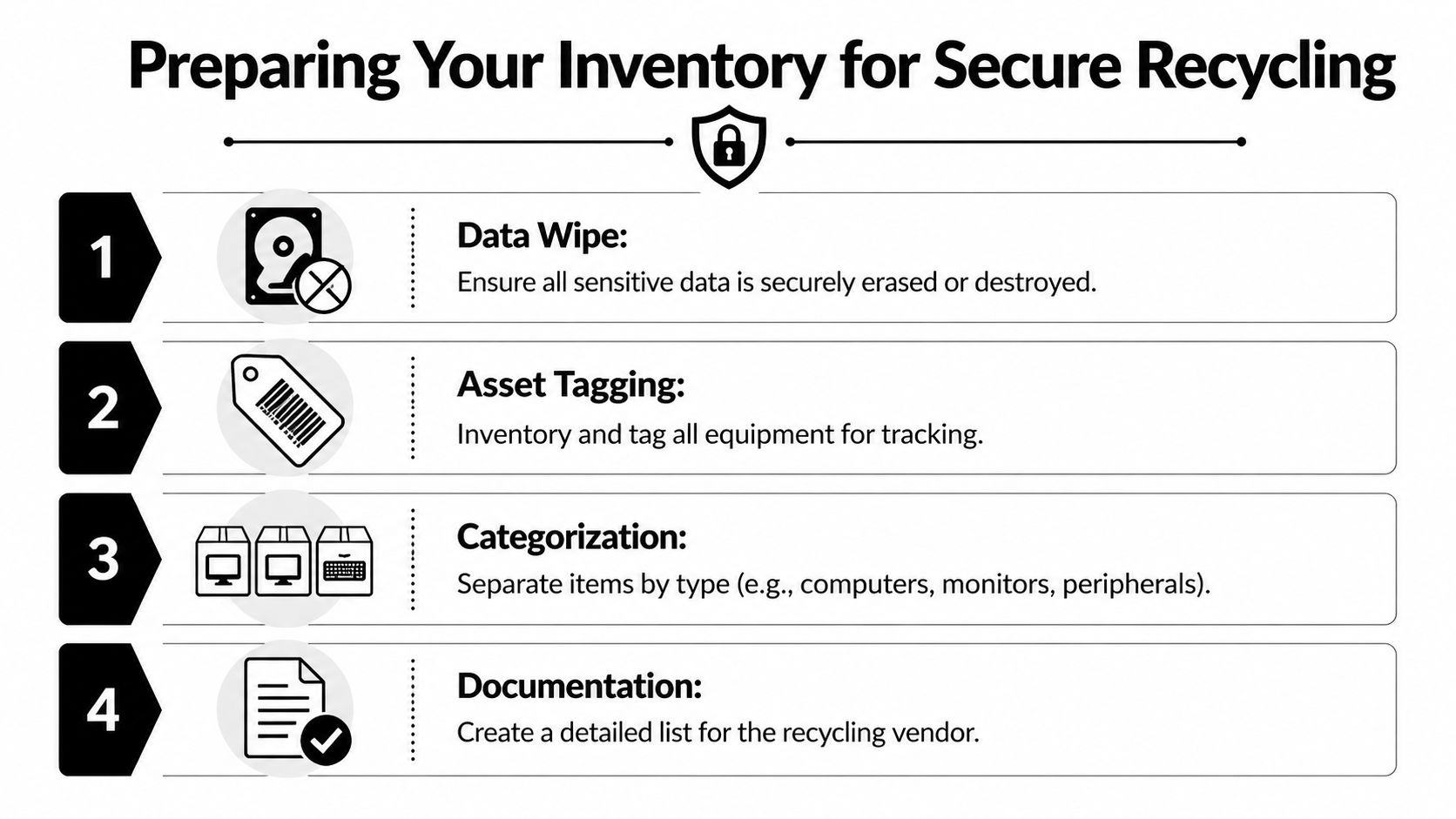
Separate standard IT from specialized equipment
Don’t build one pile for everything. That’s where mistakes happen.
A retired Dell OptiPlex, a rack server, and a bank of monitors can usually move through one recycling workflow. A medical analyzer or benchtop centrifuge often can’t. The issue isn’t just weight or shape. It’s prior use, contamination risk, de-installation complexity, and internal approvals.
A clean segregation model works well:
- Data-bearing IT assets such as laptops, desktops, servers, SSDs, HDDs, backup devices, and network appliances with storage.
- Peripheral electronics such as monitors, keyboards, docking stations, cables, and battery backups.
- Lab and medical equipment that needs use-history review and handling controls.
- Unknown items that nobody should move until ownership and risk are clarified.
Assets with unclear ownership should be treated as higher risk, not lower risk. Uncertainty is a reason to pause movement, not accelerate it.
Identify what’s worth remarketing and what’s not
Some organizations leave money on the floor because everything gets treated as scrap. Others waste time trying to recover value from equipment that clearly belongs in destruction or recycling.
A better approach is to make early decisions by category:
- Recent enterprise IT gear: Often worth evaluation for resale or reuse if it’s complete and functional.
- Broken data-bearing devices: Usually better routed to certified destruction.
- Outdated monitors and low-value peripherals: Usually best grouped for recycling.
- Specialized instruments: Evaluate based on condition, serviceability, and whether de-installation costs outweigh any residual value.
This isn’t just a finance question. It affects how the vendor scopes labor, transport, and reporting.
Handle decontamination before pickup day
General IT disposal advice often fails labs and healthcare sites. For any scientific, medical, or research equipment, surface cleaning alone may not be enough. Your internal safety, EHS, or lab leadership team should decide what decontamination standard applies based on prior use.
The vendor should not be expected to guess whether an instrument is safe to touch.
Create a release packet for each relevant item or batch that includes:
- Department owner
- Equipment identification
- Prior use summary
- Decontamination confirmation
- Any restrictions on movement or disassembly
- Approving signature from the responsible internal party
If this documentation is missing, the safest outcome is often a delayed pickup. That’s inconvenient, but it’s far better than having a driver or warehouse technician refuse the load after arrival.
Prepare the building, not just the equipment
The removal team needs more than a device list. They need to know how the assets leave the building.
Confirm these points internally:
- Access route: Loading dock, freight elevator, lab corridor, security desk, or after-hours entry.
- Staging point: Where equipment will be counted and transferred.
- Packing responsibility: Whether your team will box small items or the vendor will handle all packing.
- Sign-off authority: Who can release assets and sign chain-of-custody paperwork.
When those details are settled in advance, IT Equipment Recycling Services in Lilburn GA become much more predictable. The difference between a smooth pickup and a stalled one usually isn’t the truck. It’s the prep.
Navigating Data Destruction and Sanitization Mandates
Data destruction is where defensible disposal either holds up or falls apart. If your organization can’t show what happened to each data-bearing device, when it happened, and which method was used, you’re relying on assumption instead of evidence.
For most facilities, the decision often comes down to software sanitization and physical destruction. Both have a place. The wrong move is treating them as interchangeable without regard to asset condition, reuse goals, and compliance requirements.
When wiping is the right choice
Software wiping makes sense when a drive is functional and the device may be reused, resold, or refurbished. The standard many teams recognize is DoD 5220.22-M 3-pass wiping. According to Reworx Electronics Recycling in Lilburn, that method can render information unrecoverable by forensic tools with success rates exceeding 99.9% per NIST 800-88 guidelines, while industrial shredding reduces drives to particles smaller than 2mm for complete destruction.
That distinction matters. Wiping preserves the hardware. Shredding does not.
Wiping works best when:
- the drive powers on reliably
- the device still has resale or redeployment value
- you need serialized reporting tied to each asset
- your organization wants the option of downstream remarketing
A good vendor won’t just say a drive was “cleared.” They’ll document the asset and method used.
When physical destruction is the safer call
Failed drives, obsolete media, and high-sensitivity assets often shouldn’t be wiped and returned to circulation. They should be destroyed. This is especially true when devices can’t be reliably accessed, when hardware is visibly damaged, or when your internal policy requires irreversible destruction.
Physical destruction also simplifies decision-making for equipment with uncertain health or incomplete provenance. If the device came out of a regulated environment and nobody can verify its condition, destruction can be the cleaner compliance choice.
For some organizations, especially in healthcare and legal environments, certainty matters more than residual value.
If you have to argue for ten minutes about whether a failed drive is worth saving, it probably isn’t.
Data Destruction Methods Compared
| Method | Best For | Compliance Fit | Key Benefit |
|---|---|---|---|
| DoD 5220.22-M 3-pass wiping | Functional HDDs and reusable systems | Strong fit where documented sanitization supports internal policy and regulated handling | Preserves asset value while securely sanitizing data |
| Industrial shredding | Failed drives, obsolete media, and high-risk storage devices | Strong fit where irreversible destruction is preferred or required | Eliminates reuse risk through complete physical destruction |
| Crushing | Media that needs fast physical disablement before final processing | Useful as a physical control step when reuse is off the table | Immediately prevents normal access to stored data |
Match the method to the device, not your convenience
One mistake I see often is a blanket instruction such as “wipe everything” or “shred everything.” Both can be wrong.
A mixed lot should usually be split:
- Healthy laptops and desktops may be wiped for potential resale.
- Dead hard drives should move to destruction.
- Servers with removable drives may need separate handling, with the chassis recycled and the drives wiped or shredded based on condition and policy.
- Lab instruments with embedded storage should be evaluated before de-installation so nobody overlooks onboard data.
For teams building broader retirement controls, these data loss prevention best practices are a useful companion resource because they reinforce the same principle. Controls should extend to endpoints leaving service, not just systems still in production.
If you’re assessing local options, a focused reference on secure hard drive destruction in Lilburn GA can help you align destruction choices with device condition and chain-of-custody expectations.
What your documentation should show
The certificate matters, but the supporting detail matters too. For data-bearing assets, you want records that connect the pickup to final disposition without gaps.
Look for:
- Serialized asset reporting
- Method of destruction or sanitization
- Date of processing
- Chain-of-custody continuity from pickup through final handling
- A certificate of destruction tied to the processed material
That paperwork is what makes your disposal decision defensible in an audit, an internal review, or an incident response investigation months later.
Special Considerations for Lab and Medical Equipment
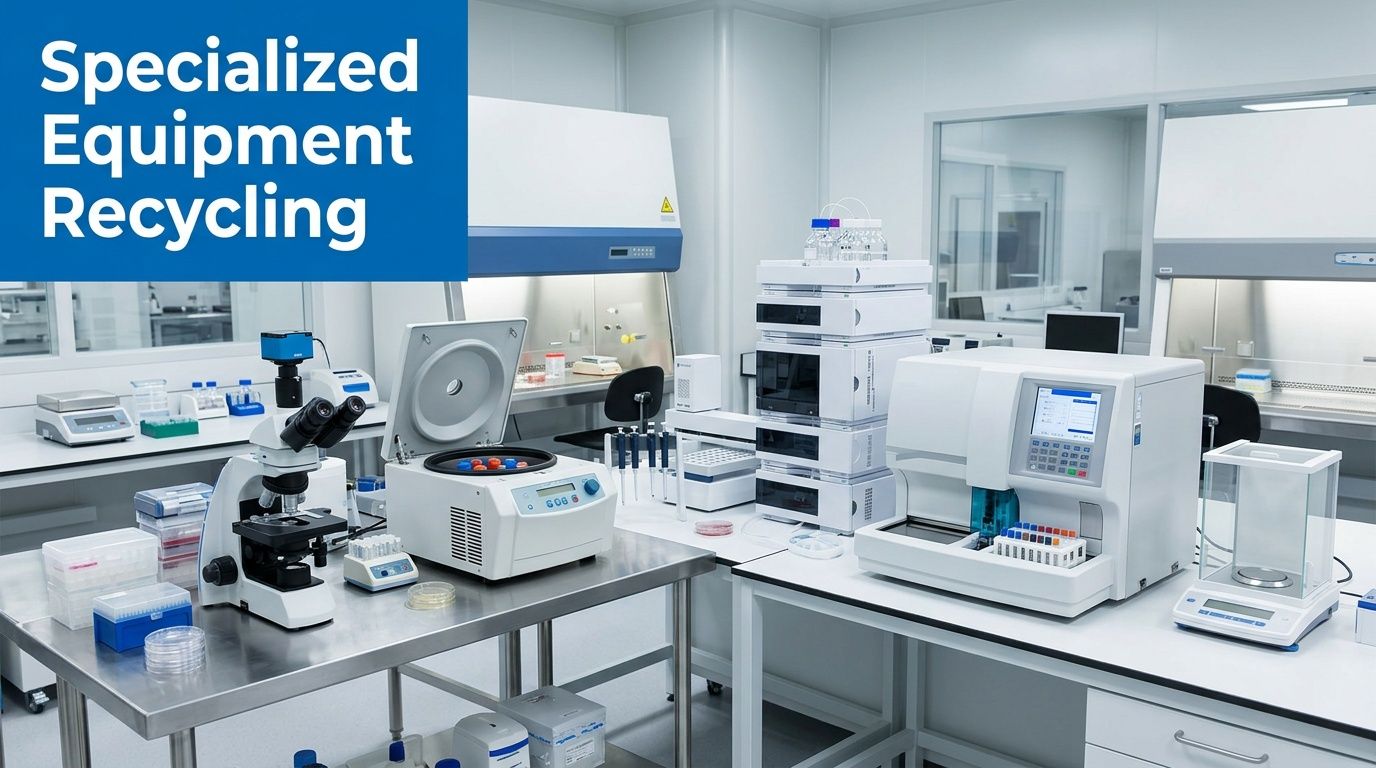
Most guides on IT Equipment Recycling Services in Lilburn GA stop at laptops, monitors, and servers. That’s not enough for hospitals, clinics, university labs, and research facilities that also need to retire analyzers, incubators, centrifuges, microscopes, fume hoods, and other specialized assets.
That gap is real. A 2024 industry report noted that specialized lab equipment recycling represents 22% of e-waste volume in research-heavy regions but receives less than 8% of vendor attention, creating a critical market gap, as cited by Reworx Recycling Center in Lilburn.
Why lab equipment is different
A retired server is usually a data problem first. A retired analyzer may be a data problem, a safety problem, and a logistics problem at the same time.
Specialized equipment often raises questions that standard electronics vendors aren’t prepared to answer:
- Has the unit contacted biological material, chemicals, or controlled substances?
- Does it contain refrigeration components, internal fluids, shielding, or specialty glass?
- Can it be safely moved without partial disassembly?
- Does it store user data, patient information, or test history?
These aren’t edge cases. They’re routine questions in medical and research environments.
Decontamination has to be formal, not assumed
If your internal team says an instrument is “clean,” that’s not enough unless someone authorized can document what was done and whether any restrictions remain. The people loading the equipment need to rely on something more than verbal assurance.
For healthcare organizations reviewing disposal through the lens of patient privacy and operational safeguards, this primer on HIPAA compliance is a useful reminder that regulated handling extends beyond active systems and into retirement workflows.
Your release package for lab and medical assets should include:
- Equipment identification with serial number or asset tag.
- Use history that states whether the item was used in clinical, research, teaching, or mixed environments.
- Decontamination certification signed by the responsible internal authority.
- Movement instructions for fragile, heavy, or fixed-installation items.
- Data review status for any unit that may contain onboard storage.
A missing decontamination form doesn’t create flexibility. It creates delay, refusal, or unsafe handling.
Embedded storage is easy to miss
Many facilities catch desktops and servers but overlook data in specialized devices. Some analyzers, imaging peripherals, and instrument control systems retain local data or connect to external PCs that don’t stay physically attached once the room is cleared.
That means your review has to include:
- control PCs
- detachable drives
- onboard storage modules
- connected printers or label systems
- attached tablets or operator interfaces
If your site is planning a larger lab cleanout or instrument retirement, this overview of lab equipment recycling and disposal services is helpful for understanding how specialized assets differ from ordinary office electronics in handling and transport.
De-installation is part of disposition
Large equipment often can’t just be rolled to a dock. It may need bench disconnection, utility shutdown, door clearance planning, or partial dismantling. That’s where many pickups fail. The vendor expected loose equipment. The facility assumed the vendor would figure it out onsite.
Spell it out in advance. If the item is bolted down, plumbed in, vented, cabled into fixed infrastructure, or too large for normal access routes, the de-installation scope has to be agreed before pickup day.
Coordinating On-Site Services and Logistics in Lilburn
Once your inventory is ready and your internal approvals are in place, the pickup itself should feel controlled, not improvised. A good on-site removal in Lilburn starts before the truck moves. The vendor should already know what’s being removed, where it sits, how it leaves the building, and who signs the transfer.
That process matters most in active facilities where staff, patients, students, or researchers are still moving through the space.
What a well-run pickup looks like
The strongest crews don’t arrive asking basic questions they should’ve resolved during scheduling. They arrive with the scope, access plan, and handling approach already understood.
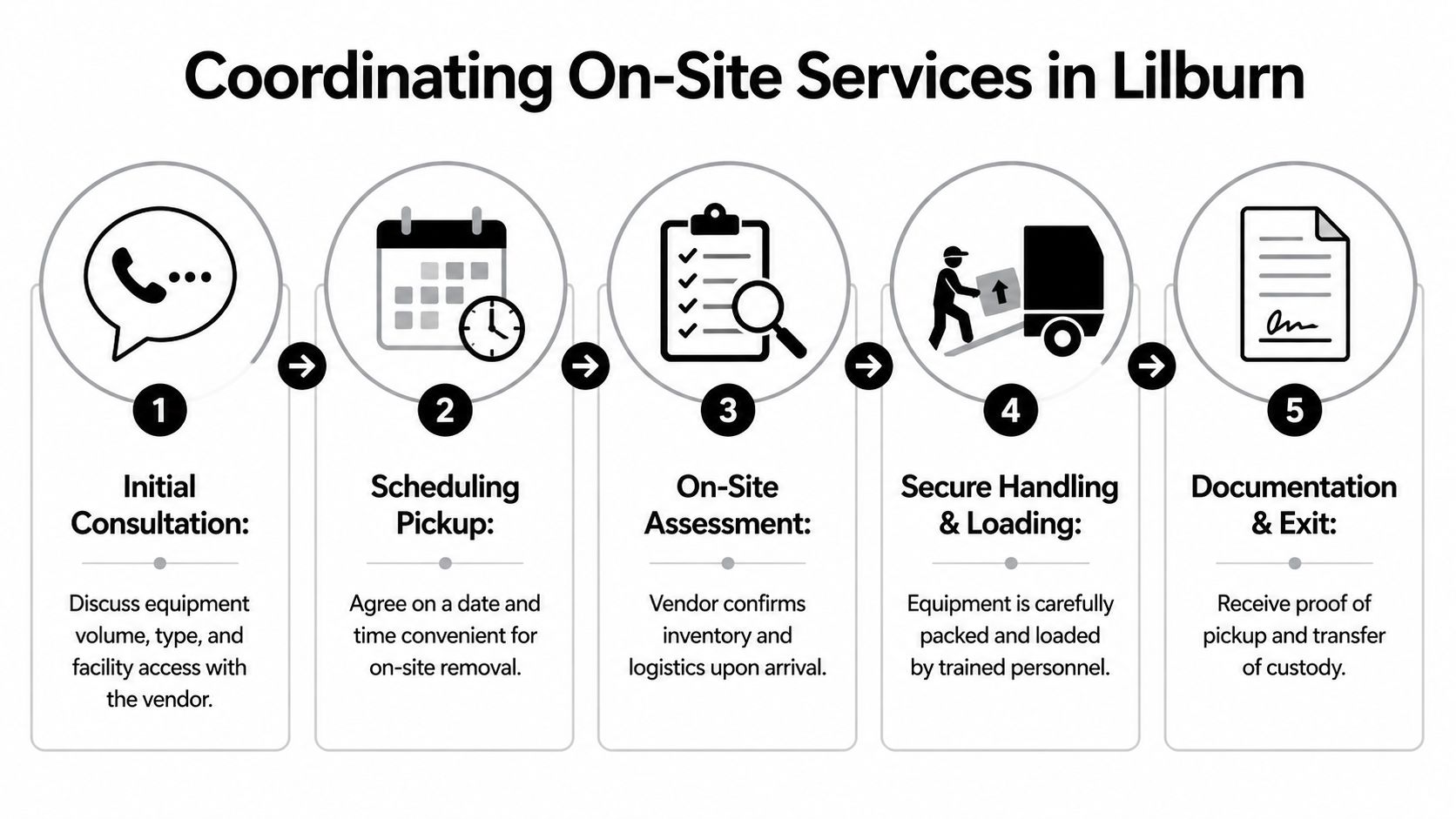
On a typical site, the sequence looks like this:
- Arrival and check-in: The crew meets the site contact, reviews the pickup scope, and confirms any building restrictions.
- Inventory confirmation: High-priority assets, especially data-bearing devices and specialized instruments, are matched against the prepared list.
- Packing and staging: Small electronics go into secure containers or pallets. Larger items are wrapped, labeled, and routed for safe movement.
- Transfer documentation: The releasing contact signs paperwork showing custody transfer before the truck departs.
This flowchart captures the expected handoff clearly.
Building access can make or break the day
A lot of failed pickups aren’t caused by the recycling team. They happen because the building wasn’t ready.
Common friction points include:
- Dock access problems: Another delivery has the bay blocked, or the truck type wasn’t approved.
- Elevator constraints: Freight access wasn’t reserved, or the item won’t fit without reorientation.
- Security delays: The crew isn’t on the access list, or badges and escorts weren’t arranged.
- Occupancy conflicts: Removal overlaps with patient care, classes, or active lab work.
These are facility issues, not recycling issues, but they directly affect chain-of-custody and timing. The site contact should own them in advance.
Chain of custody starts at the room, not the warehouse
When teams talk about secure recycling, they often focus on what happens after the equipment leaves the property. That’s only half the story. The first custody event happens when the asset leaves your control inside the building.
That means you should know:
- who counted the assets
- who released them
- who accepted them
- which containers or pallets they entered
- what paperwork accompanied them
The moment a device leaves a locked room without documented transfer, you’ve created a preventable gap.
What your team should receive before the truck leaves
Don’t settle for a casual verbal confirmation that “everything’s on board.” You should receive documentation that reflects the pickup as executed, not just as scheduled.
At minimum, the handoff should include:
- Pickup acknowledgment that identifies the date, facility, and releasing party.
- Asset summary or scope confirmation for the material removed.
- Chain-of-custody record that connects the load to later processing.
- Any exception notes for items left behind, refused, or pending clarification.
That’s what gives your internal stakeholders confidence that the removal wasn’t just completed, but controlled.
Vetting Recycling Vendors and Understanding Costs
The easiest way to create disposal risk is to choose a vendor based on convenience alone. A clean website, a fast quote, or a promise of free pickup doesn’t tell you enough about how that company handles data-bearing assets, downstream materials, or regulated equipment.
Vendor diligence matters because weak oversight creates real operational problems. According to ShredTronics in Lilburn, common pitfalls include inadequate audits leading to 12% non-compliance in downstream smelting and logistical delays affecting 25% of large-volume pickups in the industry.

What to ask before you approve a vendor
A serious recycling partner should be able to answer direct questions without vague language.
Ask about these areas:
- Certifications and audit posture: Are they operating with recognized recycling and management certifications, and can they explain what those standards cover?
- Data destruction methods: Do they offer wiping, shredding, or both? How do they decide which method applies?
- Chain of custody: How is material tracked from pickup through final processing?
- Downstream transparency: Can they explain where commodities and destroyed material go after primary handling?
- Insurance and liability: What coverage do they carry for transportation, general liability, and data-related incidents?
- Specialized asset handling: Can they manage lab and medical equipment with documented de-installation and decontamination requirements?
If you’re comparing options, it helps to review how a dedicated e-waste recycling company frames service scope, accepted items, and logistics expectations before you start vendor interviews.
Free pickup isn’t always the best offer
In Lilburn and across the Atlanta metro, some providers promote free pickup. That can be a good fit, but only when the scope and documentation are strong. “Free” can mean several different things.
A vendor may absorb collection costs because:
- the load contains equipment with resale value
- the route is efficient for their existing service area
- they expect commodity recovery downstream
- the pickup excludes labor-intensive de-installation or specialty handling
That doesn’t make free service bad. It means you need to understand what is and isn’t included.
Common pricing models and their trade-offs
| Cost model | Works well when | Watch for |
|---|---|---|
| No-charge pickup | The load contains standard electronics and enough recoverable value to offset service | Scope exclusions, limited reporting, or added fees for stairs, packing, or specialty items |
| Profit-sharing or value recovery | Functional enterprise assets may be remarketed after sanitization | Unclear valuation methods and weak reconciliation reporting |
| Service-based billing | The project includes labor, de-installation, specialty handling, or complex building logistics | Quotes that aren’t itemized enough to show what drives the cost |
| Destruction-focused billing | Failed media or high-sensitivity assets need irreversible destruction | Whether certificates and serialized reporting are included or charged separately |
What works and what doesn’t
What works is simple. Choose vendors that define scope precisely, document custody clearly, and understand both standard electronics and nonstandard equipment. The best partner is rarely the one with the shortest email response. It’s the one that leaves no ambiguity about handling, reporting, and downstream control.
What doesn’t work is treating all recyclers as interchangeable. They aren’t. A company that’s fine for office monitors may be the wrong choice for a hospital storeroom with failed drives, retired networking gear, and partially decommissioned lab instruments in the same load.
Vendor test: If a provider can’t explain how they handle exceptions, they probably haven’t handled many well.
From Liability to Asset The Final Steps in Compliant Disposal
By the time your equipment leaves the building, most of the hard work should already be done. You’ve identified what you have, separated standard IT from specialized equipment, matched data-bearing assets to the right destruction method, and made sure the logistics plan fits your facility instead of fighting it.
That’s how a cluttered storeroom turns into a controlled disposition workflow.
The final proof comes after pickup. You should expect the records that close the loop, especially your certificate of destruction and any environmental or recycling reporting tied to the load. If you want to see what that output should generally look like, a sample certificate of destruction is a helpful benchmark for what complete documentation should support.
For facility managers in healthcare, research, education, government, and corporate IT, compliant disposal isn’t a side task. It’s part of risk management. When the process is done correctly, retired equipment stops being a security problem, a safety concern, and a space drain. It becomes a documented, auditable outcome you can stand behind.
If your organization needs a practical partner for secure electronics and laboratory asset disposition, Scientific Equipment Disposal serves the Atlanta area with on-site pickup, de-installation, compliant recycling, and data destruction support for hospitals, labs, universities, and business facilities. If you’re planning a cleanout in Lilburn, they can help you turn a mixed inventory of IT and lab equipment into a clear, documented disposal process.