How Atlanta Schools Are Upgrading IT Infrastructure for 2026

If you're responsible for district technology right now, you're probably balancing two uncomfortable realities at once. Staff want better classroom technology immediately, and your network, identity systems, back-office platforms, and disposal workflows are all reminding you that none of this is simple.
That tension explains a lot of how Atlanta schools are upgrading IT infrastructure. The visible part is easy to spot. New Chromebooks. New iPads. New cloud platforms. The harder part is what sits underneath those decisions: wireless density, access control, staged migration, vendor coordination, and the final step many districts still under-plan, secure retirement of old hardware.
Atlanta Public Schools offers a practical example because its modernization work reaches from the network core to student endpoints. In a major phase of the Digital Bridge Project, APS planned to equip students with approximately 5,000 iPads and nearly 35,000 HP Chromebooks according to this APS case study. That kind of rollout only works when the district treats infrastructure as an operational system, not a shopping list.
The Modernization Blueprint for Atlanta Schools
At 7:10 a.m., a principal calls because a testing lab is offline, a cart of student devices did not finish overnight updates, and facilities has an electrician scheduled to shut power to an IDF closet at the same campus before lunch. That is what a district upgrade looks like in practice. The blueprint has to account for instruction, network operations, building constraints, procurement timing, and what happens to the equipment you are pulling out of service.
A sound modernization plan starts with operating conditions, not a device count. District leaders need a clear view of campus wiring, wireless density, identity and access controls, endpoint management, repair flow, and end-of-life handling before ordering another round of laptops or tablets. In Atlanta, that also means planning around older school buildings, uneven carrier options by site, and the coordination load between IT, facilities, school leaders, and outside vendors.
What belongs in the blueprint
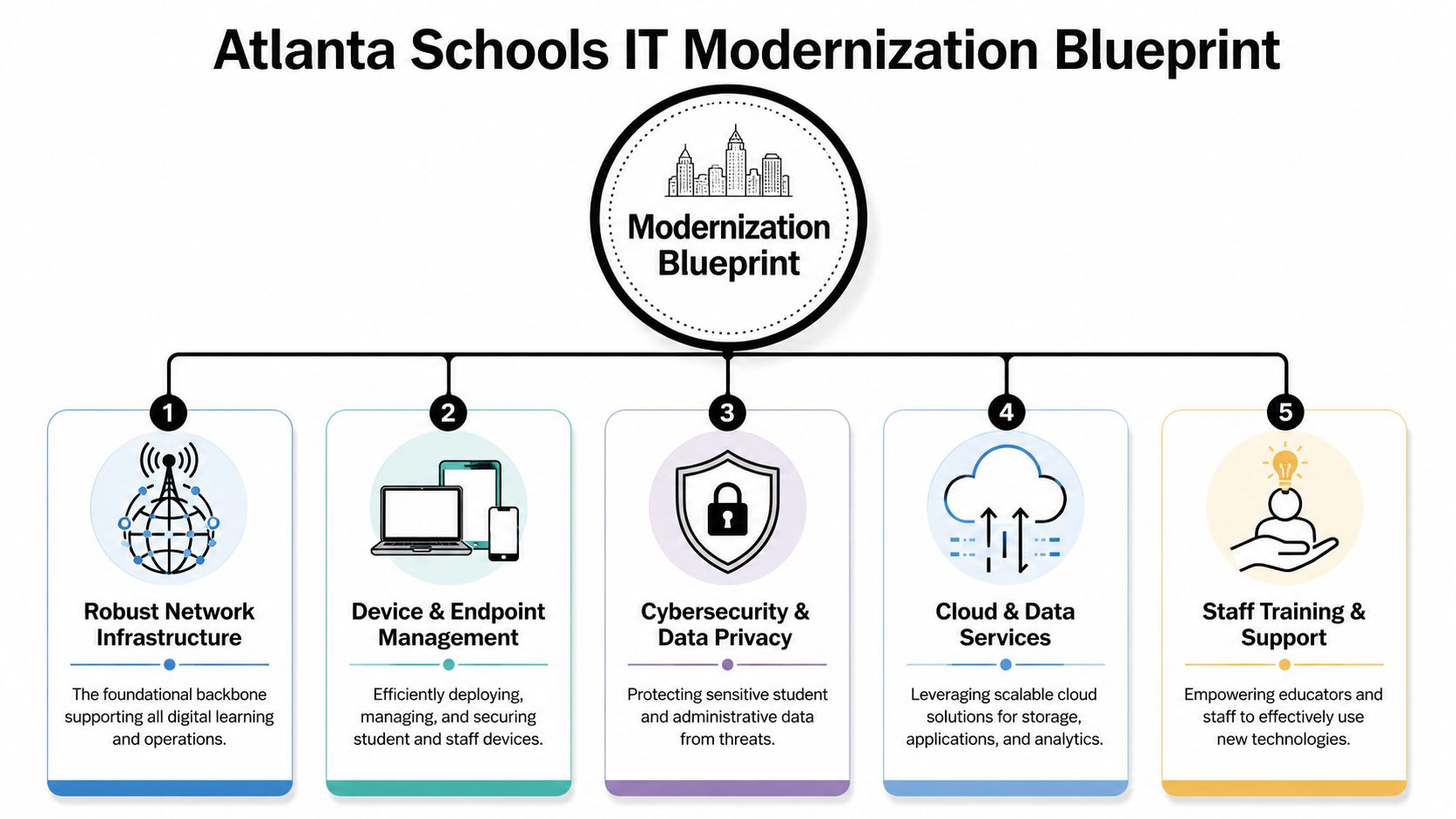
For a district this size, the blueprint usually needs five operating layers tied together from the start.
- Network foundation. Core capacity, switching, wireless coverage, segmentation, and access control have to support daily instructional load, state testing windows, and staff systems at the same time.
- Endpoint lifecycle. Device choices by grade band are only one part of the decision. Enrollment, imaging or zero-touch setup, break-fix workflow, spare pool targets, charging, and refresh timing matter just as much.
- Applications and cloud architecture. SIS, LMS, productivity tools, and classroom apps need clean integrations and dependable identity sync, or the support burden spreads to every school.
- Security and identity. MFA for staff, role-based access, certificate management, content filtering, and audit controls need to be designed before expansion, not patched in later.
- Disposition and compliance. Retired devices need serialized tracking, data destruction, documented chain of custody, and compliant e-waste processing. Districts that skip this step create audit, privacy, and storage problems for themselves.
That last point gets left out too often. A modernization blueprint is incomplete if it covers procurement and deployment but says nothing about how old assets leave the environment. In large districts, closets and warehouses fill up fast with replaced switches, dead batteries, cracked screens, and systems that still contain district data.
What works in Atlanta and what usually breaks
The districts that hold up under pressure standardize wherever they can. They set a limited number of device models, define network standards for every campus, document closet readiness before installation crews arrive, and assign one owner for cutover decisions. They also set expectations with principals early. A building cannot be treated as "ready" because the shipment arrived. It is ready when power, mounting, cabling, authentication, device enrollment, and support coverage are all confirmed.
What usually breaks is coordination.
A vendor may be ready to swap switches, but facilities has not cleared ceiling access. The ISP handoff is installed, but the district has not finished firewall policy changes. Student devices are delivered, but cases, carts, or MDM assignments are still missing. Those are not edge cases. They are common failure points in school projects, especially in older Atlanta campuses where construction history and closet conditions vary more than the spreadsheet suggests.
Provider selection also affects the blueprint earlier than many teams expect. Carrier availability, building location, and circuit diversity can limit design choices long before deployment starts. For local comparisons, this overview of Atlanta internet service providers is a useful reference point when mapping realistic connectivity options by campus.
The blueprint has to cover old systems too
District upgrades often stall because the back office is still tied to aging finance, HR, transportation, or student administration platforms. Those systems create identity duplication, manual exports, and brittle integrations that increase support tickets across the district. Teams trying to upgrade outdated business systems run into the same pattern. Infrastructure, application architecture, and operating process have to be redesigned together or the district keeps paying for the same inefficiencies in a newer environment.
The strongest plans also define the exit path for every replaced asset before the first new shipment lands. That means deciding who verifies serials, who authorizes pickup, what data destruction standard applies, how certificates of destruction are stored, and where e-waste goes if equipment has no resale value. In school systems, the last phase is part of the upgrade, not an afterthought.
That is the blueprint Atlanta-area districts need. Build for deployment, support, and retirement from day one.
Crafting a Phased Rollout and Implementation Plan
At 7:15 a.m., a school can look ready on paper and still fail in practice. The switches are mounted, the Wi-Fi is broadcasting, and the dashboard is green. Then buses unload, hundreds of devices authenticate at once, a legacy printer starts throwing errors, and the front office calls before first period starts. That is why rollout plans for Atlanta-area districts have to be written around live school operations, not vendor timelines.
APS followed the safer path during its network modernization. The district moved from an older environment to a next-generation Aruba network with Aruba ClearPass, according to the Aruba case study on APS. The practical value was not just newer hardware. It was the ability to migrate in controlled stages, test policy behavior before broad deployment, and avoid a districtwide cutover that would have pushed too much risk into one week.
A rollout model that holds up under pressure
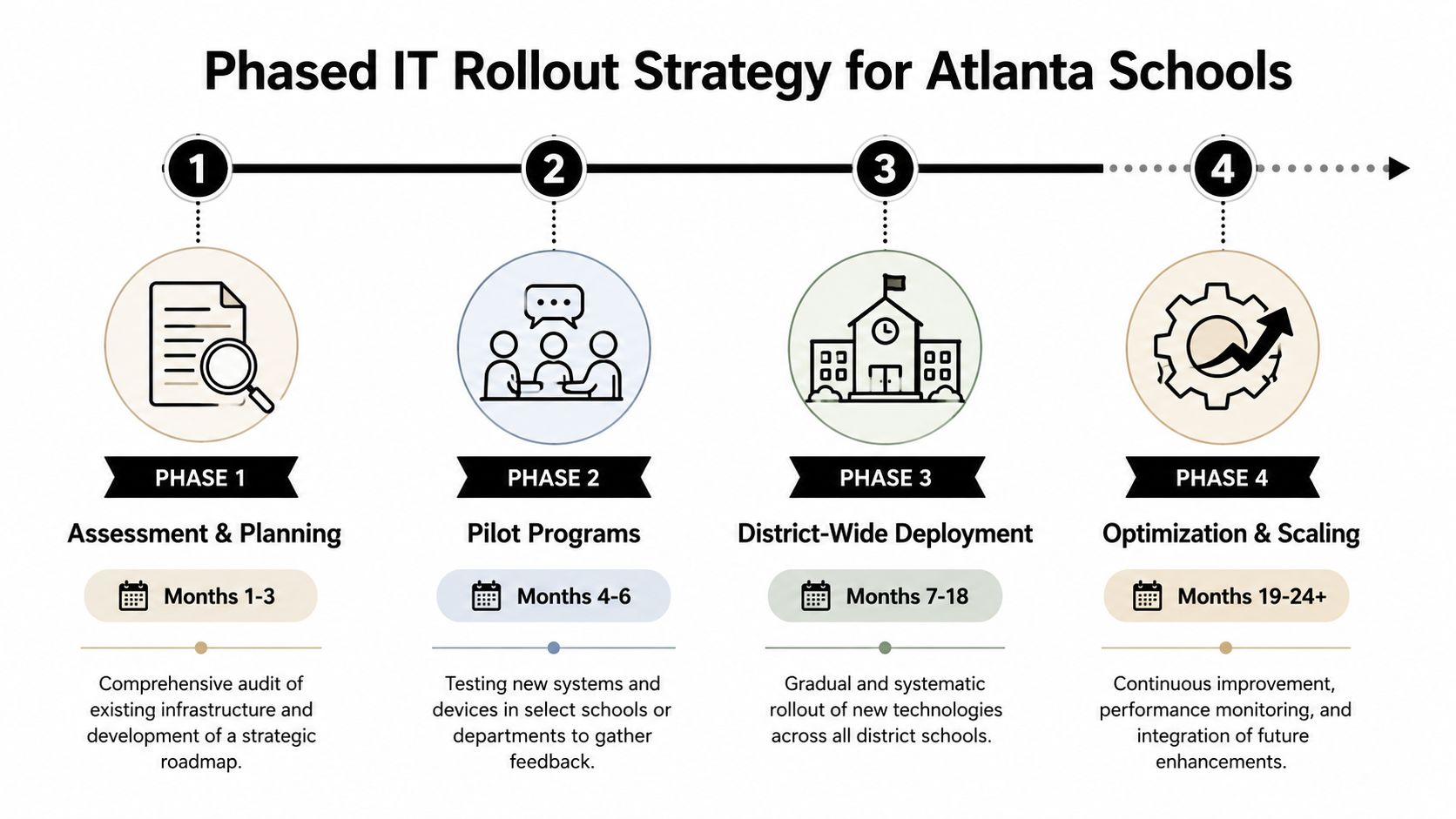
A phased plan should reduce operational risk at each step. If a phase only looks orderly in a project schedule, it is not doing its job.
Assess the current state
Audit switching, wireless coverage, authentication flows, MDF and IDF conditions, UPS health, closet cooling, and support capacity. In Atlanta, older buildings often hide cabling problems and power constraints that do not show up until install crews open the closet.Pilot in a school that reflects district conditions
Pick a site with real instructional load, mixed device types, and the same identity dependencies the rest of the district uses. Test login patterns, roaming, guest access, VoIP behavior, testing platforms, and classroom device onboarding during a normal school day.Deploy in waves based on readiness
Group schools by technical readiness and field logistics. A campus waiting on electrical work, fiber handoff, or closet remediation should not be placed in the same wave as a site that is already prepared just to make the map look balanced.Stabilize each wave before releasing the next one
Watch ticket volume, failed authentications, AP saturation, roaming complaints, and device registration errors. Hold the next wave if those numbers spike. Hardware installed is not the same thing as service stabilized.
The implementation sequence matters just as much as the hardware list. Education Week reporting on school infrastructure planning has long pointed to the same operational truth. Classroom technology performs only as well as the network, power, and physical plant underneath it. District teams that reverse that order usually spend the next semester chasing avoidable support issues.
The Atlanta challenge is coordination
The technical work is only half the plan. Metro Atlanta projects also run into carrier lead times, building access limits, summer construction overlap, and a shortage of clean overnight windows once testing, athletics, and administrative operations stay active year-round.
That is why rollout ownership needs a clear decision structure. Someone has to own site readiness. Someone has to own vendor sequencing. Someone has to decide whether a school proceeds, slips, or rolls back after a failed cutover test. Districts that are reviewing outside support during circuit changes or provider transitions can use this guide to managed telecom services near me to set realistic expectations for carrier coordination and escalation.
A good phased plan also sets rules for rollback before the first install begins. If ClearPass policies break staff authentication, if wireless handoff fails between wings, or if testing labs lose stable connectivity, the field team needs preapproved thresholds for stopping the next site. Waiting for an executive meeting after the problem appears wastes the school day.
The overlooked work starts before and after the install
Schedule heavy work for breaks, nights, and weekends. Validate performance when teachers and students are using the network. Districts need both windows.
They also need to plan the tail end of the project while rollout is still underway. Replaced switches, APs, phones, and end-user devices have to be tagged, removed from inventory, staged for pickup, and routed through approved data destruction and e-waste channels without disrupting classrooms or violating records policy. That handoff is part of implementation, not cleanup.
If a district is pairing capital planning with grant research, resources on funding for digital transformation nonprofits can help teams identify outside support options that may offset parts of the transition, especially in programs that blend instructional access with broader community benefit.
Securing Funds and Managing the Upgrade Budget
A district can approve a well-designed modernization plan and still lose control of the project at the budget stage. I see this happen when leadership funds visible purchases, then underestimates the cost of cutovers, cabling corrections, overtime, software dependencies, and the final removal of retired assets. In Atlanta-area schools, older buildings and uneven site conditions make that problem worse. Two schools can receive the same equipment and require very different labor budgets to install it correctly.
District budget discussions also tend to flatten infrastructure into a single line item. That is a mistake. Classroom devices, core switching, identity services, UPS replacement, wireless density adjustments, and retired asset handling do not move on the same timeline and should not be funded as if they do.
The budget categories districts routinely miss
The budget usually fails in the support layers, not in the purchase order.
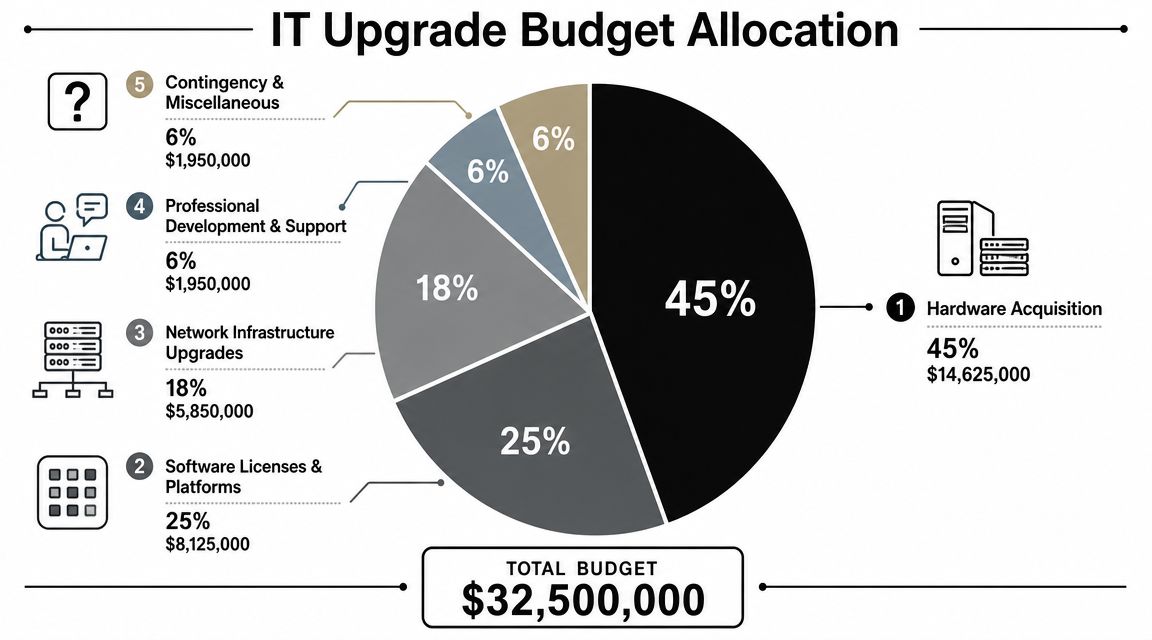
A workable upgrade budget should break out five cost groups:
- Core infrastructure. Switching, wireless hardware, network-access control, cabling remediation, electrical work, rack cleanup, and closet readiness.
- Implementation labor. Vendor field teams, integration work, project management, after-hours cutovers, testing, and rollback support.
- Device lifecycle costs. Spares, break-fix inventory, carts or charging, asset tagging, warranty tracking, and replacement planning.
- Training and support. Teacher onboarding, technician cross-training, documentation, help desk surge, and post-go-live troubleshooting.
- Retirement and disposition. Deinstallation, packing, chain-of-custody records, data destruction, recycling, and compliant e-waste processing.
That last category gets pushed aside too often. Districts are usually disciplined about what comes into the building and vague about what leaves it. For a school system handling student records, staff data, and aging storage media, that is not a cleanup issue. It is part of the project budget from day one.
Potential funding sources for school IT upgrades
| Funding Source | Focus Area | Typical Use Case |
|---|---|---|
| District capital planning | Long-horizon infrastructure | Core refresh, wiring, MDF and IDF improvements, major platform replacement |
| Operational IT budget | Ongoing support and software | Licensing, support contracts, managed services, repairs |
| Federal programs such as E-Rate | Connectivity-related needs | Network services and eligible communications infrastructure |
| State and local grants | Strategic modernization priorities | Classroom technology, security improvements, targeted upgrades |
| Special initiative funding | Time-bound transformation work | Cloud migrations, pilot programs, districtwide refresh cycles |
The funding mix matters as much as the total. Capital dollars can cover the big refresh, but they rarely carry the recurring software, support, and staffing load that follows. If the district buys new systems without a clear operating plan, the first budget season after deployment becomes the true stress test.
Building the case to finance teams and boards
Strong budget requests tie each expense to a service risk, a compliance requirement, or an operational result. Boards respond better to that format than to generic requests for “technology modernization.”
For example:
- Identity and access spending reduces account risk and keeps staff and students connected during peak school-day usage.
- Core network refresh prevents new devices and cloud traffic from overwhelming old switching, power, and cabling.
- Cloud migration support shortens dependence on aging systems that are expensive to maintain and difficult to integrate.
- Asset disposition planning reduces the chance that retired devices leave district control without verified data destruction.
For school systems that also operate through nonprofit partnerships or education foundations, this list of funding for digital transformation nonprofits can help teams think more broadly about outside support without treating grants as the base plan.
Staffing should be budgeted with the same discipline. Some districts carry enough internal engineering and field support to absorb a refresh. Many do not. Atlanta organizations in several sectors face the same build-versus-buy decision, and these IT outsourcing trends among Atlanta businesses mirror what school systems run into during major upgrades. Use outside help for short-duration work such as staging, cutovers, and disposal logistics if that keeps your full-time team focused on instruction-facing operations and post-deployment support.
One more point gets missed in board presentations. The project does not end when the new equipment turns on. The budget has to cover the exit path for what was replaced, including documented removal, secure storage, pickup coordination, and compliant downstream processing. Districts that fund the full lifecycle make better decisions early because they know the true cost of both deployment and retirement.
Boards usually understand visible devices immediately. They need a clearer explanation of why invisible infrastructure and controlled asset retirement determine whether those devices are reliable, supportable, and safe to operate.
The districts that budget well explain foundational spending in plain terms. Classroom technology is only the visible layer. The work underneath, and the disciplined handling of what gets retired, determines whether the upgrade holds up.
Coordinating with Vendors and Facilities Teams
A district can have a solid architecture and still stumble in execution if vendor coordination is weak. Large school IT upgrades are part procurement project, part construction schedule, part change-management exercise.
APS's decision in 2021 to select Infor CloudSuite Public Sector marked a shift away from a legacy single-tenant system to a cloud platform, as announced by Infor. On paper, that sounds like a software decision. In practice, it pulls in application owners, data teams, finance, HR, security, procurement, and the vendor's implementation staff.
What a good vendor relationship actually looks like
The districts that manage vendors well define three things early:
- Scope ownership. Who handles migration mapping, testing, integrations, and exception cases.
- Decision paths. Who can approve changes, accept delays, or reject incomplete deliverables.
- Operational constraints. Which systems can go offline, when buildings are accessible, and where field work intersects with instruction.
Cloud platform migrations especially require disciplined vendor management. Data cleanup takes longer than expected. Legacy workflows surface late. School calendars tighten testing windows. If the vendor team doesn't understand district timing, you'll end up with a technically “on-schedule” project that disrupts payroll, enrollment, or reporting.
Why facilities has to be in the room
Facilities teams often get pulled in too late. That's a mistake.
Even when the project sounds software-heavy, the physical layer keeps showing up. Deliveries need staging space. Old gear needs de-installation. Closets may need power cleanup, rack work, or cooling review. Building access has to be coordinated. If your team is replacing edge hardware, moving storage, or retiring local systems, facilities is part of the implementation whether the org chart says so or not.
A practical move is to maintain one integrated field schedule that includes vendor labor, district IT, and facilities dependencies. That schedule should track what arrives, what gets installed, what gets removed, and what has to be verified before the room is closed back up.
Districts also benefit from understanding the local provider ecosystem before procurement locks in telecom assumptions. This directory of local telecom companies is useful when mapping carrier handoffs, voice transitions, or service dependencies that sit outside the main IT contract.
The cleanest projects have one truth source for schedule, inventory, and site readiness. Everyone else is working from a version of that document.
When vendor and facilities coordination is weak, classroom disruption rises quickly. Deliveries stack up. Old gear lingers in hallways or closets. Technicians lose hours waiting for access. None of that is glamorous, but those are the details that separate a smooth district upgrade from a messy one.
Managing Secure IT Asset Disposition and E-Waste
The last phase of modernization is where many districts expose themselves unnecessarily. They plan the buy. They plan the install. They don't plan the exit.
That blind spot matters more in a district environment because retired devices and infrastructure often carry sensitive information, embedded credentials, configuration data, or storage media that was never fully tracked. Public discussion usually centers on what new technology schools are receiving. Far less attention goes to what happens to the old fleet. Yet for districts like APS, public coverage already points to a major challenge: secure disposal of retired assets during modernization and facility restructuring creates a large e-waste and data-governance problem, as noted in this analysis of APS's technology shift.
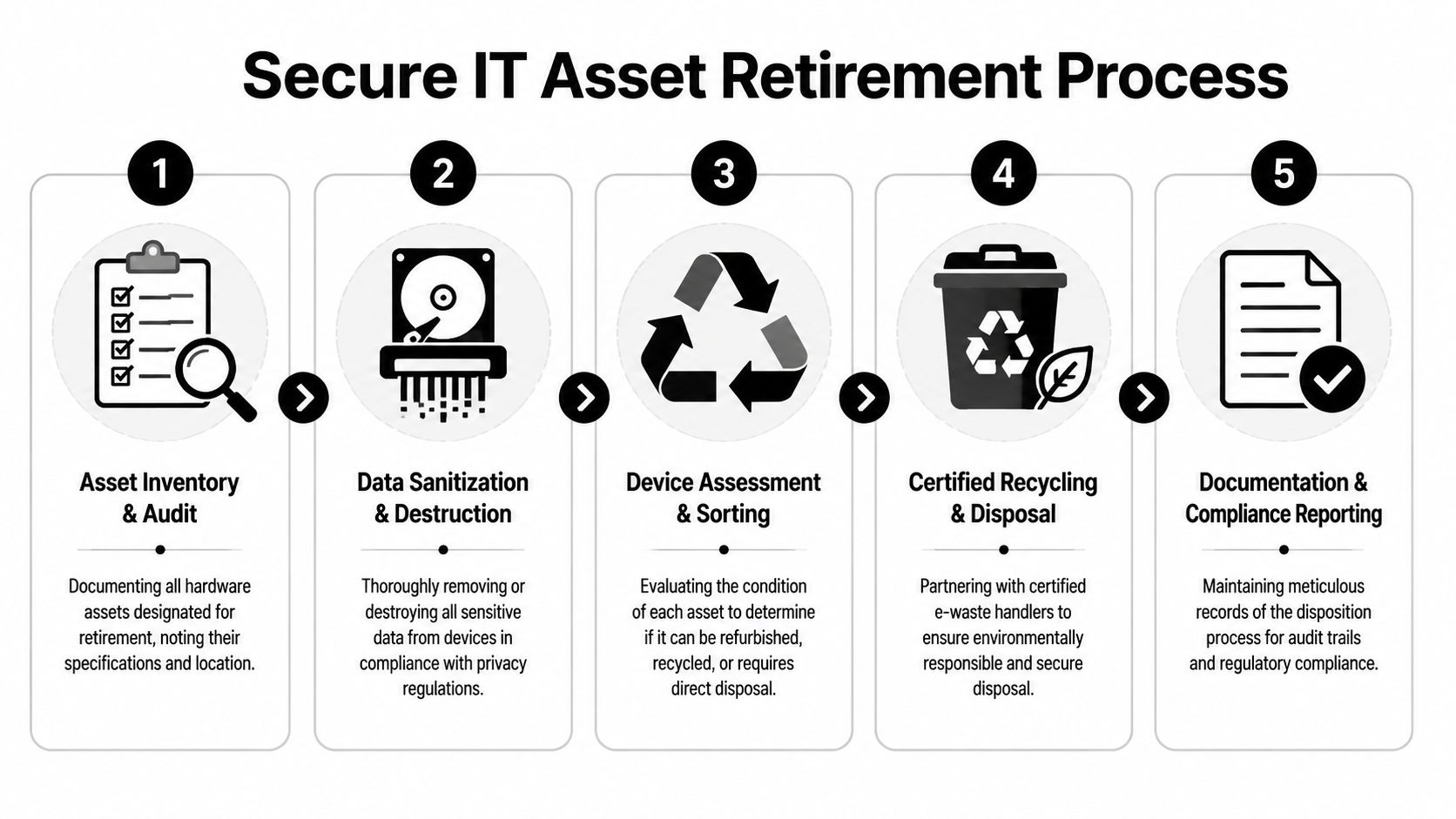
Why disposition belongs in the original project plan
Secure retirement isn't cleanup. It's part of the infrastructure project.
When districts delay it, several risks show up fast:
- Data security risk because drives, SSDs, and embedded storage may leave controlled custody without proper sanitization
- Compliance risk because inventory records and chain-of-custody documentation are incomplete
- Operational clutter because retired hardware sits in closets, media centers, and back offices long after cutover
- Environmental risk because e-waste handling gets improvised instead of routed through compliant recycling channels
A better model is to assign asset disposition its own workstream from day one. That workstream should be tied to inventory, site cutover, transport logistics, and records retention.
A practical retirement workflow
Most districts need a repeatable five-part process.
Inventory before removal
Tag what is leaving, where it came from, and whether storage media is present. Don't rely on old records.Separate data-bearing assets first
Laptops, desktops, servers, storage arrays, and loose media need a stricter chain of handling than simple peripherals.Sanitize or physically destroy media
Working media can be wiped according to policy. Failed or obsolete media should be physically destroyed under documented controls.Sort for reuse, recycling, or disposal
Not everything belongs in the same downstream channel. Some items can be remarketed or reused internally. Others should go directly to certified recycling.Close the paperwork loop
Keep pickup records, asset lists, destruction records, and recycling documentation together. Audits get much easier when those documents exist before anyone asks for them.
Old hardware is still a live security issue until the district can prove otherwise.
Asset lifecycle management proves to be more than just a finance term. Teams that want a broader frame on replacement timing, retirement planning, and lifecycle decisions may find this guide on understanding ALM and ROI useful. In K-12, the lesson is straightforward: value isn't only created when equipment is deployed. It's also protected when equipment is retired correctly.
What to ask a disposition partner
If a district uses an outside vendor, the questions should be direct.
- Can they handle on-site de-installation and pickup, not just accept drop-offs?
- Can they document chain of custody from pickup through final processing?
- How do they manage data-bearing media that is damaged or nonfunctional?
- Can they separate standard e-waste from specialized equipment?
- Do they provide clear reporting that districts can retain for compliance files?
One Atlanta-area option is IT asset disposal through Scientific Equipment Disposal, which offers business-to-business electronics disposal, on-site pickup logistics, hard-drive wiping using DoD 5220.22-M 3-pass sanitization, and shredding for obsolete or nonfunctional media. Whether a district uses that provider or another qualified partner, the key is documented control, not informal surplus handling.
The strongest districts treat retirement the same way they treat deployment. They assign owners, define procedures, and document outcomes. That's how a modernization program effectively closes.
Building a Future-Ready Educational Environment
The useful lesson from Atlanta isn't that schools are buying newer technology. It's that sustainable modernization is a full lifecycle discipline.
Districts that do this well start with an architecture blueprint, not a rush order. They phase deployment instead of gambling on one giant cutover. They budget for the invisible layers that keep visible tools working. They coordinate closely with vendors and facilities so implementation doesn't unravel at the building level. Then they finish the job by retiring old assets securely and responsibly.
That's the answer to how Atlanta schools are upgrading IT infrastructure. The work spans endpoint deployment, network modernization, cloud migration, budget discipline, logistics, and end-of-life control. None of those pieces can carry the effort alone.
For school systems in Atlanta and beyond, the practical standard is higher now. A district can't claim modernization if students receive devices while closets still depend on aging back-end systems. It also can't claim success if retired servers, laptops, and storage media leave the district without documented sanitization and compliant recycling.
Future-ready doesn't mean chasing every new tool. It means building an environment that stays reliable under everyday instructional load, adapts to change without repeated disruption, and closes risk gaps instead of moving them around.
The districts that will handle the next wave best aren't the ones with the flashiest rollout. They're the ones with clean sequencing, realistic budgets, disciplined vendor management, and a serious plan for what happens after the refresh.
If your organization is planning a school, university, lab, or district technology refresh in metro Atlanta, Scientific Equipment Disposal can support the end-of-life side of the project with business-to-business electronics recycling, pickup logistics, and documented data-bearing media handling. That's often the missing operational piece when old computers, servers, storage, and lab equipment need to leave the site as securely as the new environment comes online.