How Atlanta Firms Handle Remote IT Management: A Playbook

Your office manager is chasing a missing laptop. A physician wants remote access from home. A partner at a law firm is forwarding documents between devices because the VPN feels slow. Your IT person is buried in tickets, but the bigger problem isn't the ticket queue. It's that your company now operates across homes, offices, phones, personal networks, and a growing pile of hardware that eventually has to be tracked, recovered, wiped, and retired.
That's the day-to-day reality behind how Atlanta firms handle remote IT management. It isn't a single software purchase. It's an operating model. The firms that do this well build policy first, choose a support model that fits their size and risk profile, standardize their remote management stack, lock down compliance controls, and treat the hardware lifecycle as part of security, not an afterthought.
The New Reality of Managing IT in Atlanta
A lot of Atlanta businesses are no longer fully office-bound, but they're not fully remote either. They're running a mixed environment where some staff are at desks in Buckhead or Midtown, some are in branch sites, and others are working from home several days a week. That mix creates more complexity than either extreme.
Robert Half's 2026 remote work research found that 88% of U.S. employers offer some form of hybrid work. The same research found that in Q1 2026, 77% of new job postings were fully on-site, 19% hybrid, and 4% fully remote. For Atlanta companies, that means IT leaders often have to support office systems and off-site users at the same time.
The friction shows up in familiar ways. Devices miss updates because they rarely touch the office network. New hires wait too long for equipment. Personal devices creep into business workflows. Managers assume remote support is in place, but nobody has defined what tools are approved, who can remotely access what, or how to handle a terminated employee's laptop.
Remote IT starts breaking down when a company treats every remote exception as temporary. Hybrid work only becomes manageable when you standardize it.
Local firms are dealing with many of the same pressures discussed in this look at Atlanta small business IT challenges in 2026. The common thread is that ad hoc support doesn't scale. Someone always ends up depending on one technician, one undocumented workaround, or one laptop that nobody can fully account for.
What actually works
The firms that get control back do a few things consistently:
- They centralize decisions: one process for provisioning, patching, support, and offboarding.
- They define approved devices: not every personally owned machine should be allowed near regulated data.
- They separate convenience from access: just because an employee needs to work remotely doesn't mean they need full network visibility.
- They plan for the device's last day: every laptop, phone, and server should have an end-of-life path before it's issued.
That's the practical playbook. Remote IT gets easier when you stop treating policy, support, security, and disposal as separate projects.
Building Your Remote IT Policy Framework
Technology follows policy. If your remote environment feels inconsistent, the issue usually isn't the toolset first. It's that nobody wrote down the rules clearly enough for managers, users, and IT to enforce them.
A solid remote IT policy should answer four basic questions. Which devices are allowed? What data can be accessed remotely? Who approves exceptions? What happens when an employee leaves, loses a device, or works from an unmanaged endpoint?
Start with device and user rules
Most policy failures happen because companies try to write one broad remote work document and call it done. In practice, you need several policy components that work together.
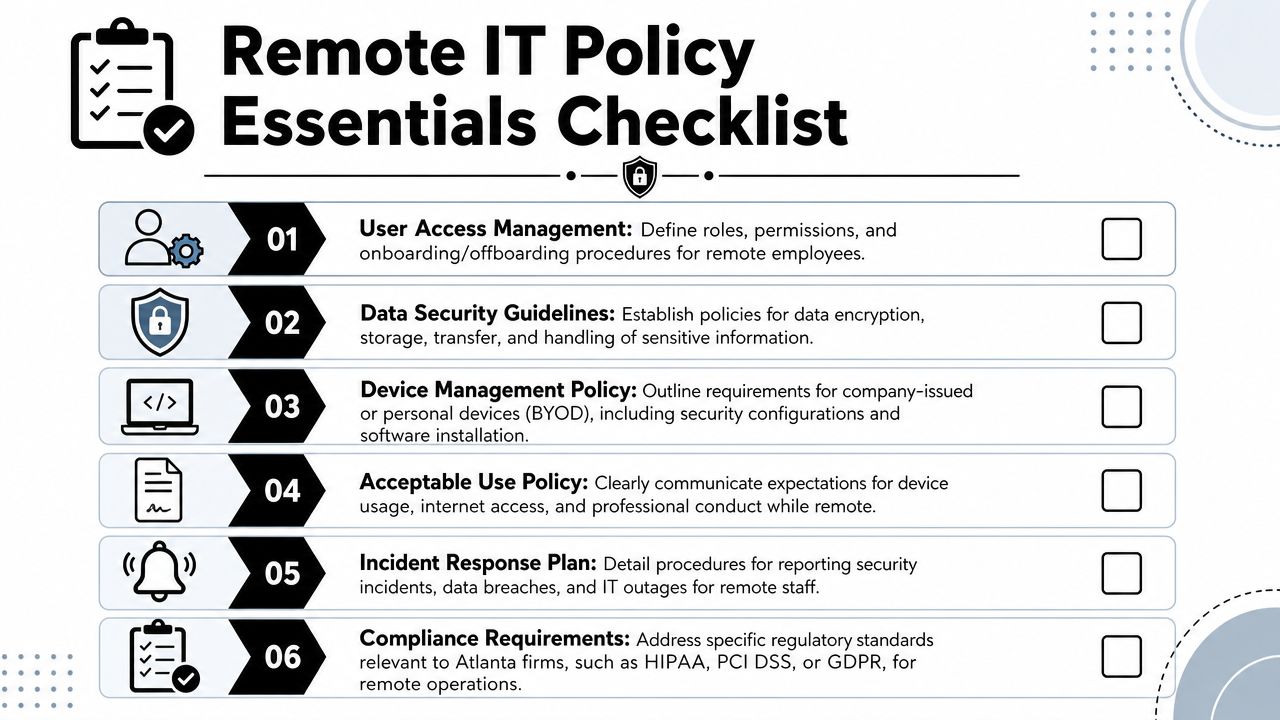
A usable framework usually includes:
- Acceptable use rules: define what employees can do on company laptops, how they handle downloads, whether family members can use the device, and whether local admin rights are allowed.
- BYOD boundaries: state which personal devices can access email, files, messaging, or line-of-business applications. If BYOD is allowed, define required security settings and the company's right to remove business data.
- User access standards: tie access to role, not convenience. People should receive the minimum access needed to do their job.
- Offboarding steps: disable accounts, collect devices, revoke tokens, document returns, and confirm data retention requirements.
Define data handling before tools
Regulated businesses in Atlanta often run into problems. They buy remote access tools before they define how staff should handle documents, screenshots, local storage, printing, and file sharing outside the office.
Use plain language. A finance manager or practice administrator should be able to read the policy and know exactly what's allowed.
A practical checklist looks like this:
- Sensitive data storage: specify whether files can be stored locally or only in approved cloud or server locations.
- Transmission controls: require approved methods for sharing client, patient, student, or internal records.
- Incident reporting: tell employees where to report suspicious login prompts, lost devices, or accidental disclosures.
- Encryption expectations: state that company-owned endpoints must use encryption and approved security controls before remote access is enabled.
Practical rule: if a policy depends on users remembering informal verbal instructions, it isn't a policy yet.
For Atlanta organizations facing legal, healthcare, finance, or education oversight, policy language also needs to line up with operational reality. That's where many teams hit the same pain points discussed in these IT compliance challenges for Atlanta companies. If your written policy says one thing but your actual remote support process does another, the gap will show up during an audit, an incident review, or an employee departure.
Choosing Your Support Model In-House or Outsourced
Once the rules are set, someone has to run them. Atlanta companies then usually face a real fork in the road. They can build internal remote support capacity, outsource to a managed service provider, or combine the two.
There's no universal right answer. The right model depends on the size of your environment, the sensitivity of your data, how fast you're growing, and whether your leadership team wants direct operational control or broader bench strength.
Where in-house support wins
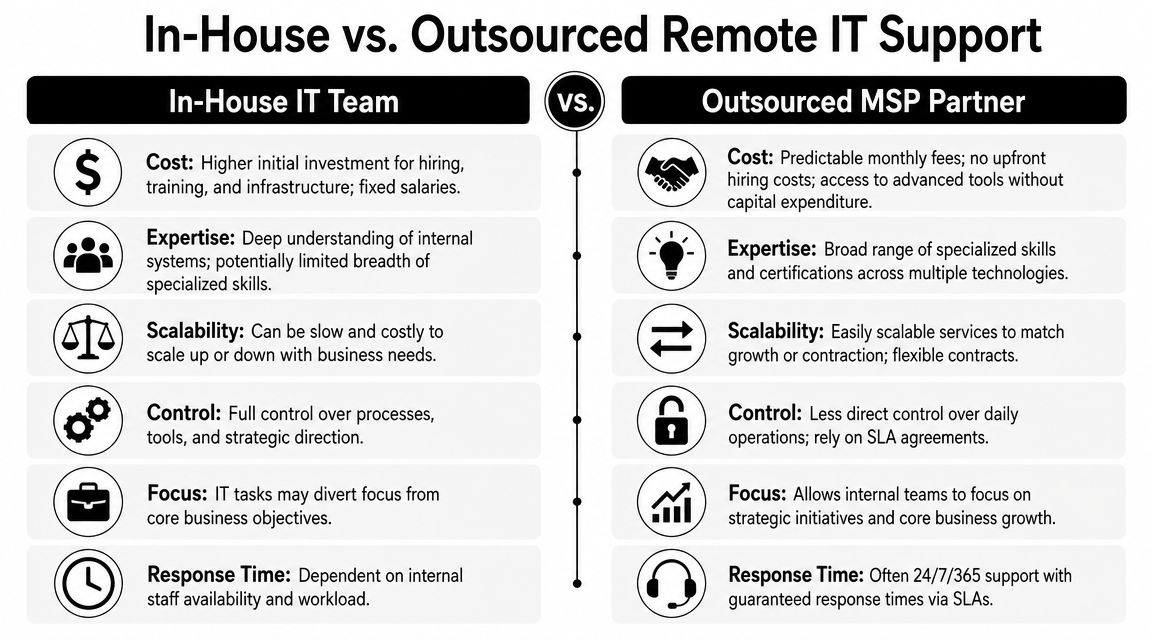
An internal team usually works best when your company has specialized workflows, legacy systems, or strict business context that an outside partner would need time to learn. Internal staff also tend to build stronger relationships with department heads. They know who always forgets MFA, which clinic printer fails on Mondays, and which executive will call instead of submitting a ticket.
That context matters.
In-house support is often stronger when you need:
- Direct process control: you choose tools, workflows, and escalation paths without negotiating through a service agreement.
- Tight alignment with operations: internal teams can sit in planning meetings and shape IT around business changes early.
- Immediate institutional knowledge: your technicians understand history, personalities, and local workarounds.
The trade-off is coverage and depth. One or two internal technicians can become a bottleneck fast. Vacation, turnover, after-hours issues, and cybersecurity specialization become harder to manage when the whole support model depends on a small team.
Where outsourced support wins
Atlanta has a mature outsourced IT market, and local providers increasingly organize around hybrid work support rather than old-style break-fix service. One example is Network 1 Consulting's managed IT services in Atlanta, which states its help desk is available from 7 a.m. to 7 p.m. on business days, a 12-hour support window that fits distributed teams and multi-time-zone schedules.
That kind of structure is useful when your staff starts early, works from home, or spans more than one office.
Outsourcing tends to work well when you need:
- Broader expertise: endpoint management, Microsoft 365 administration, cybersecurity operations, help desk coverage, and backup oversight under one umbrella.
- Scalable capacity: easier to absorb onboarding waves, office moves, and ticket spikes.
- Process discipline: mature providers often bring standardized runbooks, documentation habits, and onboarding workflows.
If your remote support model depends on one employee “just knowing how things work,” you don't have a support model. You have a dependency.
A simple decision table
| Situation | In-house is stronger | Outsourced is stronger |
|---|---|---|
| Highly customized internal systems | Yes | Sometimes |
| Need for longer support window | Sometimes | Yes |
| Small or mid-sized team without security depth | No | Yes |
| Strong desire for direct day-to-day control | Yes | Sometimes |
| Fast hiring or office expansion | Sometimes | Yes |
Many Atlanta firms land on a hybrid approach. Internal staff own strategy, vendor decisions, and executive communication. An MSP handles routine endpoint management, help desk coverage, patching, and after-hours issues. That model often gives companies enough control without forcing them to build every layer themselves.
If you're weighing that route, this overview of IT outsourcing trends among Atlanta businesses is useful context. The key is to assign ownership clearly. Co-managed IT fails when everybody assumes somebody else is handling the remote laptop, the access review, or the offboarding checklist.
Implementing Your Remote Monitoring and Management Stack
A remote IT stack should give you visibility, control, and repeatability. If it only lets technicians remote into a laptop after something breaks, it's incomplete. Good remote management lets you see device health, enforce patching, standardize security controls, route tickets properly, and prove what happened later.
Atlanta providers often onboard clients in a phased way instead of dropping tools in all at once. Cortavo's Atlanta managed IT guidance describes a process that moves from submitted needs to consultation, then to a managed plan, then fast onboarding into a flat-fee support structure with ongoing help desk and security operations. That sequence works because it reduces transition friction.
The core components that matter
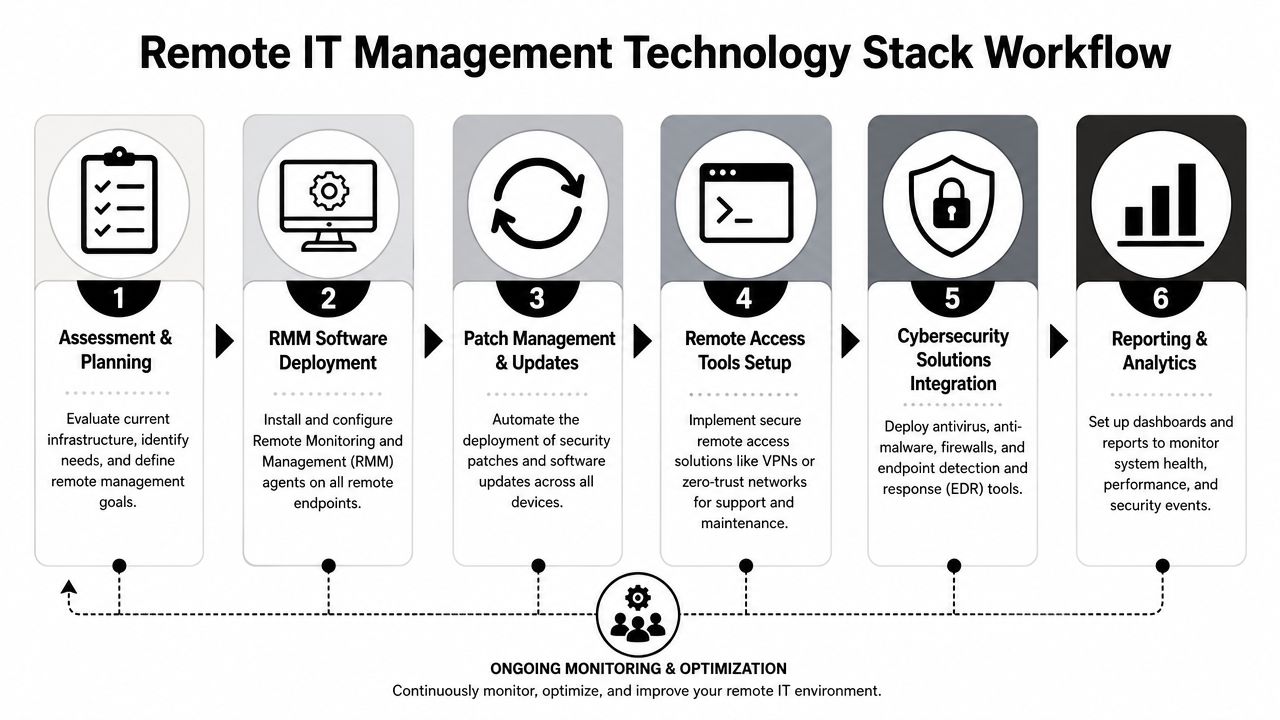
A workable stack usually includes these layers:
- RMM platform: installs an agent on each managed device so IT can monitor health, deploy software, run scripts, and troubleshoot remotely.
- Endpoint security: antivirus or endpoint protection, policy enforcement, and alerting on suspicious activity.
- Patch management: operating system and third-party update automation with reporting.
- Ticketing system: one place for requests, escalations, approvals, and closure notes.
- Identity controls: centralized account management tied to role and access policy.
- Backup oversight: visibility into endpoint or server backup status where needed.
If your team needs a plain-English explanation before evaluating products, ARPHost has a helpful primer on understanding RMM software. That's useful for nontechnical managers who need to know what the software does before approving it.
Roll out in an order that reduces disruption
The biggest mistake I see is trying to install every tool on every endpoint at once. That creates confusion, duplicate alerts, and frustrated users. Start with control points first, then layer monitoring and automation.
A practical rollout usually looks like this:
Inventory the fleet
Confirm what devices exist, who uses them, which ones are active, and which ones should already have been retired.Standardize the baseline
Define one approved build for laptops, one approved security profile, and one approved remote support process.Deploy the management agent
Get the RMM agent and security tools onto every supported endpoint before promising broad remote support.Connect tickets to accountability
Every request should land in one system. Email-only support turns into undocumented support fast.Automate what's repetitive
Patch cycles, standard software installs, health checks, disk encryption verification, and routine remediation should not depend on memory.
The stack should make good habits automatic. If technicians have to remember every step manually, inconsistency is built in.
A distributed environment also depends on reliable connectivity. Remote support is only as stable as the user's connection to cloud apps, voice platforms, and management tools. For firms evaluating that side of the equation, this guide to business internet providers near me can help frame the infrastructure side of remote work.
What not to do
Avoid these common failures:
- Too many remote access tools: staff and technicians stop knowing which one is approved.
- No asset naming standard: ticket triage and audit work become messy fast.
- Unmanaged exceptions: one executive laptop outside policy turns into ten.
- Monitoring without response rules: alerts mean little if nobody owns them.
The best stacks aren't the most complex. They're the ones your team can enforce consistently.
Securing Remote Access and Enforcing Compliance
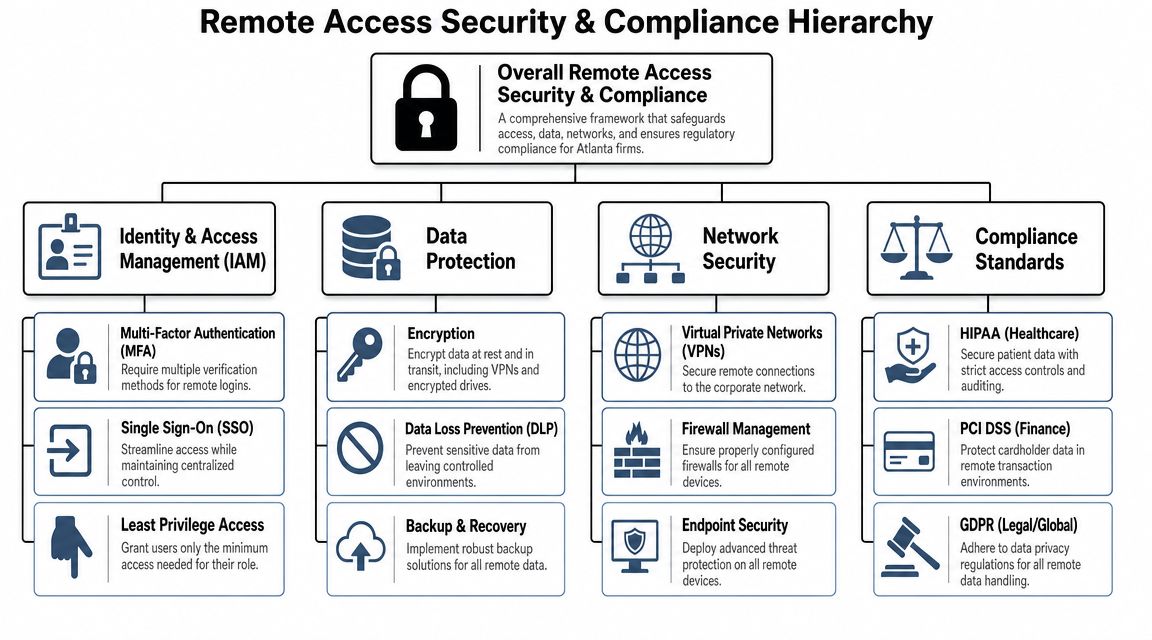
Remote IT demands serious consideration. In Atlanta healthcare groups, law firms, public agencies, and other regulated environments, remote access isn't just about convenience. It has to be defensible. You need to know who accessed what, from which device, under what controls, and what evidence you can produce if someone asks.
That's where many firms struggle. TrueITPros' discussion of managed IT for Atlanta law firms notes a local gap around the operational details buyers care about most, including secure VPN access, encrypted cloud tools, and the need to support confidentiality and security obligations. The harder questions are the ones too many providers leave vague: how MFA is enforced, whether off-network devices are encrypted, how audit logs are retained, and how privileged access is restricted.
The controls that need real enforcement
Most companies already know the vocabulary. VPN. MFA. Encryption. Audit logs. The problem is that knowing the terms isn't the same as operating the controls well.
Focus on enforcement, not just availability:
- MFA: require it for remote access, privileged accounts, email, cloud apps, and administrative consoles. If a single high-risk application is exempted for convenience, that exemption becomes the path of least resistance.
- Encryption: require company-managed endpoints to use approved encryption before remote access is granted. A lost laptop matters less when the device is encrypted and centrally managed.
- Audit logging: log remote access events, privilege changes, failed login activity, and administrative actions. If you can't reconstruct an incident timeline, your controls are weaker than they look.
- Privileged access limits: administrators should use separate accounts with increased permissions when needed, not permanent broad access all day.
Off-network devices are the real test
A lot of organizations feel secure because the office network is well protected. But remote compliance questions usually start when the device is not in the office.
Ask these questions plainly:
- Can IT confirm that a home-based laptop still has current security controls?
- Can support staff access a remote device without exposing regulated data unnecessarily?
- Can the business prove that a departed employee lost access to all relevant systems?
- Can leadership show what happened if a device is lost, stolen, or returned late?
If the answer depends on manual follow-up, spreadsheets, or someone remembering to check later, the control is weak.
A compliant remote setup is one you can explain to an auditor, not just one you believe is probably safe.
Match the control to the environment
Not every user needs the same access method. That's where a lot of firms overcomplicate their remote environment. They give everyone broad access because it's easier to administer at first. Later, they discover that convenience made monitoring harder and increased risk.
A better model is role-based access:
| User type | Better remote approach |
|---|---|
| General office staff | Managed endpoint, MFA, limited app access |
| Finance or HR staff | Managed endpoint, MFA, tighter data handling controls, stronger logging |
| IT admins | Separate privileged accounts, stronger approval and logging requirements |
| Contractors or temporary users | Time-bound access, limited systems, explicit offboarding date |
Some teams also need stronger cloud-side controls to support remote work safely. This review of cloud security trends for Atlanta organizations is useful if your environment now leans more heavily on cloud identity, storage, and line-of-business applications.
What buyers in regulated industries should ask providers
If you're evaluating outside help, skip broad promises about “secure remote work” and ask operational questions instead:
- How do you verify MFA is enforced across all covered systems?
- How do you confirm endpoint encryption before granting support or access?
- What remote access events are logged, and who reviews them?
- How are local administrator rights handled on remote laptops?
- What evidence can you provide after an incident or during an audit?
Those questions force specifics. They also reveal whether a provider understands regulated remote work or just sells generic support.
Managing the Full Remote Asset Lifecycle Securely
A remote laptop program usually looks under control until a departure, an audit request, or a failed refresh exposes the gaps. An employee leaves. HR marks them inactive. The account is disabled. Then IT realizes the laptop has not been seen in months, nobody can confirm what data lived on it locally, and the return path was never documented.
That is not a support problem. It is an asset control problem with security and compliance consequences.
In Atlanta firms that handle patient data, legal records, financial information, student files, or research material, remote IT management has to include the full device lifecycle. Issue the device, maintain it, recover it, sanitize storage, document final disposition, and retire it in a way an auditor can follow. Hardware is part of the control environment, not a side task for facilities.
Treat lifecycle controls as part of security and compliance
Teams often split remote support from hardware operations. On paper, that looks efficient. In practice, it creates blind spots around custody, documentation, and retirement standards.
A workable model covers four control points:
- Procurement and staging: assign the asset, apply the approved image, enroll it in device management, and record the user, location, and baseline configuration.
- Active use: track patching, warranty status, accessories, repair history, and approved exceptions.
- Replacement planning: identify aging devices before failures start driving downtime, ticket volume, and rushed purchases.
- Recovery and retirement: collect the device, verify account removal, sanitize or destroy storage media based on policy, and record the final outcome.
The trade-off is real. More process adds handling time and administrative work. Less process creates expensive cleanup later, especially when a user resigns, relocates, or stops responding before equipment is returned.
Why wiping alone fails in practice
A factory reset does not close out a regulated asset. It may be enough for internal redeployment in some cases, but it does not answer the questions that matter later. Who had custody of the device? What sanitization standard was applied? Was the drive wiped, removed, or physically destroyed? Where is the record tied to the serial number?
Those details become harder to reconstruct in remote environments because the device has already spent time outside controlled office space. It may have lived in a home office, a vehicle, a clinic, or a shipping box. By the time it gets back to IT, chain of custody is weaker and assumptions are riskier.
That is why end-of-life handling belongs inside the remote IT plan from day one. For regulated Atlanta organizations, disposal is part of compliance evidence, not just a cleanup task.
Build the return process before deployment
The strongest programs decide how a device comes back before it ever leaves the office. That includes more than a return label.
Set the operating rules early:
- Return logistics: define whether equipment comes back through prepaid shipping, local drop-off, pickup, or manager handoff.
- Process ownership: assign collection, verification, escalation, and documentation responsibilities across IT, HR, operations, and any outside disposition vendor.
- Sanitization standard: document when media is wiped, when it is destroyed, and what records are retained for each path.
- Disposition records: keep asset IDs, serial numbers, dates, and final handling records linked to the user and device history.
Mature remote IT teams plan for failed returns, damaged hardware, aging warranties, and devices that are no longer suitable for reuse. They do not wait until offboarding to decide what "done" means.
Scientific Equipment Disposal is one local provider Atlanta companies use for electronics recycling and business asset disposition, including hard drive wiping and shredding for obsolete or failed media. For firms that need a documented, repeatable way to retire remote laptops, drives, servers, and related equipment, that kind of operational support closes one of the most overlooked gaps in remote IT management.