Computer Recycling in Atlanta: A B2B Compliance Guide

A lot of Atlanta organizations reach the same point at once. The server closet is full, a lab is shutting down, finance wants assets cleared off the books, and IT knows at least some of those machines still hold regulated data.
That’s where computer recycling stops being a housekeeping task and becomes a risk decision. If you handle hospitals, clinics, labs, universities, government departments, or corporate IT environments, the primary job isn’t getting equipment out of the building. It’s controlling chain of custody, documenting data destruction, and proving that nothing was dumped, donated carelessly, or lost between pickup and final processing.
Why Secure Computer Recycling Matters for Atlanta Businesses
An Atlanta facilities manager usually doesn’t call about one old desktop. The call comes when a storage room fills up with retired laptops, monitors, servers, backup drives, and lab-adjacent workstations that nobody wants to touch because each item carries some mix of data risk, regulatory exposure, and disposal uncertainty.
That’s why computer recycling in atlanta has to be treated as an operational function. If a hospital sends out systems with patient data still intact, or a lab loses track of storage media during a move, the issue isn’t just environmental. It becomes a legal, reputational, and internal control problem.
The risk starts before pickup
Most organizations focus first on hauling. That’s backwards. The first questions should be:
- What data is on the equipment
- Who owns approval authority
- How will chain of custody be documented
- Whether assets have resale, recycling, or destruction value
- What proof will be retained for audit files
The industry framework behind these decisions isn’t new. The formalization of e-waste recycling in the United States began with the Resource Conservation and Recovery Act in 1976, and by 2007 the EPA reported more than 63 million computers were discarded annually nationwide. In Atlanta, certified recyclers now divert hundreds of millions of pounds of e-waste from landfills each year, and some recovery processes reduce the need for virgin material extraction by up to 90%, according to Atlanta computer recycling industry background.
Those numbers matter because Atlanta isn’t a light-duty market. It’s a healthcare, logistics, education, and technology hub. That means large decommissions, mixed asset conditions, and a steady flow of devices that carry both commodity value and liability.
Practical rule: If your organization handles protected data, every retired computer should be treated as a data-bearing asset until documented otherwise.
Why generic junk removal doesn’t work
A recycler built for business accounts does more than clear floor space. The right process supports security, records retention, and environmental compliance at the same time. That’s especially important for organizations managing specialized surpluses, including labs and technical facilities that need coordinated Atlanta recycling support for business equipment.
What works is a documented handoff with inventory, approved sanitization methods, and final reporting.
What doesn’t work is informal donation, undocumented pickup, or assuming someone “wiped everything already.”
Your Internal Preparation Checklist Before Pickup
The cleanest recycling projects are usually decided before the truck arrives. Internal preparation removes delays, prevents disputes over missing assets, and keeps IT, compliance, and operations aligned.
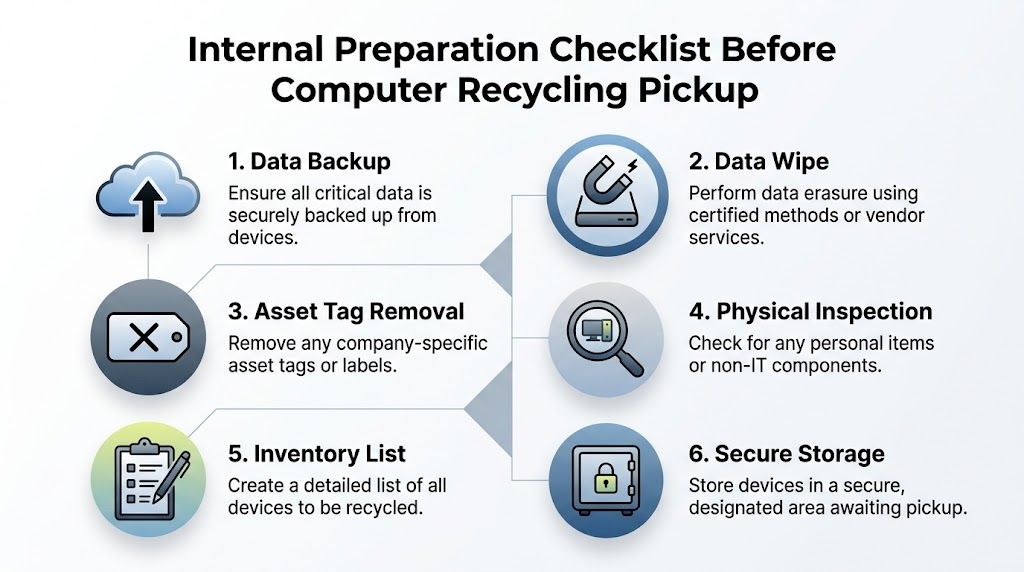
The checklist below is simple, but it fixes most of the failures I see in business cleanouts.
Build the asset list before you schedule
Start with an internal inventory. It doesn’t need to be elegant, but it does need to be usable. Capture device type, manufacturer, model, serial number if available, location, and whether the item contains storage media.
For labs, add context that matters during pickup. Note whether the workstation belongs to an instrument, whether a server rack needs de-installation, and whether any equipment sits in controlled-access space.
A practical pre-pickup list should include:
- Data-bearing devices: desktops, laptops, servers, external drives, backup appliances, and any embedded systems with storage
- Display equipment: LCDs and older monitors that may need separate handling
- Networking and accessories: switches, firewalls, docking stations, and cabling if they’re part of the project scope
- Condition notes: working, damaged, incomplete, or physically locked
Classify assets by risk, not just by type
A laptop in accounting and a workstation in a pathology lab aren’t equal from a disposal standpoint. Treat them differently. Your internal team should separate assets into categories such as regulated data, confidential business data, standard corporate data, and no-storage peripherals.
That step drives the destruction method, approval path, and pickup controls.
Keep one rule consistent across departments. If there’s uncertainty about whether a device stores data, classify it as sensitive until IT verifies it.
Lock down internal approvals
Before engaging any recycler, get the right internal sign-offs. In most organizations, that includes IT, information security, operations, and finance. In healthcare and research environments, compliance or legal often needs visibility too.
Use one project owner. That person should control the pickup window, final scope, building access, and approval of any scope changes on the day of service.
Prepare the equipment physically
At this point, projects become either efficient or chaotic. Consolidate equipment into a secure staging area if possible. Remove personal effects, loose papers, and anything that shouldn’t leave with the load.
A short pre-pickup preparation standard helps:
- Back up necessary data before assets move.
- Confirm sanitization plan for each data-bearing category.
- Remove or record asset tags based on your internal policy.
- Check for mixed materials like batteries, accessories, or non-IT equipment.
- Stage devices securely in a room with controlled access.
- Assign one on-site contact to release assets at pickup.
Organizations that need coordinated business collection often look for electronics recycling with pickup service rather than trying to move everything with internal staff.
Don’t let convenience override custody
The fastest solution is often the weakest one. Leaving equipment in an unsecured loading area, using informal building staff handoffs, or allowing ad hoc additions during pickup creates inventory gaps that are hard to fix later.
If you want a project to stay defensible in an audit, the asset list, release point, and authorized contacts need to be settled before the first item leaves your control.
Data Destruction Methods Wiping vs Shredding
For most organizations, data destruction is the part of computer recycling that matters most. The difficult part isn’t understanding that data has to be destroyed. It’s choosing the right method for the right asset.
In Atlanta ITAD work, the two most common paths are DoD 5220.22-M wiping and physical hard drive shredding. Both can be appropriate. They solve different problems.
When wiping makes sense
Wiping is best for drives that still function and may have reuse or resale value. In the standard ITAD process used by certified providers, data destruction can include DoD 5220.22-M 3-pass wiping, which overwrites data multiple times before the device moves to refurbishment or remarketing. That 7-step process also includes assessment, secure logistics, manual sorting, dismantling, asset recovery, and certified reporting, and it can achieve over 98% diversion from landfills while offsetting costs by 10-25% through remarketing. The same source warns that skipping chain-of-custody controls can create a 15% data breach exposure, according to Atlanta ITAD process guidance.
Wiping preserves asset value. If a late-model laptop, server, or workstation can be redeployed or resold, software sanitization usually supports that outcome.
When shredding is the safer answer
Shredding is the right call when the drive is damaged, inaccessible, obsolete, or tied to a stricter internal security posture. It’s also the cleanest option when an organization doesn’t want any possibility of downstream reuse for the storage component.
Hospitals, research labs, and public agencies often prefer shredding for failed drives, mixed lots with uncertain drive health, or equipment coming out of highly sensitive environments. It removes ambiguity. Once the media is physically destroyed, the storage device won’t re-enter circulation.
If the organization cares more about certainty than residual value, shredding usually wins.
Data Sanitization Comparison DoD Wiping vs. Physical Shredding
| Attribute | DoD 5220.22-M Wiping | Hard Drive Shredding |
|---|---|---|
| Best fit | Functional drives with reuse or remarketing potential | Failed, obsolete, locked, or high-risk drives |
| End result | Data is overwritten and device may remain usable | Media is physically destroyed and unusable |
| Asset value | Preserves potential resale or redeployment value | Eliminates resale value of the drive itself |
| Operational use | Good for laptops, desktops, and servers that still boot or can be processed normally | Good for damaged drives and maximum-security workflows |
| Documentation need | Should be tied to serial-based reporting and chain of custody | Should be tied to destruction records and chain of custody |
| Typical business reason | Balance security with value recovery | Prioritize irretrievability |
The real decision point
Most organizations shouldn’t force a single method across all assets. A mixed strategy is usually better. Wipe functioning drives in equipment with remarketing value. Shred failed or sensitive media that shouldn’t be reused.
That approach gives finance, IT, and compliance what each team needs. Finance gets potential recovery where appropriate. IT gets a practical process. Compliance gets documented destruction aligned to risk.
For teams formalizing policy, it helps to review a dedicated secure data destruction process for business equipment.
What weak programs get wrong
Weak programs often fail in one of three ways:
- They assume a user reset equals sanitization
- They wipe some devices but can’t prove which ones
- They choose “free” disposal without confirming media handling
That last one causes the most trouble. The invoice may be low, but uncertainty around chain of custody is expensive when questions come later from legal, compliance, or internal audit.
Navigating Computer Recycling Rules in Georgia
Most organizations don’t struggle because they ignore recycling. They struggle because the rules operate at more than one level, and each level asks for something slightly different. A hospital in Atlanta may need to think about patient data, environmental handling, internal retention requirements, and county-level disposal rules at the same time.
That’s why policy should be built in layers.

Federal duties for data-bearing equipment
If your organization handles protected health information, research records, student data, law enforcement records, or internal confidential files, computer disposal has to be managed as a records and security event. In healthcare, that means HIPAA concerns don’t end when a device is retired. They follow the asset until the organization can prove data was properly sanitized or destroyed.
The practical implication is simple. You need documented disposition, not verbal assurance. For most B2B programs, that means inventory records, release control, and a destruction certificate or equivalent reporting.
Georgia environmental responsibilities
At the state level, electronics can’t be treated like ordinary office trash just because they’re no longer useful. Computers, servers, monitors, and related equipment often contain materials that require controlled handling. That’s one reason organizations use specialized ITAD or electronics recyclers instead of standard waste streams.
For operations teams, the key point is less about mastering every regulation line by line and more about building a disposal process that stands up to review. That includes approved vendors, clear internal policy, and documented final disposition.
Good compliance programs don’t rely on memory. They rely on records.
Fulton County changed the stakes
For businesses in metro Atlanta, local rules now matter more than many teams realize. Since Q2 2025, new Fulton County ordinances require zero-landfill policies and data destruction certificates for businesses, with fines for non-compliant disposal exceeding $1,000 per ton. The same reporting states that Atlanta diverted 5,200 tons of e-waste in 2025, which was up 22% year over year, yet an estimated 40% of corporate IT decommissions still end up in landfills because of confusion over compliance and costs, according to Fulton County e-waste compliance guidance.
That changes vendor selection. A provider that can’t issue the records your business needs is no longer just inconvenient. It may leave you exposed.
What an Atlanta policy should require
A workable internal policy for computer recycling in atlanta should require:
- Approved release authority: no informal handoff by whoever happens to be on site
- Documented media handling: wiping, shredding, or another approved destruction path
- Zero-landfill confirmation: especially for business-generated loads covered by local expectations
- Final reporting: destruction certificates and recycling documentation retained with project records
- Escalation rules: legal, compliance, or security review for sensitive asset groups
Organizations dealing with broad surplus streams often need a more extensive business e-waste management approach rather than a one-off haul-away.
The practical lesson is that recycling and compliance can’t be separated anymore. In Atlanta, they’re the same project.
How to Choose a Certified Atlanta Recycling Partner
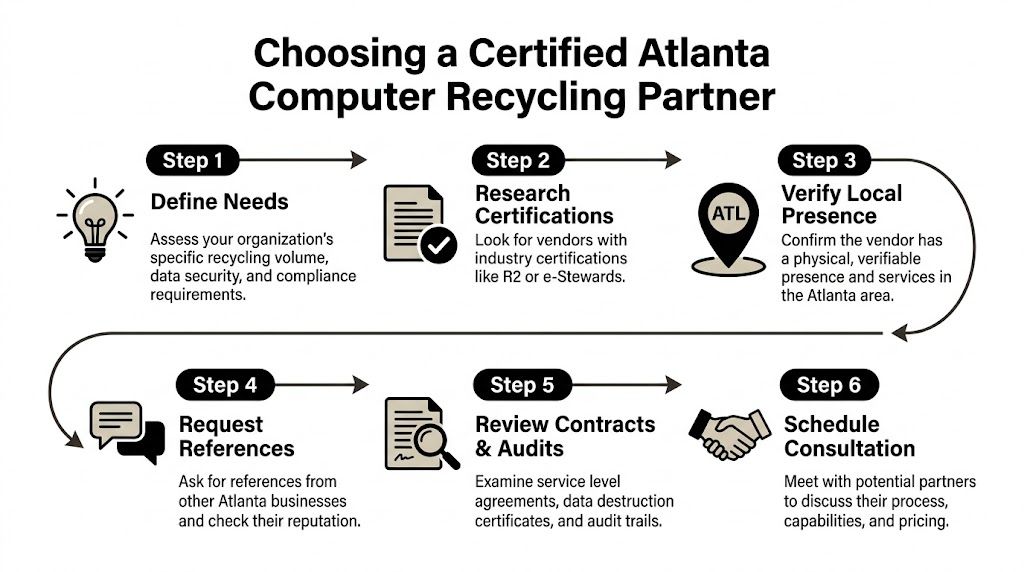
A serious recycling partner should be able to walk you through the job before you ever sign a pickup order. If the conversation stays vague, that’s usually a warning sign. Business and institutional projects need a provider that can explain custody, sanitization, logistics, downstream handling, and reporting in plain terms.
The easiest way to evaluate a partner is to compare their process against what a professional ITAD workflow should include.
Start with process, not promises
The benchmark is straightforward. A standard 7-step ITAD process includes initial assessment, secure logistics, data destruction, manual sorting, dismantling, asset recovery, and certified reporting. As noted earlier, that model can support over 98% diversion from landfills and 10-25% cost offset through remarketing, while missed chain-of-custody controls can create serious exposure.
Ask the vendor to describe each stage in your actual project, not in marketing language.
A reliable answer should cover:
- Assessment: how assets are counted, categorized, and tagged
- Logistics: who transports them, how release is documented, and whether bins or dedicated vehicles are used
- Data destruction: whether the vendor wipes, shreds, or applies a mixed method by asset type
- Sorting and dismantling: what happens to non-working equipment and mixed loads
- Reporting: what documents you receive at the end
Certifications matter, but only if the workflow matches
Certifications such as R2 or e-Stewards matter because they signal structured environmental and data handling practices. But certification alone isn’t enough if the actual service model is weak.
A good vetting call should test whether the provider can support your site realities. Can they handle labs, healthcare environments, or data center gear? Can they manage de-installation? Can they control access in a live facility? Do they issue documentation that your compliance team will accept?
A certificate on a website is useful. A documented chain of custody tied to your asset list is what protects you.
Questions worth asking before engagement
Use practical questions, not generic ones.
| Question | Why it matters |
|---|---|
| How do you document pickup and chain of custody? | You need to know when liability transfers and how assets are tracked. |
| Which assets are wiped and which are shredded? | The answer shows whether the provider applies risk-based handling. |
| What final reports do you issue? | Audit readiness depends on destruction and recycling records. |
| Do you handle pickup with your own logistics? | Control over transportation affects accountability. |
| How do you process non-working or obsolete equipment? | That reveals whether “free” programs quietly landfill difficult items. |
One Atlanta-area option among others is Scientific Equipment Disposal’s business e-waste recycling service, which handles electronics and lab assets, provides pickup logistics with its own box-truck fleet, and offers DoD 5220.22-M wiping with shredding for obsolete or nonfunctional media.
What usually works best in Atlanta
For hospitals, labs, and enterprise IT departments, the best fit is rarely a resident drop-off model repurposed for business loads. What works is a provider built for scheduled pickups, controlled access, mixed asset categories, and documentation-heavy projects.
What doesn’t work is choosing solely on convenience, assuming all recyclers handle data the same way, or treating reporting as optional paperwork after the fact.
Understanding Costs and Proving Compliance
The price of computer recycling is only part of the financial picture. The larger question is what the organization pays to remove risk, what value it recovers from usable equipment, and what proof it gets in return.
That’s why the cheapest quote can be the most expensive outcome if it leaves gaps in documentation or pushes non-refurbishable material into unclear downstream channels.
What affects cost
In practice, pricing usually changes based on asset mix, pickup logistics, labor needs, and whether devices still have reuse value. A pallet of modern laptops is handled differently from a room full of damaged desktops, old monitors, and failed drives. A lab shutdown with de-installation also has a different cost profile than a dock pickup of boxed equipment.
The trade-off is simple. More service and more control usually mean a more structured project. That can still be the better financial choice if it reduces internal labor and avoids compliance cleanup later.
Where value recovery comes from
Not every retired asset is just scrap. Component-level deconstruction can achieve 85-95% reuse rates for harvested parts, and one ton of circuit boards can yield 800g of gold and 100kg of silver. In one case study, a data center decommission recovered $15,000 in value from 50 servers while achieving 100% data destruction certification, according to component recovery and value recovery data.
That doesn’t mean every project will produce a return. It does mean organizations should ask whether the vendor can separate assets into resale, parts recovery, and end-of-life recycling streams instead of treating everything as waste.
The right question isn’t “Is there a fee?” It’s “What value, protection, and documentation do we get for the scope?”
The documents that actually matter
At the end of a project, you should receive records that close the liability loop. For most business accounts, that means a Certificate of Destruction for data-bearing media and a recycling report or manifest showing what was processed.
Those records should align with your internal inventory well enough to answer basic questions later. Which assets were picked up. When they left site. How media was destroyed. Whether the material went through approved recycling channels.
A good final file supports several internal needs:
- Audit defense: proof that assets were handled according to policy
- Legal review: evidence of due diligence if disposal is challenged
- Finance and asset accounting: support for retirement or write-off records
- Security governance: confirmation that data-bearing devices were properly sanitized
If a recycler can’t explain what paperwork you’ll receive before pickup, that’s not a minor administrative gap. It usually means the compliance side of the program isn’t mature enough for regulated organizations.
Frequently Asked Questions on Computer Recycling in Atlanta
Do Atlanta businesses need something different from residential drop-off
Yes. Business projects usually involve larger volumes, controlled access, asset tracking, and documented data destruction. Residential drop-off can be useful for individuals, but hospitals, labs, schools, and corporate IT teams usually need scheduled pickup, chain of custody, and reporting.
What equipment typically belongs in a business recycling project
Most organizations include desktops, laptops, servers, monitors, storage devices, networking gear, mobile devices, and related peripherals. In lab and research settings, the project may also include computer-controlled instruments or associated technical equipment that needs coordinated removal.
Why is demand for computer recycling in Atlanta increasing
Georgia saw the influx of new computers rise from 2,000 units in 2013 to over 55,000 units by 2017, which increased the amount of obsolete equipment requiring disposal. That aligns with the broader trend of e-waste being the fastest-growing solid waste stream globally at 50-60 million tons annually, according to Georgia electronics recycling market data.
Should we donate old computers instead of recycling them
Sometimes, but only after risk review. Donation can make sense for working equipment with no sensitive data concerns and a clear sanitization path. It’s a poor fit when the devices are damaged, hold regulated information, or require formal destruction records.
Is wiping enough, or should we shred every drive
It depends on asset condition and your internal risk tolerance. Wiping is often appropriate for working devices that may be remarketed or redeployed. Shredding is often better for failed drives, high-sensitivity data, or situations where your organization wants physical destruction rather than sanitization.
What’s the biggest mistake organizations make
They focus on removal before they define custody and documentation. That leads to missing serials, unclear media handling, and weak final records. The equipment may be gone, but the liability isn’t.
How often should organizations schedule recycling
That depends on refresh cycles, storage space, and compliance needs. High-volume IT and healthcare environments usually benefit from a recurring schedule so retired equipment doesn’t accumulate in closets, labs, or unsecured back rooms.
If your organization needs a business-focused path for computers, servers, storage media, or lab equipment, Scientific Equipment Disposal provides Atlanta-area pickup, de-installation, compliant recycling, and documented data destruction support for hospitals, labs, schools, corporate IT teams, and government agencies.