Retail Technology Trends in Atlanta Businesses: 2026 Outlook

A lot of Atlanta retail managers are in the same spot right now. A competitor down the road rolls out faster checkout, cleaner digital signage, or tighter buy-online-pickup workflows, and suddenly your existing POS terminals, back-office PCs, scanners, and displays feel old all at once.
The upgrade conversation usually starts with what to buy next. It should also include what happens to everything you're replacing. In retail, old payment hardware, store servers, tablets, kiosks, receipt printers, and networking gear don't just disappear when the new system goes live. Someone has to remove them, track them, wipe them, recycle them, or destroy them.
That full-lifecycle view matters in Atlanta more than many markets. Local retailers are under pressure to move faster, operate leaner, and get more output from each location. The businesses that handle both sides well, deployment and disposition, usually avoid the ugly problems that show up later: missing assets, exposed drives, storage-room pileups, and rushed disposal during a renovation or closure.
The Tech Revolution Reshaping Atlanta Retail
A familiar scene plays out every week. A store manager approves a rollout for new PIN pads, mobile POS tablets, or digital shelf displays. IT schedules the cutover. Operations focuses on training. Facilities lines up installers. Then, after the launch, the old equipment ends up on a pallet in the back room.
That's where many technology projects go off track.
Retail technology trends in Atlanta businesses aren't just about buying smarter systems. They're about managing the whole chain of custody. A modern store may replace fixed checkout lanes with flexible POS, add self-checkout, layer in inventory automation, connect smart sensors, and push more processing into the store itself. Every one of those moves creates a retirement problem for the previous generation of hardware.
What Atlanta retailers are upgrading
Most upgrade cycles now touch both the selling floor and the back office:
- Front-end systems like POS terminals, customer-facing displays, payment devices, digital signage, and handheld checkout units
- Store operations gear like barcode scanners, label printers, tablets, time-clock devices, and wireless access points
- Infrastructure like local servers, network switches, firewalls, and storage devices
- Experience tools like recommendation screens, queue management, and smart shelf hardware
The shiny part gets attention because customers see it. The risk sits in the retired asset pile.
Practical rule: If a device ever processed payments, held logins, cached transactions, stored customer records, or connected to your network, treat it like a data-bearing asset until proven otherwise.
Why lifecycle thinking matters now
Atlanta retailers aren't replacing physical retail. They're upgrading it. That means more layers of technology inside each store, more integration between channels, and more endpoints to manage over time.
For facilities and IT managers, the real job isn't just getting new systems live. It's getting old systems out cleanly, securely, and with documentation that stands up later if finance, compliance, or leadership asks what happened to each asset.
Key Retail Technology Trends Driving Atlanta Growth
Retail adoption has moved past the experimental stage. In a 2025 report with Atlanta coverage, 93% of retailers said they had implemented automation in at least one part of their business, while 70% of retail leaders said they rely on data analytics to guide purchasing decisions, according to WSB-TV's retail trends coverage.
That tracks with what practitioners see in the field. Retailers aren't shopping for isolated gadgets anymore. They're trying to connect sales, inventory, labor, payments, and customer data into one usable operating model.
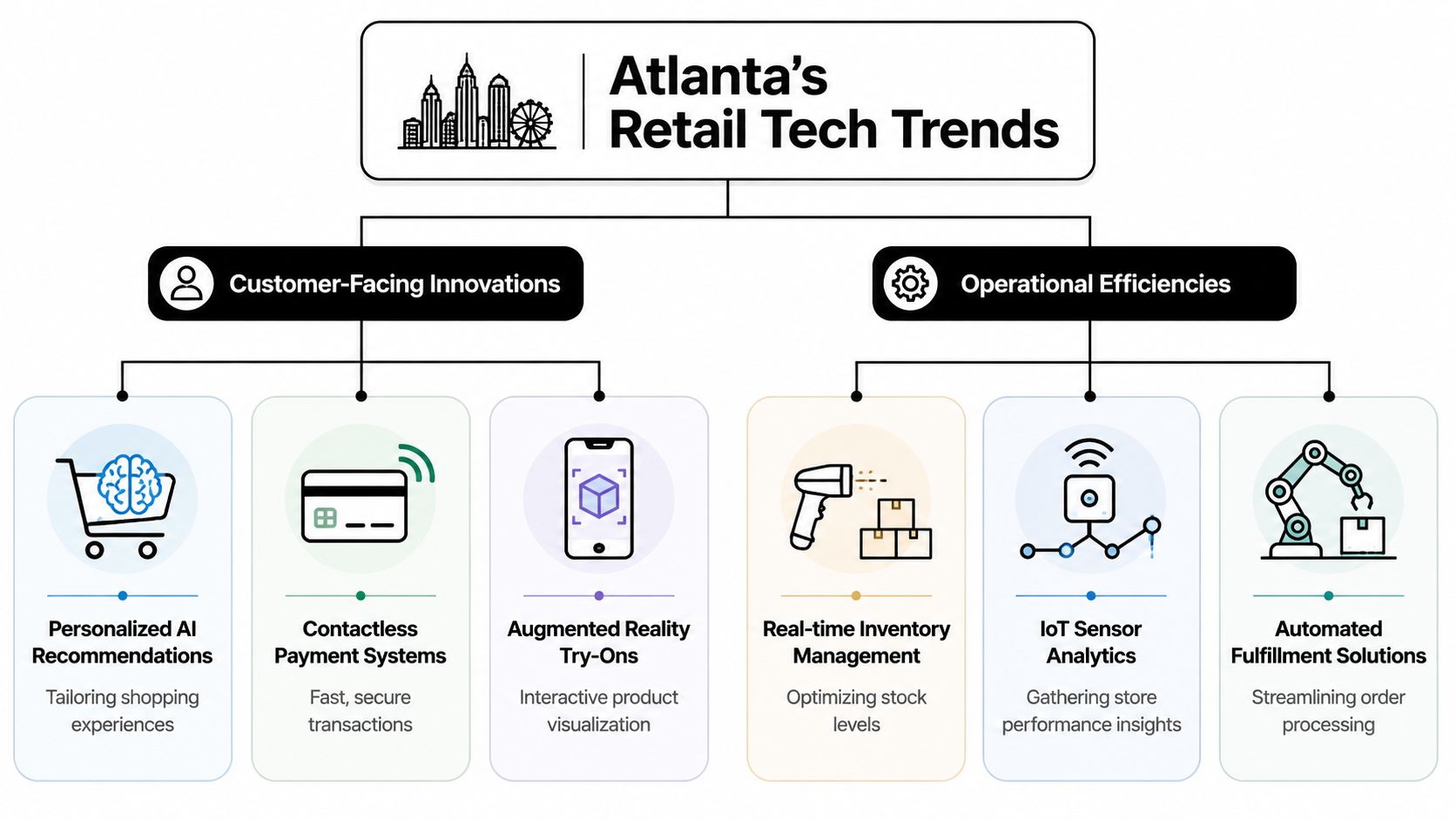
Customer-facing systems getting the budget
The visible investments tend to land here first.
POS modernization is usually the foundation. Legacy terminals still work, but they often create friction when retailers want mobile checkout, flexible promotions, unified returns, or tighter integration with loyalty and ecommerce systems. Newer POS environments also make it easier to deploy updates across multiple stores without treating each register as a one-off project.
Contactless payment systems are now a baseline expectation. The benefit isn't only speed at the lane. They also reduce wear on shared hardware, support queue-busting with handheld devices, and fit better with curbside and line-busting workflows.
Digital signage and personalized recommendation tools are gaining traction because they let retailers adjust merchandising without swapping printed materials store by store. That's useful when promotions shift quickly or stores need different messaging by location, category, or time of day.
Some operators also layer in computer vision, sensors, and smart cameras to improve traffic flow, shrink visibility, or shelf awareness. Security leaders looking at store camera strategy may find ideas in how Securitec Security protects Perth stores, especially where surveillance and operations start to overlap in the same environment.
Operational systems that actually change margins
The less glamorous upgrades usually do more for daily control.
- Inventory automation: Faster cycle counts, cleaner stock visibility, and fewer manual adjustments across locations
- Analytics-driven purchasing: Buying teams can use actual movement patterns instead of relying only on historical intuition
- Automated fulfillment workflows: Better coordination between in-store pickup, local delivery staging, and back-room labor
- IoT-driven monitoring: Sensors can feed real-time signals into replenishment or maintenance workflows
Atlanta operators also need to think about who owns this stack internally. The staffing side of modernization often mirrors broader IT outsourcing trends among Atlanta businesses, especially when retailers lack in-house bandwidth for endpoint management, patching, and decommissioning.
New retail tech works best when it removes one handoff, one spreadsheet, or one manual recount. If it only adds another dashboard, it usually won't last.
What works and what doesn't
A few patterns are consistent.
| Approach | What tends to work | What usually fails |
|---|---|---|
| POS replacement | Standardized hardware profiles and staged cutovers | Mixing too many device types by store |
| Inventory tools | Integration with receiving and replenishment | Treating automation as a standalone app |
| Digital signage | Central content control with local permissions | Requiring store managers to manually update everything |
| Payment upgrades | Unified device management and clear swap procedures | Leaving retired PIN pads untracked in storage |
The core lesson is simple. Retail technology trends in Atlanta businesses aren't about novelty. They're about reducing friction in places where friction used to be accepted as normal.
Local Market Pressures Driving Tech Adoption in Atlanta
Atlanta retailers aren't upgrading because technology is fashionable. They're upgrading because the local market gives them very little room for waste.
In Matthews Real Estate Investment Services' Atlanta retail market update, Q4 2025 retail availability was 4.1%, market time fell below six months, and asking rents reached $23.63 per square foot, up 3.6% year over year. In practical terms, that means a retailer can't assume they'll solve operational problems by just taking more space later.

Tight space changes the technology math
When space is scarce and rents rise, each location has to do more work.
A stockroom with weak inventory accuracy becomes more expensive. A checkout layout that wastes labor becomes more expensive. A back room filled with obsolete kiosks and dead monitors also becomes more expensive, even if nobody books that cost line by line.
That's why so many Atlanta retailers are leaning into systems that improve output per location:
- Omnichannel orchestration so one store can support walk-in traffic and pickup orders without chaos
- Inventory visibility so buyers and managers don't over-order to compensate for uncertainty
- Store-level analytics so labor and merchandising decisions reflect real conditions
- Flexible checkout so operators can adapt floor space without a full construction project
The same pressures are showing up across adjacent sectors, which is why Atlanta's broader logistics tech growth and IT needs matter to retailers too. Store operations and local fulfillment are increasingly part of the same conversation.
Dense competition rewards execution
Atlanta has a lot of strong retail corridors and mixed-use environments. In those areas, customers compare experiences quickly. If one store has smoother payment, better pickup coordination, or fewer out-of-stock frustrations, the difference feels immediate.
That doesn't mean every retailer needs the most advanced stack on the market. It means each store needs fewer breakdowns in the basics.
In a tight market, the winning investment is often the one that lets an existing store sell more reliably from the same footprint.
The local trade-off most teams underestimate
Retailers often frame the decision as rent versus technology. The actual trade-off is broader.
A business can spend on:
- More square footage
- More labor to patch over weak systems
- Better systems that let the current location run cleaner
Atlanta's market conditions push many operators toward the third option. That's sensible. But it also has a side effect. As stores add more connected hardware to squeeze more value out of the same footprint, they also create a larger retirement stream of obsolete devices that have to be removed responsibly.
That operational tail is easy to ignore during procurement. It becomes very hard to ignore during remodels, relocations, and chain-wide refreshes.
The Unseen Costs of Retail Tech Upgrades
Most retail technology business cases focus on deployment cost, licensing, training, and support. They should. But that's only the front half of the expense picture.
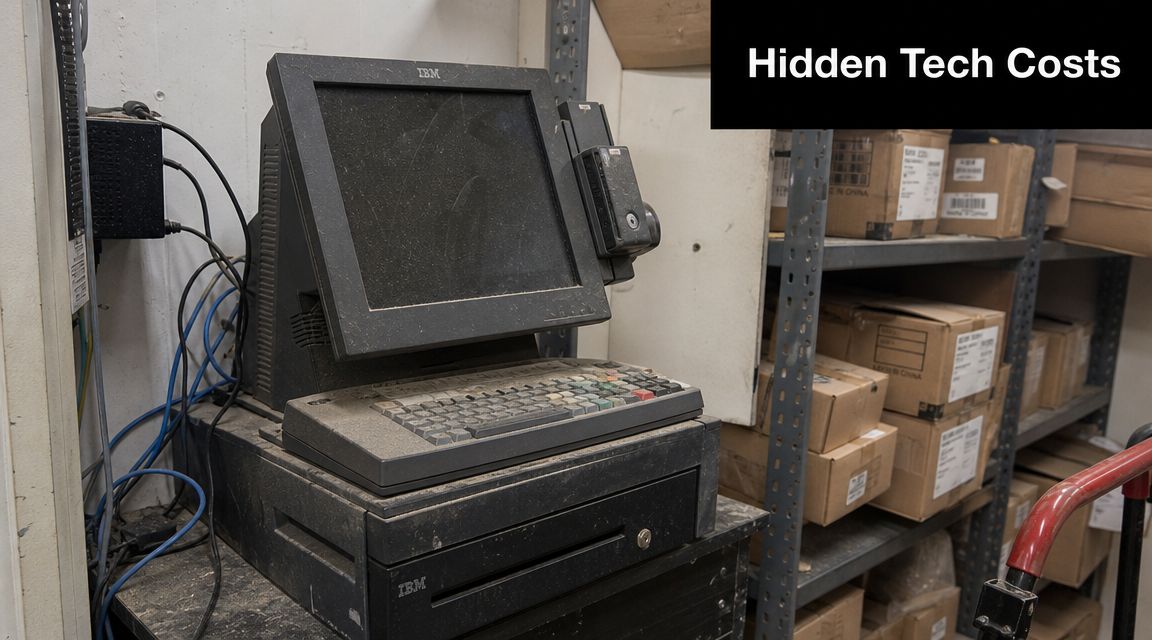
The back half shows up later in storage areas, service closets, and liquidation piles. Every refresh leaves behind old POS units, scanners, signature pads, payment devices, cables, switches, firewalls, tablets, mini PCs, and display hardware. Some still function. Some don't. Nearly all require a disposition decision.
Old hardware creates three problems at once
The first problem is data exposure. Retail teams sometimes assume only servers or corporate laptops hold sensitive information. In practice, stores can have data remnants across POS equipment, store controllers, back-office desktops, network appliances, local storage, and even devices that were used only for temporary staging.
The second problem is operational clutter. Obsolete gear consumes space that Atlanta retailers already pay dearly for. It also creates confusion around what is spare stock, what is retired, and what still belongs on an asset register.
The third problem is disposal risk. A rushed handoff to a general junk hauler or building cleanout crew may get the room emptied, but it doesn't create a reliable chain of custody.
Complexity grows quietly after every rollout
Many smart teams get caught during this phase. The new system may be cleaner than the old one, but the transition period is messy. For a while, both generations of equipment coexist. Devices get swapped in phases. Some components are stored for rollback. Others are cannibalized for parts.
Warehouse and back-room complexity tends to spread in exactly that way, which is why pieces like 3DLogistiX on warehouse complexity are useful reading. The problem isn't only storage. It's the fact that unmanaged complexity hides errors until cleanup becomes expensive.
If you can't answer where a retired payment device is, who handled it, and whether its data was destroyed, you don't have disposal. You have exposure.
The assumption that causes trouble
A lot of teams still treat retired retail equipment as low-priority surplus. That assumption breaks down fast.
Consider what can sit inside one store's retired pile:
- Payment hardware that touched cardholder environments
- Back-office workstations with vendor portals, invoices, and employee data
- Network devices with saved credentials or configuration history
- Store servers or local storage with logs, reports, and system images
That's why structured IT asset disposition practices matter in retail. This isn't a housekeeping task. It's a control function tied to security, compliance, and brand risk.
What doesn't work in practice
Facilities and IT managers usually regret the same disposal shortcuts:
- Back-room holding patterns: Devices sit for months because nobody owns the final decision
- Informal giveaways: Equipment leaves without proper wiping, documentation, or approval
- Mixed scrap loads: Data-bearing assets get mixed with general e-waste
- Last-minute closures: Store shutdowns force rushed removal with weak tracking
Retailers that avoid those mistakes usually assign disposition ownership early, often during the planning stage of the upgrade itself.
Secure and Compliant Disposal of Old Retail Technology
Once stores add more connected systems, disposal gets more technical. Comcast Business notes that retailers are moving toward edge-enabled unified commerce, pushing workloads into in-store servers and edge compute devices, which increases the number of endpoints that need secure management and eventual decommissioning, as outlined in its Retail Technology Trends for 2026 and Beyond report.
That matters because old retail hardware isn't just a pile of screens and metal. More of it now sits closer to the transaction, closer to inventory decisions, and closer to live operational data.
A practical disposal workflow
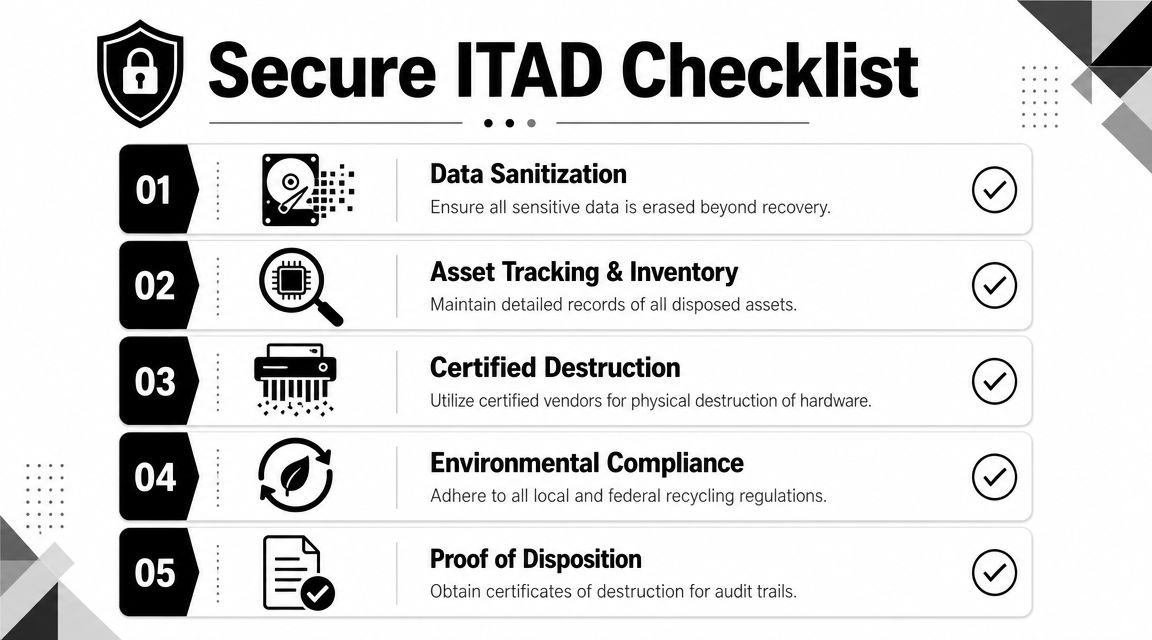
The strongest retail ITAD programs follow a sequence, not a cleanup event.
Inventory what is leaving service
Build an asset list before de-install begins. Include device type, serial number, store location, and whether the asset contains storage media. Don't rely on what accounting thinks is there. Verify against the physical environment.Separate data-bearing from non-data-bearing equipment
A monitor and a POS workstation shouldn't enter the same handling stream. Neither should a dumb peripheral and a firewall appliance. This sounds obvious, but during remodels it's often ignored.Choose the right sanitization method
If the asset is functional and eligible for reuse, wiping may make sense. If media is obsolete, damaged, or shouldn't re-enter circulation, physical destruction is often the cleaner answer. Many organizations still specify DoD 5220.22-M 3-pass wiping for suitable drives, then shred nonfunctional or restricted media.Document chain of custody
Pickup logs, serial tracking, and destruction or recycling records matter. Without them, you can't prove what happened.
Wiping versus shredding
A simple comparison helps.
| Method | Best use case | Limitation |
|---|---|---|
| DoD 5220.22-M 3-pass wiping | Functional drives intended for redeployment or compliant downstream processing | Requires the media to be readable and accessible |
| Physical shredding | Dead drives, damaged media, or assets that should never be reused | Ends resale or reuse potential |
If a drive has failed and someone suggests "we'll just recycle the unit," stop there. Failed media can still create risk. In cases where organizations need to assess unreadable devices before destruction, a specialist in professional data recovery can help determine whether recovery is possible. After that decision, destruction should be handled deliberately, not casually.
Field note: The safest method is the one that matches the asset's condition and your policy requirements. Overkill wastes money. Underkill creates liability.
Environmental compliance isn't optional
Retail electronics contain materials that shouldn't go into general trash streams. That applies to monitors, boards, batteries, printers, cables, and mixed peripheral loads. Responsible Atlanta electronics recycling options matter because secure destruction and environmental handling need to work together, not as separate projects.
The practical mistake is splitting the process between too many vendors. One company hauls, another wipes, another recycles, and nobody owns the full audit trail. For a multi-store retailer, that's where assets disappear from paperwork.
Choosing a Partner for Your E-Waste and Asset Disposition
By the time a retailer starts asking for disposal help, the situation is often already messy. A remodel is underway. The old store server is still mounted. There are unlabeled bins of cables. Payment hardware from two generations sits in the same cage. Finance wants asset records. Operations wants the room cleared by Friday.
That is not the moment to discover your vendor only does bulk junk removal.
What a serious partner should be able to handle
A qualified disposition partner for retail environments should be comfortable with mixed technology loads and real field conditions.
Look for these capabilities:
- Secure de-installation support: Removing equipment from active or recently closed stores without creating more confusion
- Serialized asset tracking: Recording what was picked up, from where, and in what condition
- Data destruction options: Wiping for appropriate media, shredding for obsolete or failed devices
- Clear downstream handling: Responsible recycling channels for non-redeployable equipment
- Operational logistics: Pickup scheduling that works around store hours, loading constraints, and multi-site coordination
A partner should also understand the difference between a clean office electronics pickup and a retail environment with payment infrastructure, edge devices, network gear, and back-room surplus.
Questions worth asking before you sign
Not every vendor needs the same script, but these questions separate strategic providers from simple haulers:
| Question | Why it matters |
|---|---|
| How do you track serialized assets from pickup through final disposition? | Proves chain of custody |
| What data sanitization methods do you offer? | Aligns destruction with policy |
| How do you handle failed or inaccessible media? | Addresses the riskiest assets |
| Can you support multi-store pickups and de-installation? | Reduces internal coordination burden |
| What documentation do you provide after completion? | Supports audits and internal reporting |
Local reach matters more than retailers expect
National capability helps, especially for chains. Local execution still decides whether the job goes smoothly. In Atlanta, loading docks, mall access rules, building schedules, and traffic windows all affect removal plans. A provider that understands local logistics can usually prevent avoidable delays.
That same principle applies when comparing a broad list of services from any e-waste recycling company. Retailers need more than environmentally sound disposal. They need pickup discipline, data controls, and records that make sense to IT, facilities, finance, and compliance.
The best disposition partner doesn't just remove old gear. They reduce uncertainty at the exact point where technology upgrades usually create it.
A good partner also helps you build process, not just clear backlog. That means advising on segregation of assets, scheduling removal in sync with deployments, and preventing retired equipment from sitting in stores long enough to become a control problem again.
If your Atlanta team is upgrading POS systems, edge devices, back-office IT, or retiring obsolete electronics, Scientific Equipment Disposal can help you handle the final step correctly. Their Atlanta-area operation supports secure pickup, de-installation, DoD 5220.22-M 3-pass hard drive wiping, shredding for nonfunctional media, and responsible electronics recycling, giving retail, healthcare, education, and corporate teams a practical path to compliant asset disposition.