Secure hdd disposal: Essential Guide for Your Business (Local & Nationwide)

That dusty old server in your storage closet? It's not just taking up space—it's a data breach waiting to happen.
When it comes to secure HDD disposal, the only real solution is the complete, verifiable destruction of the data itself. We're talking about physical shredding or certified software wiping, processes that leave absolutely nothing behind. This isn't just about clearing out clutter; it's a fundamental part of risk management that shields your business from truly devastating financial and reputational damage, whether you operate locally or across the country.
Why Improper Hard Drive Disposal Is a Major Business Risk
Every retired server, old lab computer, or decommissioned storage array in your facility is a massive, often overlooked, liability. Simply deleting files or stashing old hardware in a back room creates a ticking time bomb of sensitive information. A formal, professional approach to secure data destruction is a core business function, not just another IT task.
Imagine a healthcare provider right here in Georgia facing six-figure HIPAA fines because a single discarded server still held patient records. Or think about a tech startup in California losing its competitive edge after intellectual property was pulled from old lab computers sold for scrap. These aren't hypotheticals; they are the real-world consequences of cutting corners on disposal protocols for businesses nationwide.
The Sobering Reality of Data Recovery
The idea that formatting a drive or drilling a hole through it is "good enough" is a dangerous myth. Time and again, studies have shown that huge amounts of sensitive information can be recovered from drives that were merely "wiped" using standard, off-the-shelf methods.
Without professional-grade sanitization or physical destruction, you're leaving the door wide open for someone to access:
- Customer and Patient Data: Financial details, personal identifiers, and protected health information (PHI).
- Employee Records: Social Security numbers, payroll information, and other confidential HR data.
- Proprietary Information: Trade secrets, R&D data, and your most valuable intellectual property.
- Internal Communications: Sensitive emails, strategic plans, and operational documents you'd never want public.
The fallout from a data breach goes way beyond the initial data loss. You're looking at crippling regulatory fines, drawn-out legal battles, a shattered public reputation, and a total erosion of customer trust. It's critical to understand the full financial and reputational damage, as detailed in reports covering the cost of a data breach.
Financial and Compliance Nightmares
The regulatory landscape is unforgiving. For medical labs from Florida to Texas and hospitals across the United States, HIPAA compliance is absolutely non-negotiable, with fines now averaging a staggering $1.5 million per incident for data mismanagement.
This ever-present threat has pushed the secure data destruction market—which includes HDD disposal—to a projected USD 5.91 billion by 2030. That growth is being fueled directly by the explosion in cybersecurity threats. In 2023 alone, data breaches exposed over 5.7 billion records worldwide, with many of these incidents traced back to improperly discarded storage devices.
A proactive strategy is your only real defense. By treating every single end-of-life hard drive as a potential security incident, you move from a reactive, clean-up mindset to a robust, forward-thinking data protection strategy. This is absolutely essential for protecting your clients, your team, and your organization's future.
Comparing DIY vs. Professional Secure HDD Disposal
Before you task an intern with a drill and a pile of old hard drives, it's worth taking a moment to compare the potential outcomes. This table offers a quick look at the risks of handling hard drive disposal in-house versus partnering with a compliant, certified professional for local or nationwide service.
| Risk Area | DIY Disposal (e.g., Deleting Files, Drilling) | Professional Secure Disposal |
|---|---|---|
| Data Security | High risk of recoverable data. Standard deletion is ineffective; physical damage is often incomplete. | 100% data sanitization or destruction guaranteed through compliant methods (shredding, degaussing). |
| Compliance Risk | Fails to meet HIPAA, NIST SP 800-88, or GDPR standards. Lacks audit trail. | Fully compliant with major regulations. Provides Certificates of Destruction for audit proof. |
| Reputational Damage | A single recovered drive can lead to a public breach, eroding customer trust and damaging brand image. | Protects brand reputation by ensuring sensitive data is permanently unrecoverable. |
| Legal Liability | You remain legally responsible for any data breach, even after the drive leaves your possession. | Transfers liability through a secure chain-of-custody process, protecting your organization. |
| Internal Resources | Consumes valuable employee time and IT resources that could be focused on core business tasks. | Frees up your team. Handles all logistics, from pickup to final certified destruction, locally or nationwide. |
Ultimately, the choice comes down to certainty. Professional disposal provides a documented, insured, and compliant process that eliminates risk, while DIY methods leave your organization exposed to significant financial and legal threats.
Exploring Your Data Destruction Options
Choosing the right way to handle hard drive disposal is a big decision, one that directly impacts your security, compliance, and even your budget. Not every drive needs the same end-of-life treatment. The real question you have to answer is: do you need to reuse the drive, or does it need to be gone for good?
Let's walk through the three main approaches to data destruction: software wiping, degaussing, and physical shredding. Each has its place, and understanding the differences will help you build a solid data protection plan, whether your assets are in a single location or spread out across the country.
Software Wiping for Asset Redeployment
Software wiping, often called data erasure, is exactly what it sounds like. It uses specialized software to overwrite every single sector of a hard drive with random data, making the original information practically unrecoverable.
This is a world away from just deleting files or formatting a drive. Those actions only remove the pointers to the data, leaving the information itself ripe for recovery. Proper software wiping ensures the sensitive info it once held is truly gone. This method is perfect when you plan to redeploy assets internally, donate them, or resell them on the secondary market. The hardware is preserved, but the data isn't.
- Real-World Scenario: A national company is upgrading employee laptops across its offices in cities like New York, Chicago, and Los Angeles. Instead of destroying the old hard drives, the IT team uses certified software to wipe them clean. Now, the laptops can be safely donated to local school districts nationwide without risking a data breach.
- Key Standard: While many have heard of the DoD 5220.22-M 3-pass standard, the modern benchmark is NIST SP 800-88. This framework from the National Institute of Standards and Technology provides the most current and comprehensive guidelines for media sanitization.
Degaussing for Magnetic Media
Degaussing is a much more final step. A degausser is a beast of a machine that hits a traditional hard disk drive (HDD) with an incredibly powerful magnetic field. This process instantly and permanently scrambles the magnetic platters where your data lives.
The result? The drive is not only wiped clean but also rendered completely useless. That intense magnetic force destroys the delicate firmware and servo tracks the drive needs to even spin up, making it impossible to boot ever again. Degaussing is fantastic for HDDs and some old magnetic tapes, but it's critical to know that it has zero effect on Solid-State Drives (SSDs), which don't use magnetic storage.
Physical Destruction: The Final Word in Security
When your data is so sensitive that even a tiny risk of recovery is too much, physical destruction is the only real answer. This is the gold standard for secure HDD disposal, offering an absolute, verifiable guarantee that the information can never be compromised.
For healthcare facilities managing patient data or government agencies with classified information across the United States, this is often the only path to compliance.
Industrial shredding is the most common and effective method here. A powerful shredder grabs the hard drives and tears them into tiny, mangled pieces of metal and plastic. At that point, data recovery is physically impossible. You can learn more about how this works in our guide to professional hard drive shredding.
Below is a look at the NIST SP 800-88 guidelines, the go-to document for data sanitization.
This document is the authoritative source for federal agencies and a best-practice framework for any organization, categorizing methods into Clear, Purge, and Destroy.
To make it easier to see how these methods stack up, we've put together a quick comparison table. This should help you quickly identify the best fit for your security needs, no matter your location.
HDD Sanitization Methods at a Glance
| Method | Best For | Compliance Level (NIST) | Data Recovery Risk | Allows for Reuse? |
|---|---|---|---|---|
| Software Wiping | Reusing or reselling functional drives; lower-risk data. | Clear | Very Low | Yes |
| Degaussing | End-of-life HDDs and magnetic tapes with high-risk data. | Purge | Extremely Low | No |
| Shredding | Highest-risk data, damaged drives, SSDs, and regulatory compliance. | Destroy | None | No |
Choosing the right method comes down to your specific risk profile and operational goals. For most, a mix of approaches is the most practical and secure solution.
Key Takeaway: The market for hard disk destruction equipment tells a story. It was valued at USD 2.69 billion in 2024 and is projected to climb to USD 4.23 billion by 2032. This growth isn't surprising—it reflects the fact that physical destruction is often the most reliable method, especially for drives that are already dead. NIST guidelines even recommend shredding for high-security needs, which renders data irrecoverable in 99.9% of cases. You can discover more insights about this growing market on 360iResearch.com.
For most organizations I work with, a hybrid strategy makes the most sense. Newer, functional devices can be securely wiped to preserve their value, while older, broken, or highly sensitive drives go straight to the shredder to eliminate every last bit of risk. This approach gives you maximum security without creating unnecessary e-waste or cost.
Building a Compliant HDD Disposal Workflow
Knowing your options for secure HDD disposal is one thing. Actually putting that knowledge into a repeatable, auditable process is something else entirely. A rock-solid workflow is your company's single best defense against an accidental data breach and the steep regulatory fines that follow. It's how you turn data security from a vague goal into a practical, everyday standard.
This isn't just about picking a destruction method. It's about creating a bulletproof process that tracks every single hard drive from the moment it’s pulled from a server to its final, certified destruction. Think of this as your blueprint for a disposal program that leaves zero room for error, whether you're managing assets in a single office or across multiple states.
Starting with a Data Risk Assessment
Before you even think about wiping a drive, you need to know what’s on it. A quick data risk assessment is the first critical step, and it dictates everything that comes after. Not all data is created equal, so your disposal method has to match the sensitivity of the information at risk.
For example, a hard drive from a public-facing lobby kiosk carries a much lower risk than one from a server processing patient billing information. That server drive is loaded with Protected Health Information (PHI), which means it demands the highest level of security. For that kind of data, on-site physical destruction is really the only acceptable choice under HIPAA, regardless of your location.
To figure this out, just ask a few basic questions:
- What kind of data are we dealing with? Is it customer PII, internal R&D, employee records, or regulated PHI?
- What compliance rules apply here? Are we talking HIPAA, GDPR, PCI-DSS, or something else?
- What’s the fallout if this data gets out?
Answering these questions helps you sort your assets into risk categories and assign the right disposal protocol. It ensures you’re focusing your resources where the risk is greatest.
Establishing an Unbreakable Chain of Custody
The moment a hard drive is decommissioned, it enters a vulnerable state. This is where most mistakes happen. A chain-of-custody log is the most important tool you have to lock down this process. It’s simply a detailed, chronological record that tracks that drive every single step of the way.
And no, this isn't a simple sign-out sheet. A truly compliant chain-of-custody document needs to include:
- Asset Identification: The unique serial number and asset tag for each individual drive. No exceptions.
- Secure Handling: Signatures and timestamps from every single person who touches the drives, from your IT manager to the disposal vendor’s technician.
- Secure Transport: Clear documentation of how the assets are stored while in transit, like in a locked, tamper-evident container.
- Final Disposition: The exact date, location, and method of final destruction.
For a business with multiple U.S. offices, this means documenting the precise moment a locked bin of hard drives is loaded onto a vendor's truck at your Boston facility, who signed for it, and when it’s scheduled to arrive at the secure shredding facility in Massachusetts. This level of detail is your proof of due diligence.
On-Site vs. Off-Site Destruction: The Final Checkpoint
A huge decision in your workflow is where the destruction actually happens. Both on-site and off-site services have their place, and the right choice usually comes down to your company's security policies and compliance needs.
On-site destruction means a mobile shredding truck comes right to your parking lot or loading dock. You can physically watch the entire process, from serial number scanning to the moment your drives are turned into tiny metal fragments. This offers the ultimate peace of mind and is pretty much standard for high-security environments, whether in a dense urban center or a suburban corporate campus.
Off-site destruction, on the other hand, is usually more budget-friendly. Your hard drives are packed into locked containers and securely transported to a specialized facility. This requires absolute trust in your vendor’s logistics and, of course, that impeccable chain-of-custody record to ensure nothing goes missing along the way.
This simple visual breaks down the core options that make up the final step of your disposal workflow.
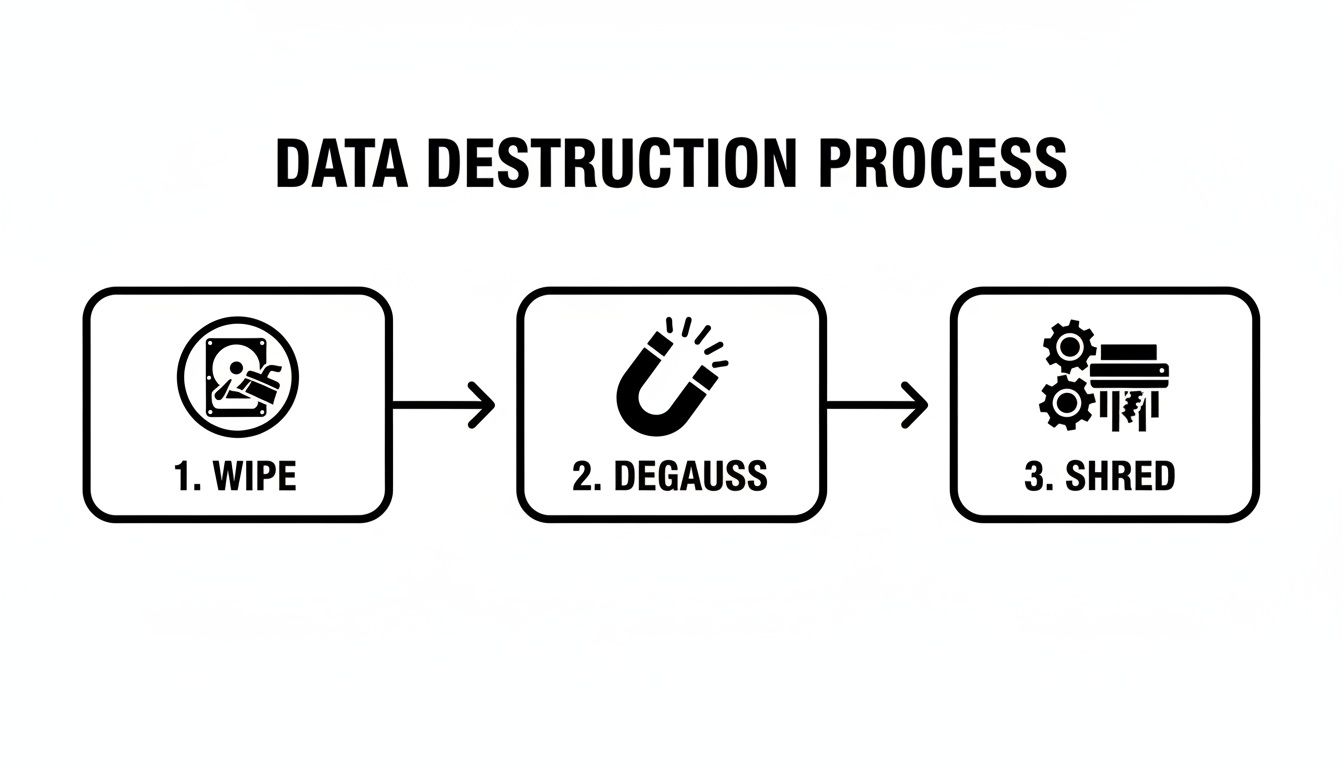
This process shows the escalating levels of data sanitization, with physical shredding being the final word for absolute, irreversible data security.
Your Final Proof: The Certificate of Destruction
The job isn't done until you have the final paperwork in hand. A Certificate of Destruction is the legally recognized document that officially closes the loop. It serves as your auditable proof that your data was destroyed according to all compliance standards.
This certificate is non-negotiable. It must list every single serial number, confirm the date and method of destruction, and be signed by an authorized person from the certified disposal vendor. If an auditor ever comes knocking, this document is your ultimate defense, proving you met your legal and ethical duties for secure HDD disposal. To see exactly what this critical document should include, check out the details in our guide on the Certificate of Destruction.
How to Vet a Secure Disposal Partner
Your entire hard drive disposal strategy really boils down to one thing: picking the right partner. The vendor you choose becomes the final gatekeeper for your company's most sensitive data, so this isn't a decision to take lightly. Handing your assets over to an uncertified or fly-by-night operator is no different than leaving your server room door wide open.
This is a critical piece of modern third-party risk management, where you have to assess and head off potential weak spots in your supply chain. Whether you’re looking for a local provider or a national service, the vetting process needs to be thorough. A top-tier partner doesn’t just destroy hard drives; they provide an insured, auditable, and compliant service that genuinely transfers the risk away from your organization.
Look for Non-Negotiable Certifications
Certifications are your first line of defense. They are independent, third-party proof that a company meets tough standards for security, employee training, and how they run their day-to-day operations.
The single most important credential to demand is NAID AAA Certification. This isn't just another logo for a website. Run by the International Secure Information Governance & Management Association (i-SIGMA), it's the global gold standard for data destruction.
A NAID AAA certified vendor is subject to surprise, unannounced audits that cover every corner of their business, including:
- Employee screening and background checks.
- Secure chain-of-custody procedures.
- Operational security at their facility and inside their trucks.
- Mandatory insurance coverage.
If a potential vendor isn’t NAID AAA certified, they shouldn't even be on your shortlist. It's that simple.
Verify Deep Regulatory Expertise
Your disposal partner has to be fluent in compliance. They need to intimately understand the specific rules that govern your industry, whether it’s HIPAA for healthcare, FACTA for finance, or NIST SP 800-88 for government work. Their expertise—or lack thereof—directly impacts your own compliance posture.
This is especially true here in North America, which drives a global data destruction market valued at USD 1.65 billion in 2024. Why? Because laws like HIPAA can slap you with penalties up to $50,000 per violation for improper disposal. And with studies showing that a shocking 40% of used drives sold online still contain recoverable data, the stakes couldn't be higher. Discover more insights about the hard drive destruction service market from Spherical Insights.
Pro Tip: Don't just take their word for it. Ask for redacted case studies or client references from your industry. A partner who’s truly been in the trenches will have a proven track record of handling data under the same regulatory pressures you face every day.
Ask the Right Questions During Vetting
Once you've narrowed your list to certified, experienced vendors, it's time to dig into the nuts and bolts of their process. The answers they give—or can't give—will tell you everything you need to know.
Key Vetting Questions:
- "Can you provide a sample Certificate of Destruction and a chain-of-custody report?" This is non-negotiable. Scrutinize these documents to make sure they capture every critical detail, especially individual serial numbers for each drive.
- "What’s your process for non-functional or damaged drives?" A real pro will have a clear, secure workflow for drives that can’t be wiped. The answer should almost always be physical shredding.
- "Are your employees background-checked and trained specifically on data security?" The human element is often the weakest link. You need to know who is handling your assets.
- "How do you ensure a secure chain of custody during transport?" You're looking for answers that include locked containers, GPS-tracked vehicles, and dual-employee control. Anything less is a red flag.
- "What are your environmental and recycling credentials?" A responsible partner should also be certified for sustainable electronics disposal, like R2 or e-Stewards. You can learn more about what to look for in a certified e-waste recycling company.
Remember, choosing a vendor is like adding a member to your security team. Take the time to vet them properly. It’s the only way to ensure your secure HDD disposal process is truly secure from start to finish.
Blending E-Waste Sustainability with Rock-Solid Data Security
A truly bulletproof plan for getting rid of old hard drives goes beyond just protecting your data. It has to tackle your company's environmental footprint, too. This is exactly where data security strategy meets Corporate Social Responsibility (CSR). It’s about moving past a tunnel-vision focus on destruction and embracing a smarter approach that manages your entire e-waste ecosystem responsibly.
This dual focus isn't some "nice-to-have" anymore; it's a core business expectation for companies nationwide. Your stakeholders, your clients, and even your own team expect companies to show a real commitment to sustainability. Just shredding every piece of hardware, while secure, feeds the massive global e-waste problem and completely ignores the value still locked inside those retired assets.
The Hidden Environmental Cost of E-Waste
Every single hard drive, server, and computer is packed with valuable and finite resources—everything from aluminum and steel to precious metals. When these devices get dumped in a landfill, or even just shredded without a proper recycling plan in place, those resources are gone for good. Manufacturing new devices to replace them then generates a huge carbon footprint.
Think about the lifecycle of a single 1TB hard drive. Its creation can produce the equivalent of 200kg of CO₂. When that drive is shredded at the end of its life, the whole manufacturing cycle has to kick off again, compounding the environmental cost.
The most responsible approach to secure HDD disposal isn't always destruction. It's about making a conscious choice to preserve value and resources whenever security protocols allow, turning a potential liability into a sustainable asset.
Zero-Landfill Policies and Certified Recycling
This is exactly why partnering with a vendor committed to certified, zero-landfill recycling is so critical. These partners don't just offer destruction services; they provide a complete asset disposition strategy. They operate under certifications like R2 (Responsible Recycling) or e-Stewards, which are your guarantee that all electronic waste is handled in an environmentally sound and ethically responsible way.
A certified partner follows a clear hierarchy:
- Assess for Reuse: First, they figure out if a device can be safely and securely refurbished for a second life.
- Secure Sanitization: For functional hardware, they use certified methods like NIST 800-88 compliant software wiping to make data completely unrecoverable, preserving the device itself.
- Responsible Recycling: For broken or obsolete equipment, they ensure materials are recovered and put back into the manufacturing stream instead of ending up in a landfill.
This strategy directly supports a circular economy, which is all about minimizing waste and cutting down the need for new raw materials.
A Single Partner for Security and Sustainability
Let's be honest: managing a facility shutdown, a lab decommissioning, or a massive equipment upgrade is already complex enough. Juggling one vendor for data destruction and another for e-waste recycling just adds unnecessary logistical headaches and, more importantly, increases the risk of a broken chain of custody.
A single-source partner who is an expert in both security and sustainability simplifies everything. They can manage the entire process, from on-site de-installation and secure transport to certified data wiping and final recycling. This integrated approach ensures your security goals and your CSR objectives are met at the same time.
For organizations looking to streamline operations, you can learn more about how corporate e-waste solutions can provide a unified strategy. This not only makes the process more efficient but also strengthens your company’s commitment to being a good environmental steward. By choosing a partner who can securely wipe and redeploy assets when possible and responsibly recycle them when not, you achieve two critical business objectives at once.
Answering Your Top Questions About Secure HDD Disposal
Even with the best plan in place, a few specific questions always seem to pop up right before you pull the trigger on a data destruction project. That's perfectly normal. Getting straight answers is the only way to move forward with confidence.
Let's tackle some of the most common questions we hear from IT managers and facility directors, whether they are in a specific city or managing assets across the country. These aren't just hypotheticals—they're the real-world concerns that come up during equipment refresh cycles.
So, Is Just Drilling Holes in a Hard Drive Secure Enough?
It’s a tempting thought, isn't it? Drilling a hole through a stack of old hard drives feels final and destructive. But in reality, it's a dangerously unreliable method that gives a false sense of security.
Picture the data platters inside the drive like a stack of tiny CDs. A drill bit only chews through a very small fraction of the total surface area where your data lives. Believe it or not, a determined data recovery specialist can often pull significant amounts of information from the undamaged sections of those platters.
Here's the bottom line: For any data governed by HIPAA, financial regulations, or other privacy laws, drilling holes is absolutely not a compliant disposal method. It falls far short of NIST standards and leaves your organization wide open to massive legal and financial blowback.
To be truly safe, you need a method that guarantees 100% data destruction. That means professional shredding or degaussing—methods that provide the auditable proof you need to satisfy regulators.
What Exactly Is a Certificate of Destruction?
A Certificate of Destruction is much more than a simple receipt. It's a formal, legally recognized document that acts as your official proof that your data-bearing assets have been permanently and irreversibly destroyed. Think of it as the final, critical piece of your compliance and risk management puzzle.
This document is your definitive, auditable record. When regulators come asking, this is what you'll use to demonstrate due diligence under frameworks like HIPAA.
A legitimate certificate must include:
- A Full Inventory: The unique serial number of every single asset that was destroyed. No exceptions.
- Destruction Method: A clear explanation of how the drives were destroyed—shredded, degaussed, or sanitized—and the standard used (e.g., NIST SP 800-88).
- Chain of Custody: Verifiable details showing who handled the assets, when, and the secure location of the final destruction.
- Official Sign-off: The signature of an authorized representative from the certified vendor, confirming the process was completed to spec.
Without this certificate, you have no verifiable proof that you fulfilled your legal obligations. It's that simple.
On-Site vs. Off-Site Destruction: Which is Right for Me?
Deciding where the destruction takes place is one of the biggest logistical and security choices you'll make. The right answer really hinges on your organization’s internal security policies, risk tolerance, and compliance mandates.
On-site destruction offers the ultimate level of security and transparency. A mobile shredding vehicle comes directly to your facility, allowing your team to witness the entire process from start to finish. You can personally verify serial numbers right before the drives are fed into the shredder, guaranteeing a perfect, unbroken chain of custody.
Off-site destruction is typically the more budget-friendly option, especially when dealing with a large volume of assets. In this scenario, your hard drives are secured in locked, tamper-evident containers and safely transported to a specialized destruction facility. This workflow demands complete trust in your vendor and relies on a meticulously documented chain-of-custody report to track your assets every inch of the way.
For most organizations handling highly sensitive data or operating under strict compliance rules, the absolute transparency of on-site service is the hands-down winner. It completely eliminates any doubt about what happens to your assets the moment they leave your sight.
FAQ on Secure HDD Disposal
Still have questions? We've got answers. Here are a few more common queries we get from organizations planning their data destruction projects locally and nationwide.
| Question | Answer |
|---|---|
| How small should hard drives be shredded? | For most compliance needs, drives should be shredded to 2mm particles or smaller. This ensures that no recoverable data fragments remain, meeting the highest security standards set by organizations like the NSA and DoD. |
| Can you destroy Solid-State Drives (SSDs)? | Yes, but it requires specialized equipment. SSDs must be disintegrated or shredded into tiny particles to destroy the individual memory chips. Degaussing does not work on SSDs as they don't store data magnetically. |
| What's the most common mistake companies make? | The biggest mistake is underestimating the risk of old, forgotten drives. Many breaches happen because a drive was left in a storage closet, a retired server, or a leased copier and wasn't included in the final disposal plan. |
| Is wiping a drive enough for disposal? | For internal redeployment, a multi-pass software wipe following NIST SP 800-88 guidelines is often sufficient. For final disposal of drives containing sensitive data, physical destruction is the only foolproof method. |
Hopefully, this clears things up! The key is to approach data destruction with the same seriousness you apply to live data security.
Navigating the world of secure data destruction and compliant e-waste recycling is a lot easier with an experienced partner. Scientific Equipment Disposal delivers certified, transparent, and sustainable solutions for businesses both locally and nationwide. We manage everything from on-site logistics to the final certified destruction, ensuring your data is protected and your environmental goals are achieved.