Secure Hard Drive Destruction in Suwanee GA: A 2026 Guide

You’re probably dealing with this already. A closet, cage, or back room has become the holding area for retired desktops, failed laptops, old backup drives, decommissioned servers, and maybe a few pieces of lab equipment nobody wants to throw away until “data destruction is handled.”
That pile isn’t just e-waste. It’s stored liability.
In Suwanee and the broader Atlanta metro, that matters more than many teams realize. Healthcare groups, research labs, universities, manufacturers, and corporate offices all cycle through equipment that can retain patient data, employee records, research files, credentials, and proprietary information long after the device is no longer useful. Formatting a drive, deleting folders, or pulling a machine out of service doesn’t solve the problem. It only changes where the risk sits.
Secure Hard Drive Destruction in Suwanee GA is really about two jobs. First, make the data unrecoverable. Second, create records that prove exactly how, when, and by whom that happened. If either piece is missing, your disposal process is incomplete.
The Data Security Blind Spot in Your Suwanee Facility
A common failure point isn’t the active server room. It’s the forgotten storage area.
A facility manager approves a refresh. IT swaps out workstations. A lab retires an analyzer with embedded storage. A clinic replaces imaging peripherals and a few nursing station PCs. Everything gets stacked for later pickup. Weeks pass. Sometimes months. The devices are out of production, but the data is still there.
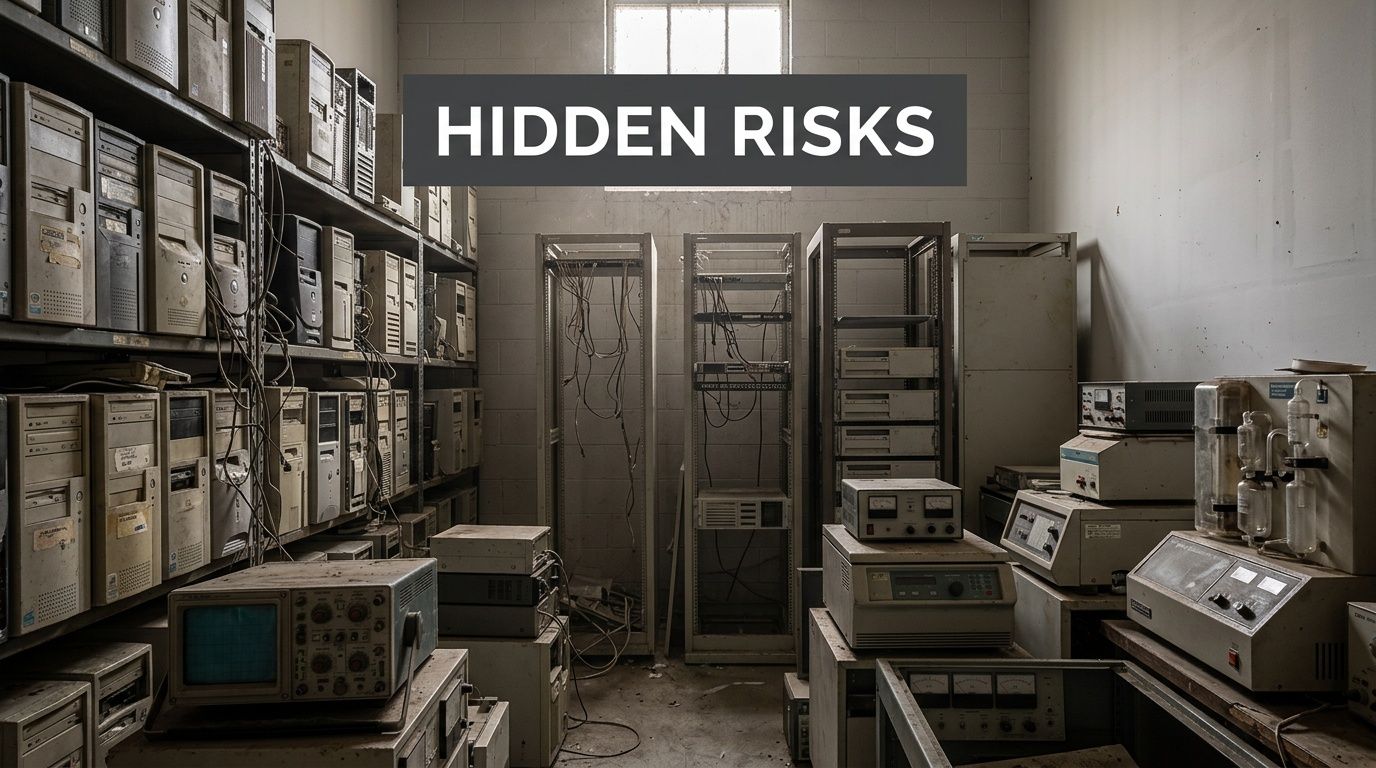
That’s where disposal mistakes begin. Teams treat old equipment like surplus property when they should treat it like a regulated information asset. Hard drives in old towers. SSDs inside laptops. Storage modules inside medical and scientific equipment. Backup media in drawers. All of it can carry recoverable information if it isn’t sanitized or destroyed correctly.
What makes the pile risky
The danger usually comes from ordinary operational habits:
- Delayed pickup: Assets sit untracked while departments wait to consolidate volume.
- Incomplete inventory: Staff remember the computers, but miss the drives inside lab gear, printers, copiers, or network equipment.
- Assumed erasure: Someone says the devices were “wiped” years ago, but there’s no log, no serial-level report, and no certificate.
- Shared storage access: Multiple teams can enter the area, which weakens chain of custody.
Old equipment doesn’t stop being sensitive because it stopped being useful.
For regulated organizations, secure destruction is the point where IT asset disposition becomes compliance work. If you’re vetting partners, this guide on how to choose an electronic recycling center you can trust is a practical place to start because disposal quality depends as much on process control as it does on machinery.
What works and what doesn’t
What doesn’t work is informal handling. A maintenance room with unsecured shelves. A pickup arranged without serial tracking. A recycler who can haul equipment but can’t explain chain of custody.
What works is a controlled destruction workflow. Identify the assets. Separate reusable media from nonfunctional media. Decide what must be physically destroyed. Witness the process when risk or policy requires it. Then retain documentation that will stand up during an audit.
That’s the standard your Suwanee facility should operate against.
Understanding Your Data Destruction Options
Most confusion starts with one mistaken assumption. People use “erase,” “wipe,” and “destroy” like they mean the same thing. They don’t.
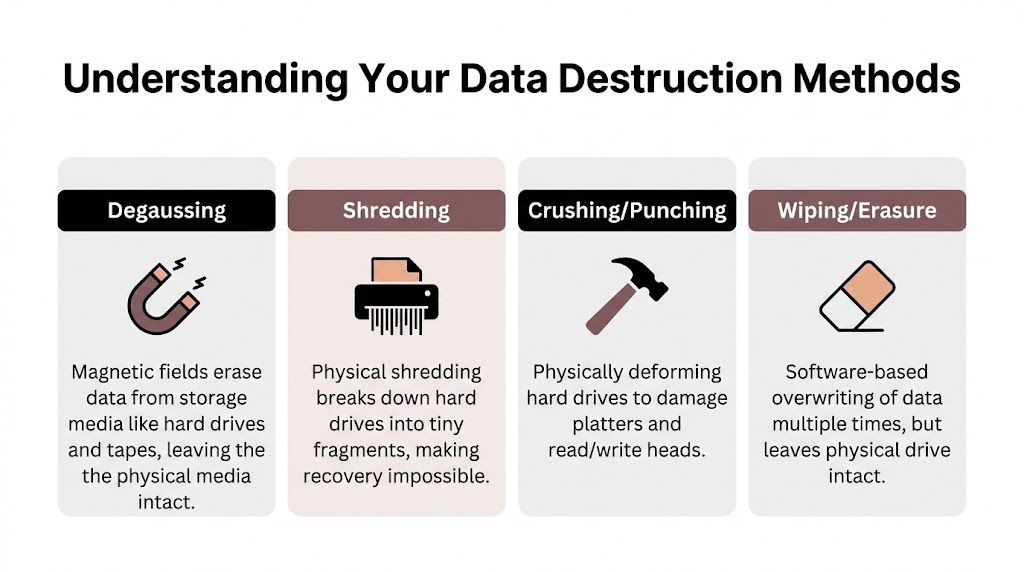
Think of a hard drive like a book. Deleting files is like removing the table of contents. The pages still exist. Wiping is like writing over the pages. Degaussing is like stripping the ink out of magnetic media. Physical shredding is like feeding the entire book through an industrial shredder until no page can be reconstructed.
Demand is rising for all of these services. The global hard drive destruction service market is projected to grow from USD 1.65 billion in 2024 to USD 5.05 billion by 2035, with a projected CAGR of 10.7%, according to this hard drive destruction market projection. That growth tracks with what facilities are seeing on the ground. More devices, more compliance pressure, and less tolerance for recoverable data.
Wiping and erasure
Software wiping overwrites stored data. It has a place, especially when an organization plans to reuse working media inside a controlled program.
Wiping is useful when:
- The drive is functional: The device can still be read and processed.
- Reuse is part of the plan: Internal redeployment, resale, or refurbishment may require sanitization rather than destruction.
- You have verification: Logs and reporting must show the wipe completed.
Wiping is a poor fit when the drive is damaged, inaccessible, encrypted in an unmanaged way, or leaving your control without strong documentation. It also leaves the physical drive intact, which many regulated teams don’t find sufficient for final disposition.
Degaussing and crushing
Degaussing uses a magnetic field to disrupt data on magnetic media. It can be effective for certain traditional hard drives and tape media, but it isn’t a universal answer.
Crushing or punching physically deforms the drive. It damages key components, but it doesn’t create the same level of assurance as full shredding for every media type and every audit context.
A quick comparison helps:
| Method | Best use | Limitation |
|---|---|---|
| Wiping | Reusable, working drives | Drive remains intact |
| Degaussing | Certain magnetic media | Not suited to all media types |
| Crushing | Rapid physical damage | Less definitive than full shredding |
| Shredding | Final destruction | Media is not reusable |
Why shredding is the default for final disposal
For drives that are obsolete, defective, or leaving organizational control, physical shredding is the strongest practical option because it removes the recovery question entirely. That matters when your issue isn’t convenience. It’s proof.
Practical rule: If a drive is dead, unknown, mixed into decommissioned equipment, or tied to regulated data, treat physical destruction as the safer endpoint.
That becomes even more important once SSDs enter the picture, because the media type changes what “secure” really means.
Meeting HIPAA and NIST Compliance in Georgia
Compliance language can sound abstract until you connect it to a storeroom full of retired assets. Then it becomes operational. Your organization has to render sensitive data unreadable and unrecoverable before equipment is recycled, resold, transferred, or discarded.
For many Georgia organizations, the working benchmark is NIST SP 800-88. HIPAA, FACTA, internal security policies, and audit expectations all point toward the same outcome: data can’t remain recoverable when media leaves your control.
One number should reset the conversation. HIPAA fines can reach up to $50,000 per violation, and this NIST 800-88 hard drive destruction summary states that NIST SP 800-88 mandates physical destruction for hard drives leaving organizational control because it renders data recovery impossible. The same source notes that software wiping like the DoD 3-pass method can leave residual magnetic traces recoverable by advanced forensic tools in 5-10% of cases per NIST tests.
What that means in plain English
If you’re moving drives off premises, handing them to a third party, or disposing of mixed old equipment, your standard can’t be “probably erased.” It needs to be defensible.
For a healthcare facility, that means protected health information can’t remain on decommissioned media. For a research organization, the issue may be study data, grant records, or controlled information. For a finance or corporate environment, it may be employee files, customer records, or contract data.
A compliant process usually includes:
- Asset identification: Know which devices contain data-bearing media.
- Method selection: Match the sanitization method to the media type and final disposition.
- Controlled custody: Record who handled the assets and when.
- Proof of completion: Keep evidence that destruction occurred as specified.
Why network compliance and disposal compliance connect
Media destruction doesn’t sit outside your broader security program. It closes the gap left when endpoint lifecycle management ends and disposal begins. Teams working to achieve network security compliance usually focus on systems, access, and monitoring. That’s necessary, but disposal controls matter just as much when retired assets still hold regulated data.
If you need a more direct overview of disposal-specific obligations, secure data destruction services are typically evaluated against the same risk lens your auditors will use: Can the organization prove the data was rendered unrecoverable?
If the drive leaves your custody and you can’t prove what happened to it, compliance gets harder fast.
What auditors usually care about
Auditors rarely care about marketing language. They care about process evidence.
They’ll want to see whether your policy matched the media involved, whether chain of custody was documented, and whether your records tie destroyed assets to specific dates, methods, and responsible personnel. If your vendor can’t explain that in plain terms, your program probably has a weak spot.
On-Site vs Off-Site Destruction Which Is Right for You
This decision isn’t just about price. It’s about where you want risk to sit.
On-site destruction means the shredding or destruction happens at your location, often with a mobile unit. Off-site destruction means the media is transported to a secure facility for final processing. Both models can work. The right choice depends on your volume, sensitivity level, operational constraints, and documentation requirements.
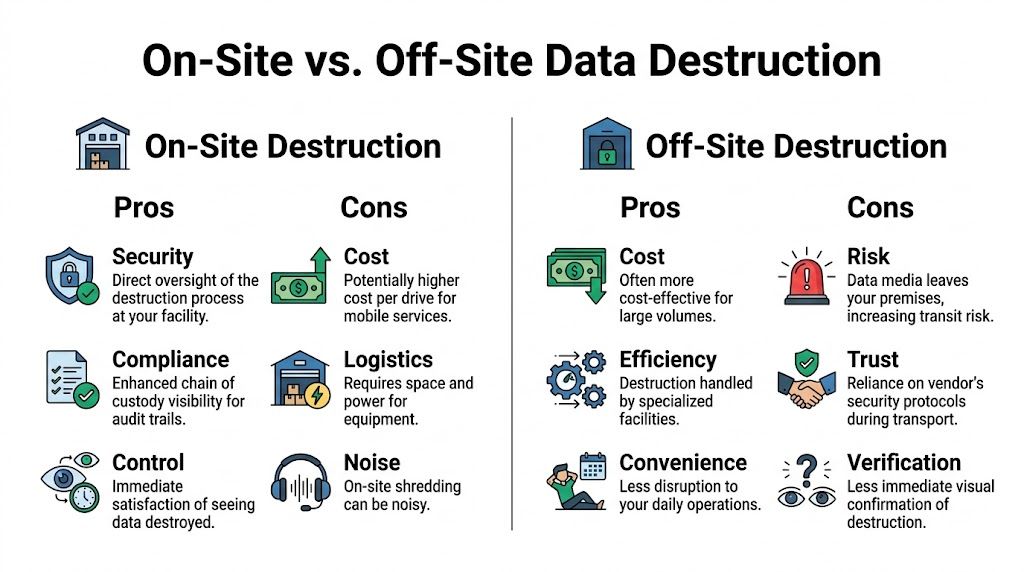
In Georgia, over 1,000 businesses trust on-site hard drive destruction providers for witnessed shredding, and pricing typically falls in the $7 to $20 per drive range, according to this Georgia on-site data destruction overview. That’s one reason on-site service is common for hospitals, universities, and corporate IT groups that need auditable handling.
When on-site destruction makes sense
On-site service is usually the better fit when your priority is direct oversight.
Choose on-site when:
- Witnessing matters: Compliance staff, IT, or department leaders want to observe destruction.
- Chain of custody must stay tight: The fewer handoffs, the easier the audit trail.
- You’re handling mixed regulated assets: Hospitals, labs, and public sector teams often prefer destruction before anything leaves the property.
On-site service also reduces internal debate. Staff can see the drives destroyed, serials can be checked at pickup, and documentation can be tied to the event more directly. If you’re comparing providers, computer shredding services in the Atlanta area should be evaluated on witness options, inventory handling, and certificate detail, not just haul-away convenience.
When off-site destruction can work
Off-site destruction can be reasonable for high-volume projects, recurring asset streams, or organizations with secure staging and strong confidence in the vendor’s transport controls.
It’s often chosen when:
- Volume is large: Consolidated loads may be easier to process at a dedicated plant.
- Scheduling is tight: Pickup can happen before a full mobile shred event is arranged.
- Your policy allows it: Some organizations are comfortable with secure transport if documentation is strong.
The trade-off table
| Decision factor | On-site | Off-site |
|---|---|---|
| Witnessed destruction | Strong | Limited or delayed |
| Chain of custody visibility | Stronger | Depends on transport controls |
| Operational disruption | Some on-site activity | Less activity at your facility |
| Best fit | High-sensitivity assets | Large consolidated loads |
The more sensitive the data and the less tolerance you have for transit risk, the more attractive on-site destruction becomes.
If your facility manager and compliance lead disagree, start with one question: do you need to see the media destroyed before it leaves your premises? The answer usually points to the right model.
The Certificate of Destruction Your Audit-Proof Guarantee
Physical destruction is only half the job. The other half is proving it happened in a way an auditor, regulator, insurer, or internal investigator can understand without guesswork.
That proof is the Certificate of Destruction, and it should never be treated as a throwaway PDF.
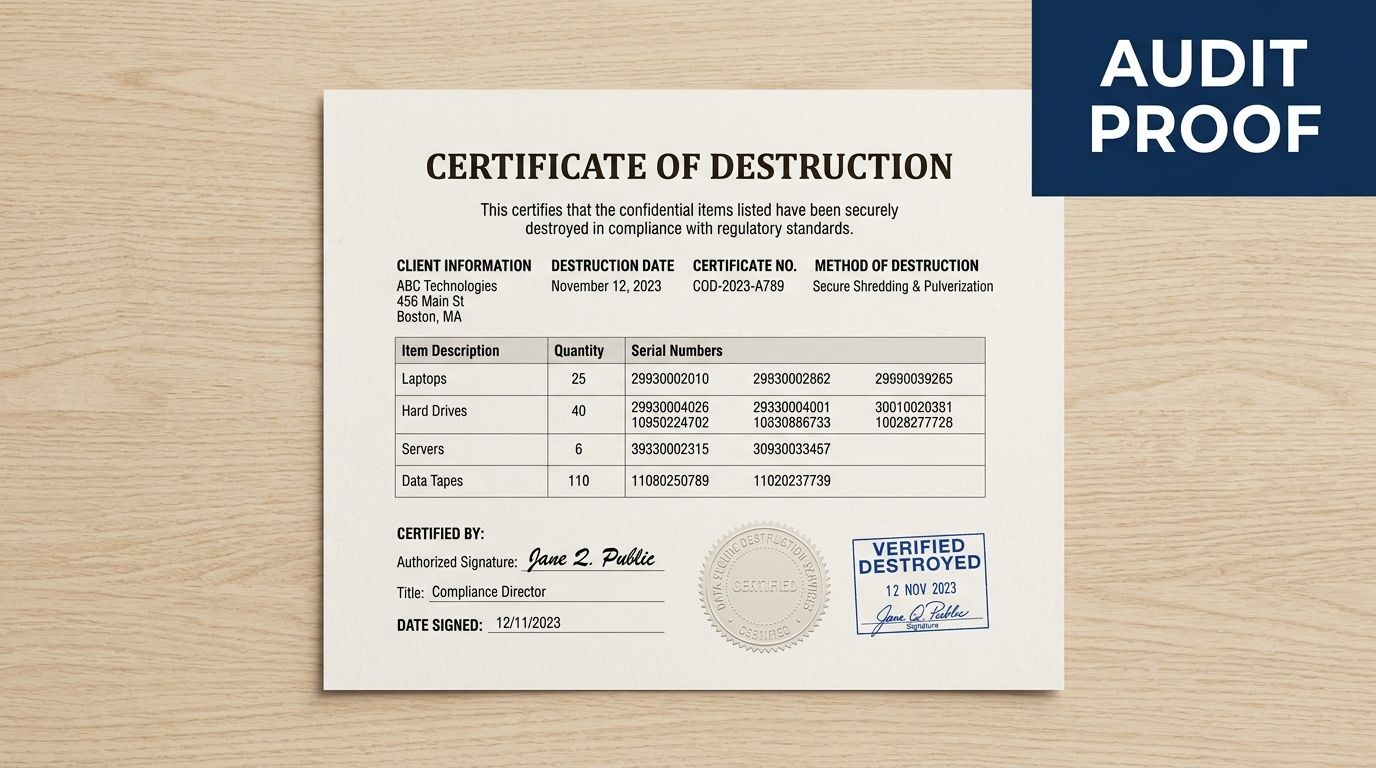
For healthcare, research, and government-adjacent operations, documentation quality is often the difference between a clean audit response and a scramble. This discussion of Atlanta-area hard drive destruction documentation gaps notes that existing local content often fails to explain how destruction records align with requirements such as HIPAA, FDA 21 CFR Part 11, or NIH data governance standards. That gap is real. Many organizations receive a generic certificate that confirms a service occurred but doesn’t prove enough.
What a strong certificate should include
A usable certificate should tie the destruction event to identifiable assets and a defined process.
Look for these elements:
- Asset-level detail: make, model, and serial number for each drive or device where practical
- Destruction method: shredding, degaussing, disintegration, or another named process
- Date and location: where and when the destruction occurred
- Personnel and witnesses: who performed the work and who observed it
- Compliance language: a statement connecting the process to the applicable standard or customer requirement
Why generic paperwork falls short
A vague certificate that says “electronics destroyed” doesn’t answer the questions that matter during an audit. Which electronics? Which serials? Which media type? Which method? Was the destruction witnessed? Did the assets remain in custody until final processing?
That’s why regulated teams should review an example before they book service. A sample certificate of destruction helps you assess whether a vendor’s paperwork will support an actual compliance review instead of just closing a procurement file.
Good documentation turns destruction from an operational task into a defensible control.
If your organization handles patient records, lab data, or grant-funded research information, that control needs to be detailed enough to stand on its own months later, when nobody remembers the pickup day.
How Scientific Equipment Disposal Delivers for Suwanee
In practice, Suwanee organizations often need more than a basic hard drive pickup. They may be shutting down a lab, clearing a hospital department, replacing servers, or retiring instruments that contain embedded storage alongside standard IT equipment. That mix changes the job.
One local option is Scientific Equipment Disposal’s Suwanee service coverage. The company handles business-to-business pickups for electronics and laboratory assets in the Atlanta area, using its own box-truck fleet for de-installation, packing, pickup, and transport. For working media intended for reuse, the process can include free DoD 5220.22-M 3-pass wiping. For obsolete or nonfunctional media, the practical endpoint is physical shredding.
Why lab and medical environments need a different approach
General office cleanouts are one thing. Medical and research environments are another.
A clinic may have ordinary laptops plus specialized devices with internal drives. A university lab may have workstations, small servers, storage arrays, and instruments that nobody on facilities wants to open. In those settings, disposal teams need to identify where media exists before anything leaves the site.
That matters even more with SSDs. For SSDs and hybrid drives, common in modern lab equipment, NIST 800-88 requires physical shredding because wear-leveling can allow for up to 40% data recovery via chip-off forensics even after multiple overwrites, according to this Georgia enterprise compliance guide for SSD destruction. The same source notes that on-site shredders that pulverize SSDs into sub-1mm particles ensure zero recoverability and maintain chain of custody.
What the workflow should look like
A competent project usually follows a disciplined sequence:
Pre-pickup review
The facility identifies what’s being removed, including loose drives, servers, desktops, laptops, and any lab equipment with embedded storage.Segregation by outcome
Reusable media is separated from dead or obsolete media. That distinction affects whether wiping is appropriate or whether shredding is required.Serialized tracking
Assets are logged so the destruction record can connect to a specific device list.Destruction and documentation
The media is sanitized or destroyed using the agreed method, and records are issued to support audit retention.
For Suwanee facilities dealing with both IT and scientific equipment, that combination of logistics and documentation is usually more important than flashy service language. The process has to fit the asset mix.
Planning Your Hard Drive Destruction Project and Costs
Most organizations don’t struggle with the decision to destroy data-bearing media. They struggle with scoping the project well enough to get an accurate quote and internal approval.
That’s a local pain point. This Suwanee shredding service page highlights a real market gap: vendors often mention “free” or “customized” plans, but clear pricing structures and volume details are hard to find. That creates friction for clinics, labs, and universities that need budget-ready estimates before they can move.
What drives cost
Pricing usually changes based on a few practical variables:
- Volume of media: More drives can change the per-unit economics.
- Media type: HDDs, SSDs, and mixed media can require different handling.
- Service model: On-site witnessed destruction and off-site processing are priced differently.
- Project complexity: Loose drives are easier than drives still mounted in servers or embedded in equipment.
- Documentation needs: Detailed inventory reporting and chain-of-custody support can affect the scope.
If you’re collecting comparison material, this overview of secure disk destruction is useful as a general reference point for how organizations frame destruction work operationally.
What to have ready before requesting a quote
Bring structure to the request. It saves time on both sides.
- Asset count or estimate: Even a rough inventory is better than “a room full.”
- Media locations: Note whether the drives are loose, in systems, or inside lab devices.
- Preferred service model: Decide whether witnessing is required.
- Compliance context: Tell the vendor whether HIPAA, research controls, or internal audit requirements apply.
- Site logistics: Loading dock access, scheduling windows, and staging constraints matter.
A clean scope produces a cleaner quote and fewer surprises on pickup day.
Frequently Asked Questions About Data Destruction
What’s the right way to destroy SSDs
Use physical shredding or disintegration when the SSD is at end of life or leaving organizational control. SSDs don’t behave like older magnetic hard drives, and software overwrite assumptions often fail because the data can be spread across flash cells in ways the user never sees. For regulated environments, relying on guesswork here is a bad bet.
Is DoD-level wiping ever enough
Sometimes, but only in a narrow lane. Wiping can make sense for working, reusable media inside a documented ITAD workflow where the organization controls the process and keeps proper records. It’s not the same as final destruction, and it’s not a safe shortcut for dead, inaccessible, mixed, or unknown drives.
Can’t we just drill holes in the drives ourselves
You can damage a drive that way. You usually can’t create a complete compliance record that way.
Drilling, smashing, or improvised destruction creates three problems. The method is inconsistent, chain of custody is weak, and documentation is often nonexistent. In a regulated setting, a damaged drive without a defensible paper trail is still a problem.
Do we really need witnessed destruction
Not every project requires it, but many high-sensitivity ones do. If your organization handles patient records, research datasets, legal files, or controlled internal data, witnessed destruction makes it easier to prove that media was destroyed before it left your control.
What matters most when choosing a vendor
Look for process discipline, not just hauling capability. Ask how they identify data-bearing assets, how they track serials, what methods they use for HDDs versus SSDs, whether destruction can be witnessed, and what exactly appears on the final certificate.
If your team is planning Secure Hard Drive Destruction in Suwanee GA and needs a disposal process that addresses both data risk and audit proof, Scientific Equipment Disposal provides Atlanta-area pickup, electronics removal, lab equipment handling, media wiping for reusable drives, and shredding for obsolete or nonfunctional media. The practical next step is to build an asset list, define whether on-site witnessing is required, and request a scope that includes chain-of-custody and certificate details from the start.