Secure Hard Drive Destruction in Sugar Hill GA.

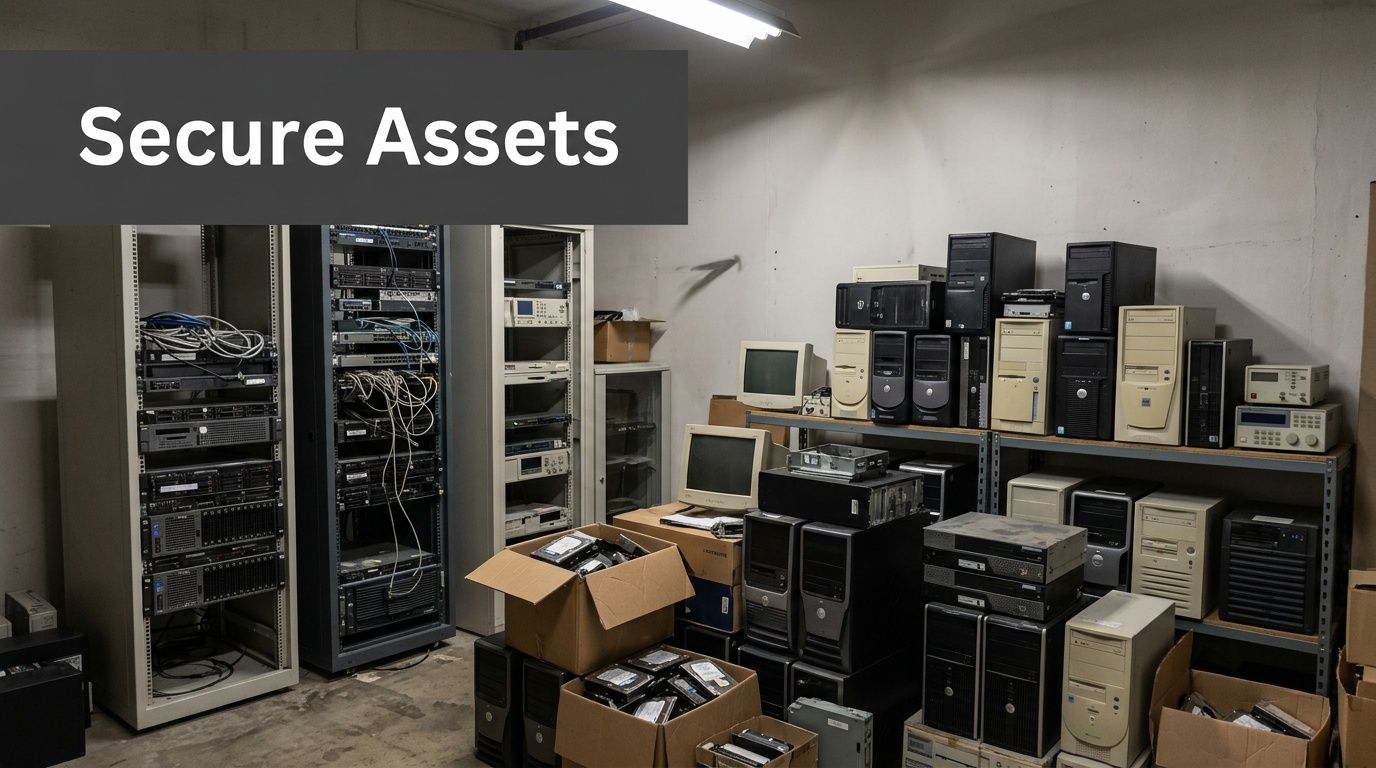
A lot of Sugar Hill facilities have the same problem sitting behind a locked door or at the back of a storage room. Old PCs from a nursing station. Retired servers from a lab upgrade. Analyzer workstations, backup drives, and failed SSDs pulled from medical equipment. They’re out of service, but they’re not out of risk.
That’s where Secure Hard Drive Destruction in Sugar Hill GA. stops being an IT housekeeping task and becomes a compliance decision. If a drive still holds patient records, research files, HR data, financial records, or login credentials, that device is a liability until it’s sanitized or destroyed in a way you can prove.
Why Data Security for Retired Assets Is Non-Negotiable in Sugar Hill
A facilities manager clears a storage room after an equipment refresh. The old towers, failed SSDs, backup drives, and instrument controllers look like scrap headed for pickup. From a compliance standpoint, they are still active risk until the data is sanitized or the media is physically destroyed and documented.
In Sugar Hill, that risk shows up most often in medical offices, labs, universities, and public agencies that retire equipment in uneven batches. A pallet may include a nurse station PC, a research workstation, a copier hard drive, and a failed server pulled during an emergency swap. Each asset has a different data profile, retention issue, and destruction requirement. Treating all of it as generic e-waste is how organizations lose control of protected data.
For Sugar Hill facilities, retired media has to be handled as part of the compliance process, not the cleanout process. That means inventory first, access control during staging, verified chain of custody, and a destruction method that matches the media type and the sensitivity of the data. A general overview of secure data destruction services for regulated equipment retirement can help set the baseline, but the real test is whether your records would satisfy an auditor, privacy officer, or agency counsel after the fact.
Georgia law raises the stakes. Under the Georgia Personal Identity Protection Act, improper disposal of records containing personal information can create breach exposure and notification obligations. HIPAA adds another layer for covered entities and business associates. In practice, the missed step is rarely the final shred. It is the period before destruction, when drives sit in a storeroom, move between departments, or leave the site without a defensible log.
What retired assets usually contain
Retired media from healthcare, research, and government environments often holds more than one class of sensitive information at the same time:
- Patient data from imaging systems, lab systems, scheduling platforms, and exported records
- Research files including study outputs, unpublished data sets, and sponsor documentation
- Employee and financial records tied to payroll, purchasing, HR, and vendor management
- Credentials and system access artifacts stored in browsers, scripts, local profiles, and remote tools
I see the same assumption create problems across facilities. A device is broken, won’t boot, or has been out of service for months, so staff treat it as harmless. That is not a safe assumption. If the storage media still exists and you cannot prove sanitization or destruction, you should treat the data as recoverable.
Practical rule: If you cannot show who had custody of the device, what happened to the media, and when destruction was completed, the asset is still a compliance liability.
Why this matters more for medical, research, and government facilities
These environments retire equipment in ways that basic shredding vendors often do not plan for. A hospital may decommission charting stations and networked printers. A lab may pull analytical instruments with embedded drives. A city office may have desktops, external media, and surveillance storage tied to public records obligations. The disposal workflow has to account for mixed asset types, mixed data classes, and mixed legal requirements in one documented process.
That is the part many providers miss. Secure destruction is not just a truck, a shredder, and a certificate. For regulated organizations in Sugar Hill, it starts earlier with asset identification and ends later with audit-ready records mapped back to specific devices, departments, and dates. If that trail is incomplete, the organization is left arguing about what was probably destroyed instead of proving what was destroyed.
Data Wiping vs Physical Shredding Which Is Right for Your Media
Not every device needs the same end-of-life treatment. Some media should be wiped and reused. Some should be shredded without hesitation. The right answer depends on the media type, the condition of the device, and how sensitive the data is.
A functional hard drive that’s headed for compliant reuse is different from a failed SSD pulled from lab equipment. Treating them the same usually creates either unnecessary cost or unnecessary risk.
When wiping makes sense
If a drive is still functional and the organization plans to redeploy, remarket, or recover value from the device, software-based wiping can be the right choice. In regulated environments, that usually means a documented sanitization process rather than an informal erase or reformat.
For IT teams, the key question isn’t “Was the file deleted?” It’s “Was the media sanitized to the standard required for its next use?” That’s why organizations often align workflows to NIST 800-88r1 categories such as Clear, Purge, and Destroy when setting policy.
A practical reference for the technical side is this guide on how to wipe a hard drive completely. The important point is procedural, not just technical. Wiping only works when the device is readable enough for the process to complete and be documented.
When shredding is the better answer
Physical destruction is the stronger choice when media is failed, obsolete, highly sensitive, or mixed in a way that makes reuse impractical. That is especially true for SSDs.
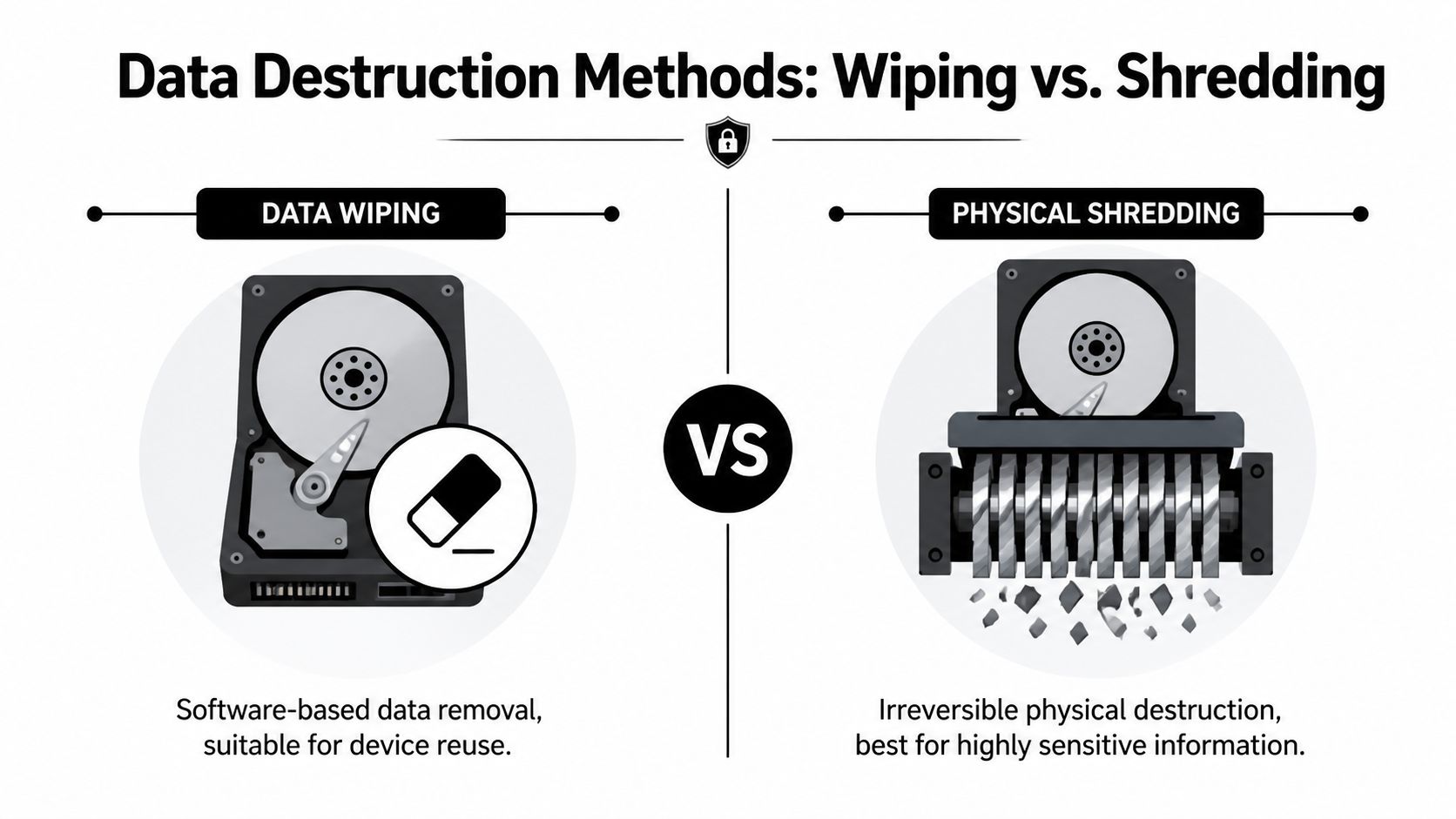
According to industrial on-site shredding guidance aligned to NIST 800-88r1, on-site hard drive destruction via industrial shredders is the gold standard, achieving 100% irreversibility, with drives reduced to confetti-sized fragments under 2mm. That same guidance warns that drilling or punching can fail on 15-20% of SSDs because residual flash memory chips may still be recoverable.
That trade-off matters in real operations. SSDs don’t behave like older spinning disks. A method that looks destructive to the eye may still leave recoverable memory components behind.
Destroy media physically when any one of these is true: the drive won’t reliably wipe, the asset won’t be reused, the contents are highly regulated, or the device type includes flash storage you can’t confidently sanitize.
A simple decision table
| Media situation | Better fit | Why |
|---|---|---|
| Functional HDD scheduled for reuse | Wiping | Preserves asset value if sanitization is documented |
| Failed HDD from a workstation or server | Shredding | You can’t depend on software if the drive won’t complete the process |
| SSD from clinical, research, or admin equipment | Shredding in many cases | Flash memory creates recovery concerns if destruction is incomplete |
| Mixed media from a lab decommission | Often both | Reusable devices may be wiped, nonfunctional or high-risk media should be destroyed |
What doesn’t work well is improvisation. A facility manager shouldn’t have to guess whether a punch tool, drill press, or quick erase is “good enough.” Those methods create the most problems later because they often produce no reliable audit trail and no defensible proof of outcome.
On-Site vs Off-Site Destruction A Key Security Decision
Once you know the method, the next decision is where the destruction happens. Many organizations often underestimate the associated risk.
The usual assumption is that a secure truck pickup and off-site plant process are basically equivalent to on-site destruction. They aren’t. The gap is transport. The moment media leaves your building intact, custody becomes the issue.
Why transport is the weak point
Many Sugar Hill search results push convenience first. Drop-off. Pick-up. Off-site processing. Those models may work for low-risk material, but for regulated storage media, transportation is the stage that demands the most scrutiny.
According to off-site versus on-site destruction discussion for Georgia organizations, 22% of data breaches originate from lost or stolen media in transit, and that’s why on-site destruction is the only true zero-transport risk profile for universities and government agencies.

If the device is destroyed at your facility, under your observation, the chain is shorter and easier to defend. If it’s loaded whole for transport, your controls depend on sealed containers, vehicle security, driver procedures, handoff documentation, and plant intake discipline. All of that can be managed, but none of it is as clean as eliminating transport altogether.
Which model fits which environment
This isn’t just a security argument. It’s a control argument.
For hospitals, clinics, research centers, school systems, and government offices, on-site destruction often makes more sense because managers want direct confirmation that the media is gone before the truck leaves. For large warehouse-style clears or mixed recycling programs, off-site processing may be operationally simpler if the vendor’s custody process is strong.
A quick comparison helps:
On-site destruction
- Best for: HIPAA environments, public-sector records, high-sensitivity research data
- Strength: immediate witness, immediate destruction, no intact media transport
- Trade-off: scheduling space, site access, and possible noise coordination
Off-site destruction
- Best for: lower-sensitivity programs with strong custody controls and centralized processing
- Strength: efficient plant workflow for broader recycling streams
- Trade-off: intact media must travel before destruction occurs
For organizations evaluating vendors, computer shredding service options can help clarify what a supervised destruction workflow should look like operationally.
If your security policy would be uncomfortable with a pallet of live drives sitting overnight in a third-party vehicle or warehouse, you already have your answer. Choose on-site destruction.
The practical threshold
Facility managers usually know when they’ve crossed into on-site territory. If the inventory includes patient data, student records, grant-funded research, criminal justice data, or internal government systems, direct witness and immediate destruction usually outweigh any small convenience gain from sending media elsewhere.
Building an Audit-Proof Trail Chain of Custody and Certification
A destruction event isn’t defensible because someone says it happened. It’s defensible because the records show exactly what moved, who handled it, how it was destroyed, and when that occurred.
That’s the part many general shredding vendors underserve. They’ll collect material and issue a generic receipt. For regulated media, that’s not enough.

What chain of custody should include
In Sugar Hill, a proper chain of custody is an unbroken record from pickup through destruction. Georgia hard drive disposal guidance focused on chain of custody and certification notes that this record should track assets from pickup to destruction, and that the final Certificate of Data Destruction should list each device’s serial number, the destruction method, and the exact date.
A useful chain-of-custody record usually captures these elements:
- Asset identification such as serial number, tag number, or another unique device reference
- Count and media type so the record distinguishes HDDs, SSDs, tapes, phones, or embedded storage removed from equipment
- Handoffs showing who released the assets and who accepted them
- Secure containment details such as sealed bins, pallets, or transport containers
- Arrival and processing confirmation if anything is handled off-site
- Exception logging for missing labels, unreadable serials, damaged devices, or assets added after the initial manifest
That last item matters more than people think. Audits rarely become difficult because the normal items were documented. They become difficult because two drives had scratched labels, one workstation still contained an unlisted SSD, or a box count changed during loading and nobody wrote down why.
What a certificate must prove
A Certificate of Data Destruction isn’t a marketing document. It’s the artifact your compliance team, legal department, or auditor may rely on later.
Here’s what the certificate needs to do:
| Certificate element | Why it matters |
|---|---|
| Device identification | Connects the destroyed asset to your internal inventory |
| Method used | Shows whether the media was wiped, shredded, or otherwise destroyed |
| Exact date | Supports retention, closure, and audit timelines |
| Service provider details | Identifies the party that performed the work |
| Scope of destruction | Confirms which items were included in the event |
If you want to see the level of detail worth expecting, a sample certificate of destruction is helpful as a benchmark.
Audit view: If the certificate only says “electronics destroyed,” it won’t answer the questions that matter.
Red flags that create compliance trouble
Some warning signs show up repeatedly in problematic projects:
- Generic paperwork that doesn’t identify specific devices
- Batch-only receipts with no serial-level documentation
- Unclear methods such as “disposed” or “processed” instead of wipe or shred
- No exception process when a device can’t be scanned or matched
- Separate logistics and destruction vendors with a weak handoff record between them
Facilities in healthcare and higher education should be especially careful here. Those environments often face audit questions long after the equipment is gone. Good documentation is what closes the loop.
How to Prepare Your Assets for Secure Pickup and Destruction
Most secure destruction jobs go smoothly when the client does a small amount of prep before pickup day. The goal isn’t to do the vendor’s work. The goal is to remove ambiguity.
That starts with inventory. If you know what’s leaving the building, where it came from, and whether each device is intended for wiping or destruction, the project moves faster and the paperwork is cleaner.

Start with asset tagging and segregation
According to technical hard drive destruction benchmarks for Georgia, the process should begin with asset tagging, where all drives are scanned and logged for 100% traceability. That same guidance states that high-torque shredders reduce devices to under 2mm particles, meeting DoD standards, and notes that software wiping can fail on 3-5% of worn SSDs.
That tells you exactly how to prepare.
First, separate what you have into operational categories:
Devices for possible reuse
Functional systems or drives that may be sanitized and remarketed or redeployed.Devices for destruction
Failed drives, obsolete media, sensitive devices, and anything with uncertain condition.Embedded media in equipment
Lab analyzers, imaging systems, network appliances, and specialized instruments that may contain internal storage.
Don’t mix those categories on the same pallet if you can avoid it. It slows intake and increases the chance of mismatch between your internal list and the vendor manifest.
A practical pickup checklist
Before scheduling service, the facility team should answer these questions:
- What’s in scope? Identify desktops, laptops, servers, loose drives, tapes, mobile devices, and equipment with embedded storage.
- Who owns the list? Assign one person from IT, facilities, biomed, or lab operations to reconcile the asset manifest.
- Can drives stay installed? Confirm whether the vendor will remove drives from systems or expects loose media only.
- What requires witness? Decide whether any assets must be destroyed on-site under staff observation.
- What paperwork do you need back? Define whether serial-level certificates are required for all items or only regulated assets.
A lot of confusion starts when facilities assume every retired device is a “computer recycling” item. In reality, many jobs include mixed assets that need different handling on the same day.
What to expect on service day
The best service visits are boring. The crew arrives with the manifest, confirms scope, scans or tags assets, stages the material, and follows the agreed custody process.
If the project involves on-site destruction, staff should know where the truck can park, who will witness the event, and which areas need building access. If the work is off-site, the team should verify sealing, count confirmation, and release signatures before the material leaves.
A few final preparation steps help:
- Consolidate equipment in one secure room if possible
- Label exceptions such as devices with missing asset tags
- Flag specialty equipment that may contain hidden or embedded media
- Notify compliance stakeholders if they need copies of final records
For organizations ready to turn that preparation into an actual pickup, schedule a secure pickup only after the inventory owner, facilities contact, and compliance contact are aligned. That simple step prevents most day-of-service delays.
Frequently Asked Questions About Data Destruction in Georgia
A Sugar Hill facility usually does not fail on the obvious part. The problem starts with the exceptions. A hospital retires analyzer controllers with embedded flash storage. A research lab sends out servers and forgets the backup tapes. A county office clears desktops but leaves phones and removable media outside the manifest. Those are the failures that create audit trouble later.
How do hospitals handle mixed HDD and SSD inventories from lab equipment
Start by separating media by technology and risk, not by department.
Hospitals and labs often retire mixed storage from imaging systems, analyzers, workstations, and local servers in the same project. Those assets should not go through one generic process. Conventional hard drives may be eligible for documented wiping if the drives are functional, the standard used is defined, and the result is recorded. SSDs, failed drives, and media pulled from regulated clinical systems usually belong in a physical destruction workflow because verification is harder and residual data risk is higher.
The mistake is treating every drive as if it can be handled the same way. It cannot.
Is degaussing enough for modern media
Degaussing only addresses magnetic media.
That may still matter for some legacy hard drives or tape environments, but it does not solve the flash-memory problem in SSDs, phones, tablets, and embedded modules. Facilities with mixed inventories need a media-specific method assigned before pickup. If the vendor cannot explain which devices are wiped, which are shredded, and which need special handling because the storage is embedded inside equipment, the process is not ready for a regulated environment.
Can backup tapes, phones, and embedded drives be included
Yes, if they are identified before the truck arrives.
Decommission projects often miss the smaller items that hold the most overlooked data. Tape cartridges, field phones, tablets, removable flash media, and embedded storage inside lab or medical equipment should be listed on the manifest and tied to the same custody record as the larger assets.
Ask direct questions:
- Backup tapes
- Mobile phones and tablets
- Removable flash media
- Embedded drives in lab or medical equipment
- Nonfunctional devices with unreadable labels
A vendor who only talks about desktop hard drives is not describing the full job.
What makes a certificate valid enough for HIPAA or GPIPA review
A certificate is only useful if it matches a controlled process.
For regulated facilities, the record should identify what was destroyed, how it was destroyed, and when the event occurred. If your internal policy requires serial-level tracking for servers, workstations, or medical devices, the final certificate should support that requirement instead of replacing it with a vague batch statement. For Georgia public entities and healthcare organizations, that matters because reviewers do not just look for proof that destruction happened. They look for proof that the organization maintained control from retirement through final disposition.
Should facilities remove drives before pickup
Sometimes. The right answer depends on the equipment.
Drive removal is usually straightforward in standard office hardware. It is often less straightforward in lab instruments, imaging systems, and specialized medical equipment. Removing storage without the right technician can damage the equipment, break internal asset records, or create a custody gap once the media is separated from the chassis. Decide before service day who removes the media, who logs it, and whether the device itself also needs documented downstream disposition.
What’s the biggest mistake facilities make
They let retired assets accumulate without one written process.
That is how regulated media ends up mixed with ordinary e-waste, how missing serial numbers go unnoticed, and how departments assume someone else is keeping the records. In practice, Sugar Hill facilities that stay out of trouble use one retirement workflow across IT, facilities, lab operations, records management, and compliance. The workflow covers inventory review, custody control, approved sanitization or destruction method, exceptions for embedded media, and final documentation.
That is what makes the process defensible in an audit.
Scientific Equipment Disposal helps Atlanta-area hospitals, labs, universities, corporate IT teams, and government facilities manage secure, auditable end-of-life workflows for electronics and lab assets. If you need compliant pickup, hard drive wiping, shredding, or support for a lab decommission in Sugar Hill, visit Scientific Equipment Disposal to schedule a project review.