Expert Onsite Telecom Services Houston


A lot of Houston telecom projects start the same way. A clinic adds imaging capacity, a university refreshes a lab, or a multi-site business moves more systems into the cloud, and suddenly the network that felt “good enough” turns into the bottleneck. Calls get choppy, file transfers drag, Wi-Fi complaints multiply, and nobody can tell whether the problem is the carrier, the switch stack, the old cabling above the ceiling, or the patchwork of moves and quick fixes from the last few years.
What gets missed is that the project isn’t only about turning up new circuits or installing faster gear. It’s also about the physical environment inside the building and what happens to the hardware you’re removing. In Houston, that matters more than many teams expect. Local facilities often have complex pathways, strict standards, multi-building layouts, and operating constraints that make a telecom upgrade as much a facilities project as an IT one.
That’s why onsite telecom services Houston searches usually come from people who are already in the middle of a real operational problem. They need a crew that can assess pathways, test fiber, coordinate downtime, protect active connections, and leave the site cleaner and more reliable than they found it. They also need a plan for the old routers, switches, PBX components, servers, and related electronics that come out during the work.
Why Your Houston Business Needs Onsite Telecom Expertise
Monday at 7:15 a.m., a Houston office opens after a weekend refresh. The new circuit is live, the cloud phones register, and the carrier handoff tests clean. By 9:00, one floor reports dropped calls, a conference room loses connectivity, and a badge reader near the loading dock starts timing out. The problem is not the provider. It is the mix of old cabling, crowded closets, undocumented patches, and retired gear that never got properly removed.
That pattern shows up across Houston facilities. A hospital wing expands, a lab adds higher-throughput equipment, or an office reworks space for hybrid teams. The outside service may be adequate, but the building infrastructure often reflects years of piecemeal changes, emergency adds, and closet-by-closet workarounds.

The bottleneck is often inside the building
Houston businesses usually feel the pain through operations first. Users report spotty Wi-Fi, voice jitter, slow uploads, dead ports, or issues isolated to one suite or IDF. Those symptoms point to onsite conditions that no carrier SLA will fix, such as aging terminations, poor rack layout, unlabeled cross-connects, failed patching, heat in telecom rooms, or fiber that passes a basic check but struggles under production load.
An experienced onsite telecom crew does more than swap hardware. They trace pathways, verify what is connected, test fiber and copper, check power and cooling, and identify which parts of the plant can support growth without creating a fragile environment. That work matters if your building is adding cameras, access control, sensors, or smartphone-controlled building entry. Those systems ride on the same physical foundation.
A practical review usually answers four questions:
- Can the existing cabling plant support current traffic and planned adds without creating intermittent faults?
- Are closets, racks, and UPS-backed devices arranged in a way that can be serviced without unnecessary downtime?
- Do labels, test results, and as-builts match reality, or is the next outage going to start with guesswork?
- What equipment is staying, what is being cut over, and what must be decommissioned under a controlled chain of custody?
The last question gets missed too often.
Installation is only half the job
In Houston, telecom upgrades are also facilities projects. Work has to fit around tenant hours, patient care, class schedules, permit rules, loading dock access, elevator reservations, and building engineering requirements. If the provider only focuses on turn-up, the site is left with a second problem after the new system goes live: old switches, PBX shelves, batteries, servers, handsets, and cabling debris sitting in closets or staging rooms.
That is not harmless leftover material. Legacy hardware can hold configuration data, call records, stored credentials, and asset tags that tie equipment back to your environment. It also consumes rack space, blocks airflow, complicates inspections, and creates confusion during the next outage. Good project teams build retirement into the original scope, including removal sequencing, data handling, inventory reconciliation, and documented disposition. If you want a useful reference point, this overview of telecom maintenance and decommissioning support reflects the kind of lifecycle planning many Houston sites need.
The business case is straightforward. Onsite telecom expertise reduces cutover risk, shortens troubleshooting time, and keeps the project from ending with a pile of untracked electronics in a locked room. For Houston operators, that is the difference between a clean upgrade and a problem postponed.
What Are Onsite Telecom Services Exactly
Think of structured cabling and telecom infrastructure as your building’s central nervous system. Applications, cloud platforms, cameras, VoIP, badge readers, lab systems, and Wi-Fi all depend on that physical layer carrying signals where they need to go, cleanly and consistently.
When people say “onsite telecom services,” they usually mean the hands-on work inside the facility that supports communication and data flow. That includes design, installation, testing, repairs, upgrades, and ongoing changes after the original build.
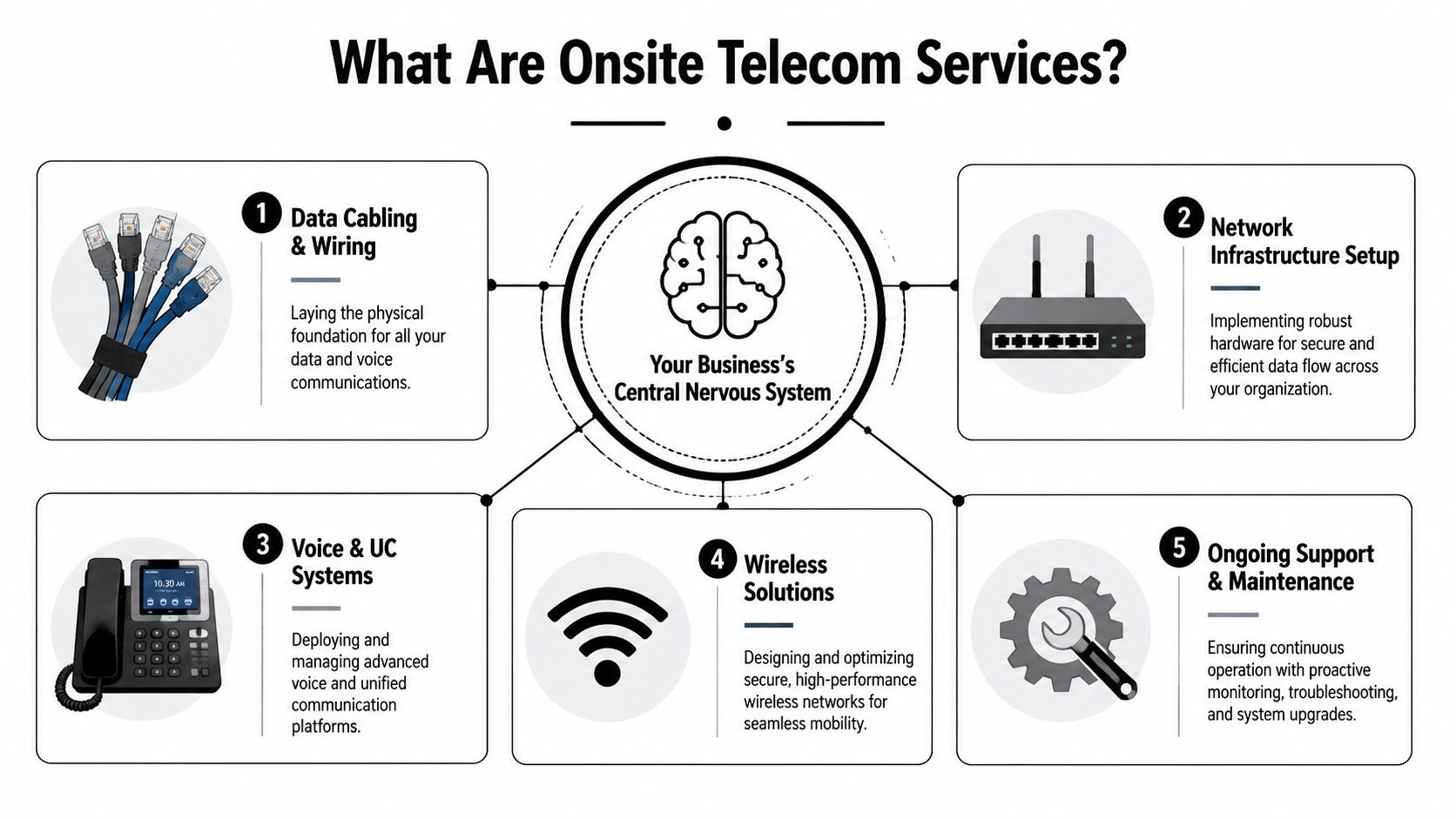
The five functions that matter most
Data cabling and wiring
This is the physical foundation. It includes fiber backbones, horizontal copper runs, patch panels, terminations, labeling, and pathway management. If this layer is sloppy, everything above it becomes harder to troubleshoot.
For a facilities manager, the practical question is simple: can the building support current demand without becoming fragile?
Network infrastructure setup
This covers the active equipment and its physical deployment. Switches, routers, cabinets, UPS units, rack layouts, cross-connects, and closet organization all fall here. Good setup work reduces heat, confusion, accidental disconnects, and messy future adds.
Voice and unified communications
Even when traditional voice is less visible, organizations still rely on call flows, paging, conferencing, and integrated communications. The physical and logical telecom environment has to support those services without creating dead spots or handoff issues.
Wireless solutions
Wireless isn’t a replacement for cabling. It rides on it. Access points still need power, uplinks, switching capacity, and smart placement. If the wired side is weak, the Wi-Fi experience degrades no matter how good the access points look on paper.
Ongoing support and maintenance
Buildings change. Departments move, labs expand, offices reconfigure, and tenants turn over. Telecom systems need MAC work, testing, documentation updates, and preventive maintenance to stay reliable. A related example is this page on telecom maintenance support, which reflects how ongoing upkeep fits into the broader telecom lifecycle.
Testing is where serious providers separate themselves
In Houston-area field work, serious telecom specialists use fiber testing methods that go well beyond plugging in a link light and calling it done. Houston-area telecom specialists follow OTDR traces at 1,310/1,550 nm, end-face inspection at 200x magnification, and insertion-loss budgets below 1.5 dB per 100 m for 10G speeds, especially in clinical labs and research data centers, as described by Houston telecom construction practices.
That matters because poor fiber work can hide for a while. The link may come up, but performance degrades under real traffic.
A clean turn-up isn’t proof of a healthy installation. Certification testing and documentation are what make the result usable six months later.
What good onsite telecom service looks like day to day
A useful way to evaluate scope is to separate what the team is doing from what outcome you need.
| Service area | What the crew does onsite | What you get |
|---|---|---|
| Cabling | Runs, terminates, labels, and organizes pathways | A supportable physical network |
| Hardware deployment | Installs and stages switches, racks, and patching | Cleaner closets and fewer mistakes |
| Testing | Verifies fiber and copper performance | Fewer hidden faults |
| Maintenance | Repairs wear, damage, and drift over time | Better reliability |
| Moves, adds, and changes | Reworks drops and layouts as space evolves | Faster adaptation without chaos |
If you manage a busy site, that practical distinction helps during vendor conversations. You’re not buying “telecom” in the abstract. You’re buying reduced risk at the physical layer.
The Strategic Benefits of Upgrading Your Houston Network
A network upgrade is easy to frame as a technical expense. That’s too narrow.
The larger telecom market explains why. The US telecom services market is projected to grow from USD 451.7 billion in 2025 to USD 601.2 billion by 2030, while data and messaging services are expected to lead with an 8.67% CAGR, driven by cloud migration and IoT deployment, according to US telecom market projections. For operators on the ground, that means one thing: buildings are carrying more data, more continuously, for more mission-critical functions than they did before.

Reliability protects operations
In Houston, reliability isn’t abstract. It affects imaging workflows, building access, warehouse coordination, trading floors, call handling, and clinical communications. If one closet is overloaded or one backbone run is compromised, the organization feels it immediately.
Good onsite telecom work improves reliability because it removes weak points that software teams can’t patch around:
- Undocumented cabling becomes labeled and testable
- Aging uplinks get replaced before they become emergency tickets
- Messy rack layouts stop causing accidental service disruption
- Single points of failure become visible during design review
Scalability is cheaper when you plan it early
Organizations often wait until growth forces an upgrade. That approach usually costs more because the work has to happen fast, after hours, and with limited room for redesign.
A better approach is to build for the next phase of occupancy, devices, and application load while walls, ceilings, closets, and schedules are already in play. The same logic sits behind multi-site architecture planning and WAN design. If you’re comparing branch or campus connectivity models, Purple's SD-WAN insights are a useful complement to the onsite conversation because they show how transport strategy and local infrastructure need to align.
For teams handling broader physical upgrades, pages like network cabling services for enterprise environments also reflect the reality that cabling decisions made once tend to shape operations for years.
Future-readiness starts in closets and conduits
The strategic value of onsite telecom services Houston providers deliver isn’t just speed. It’s readiness.
A port-adjacent logistics site may need cleaner handoffs between facilities and field systems. A medical campus may need stable throughput for imaging, records, and analytics. A university may need to support dense research traffic in one building and ordinary office demand in another. Different environments, same lesson: future applications only work if the physical network has room, order, and tested performance.
If the upgrade plan only talks about new gear and never talks about pathways, labeling, decommissioning, and testing, the plan is incomplete.
How to Hire the Right Houston Telecom Service Provider
Most telecom vendors sound capable in the first meeting. The differences show up in the walkthrough, the quote, and the questions they ask.
A strong provider notices pathway constraints, asks for as-builts, wants access to closets early, and talks about cutover sequencing before talking about hardware. A weaker one jumps straight to product lists.
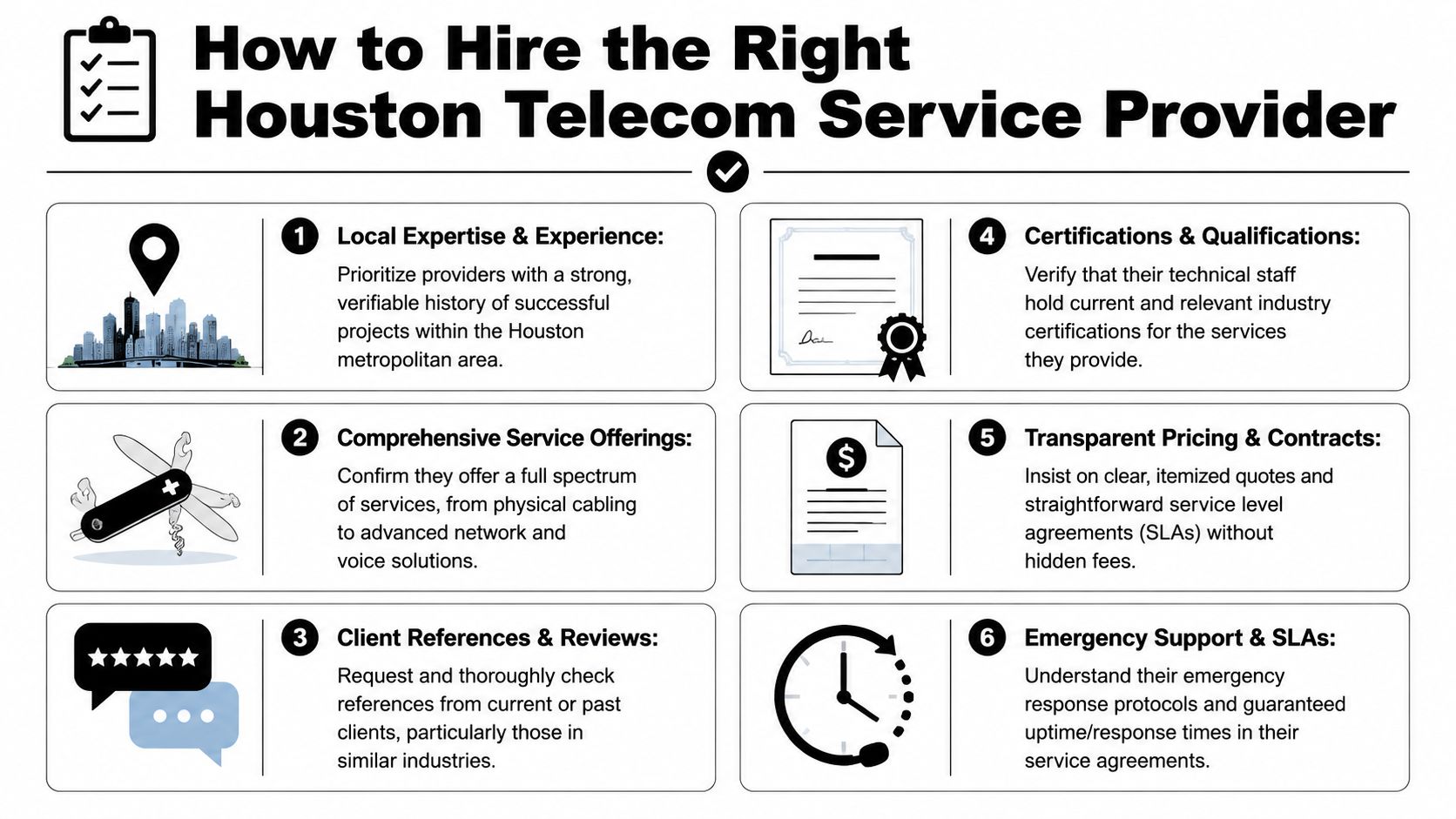
What to verify before you sign
Houston work often involves pathway restrictions and site-specific standards. Municipal standards can require campus-wide communications infrastructure to run underground in specified raceways, and contractors may need to install fiber such as single-mode G.652.D while keeping splice losses under 0.3 dB, according to the City of Houston network standards. If a vendor can’t speak confidently about pathway discipline, underground routing, and preserving performance during retrofit work, that’s a warning sign.
Use this checklist during selection:
- Ask about Houston-specific experience: Downtown towers, healthcare campuses, university buildings, and multi-tenant properties all behave differently.
- Confirm who performs the field work: Subcontracted labor isn’t automatically bad, but you need clarity on who owns quality.
- Require test documentation: Don’t accept “we test everything” without deliverables.
- Review safety and access procedures: Especially for active facilities with patient, student, or public traffic.
- Clarify decommission scope: Removal, staging, labeling, and handoff of retired equipment should be written down.
- Check repair capability after install: If the same provider can’t support post-cutover issues, you may inherit a handoff problem, making a service model like telecom repair support relevant in your broader planning.
Questions that expose weak proposals
Not every bad vendor looks bad on paper. Ask questions that force operational detail.
How will you protect active services during removal and cutover?
Good answers mention sequencing, temporary patching, maintenance windows, rollback planning, and labeling discipline.What test results will you provide at closeout?
Good answers mention certification records, fiber traces where applicable, and clear documentation.How do you handle undocumented legacy cabling?
Good answers include discovery, validation, tagging, and client signoff before removal.Who coordinates with facilities, security, and building management?
Good providers know telecom work touches multiple stakeholders.
The vendor you want is the one who talks about constraints before talking about speed.
What works and what usually doesn’t
Here’s a practical comparison from the owner side.
| Approach | Usually works | Usually causes trouble |
|---|---|---|
| Site survey | Joint walkthrough with IT and facilities | Quote based only on floor plans |
| Scope | Written assumptions and exclusions | Verbal understanding |
| Scheduling | Phased work around operations | One big cutover without fallback |
| Documentation | Labels, test records, updated drawings | “We’ll clean it up later” |
| Legacy removal | Tracked deinstall and secure handoff | Piling gear in a storage room |
The right Houston telecom service provider isn’t just technically capable. They understand how to work inside an occupied facility without turning the project into a disruption campaign.
Estimating Project Timelines and Costs for Telecom Work
A Houston telecom upgrade rarely slips because of the new equipment. It slips because the old environment is messier than the quote assumed.

A site with clean labeling, open pathways, and a current rack inventory can move fast. A similar-sized building with abandoned cabling, undocumented cross-connects, and tight work windows can take much longer and cost far more. In Houston, those differences show up quickly in labor hours, scheduling friction, and closeout scope.
The part many teams under-budget is the back end. Deinstalling retired switches, removing dead patching, sorting reusable versus scrap material, and preparing hardware for secure disposition all take time. If you skip that planning, the project may still go live on schedule, but the facility ends up storing risk in a closet.
What drives the project calendar
Most telecom jobs follow the same broad path, but each phase expands or contracts based on building conditions and business constraints.
Discovery and design
This phase establishes the schedule. Crews need to verify closets, pathways, rack space, power, existing carrier handoffs, and what legacy gear must stay online during cutover. If records are outdated, discovery turns into field verification, and that adds days before any install starts.
Procurement and scheduling
Lead times depend on the equipment you standardize on and whether substitutions are acceptable. Scheduling often gets harder than purchasing. Downtown high-rises, medical space, shared industrial facilities, and multi-tenant offices often limit freight access, after-hours work, or riser availability. Those restrictions affect staging, crew size, and how many nights the project needs.
Installation and testing
Labor can fluctuate dramatically. Fiber backbone work, closet reconfiguration, recabling, patching, device turn-up, and certification all compete for time. Occupied offices add another layer. Crews work slower when they have to protect business operations, coordinate with security, or stop and restart around other trades.
Decommission and closeout
Retiring legacy telecom gear should be part of the base plan, not an allowance buried in fine print. Removed equipment has to be inventoried, disconnected in the right order, staged safely, and handed off for secure processing. Teams that need guidance on data-bearing equipment disposal procedures should settle that process before cutover, not after retired hardware starts piling up.
What changes the budget most
Budget pressure usually comes from field conditions, not from the headline scope on page one of the proposal.
These are the cost drivers I watch first:
- Existing condition of closets and pathways: Organized spaces lower labor. Congested ceilings, blocked conduits, and abandoned cable raise it.
- Amount of unknown legacy infrastructure: Unlabeled patch panels, mystery circuits, and old voice gear slow both install and removal.
- Network design complexity: A single office floor prices differently than a campus, warehouse, hospital wing, or multi-IDF office stack.
- Work hour restrictions: Nights, weekends, escort requirements, and shutdown windows add labor and coordination cost.
- Testing and documentation requirements: Certification, as-builts, labeling standards, and closeout packages all take time.
- Disposition of retired assets: Secure wipe, chain of custody, recycling, and documented disposal are part of the project cost if the old gear holds configurations, logs, or credentials.
Low bids often assume the existing environment is cleaner, simpler, and better documented than it really is.
A better way to review quotes
A useful quote makes its assumptions obvious. A risky quote leaves them vague.
Review each proposal for answers to these practical questions:
- What exactly is included in deinstall, haul-off, and disposal preparation?
- Which testing results are included at closeout?
- Are after-hours labor, lift access, escorts, and building fees listed separately?
- What is the process if the crew finds undocumented live circuits?
- Who owns the inventory of removed equipment until final disposition?
- Is secure handling of retired hardware included, or does that become your problem after cutover?
For Houston organizations in healthcare, legal, education, energy, and public-sector work, those last two questions matter more than many buyers expect. General Data security and compliance best practices apply here, but the project budget still needs room for the actual field work of collecting, documenting, storing, and retiring old telecom assets properly.
The best estimate is not the cheapest one. It is the one that accounts for the building you have, the operating constraints you cannot avoid, and the old equipment you still need to remove responsibly once the new network is online.
Managing Data Security and Compliance During Telecom Upgrades
The riskiest part of a telecom upgrade is often sitting on a cart in the hallway after the new gear is online.
That old switch may hold configuration data. The retired router may contain stored credentials or network details. The decommissioned server from a communications rack may contain logs, management tools, or sensitive records tied to business operations. In healthcare, education, research, and government settings, that’s not a side issue. It’s part of the project.
Current Houston telecom content rarely addresses end-of-life responsibility for removed gear, even though upgrade activity is increasing and public-sector and healthcare organizations need compliant retirement pathways, as discussed in this piece on the gap in telecom end-of-life coverage.
Why unplugging hardware isn’t enough
A lot of teams still treat retired network equipment like scrap metal. It isn’t.
Telecom and adjacent IT assets can carry:
- Stored settings and credentials
- Logs and management data
- User, device, or network identifiers
- Configuration history that reveals internal architecture
That’s why decommissioning has to be planned like a controlled workflow, not an afterthought. General data security and compliance best practices are helpful here, but telecom projects need those practices tied directly to physical removal, custody, and final disposition.
For organizations with regulated data, a deeper review of data security requirements during asset disposition can help shape internal handoff standards between IT, facilities, and any downstream recycling vendor.
What a compliant retirement process should include
The exact policy depends on your organization, but the workflow should be disciplined.
Asset identification before removal
Tag what’s being removed and verify ownership, status, and dependencies.Controlled handoff onsite
Don’t leave retired gear in unsecured staging areas.Documented chain of custody
Someone should be able to show who handled the device from rack to final disposition.Data sanitization or destruction
The method has to fit the device and the organization’s policy.Responsible recycling
Hardware should move through an electronics recycling path that aligns with your compliance expectations.
Secure decommissioning starts before the first cable is disconnected. If you wait until the truck is outside, you’re already behind.
Installation and disposal belong in the same project plan
This is the lifecycle issue that many teams learn the hard way. The new network may be live, but the project isn’t finished until the old assets are accounted for, secured, and removed properly.
That’s especially true in Houston environments where upgrades happen in hospitals, universities, labs, and government facilities with strict operational and records concerns. If your telecom provider doesn’t address that handoff, you need to address it yourself in the project scope.
Frequently Asked Questions About Onsite Telecom
What’s the difference between a telecom contractor and a managed IT provider
A telecom contractor works on the physical and field side of connectivity. That includes cabling, fiber, pathways, racks, terminations, testing, and onsite cutovers. A managed IT provider usually focuses more on systems, endpoints, software, monitoring, and user support. On many projects, you need both.
Can internal staff handle cable runs and closet work
Sometimes for small, low-risk changes. Not usually for major upgrades. Active facilities need disciplined labeling, testing, safe pathway work, and clean change control. If your team is already stretched, giving them a live telecom retrofit usually creates delays somewhere else.
If we’re mostly wireless, do we still need structured cabling
Yes. Wireless depends on wired backhaul, switching, power, and proper access point placement. A weak cabling plant creates wireless complaints that never fully go away.
Should telecom removal be part of the same project as the upgrade
Yes, or at least part of the same plan. If removal is left vague, retired hardware often sits onsite too long, disappears from records, or gets handled inconsistently.
What should happen to old switches, routers, and related IT gear
They should move through a documented retirement process that includes asset tracking, secure handling, and appropriate disposition. If your organization already manages broader retired electronics, your telecom refresh should align with the same IT asset disposal process.
If your Houston telecom upgrade includes old servers, switches, storage, lab electronics, or other retired equipment, Scientific Equipment Disposal can help close the loop. Their team supports secure, compliant asset removal and responsible electronics recycling, which is exactly the part many telecom projects leave unresolved until the end.