Secure Computer Recycling for Organizations

Old laptops in a locked closet. Retired lab workstations under a bench. A server rack with equipment nobody wants to power back on, but nobody wants to move either.
That is how many computer recycling projects begin in hospitals, research labs, universities, and corporate facilities across Atlanta. Not with a clean plan, but with accumulated risk.
For a facility manager, the problem is not just disposal. It is data exposure, chain of custody, regulatory proof, and safe physical removal from active buildings. A desktop in an office is one thing. A storage array from a medical department, a workstation tied to lab instruments, or a batch of obsolete PCs from multiple departments is another.
Casual disposal fails because regulated organizations do not get judged by intent. They get judged by process. If equipment leaves your building without documented custody, verified data destruction, and responsible downstream recycling, you are left defending a gap you cannot prove away.
The High Stakes of Corporate Computer Recycling
A pile of retired equipment does not look urgent until someone asks what is on the drives, who signed it out, and where it is going.
That is the primary issue with business computer recycling. The equipment itself is usually the easiest part. The risk sits in the hard drives, the batteries, the missing asset records, and the informal handoff that nobody documented.
Why stockpiled computers become a compliance problem
In many facilities, retired devices sit in place because nobody wants to make the wrong call. IT does not want to release media without confirmation of destruction. Facilities does not want pallets sitting in hallways. Department managers want the space back. Procurement may still be asking whether any of it has reuse value.
While organizations hesitate, the global e-waste stream keeps growing. In 2022, the world generated 62 million tonnes of e-waste, and only 22.3% was formally collected and recycled. That gap is widening, with e-waste generation growing five times faster than recycling efforts, according to e-waste facts and statistics. The same source notes that recycling 1 million laptops saves enough energy to power over 3,500 U.S. homes for a year.
Those numbers matter because they show two things at once. First, a large share of electronics still misses formal processing channels. Second, the environmental value of proper recycling is significant, especially for organizations retiring computers at scale.
The three risks that matter most
For regulated industries, these are the failures that cause the most damage:
- Data leakage from storage media. If a workstation, server, or external drive leaves your control without proper sanitization, you have created a preventable security event.
- Compliance exposure. HIPAA-sensitive environments, research settings, and government-adjacent operations need documented handling, not assumptions.
- Landfill and hazardous material issues. Batteries and other components require controlled handling. That is one reason internal accumulation areas become a safety concern, not just a storage annoyance.
Tip: If retired computers are mixed with loose batteries, damaged UPS units, or swollen packs, treat the cleanup as both an ITAD and a safety project. Guidance on Lithium Batteries Explosion: A Guide to Prevention and Response is useful before anyone starts moving boxes in such cases.
What works and what does not
What works is a managed, auditable process. Inventory first. Decide which assets need wiping and which need shredding. Control pickup access. Match serial numbers to destruction records. Keep environmental documentation with the same discipline as security documentation.
What does not work is the common shortcut list. Sending devices to general junk removal. Letting staff self-drop equipment. Assuming a quick format solved the data problem. Clearing out a room before custody paperwork is ready.
Computer recycling for organizations is not a housekeeping task. It is a decommissioning event. Treat it that way and the project becomes manageable.
Building Your Secure Decommissioning Plan
A secure project starts before the first cart rolls down the hallway. If you skip the planning phase, the rest becomes reactive.
The fastest way to lose control is to call for pickup before you know what you have, where it sits, and which devices still contain data.

Start with a real asset inventory
For business computer recycling, an inventory needs more than a rough count. You need enough detail to support custody, sanitization, and final reporting.
At minimum, track:
- Asset identity. Record make, model, serial number, and internal asset tag if one exists.
- Current location. Note building, floor, room, and rack or bench location.
- Data-bearing status. Flag desktops, laptops, servers, external drives, storage arrays, and any embedded systems that may hold data.
- Operational condition. Distinguish working units from dead units. That affects whether wiping, shredding, or parts harvesting is possible.
- Ownership status. Mark leased equipment, grant-funded assets, or devices under return obligations.
This inventory becomes the backbone of your chain of custody. If a serial number is not on your front-end list, it is much harder to prove what happened later.
Separate project scope from wishful thinking
Many decommissions stall because departments treat one event as a chance to clear everything at once. That sounds efficient, but it often creates confusion.
A better approach is to define scope in writing:
- What is leaving now. Name the rooms, departments, and asset categories included.
- What stays in place. Exclude active devices, instrumentation controllers, and anything awaiting internal approval.
- What needs special handling. Call out drives for shredding, rack equipment needing de-installation, and mixed loads with batteries or peripherals.
That decision prevents scope creep on pickup day. It also keeps technicians from being asked to remove equipment that was never approved for release.
Assign internal roles before pickup
One person should own the project. Not five people sharing partial responsibility.
That project owner usually coordinates four internal functions:
| Role | What they control |
|---|---|
| Facilities | Site access, loading routes, dock timing, building rules |
| IT | Asset verification, sanitization decisions, user signoff |
| Compliance or legal | Retention concerns, policy requirements, documentation standards |
| Department leadership | Approval to release equipment from service |
If your organization spans multiple sites, add one local contact at each building. That avoids pickup crews waiting outside locked suites while everyone emails each other.
Build the timeline around operations
Healthcare and research environments rarely have a clean shutdown window. You may be decommissioning one lab while another remains active next door.
Plan around the points that cause disruption:
- Elevator access
- Dock reservations
- After-hours removal needs
- Restricted zones
- Biohazard or cleanroom boundaries
- Server room change-control requirements
A realistic plan also decides whether assets will be staged before pickup or removed directly from their installed locations. Direct removal is often safer for custody. Staging can be faster, but only if the temporary holding area is controlled.
Key takeaway: The inventory is not paperwork for its own sake. It is what lets you tie every computer, server, and drive to a final disposition record.
Decide what success looks like
Before contacting a vendor, define the end state. Some organizations care most about clearing space fast. Others care most about resale recovery, absolute data destruction, or audit-ready reporting.
Common goals include:
- Zero undocumented assets leaving the site
- Segregation of reusable hardware from end-of-life scrap
- Documented destruction for all data-bearing media
- Environmentally responsible downstream recycling
- Minimal disruption to patient care, lab schedules, or campus operations
If you need a reference point for service scope, a provider’s IT asset disposal services page can help you map your internal checklist against the actual field work required, especially for pickups involving servers, storage, and mixed electronics.
A good decommissioning plan is plain, specific, and operational. If your team can hand it to security, facilities, IT, and the pickup crew without a debate, it is ready.
Choosing Your Data Sanitization Method for Full Compliance
The most important decision in computer recycling is not where the equipment goes. It is how the data is destroyed before final disposition.
Organizations get into trouble when they treat all storage the same. They are not the same. A functioning magnetic hard drive can often be sanitized for reuse. A failed SSD, a damaged server drive, or media governed by stricter internal policy often needs physical destruction.
Two methods dominate compliant data destruction
The core choice usually comes down to DoD 5220.22-M 3-pass wiping versus physical shredding.
According to the EPA methodology review, DoD 5220.22-M 3-pass wiping achieves 99.9% data sanitization on magnetic hard drives, while for SSDs and absolute data irrecoverability, physical shredding or degaussing is the standard, offering 100% effectiveness in line with NIST 800-88 R1 and IEEE 2883-2022 guidelines. See the EPA document on electronic products generation and recycling methodology review.
That does not mean one method is always better. It means each method fits a different risk profile.
Data Sanitization Methods Compared
| Attribute | DoD 5220.22-M Wiping | Physical Shredding |
|---|---|---|
| Best fit | Working magnetic hard drives intended for reuse or resale | Failed drives, SSDs, obsolete media, high-security mandates |
| Outcome | Data overwritten and device may remain usable | Media destroyed and not reusable |
| Compliance use | Strong option where policy permits sanitization for reuse | Best option where policy requires destruction or media is not suitable for wiping |
| Asset value impact | Preserves possible remarketing value | Eliminates device resale value |
| Operational trade-off | Requires functioning drive and verification workflow | Provides finality, but ends reuse path |
When wiping is the right call
Wiping makes sense when the drive is functional, the asset still has reuse value, and your internal policy allows sanitized remarketing or redeployment.
In practical terms, wiping works well for:
- Recently retired office desktops
- Laptops suitable for redeployment
- Working HDDs removed from standard servers
- Equipment where your organization wants documented sanitization without destroying the hardware
The trade-off is process discipline. Wiping only works if the drive can be read, the overwrite completes successfully, and the result is logged against the correct serial number or asset record.
This is not the place for a simple file delete or a quick reformat. Those actions are not equivalent to certified sanitization.
When shredding is the right call
Shredding is the clean answer when the storage device is dead, unstable, encrypted but untrusted, or covered by a stricter destruction rule.
Use shredding for situations like these:
- Failed SSDs that cannot be wiped reliably
- Nonfunctional drives from old lab or medical systems
- Media with severe chain-of-custody sensitivity
- Projects where internal policy demands destruction rather than erasure
A lot of high-risk confusion comes from mixed loads. An organization sends desktops, servers, loose drives, and old external media together, but nobody clearly labels what must be shredded. That is how drives end up in the wrong stream.
Reuse value versus irreversible destruction
This is the central trade-off. Wiping preserves the possibility of reuse. Shredding removes all doubt and all residual hardware value.
That matters for organizations handling large retirement cycles. If you wipe a working HDD in a still-usable machine, the asset may be suitable for remarketing or internal reuse. If you shred it, that path is gone. In some environments that is fine. In others, finance or sustainability teams may want the reuse path considered.
The right answer is usually policy-driven:
- If your priority is maximum certainty, shred.
- If your priority is secure sanitization with reuse potential, wipe eligible HDDs and shred the rest.
- If your inventory is mixed and condition is uncertain, use a split-stream process with clear labeling.
Practical rule: Decide the sanitization method at the inventory stage, not while boxes are being loaded. Last-minute decisions create the highest chance of a custody mistake.
What to require from a vendor
Ask direct questions. Avoid broad promises like “all data is handled securely.”
You need to know:
- Whether they support DoD 5220.22-M 3-pass wiping
- Whether they physically shred HDDs, SSDs, and other storage media
- How they document each outcome
- Whether serial numbers from your inventory can be matched to destruction records
- Who handles exceptions such as failed wipe attempts or unlabeled loose drives
For organizations comparing options, this overview of secure data destruction services is useful because it frames wiping and shredding as separate operational choices, not interchangeable buzzwords.
The best computer recycling programs do not force every asset into one method. They apply the right method to the right media, then document the result in a way your compliance team can defend.
Managing On-Site Packing Pickup and Logistics
Most failures in business computer recycling do not happen at the recycler’s facility. They happen earlier, in hallways, freight elevators, loading docks, and temporary staging rooms.
That is why on-site logistics deserve the same attention as data destruction. Once equipment starts moving, any weak handoff becomes a custody problem.
What a professional pickup should look like
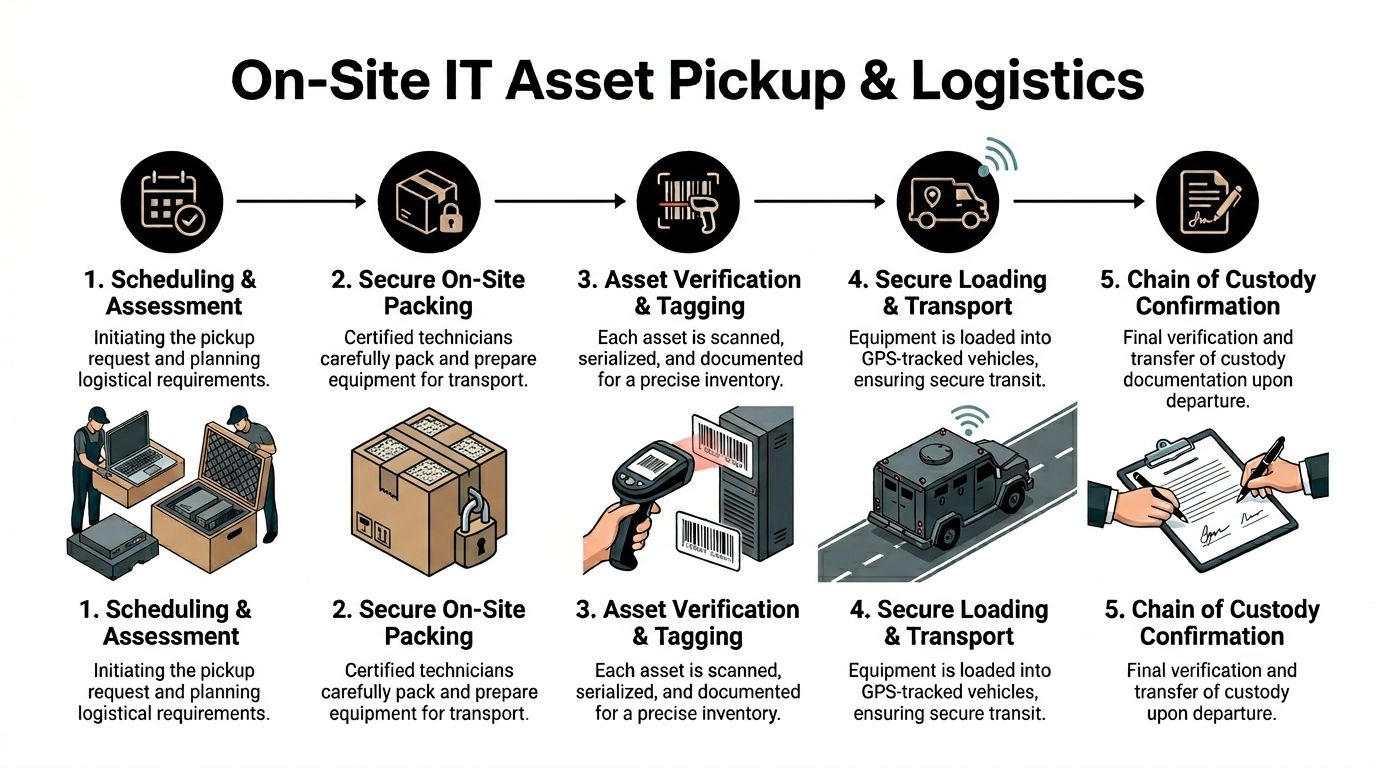
A well-run pickup is controlled from the first walk-through. The crew arrives with the site scope, understands what must be removed, and confirms access routes before touching equipment.
For installed assets, that usually means:
- De-installation at the point of use. Servers come out of racks, workstations are disconnected, and accessories are kept with the correct unit when needed.
- Packing by asset type. Loose drives, towers, laptops, monitors, and network gear should not be mixed randomly.
- Verification before loading. Labels, counts, or serial-based records are checked against the release list.
- Secure transport. The load goes directly into controlled vehicles, not informal third-party transit.
In Atlanta-area hospitals and labs, the operational details matter. You may need after-hours work, loading dock coordination, or removal paths that avoid public-facing areas.
Why packing standards matter
Improper packing causes two different problems. It increases physical damage, and it breaks the audit trail.
That is especially true for reused equipment. If working machines are tossed into gaylords without separation, you lose both hardware value and traceability. Even for scrap streams, mixed packing creates confusion when drives, peripherals, and battery-containing devices arrive intermingled.
For teams that need a plain-language reference on transport prep, this guide on how to pack a computer for moving is useful for the physical handling side, even though regulated B2B pickups require much tighter documentation than a standard move.
What happens after the truck leaves
The downstream process should not be a black box. In the B2B computer recycling stream, intake begins with weighing for compliance reporting, followed by manual hazard removal such as batteries and mercury-containing items. After that, industrial shredders reduce material for separation, where magnets and eddy currents recover 90-95% of ferrous and non-ferrous metals. For assets routed for reuse, parts harvesting can yield 60-75% reusable components, according to how the B2B e-waste recycling process works.
That matters for facility managers because it shows why pickup quality affects final outcomes. If the load arrives sorted and documented, reuse and recovery improve. If it arrives as a mixed mess, downstream handling becomes harder and riskier.
Questions to settle before pickup day
Use a short operational checklist:
- Who disconnects equipment. Your staff, the vendor crew, or a hybrid team?
- Where is the staging area. If there is one, is it secure and access-controlled?
- What leaves first. Data-bearing assets, rack gear, office PCs, or peripheral scrap?
- How is the load documented. By pallet, room, asset list, or serialized scan?
- What happens to exceptions. Unlisted devices, damaged media, or equipment found during the sweep?
Tip: The cleanest projects have one release list, one site contact, and one loading plan. Multiple ad hoc instructions from different departments create avoidable mistakes.
If you are arranging local service, electronics recycling with pickup is the kind of operational model to look for, especially when your project includes de-installation, packing, and transport rather than a simple dock drop.
A computer recycling vendor should move equipment the way a regulated facility operates. Deliberately, visibly, and with no loose ends.
Ensuring a Flawless Chain of Custody and Documentation
If the equipment is gone but the paperwork is weak, the project is not finished. It is exposed.
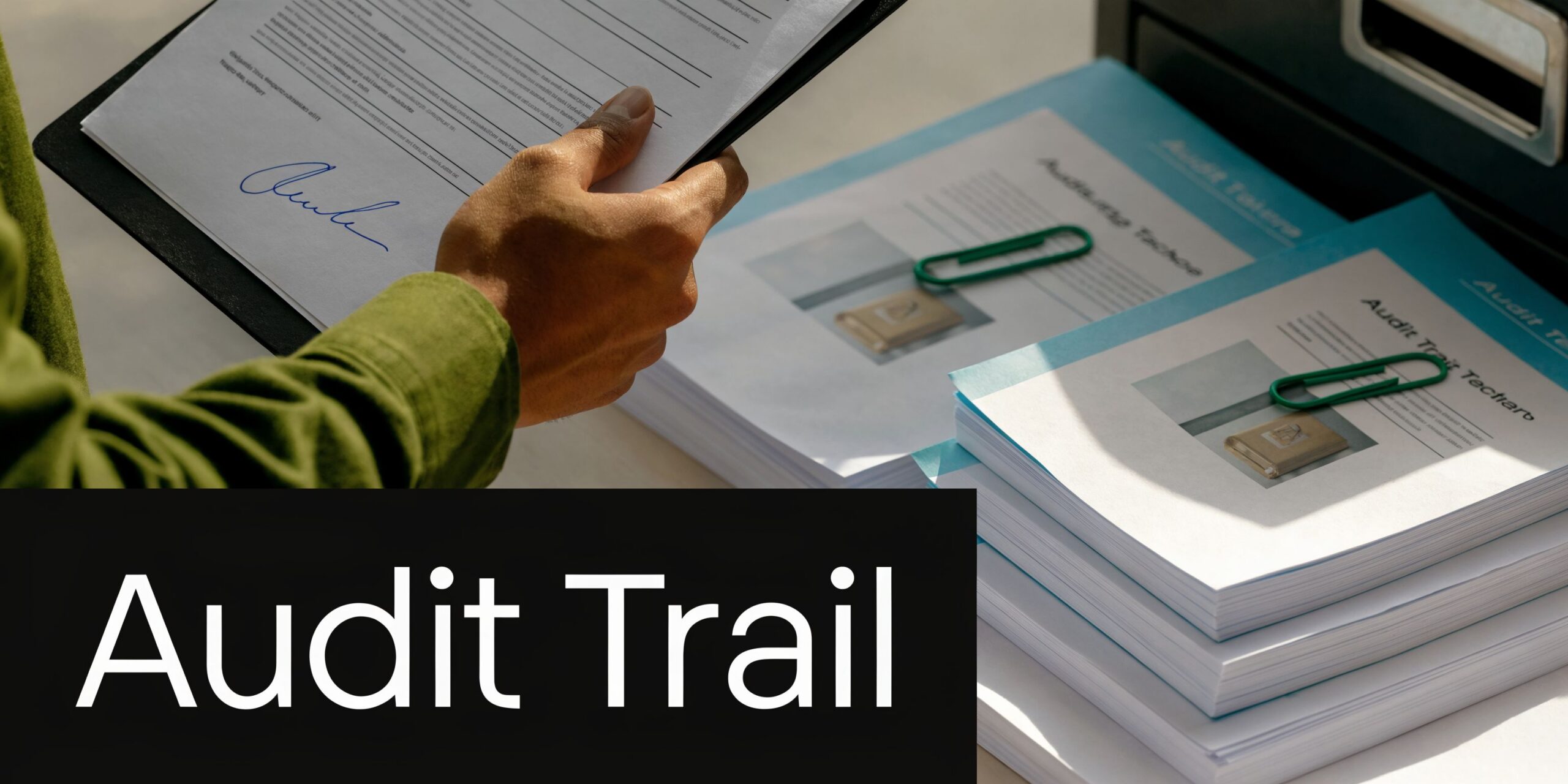
In audits, investigations, and internal reviews, organizations rarely get credit for having “handled it responsibly” unless they can produce records that show exactly what happened. That is why documentation is not an admin afterthought. It is the proof that your process held together.
Why documentation is the control that survives after pickup
The United States generated over 7 billion kilograms of e-waste in a single year, and according to a 2022 UN report, only about 58% was properly collected and treated. The improper handling of the remaining 42% creates significant risks of data breaches and environmental harm, as explained in this overview of electronic tech recycling risks.
For a facility manager, that is the key point. The vulnerability is not only whether a vendor says the right things. It is whether the process leaves a documented, compliant record.
The records you should insist on
A defensible computer recycling project usually produces several linked records, not one generic receipt.
Look for these:
- Chain-of-custody record. This should show when assets were released, who transferred them, and how they moved from site to processor.
- Certificate of Data Destruction. This should identify the sanitization method and tie it to the applicable assets or media.
- Certificate of Recycling. This confirms the equipment entered a responsible recycling stream.
- Asset-level reporting. Where applicable, this should tie serial numbers back to your original inventory.
If you cannot match the original release list to the final certificates, your record set is weaker than it looks.
What a strong Certificate of Destruction includes
A good certificate is specific. It should not read like a generic completion note.
At minimum, it should show:
| Documentation element | Why it matters |
|---|---|
| Organization name and service date | Establishes who the record applies to |
| Asset identifiers or media identifiers | Ties destruction back to the released equipment |
| Destruction method used | Shows whether media was wiped, shredded, or otherwise processed |
| Processor information | Identifies who performed the work |
| Final confirmation statement | Supports audit and legal review |
One practical way to vet this before hiring a vendor is to review a sample certificate of destruction. If the sample is vague, expect the live documentation to be vague too.
Why vague paperwork fails under scrutiny
The common failure points are predictable:
- A pickup receipt with no asset identifiers
- A destruction certificate that does not match the release inventory
- A recycling statement that does not say what was processed
- Separate records stored by different departments with no shared version control
Key takeaway: Your paperwork should let an auditor follow one device from room location to final disposition without guesswork.
That is the standard to apply. Not whether the vendor was easy to schedule. Not whether the truck arrived on time. Those things matter operationally, but the document trail is what protects the organization months or years later.
Frequently Asked Questions about Business Computer Recycling
Does old computer equipment always have resale value
No. Some equipment has reuse or parts value, and some is end-of-life material that must be processed as scrap.
The deciding factors are usually age, condition, working status, configuration, and whether the storage media can be handled in a way that still preserves remarketing potential. Working business-class desktops, laptops, and some server components can be candidates for reuse. Damaged units, obsolete systems, and failed storage often move directly to destruction and recycling.
The mistake is assuming every pickup should generate revenue. In many regulated cleanouts, the priority is secure removal and compliant disposition, not maximizing resale.
How should a hospital or lab handle computers connected to specialized equipment
Treat those devices as part of the instrument environment, not as ordinary office PCs.
Some lab workstations and embedded computers may hold operating records, method files, user credentials, or local exports that are easy to overlook. Coordinate with the department owner before disconnecting anything. Confirm whether the device controls active equipment, whether records must be retained, and whether the media should be wiped or physically destroyed.
If there is any uncertainty, pause the removal until IT and the department validate release.
What is the safest approach for a multi-site decommissioning project
Centralize planning, then execute locally.
Use one master inventory format across all sites. Define one sanitization policy. Standardize pickup instructions and documentation requirements. Then assign a site contact for each building so access, staging, and release signatures happen smoothly on the ground.
For large projects, stagger pickups instead of trying to clear every location at once. That reduces confusion and gives the team time to reconcile inventories before the next wave moves.
Should drives be wiped on-site or off-site
That depends on policy, risk tolerance, and equipment type.
On-site handling offers more direct oversight, which some organizations prefer for highly sensitive media. Off-site processing can work well if chain of custody is tight, the vendor’s process is documented, and the final records are detailed.
The key issue is not geography alone. It is control. If you cannot trace who had the media and how it was processed, the location does not solve the problem.
What certifications should we look for in a computer recycling vendor
Use certifications as one part of vetting, not the whole decision.
Ask whether the vendor follows recognized electronics recycling and management standards. Then go further. Review their actual pickup process, data destruction methods, downstream documentation, and whether they can support your environment’s logistics. A vendor may say the right certification names and still be weak on inventory discipline or chain of custody.
Procurement teams often need a practical screening tool. A checklist like how to choose an electronic waste recycling company helps structure the conversation around operations, security, and documentation rather than marketing language.
Is there a Georgia law that solves this for businesses
Do not assume state law removes your internal responsibility.
Georgia organizations still need a controlled process for data-bearing assets, environmental handling, and auditable documentation. Even where there is no single state mandate dictating every step for your facility type, your own regulatory obligations, contractual obligations, and internal policies still govern how retired equipment should be handled.
For Atlanta hospitals, universities, labs, and government-related sites, the safest approach is to act as if every retired asset may need to be defended later in an audit or investigation.
What should we ask a vendor before approving pickup
Keep the questions direct:
- Who performs de-installation?
- How are assets inventoried at pickup?
- Which media gets wiped and which gets shredded?
- How are exceptions handled?
- What certificates will we receive?
- Can final documents tie back to our serial numbers or asset list?
- Are batteries and other hazards segregated during processing?
If the answers are broad and unspecific, keep looking.
How do we prepare internally before the truck arrives
Do three things well.
First, finalize the release list. Second, identify one authorized site contact who can make decisions in real time. Third, secure any staging area so nobody adds or removes assets after the list is locked.
That preparation is often the difference between a clean decommissioning and a pickup day scramble.
Can one provider handle both lab equipment and computer recycling
Yes, if the provider is set up for mixed regulated asset streams.
That matters in real shutdowns because labs and clinics rarely retire only one category of equipment. You may have desktops, servers, monitors, centrifuges, analyzers, storage media, and peripheral electronics leaving the site together. A provider that can coordinate those streams under one chain of custody reduces handoff risk.
Scientific Equipment Disposal is one example of that model in the Atlanta area. The company handles lab assets and electronics, provides on-site de-installation and pickup through its own box-truck fleet, and offers DoD 5220.22-M 3-pass hard drive wiping with shredding for obsolete or nonfunctional media.
What is the biggest mistake organizations make with business computer recycling
They treat it like surplus removal instead of risk transfer.
Once you look at the project through that lens, the priorities become clearer. Inventory accuracy matters. Sanitization decisions matter. Pickup logistics matter. Documentation matters. Space recovery is still a benefit, but it is not the primary objective.
If your organization is planning computer recycling in Atlanta or managing a broader IT asset disposition project, Scientific Equipment Disposal offers B2B pickup, de-installation, secure data destruction, and electronics recycling for labs, hospitals, schools, and corporate facilities. Start with a clear asset list and a documented scope, then work with a provider that can match your custody, compliance, and logistics requirements from pickup through final reporting.