Atlanta Small Business IT Challenges in 2026

You're probably feeling two things at once right now. Business looks promising, and your IT stack feels heavier than it did a year ago. The laptop fleet is older than you'd like, cloud invoices are harder to predict, someone on your team keeps asking about a new AI tool, and there's still a pile of retired drives, monitors, and network gear sitting in a back room because nobody has had time to deal with it properly.
That's the shape of Atlanta small business IT challenges in 2026. It isn't one problem. It's a chain of connected problems. Growth plans drive more software adoption. More software creates more data. More data raises the stakes around access control, backup discipline, and device retirement. At the same time, inflation, hiring pressure, and cash flow constraints push hardware replacement and cleanup work to the bottom of the list.
For Atlanta businesses, that creates a blind spot. Most IT advice still focuses on uptime, cloud apps, and endpoint security while ignoring what happens when equipment leaves service. In practice, old desktops, decommissioned servers, storage arrays, lab workstations, and embedded devices often carry the same data risks they had when they were in production. The difference is that fewer people are watching them.
That matters whether you run a clinic in Decatur, a research lab near Emory, a manufacturer in Cobb County, or a professional services firm in Buckhead. If your team uses connected devices, stores customer or employee information, or relies on aging hardware because replacement budgets are tight, end-of-life management is part of your security posture.
Your Introduction to 2026 IT Hurdles
An Atlanta owner I'd consider typical for 2026 isn't struggling because the business is failing. They're struggling because the business is moving. Orders are coming in. Staff are using more apps. A few processes are getting automated. Someone has introduced AI into support, admin, or reporting. The company is growing, but the underlying controls haven't kept up.
That's where the trouble starts. The office has a mix of current and older laptops. Some employees work partly from home. Vendors need access to certain systems. The copier has storage. The lab analyzer has storage. The retired firewall in the storage closet still has configuration data on it. None of these items look dramatic on their own, but together they create a messy operational picture.
What owners usually notice first
The first signs are rarely dramatic breaches. More often, owners notice friction:
- Longer support cycles because aging machines take more effort to maintain
- Budget tension because software sprawl grows faster than headcount
- Compliance anxiety when nobody can quickly confirm what data sits on retired devices
- Operational drift when old equipment stays on-site without documented sanitization or pickup
Old equipment doesn't become harmless when it gets unplugged. It becomes unmanaged.
A lot of small business IT planning still treats disposal like the last errand after a refresh. In reality, it belongs much earlier. If you don't decide how devices will be tracked, wiped, removed, and documented before they leave service, you're already behind.
The issue behind the issue
The hidden problem in Atlanta small business IT challenges in 2026 is lifecycle control. Security, cost management, and compliance all depend on it. A company that patches well but stores retired drives in open shelving still has a data governance problem. A clinic that upgrades endpoints but can't prove media sanitization still has a risk problem. A school that replaces lab systems without chain-of-custody records still has an audit problem.
That's why the end-of-life stage deserves the same attention as procurement and deployment.
The Atlanta Business Landscape in 2026
A Decatur clinic replaces ten workstations to support new scheduling and documentation tools, but the old PCs stay stacked in a back office because no one has time to sort wipes, pickups, and paperwork. That is a common Atlanta business problem in 2026. Growth plans are active, budgets are tight, and deferred end-of-life decisions keep creating security and cost exposure.
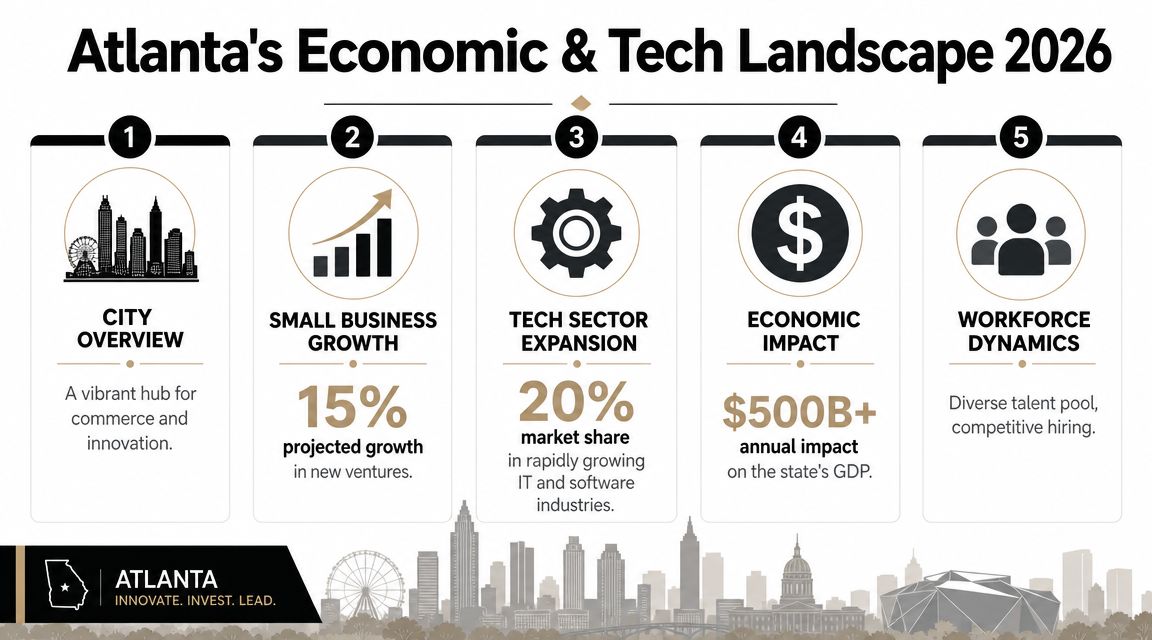
Georgia reporting shows 94% of small business owners projected growth in 2026, while inflation (31%) and cash flow (29%) remained the top challenges according to Metro Atlanta small business reporting on 2026 conditions. For owners and IT managers, that usually leads to selective spending. New systems get approved if they support revenue or staffing, while replacement cycles, disposal planning, and documentation get pushed out.
Why local pressure changes IT decisions
Tight cash flow rarely eliminates technology projects. It stretches them. Servers stay in service past the point where support becomes expensive. Spare laptops get handed down again. Old printers, switches, and specialty devices remain connected because replacement loses out to payroll, rent, or inventory.
That trade-off has consequences across Metro Atlanta because the region has so many smaller organizations with different risk profiles under one roof.
- Clinics and healthcare offices manage sensitive records with small internal teams
- Universities and school systems cycle through large volumes of shared devices
- Research and industrial sites operate instruments that may hold data locally
- Professional services firms support hybrid staff across homes, branch offices, and coworking spaces
In practice, many of these businesses do not have one clean server room. They have a headquarters closet, a branch storage area, a shelf of retired laptops, old conference-room gear, and equipment no one wants to dispose of until someone has a free afternoon. That is how asset risk accumulates in otherwise well-run companies.
AI adoption is raising the floor for IT complexity
Another pressure point is the rapid push into AI and data-heavy workflows. Seventy-five percent of SMBs are investing in AI, 78% of SMB leaders say it will transform their operations, and 66% are increasing investment in data management, based on Salesforce small business trend reporting. For small businesses, that means more stored data, more endpoints touched by business information, and more need for disciplined retention and retirement practices.
The operational issue is straightforward. If a company adds AI tools, cloud apps, and more connected devices without tightening inventory control, it also increases the number of places where customer, employee, or business data can persist after a device stops being useful. Teams trying to keep cloud systems visible often rely on resources like this DevOps guide to monitoring cloud services. That monitoring mindset matters on the hardware side too, especially once devices leave active use.
Vendor choice creates a similar problem. Businesses comparing carriers and communications support often review resources like this overview of Atlanta-area telecom providers and service options. The harder question comes later. Who tracks the routers, phones, access points, and related gear when contracts change, offices move, or equipment gets retired?
Growth pressure makes new technology feel urgent. Budget pressure makes disciplined retirement easy to delay.
In Atlanta, that delay is rarely just housekeeping. It affects security exposure, audit readiness, storage space, and the actual cost of every refresh cycle.
Cybersecurity and Data Privacy Under Pressure
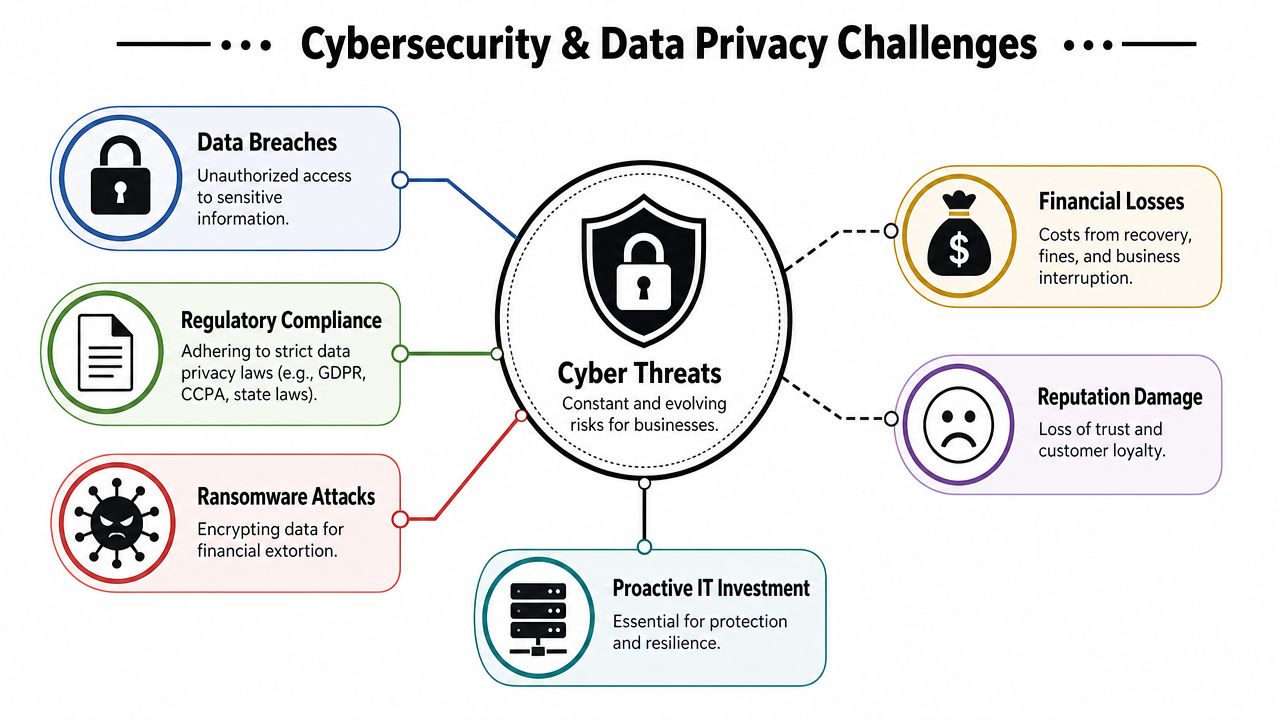
The clearest security warning for Atlanta small businesses in 2026 is this. One Metro Atlanta analysis reports cyberattacks up 40% year over year, with average breach costs above $200,000 for firms with fewer than 100 employees, according to this Metro Atlanta cybersecurity outlook. If you own a smaller company, you don't need many incidents at that cost level before your operations, customer trust, and working capital take a hit.
Where pressure is really coming from
Most owners think first about phishing, ransomware, and weak passwords. They should. But in small business environments, the risk often spreads through ordinary operational shortcuts:
- Shared admin access that nobody has cleaned up
- Mixed-use devices moving between office and home
- Retired hardware sitting unencrypted or unwiped
- Improvised decommissions where old systems are disconnected without formal records
If your team handles any regulated or sensitive information, data privacy doesn't end when a machine stops being productive. It ends when the data is removed or the media is destroyed and documented.
What works and what fails
What works is surprisingly unglamorous. Segment intake or quarantine networks away from office systems. Require multi-factor authentication for admin accounts. Keep a clear inventory of every device with storage. Treat pickups, wipes, and handoffs as controlled events, not favors between departments.
What fails is the common shortcut list. Donating machines without verification. Letting a staff member “take care of” old drives. Assuming factory reset equals secure sanitization. Storing retired servers in a warehouse corner because nobody wants to approve the project.
Practical rule: If a device ever held business data, assume it still does until you have wipe records or destruction records.
For owners tightening controls around finance workflows too, it helps to review adjacent operational risk areas. Payment systems are one example, since financial tools often overlap with endpoint management, permissions, and vendor access. A useful operational reference is this small business payment processing guide, especially if your finance and IT responsibilities overlap in a lean team.
Secure retirement is part of cyber defense
Many Atlanta companies still separate “security” from “disposal.” They shouldn't. An unwiped workstation, failed NAS unit, copier hard drive, or decommissioned lab PC can trigger the same kind of exposure as an actively compromised endpoint if sensitive data is left behind.
If your environment includes cloud apps, remote endpoints, and old on-prem equipment, the control surface is already spread out. This is why many organizations pair endpoint security reviews with broader thinking around cloud security planning for Atlanta organizations. The issue isn't choosing cloud over hardware. It's ensuring both active and retired systems stay within the same security discipline.
Managing Hybrid Work and Runaway Cloud Costs
A common Atlanta scenario in 2026 looks like this. Half the staff works from home two days a week, sales keeps one set of files in Microsoft 365 and another in a niche app, a former employee still has a laptop in a spare room, and the monthly cloud invoice is higher than anyone expected. The bill is the visible problem. The larger issue is weak control over where data lives, who still has access, and which devices should have been retired months ago.
Hybrid work makes those gaps easier to miss because equipment, accounts, and data are spread across offices, homes, shared workspaces, and vendor platforms. Add AI tools for search, support, document review, or meeting summaries, and storage grows fast. So do duplicate exports, shadow backups, and stale user accounts.
Why costs keep drifting upward
Cloud spending usually rises for ordinary operational reasons, not because a business made one bad decision. Teams keep paying for accounts tied to old roles. Managers approve overlapping software because it solves an immediate problem. Employees save data in multiple places to avoid losing it. Hardware also lingers after workloads move to the cloud, which leaves you paying twice. Once for the hosted service, and again for the old endpoint, backup process, or support time still attached to it.
The hybrid cost problem usually comes from four places:
- Inactive accounts that still carry software, storage, or backup charges
- Device sprawl across office, home, field, and shared environments
- Duplicate platforms adopted faster than IT can standardize them
- Retired hardware kept for fallback use, even though nobody has a clear business case for keeping it
A tighter operating model
Atlanta businesses that control this well treat cloud management and asset management as the same discipline. They keep a current inventory, tie software to actual job function, and set a date for review when an employee changes roles or leaves. They also decide what happens to the physical device. Keep it in service, reassign it, or send it for secure disposition. What creates risk is leaving that decision unresolved.
A practical reference for the monitoring side is this DevOps guide to monitoring cloud services. The value is not just uptime reporting. It helps teams see which services are active, which are underused, and where costs are rising without enough business value in return.
For smaller firms without deep internal IT coverage, sourcing decisions matter too. Many owners are reassessing help desk coverage, infrastructure support, and vendor oversight through IT outsourcing trends among Atlanta businesses. Outsourcing can reduce strain on a lean team, but only if contracts clearly assign responsibility for provisioning, offboarding, device recovery, and secure end-of-life processing.
What to stop doing
Stop treating cloud migration as proof that local device risk is gone. A remote laptop with cached files, saved credentials, browser history, and synced folders can still create a legal and financial problem after the workload itself has moved online.
Stop storing retired laptops, phones, and external drives just because they might be useful later.
And stop separating cost control from disposal discipline. In hybrid environments, unused hardware often keeps driving software, support, and risk long after its business value is gone.
The Hidden Risks of Aging Hardware and Staff Shortages
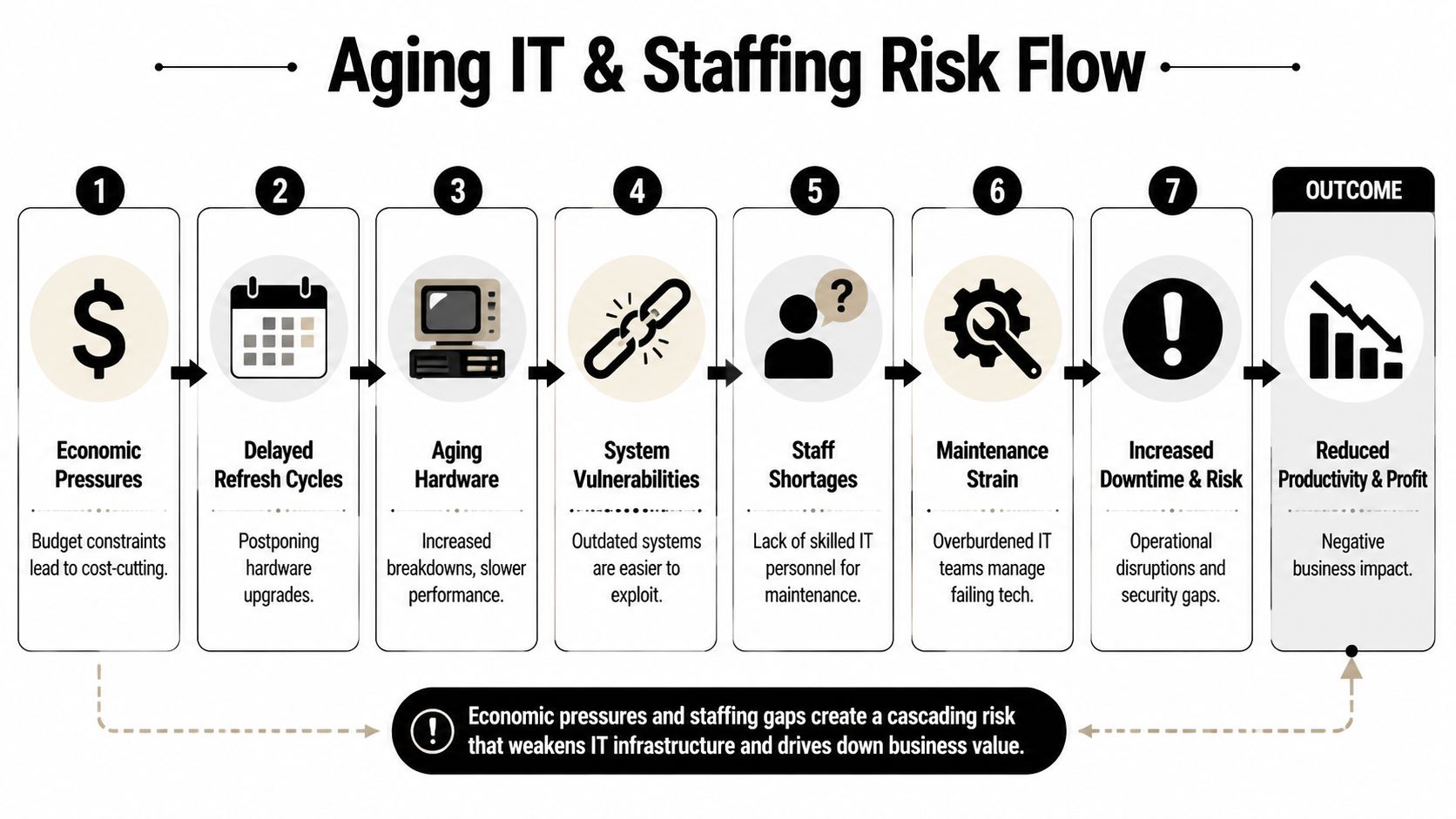
The most expensive devices in a small business often aren't the new ones. They're the old ones your team keeps alive with too much labor. Aging hardware burns time. Staff replace failed drives, troubleshoot unstable operating systems, hunt for compatible parts, and nurse machines through one more quarter because replacement keeps getting deferred.
Georgia small-business research cited in Atlanta coverage says 56% now use AI, but access to capital remains a top problem, which means many firms adopt more technology without adding headcount and create an integration and management bottleneck that can sideline critical processes such as secure asset disposition and auditability, as discussed in this Atlanta business resilience and AI analysis.
Why old equipment becomes a compliance problem
When teams are stretched, they focus on keeping active users running. That's rational. The side effect is that end-of-life assets pile up. A back office fills with obsolete PCs. A rack still holds retired switches. Lab systems stay boxed after a renovation. Nobody updates the asset list because everyone is busy handling tickets.
That turns old equipment into more than a maintenance issue. It becomes:
- A data exposure issue if storage media hasn't been sanitized
- An audit issue if the organization can't prove where assets went
- A facilities issue when storage areas become ad hoc equipment graveyards
- A management issue because no one knows what can be reused, recycled, or destroyed
The compounding effect
Aging hardware and short staffing reinforce each other. Older systems create more incidents. More incidents consume more staff time. Less staff time means less attention to documentation, retirement planning, and vendor coordination. Eventually, organizations normalize disorder.
The storage room is part of your IT environment, whether you manage it that way or not.
That's especially true for Atlanta organizations with labs, clinics, and multi-site offices. Devices in those environments aren't always standard desktops. They can be embedded systems, analyzers, imaging accessories, specialized workstations, and networked equipment with data remnants that staff may overlook.
A useful local staffing lens is this review of Atlanta tech layoffs and hiring trends. The hiring market changes, but one pattern holds. Small teams still need simpler operating models, tighter inventories, and fewer unmanaged leftovers.
Closing the Loop with Secure IT Asset Lifecycle Management
Most companies don't lack awareness. They lack a repeatable end-of-life process. That's why IT asset disposition matters. It closes the gap between “this device is no longer needed” and “this device no longer creates risk.”
A background review of underserved business challenges notes that IT asset lifecycle management during decommissions is a key overlooked risk, especially when organizations must retire servers, workstations, and scientific instruments with embedded data under cost pressure, as discussed in this analysis of overlooked 2026 business challenges.
What a formal process includes
A serious lifecycle program does more than haul equipment away. At minimum, it should cover:
| Process area | What good practice looks like |
|---|---|
| Asset identification | Devices are tagged, counted, and matched to an inventory list before removal |
| Chain of custody | Handoffs are documented from pickup through processing |
| Data sanitization | Drives are wiped to a defined standard or physically destroyed when needed |
| Reporting | The business receives records that support internal review and compliance needs |
| Environmental handling | Equipment is recycled through proper downstream channels rather than dumped |
The difference between “recycling” and “secure disposition” is documentation. If you can't prove what happened to the data-bearing asset, you don't have a complete control.
What works in the field
For offices, clinics, schools, and labs, the best approach is usually scheduled decommission planning rather than sporadic cleanouts. Bundle old desktops with failed servers, network gear, and specialty devices in one controlled project. Identify which assets require wiping, which require shredding, and which need de-installation support.
For teams that want to strengthen routine maintenance before assets reach that stage, general guidance on keeping your IT systems secure can help frame the bigger picture. Maintenance and disposal are different tasks, but they support the same goal. Reduce unmanaged risk.
Where disposal becomes strategic
This is the point where an ITAD partner becomes operationally useful, not just convenient. A provider such as Scientific Equipment Disposal's IT asset disposal service handles business-to-business pickup, de-installation logistics, data-bearing media processing, and documentation for electronics and lab-related assets. For Atlanta organizations managing clinic upgrades, lab shutdowns, office moves, or server room cleanouts, that kind of process reduces pressure on internal staff and makes asset retirement auditable.
If disposal isn't documented, it's just disappearance with paperwork missing.
A mature lifecycle policy should tell your team exactly what happens when equipment is replaced, who approves the retirement, how data is handled, who transports the asset, and what records are stored afterward. That's not cleanup. That's risk management.
Your Action Plan for IT Resilience in Atlanta
If you want to reduce risk without overcomplicating operations, start with a short list and execute it well.
The practical checklist
- Build one asset inventory: Include laptops, desktops, servers, phones, network hardware, copiers, lab systems, and anything with embedded storage.
- Mark retirement candidates now: Don't wait for an office move or emergency cleanup to identify obsolete equipment.
- Separate active from inactive assets: If a device is no longer in service, move it into a documented retirement workflow.
- Define sanitization rules: Decide what gets wiped, what gets shredded, and what proof your business requires.
- Assign ownership: Name the person or team responsible for approvals, handoff records, and final documentation.
- Budget for end-of-life work: Retirement, pickup, and destruction should sit in the IT budget, not in a vague future “cleanup” category.
- Review vendor access and account removal: Device retirement and user offboarding should happen together where possible.
- Plan by site: Atlanta businesses with more than one office, clinic, or lab should treat each location as its own asset risk zone.
What good planning feels like
Good planning doesn't feel dramatic. It feels boring in the best way. Your team knows what leaves service, when it leaves, who touches it, and what record proves the job was completed.
That's the practical answer to Atlanta small business IT challenges in 2026. Not more tools by default. Better control over the full lifecycle of the tools you already have.
Frequently Asked Questions About IT Challenges
| Question | Answer |
|---|---|
| What's the first step if my business has old IT equipment stacked in storage? | Start with an inventory. List every device, note whether it contains storage, identify its location, and mark whether it's still assigned, reusable, or ready for retirement. You can't secure what you haven't identified. |
| Does a factory reset count as secure data removal? | Not by itself as a business control. For sensitive data, you need a defined sanitization process or physical destruction of the media, plus documentation. |
| Do non-medical businesses need to care about old drives and employee PCs? | Yes. Even if you don't handle patient data, old devices may still hold employee records, financial files, contracts, saved credentials, or customer information. |
| Why should a small business pay for professional data destruction? | Because disposal is a risk event. If internal staff don't have the tools, process, or time to sanitize and document assets correctly, the business keeps the liability. |
| How often should we review devices for retirement? | Set a recurring review tied to budgeting, office moves, refresh cycles, or compliance checks. The key is consistency, not waiting until storage becomes unmanageable. |
| What kinds of assets get overlooked most often? | Copiers, backup devices, failed external drives, old network appliances, and specialized lab or medical equipment with embedded storage. |
| Should cloud-first companies still worry about disposal? | Yes. Cloud adoption changes where workloads run, but it doesn't erase local data remnants on laptops, storage media, peripherals, or decommissioned infrastructure. |
| What should I ask an ITAD vendor before pickup? | Ask how assets are tracked, how chain of custody is maintained, how data-bearing media is wiped or destroyed, what documentation you'll receive, and whether they handle specialty equipment as well as standard electronics. |
If your organization in Atlanta needs a clear, documented way to retire computers, servers, storage devices, or lab equipment, Scientific Equipment Disposal provides local business-to-business pickup, de-installation support, hard-drive wiping using DoD 5220.22-M 3-pass sanitization, and recycling services designed for clinics, labs, schools, corporate offices, and public-sector facilities.