How to Wipe a Computer Hard Drive: A Guide for Businesses Nationwide

To truly wipe a computer hard drive securely, you have to use a method that completely overwrites every bit of the existing data, making it impossible to recover. Hitting 'delete' or even reformatting the drive just doesn't cut it. Specialized software can easily pull that information right back from the dead.
A proper, certified wipe is the only way to ensure your sensitive data is gone for good before a device is sold, recycled, or tossed out, whether you're located here in Atlanta or anywhere across the nation.
Why Securely Wiping Your Hard Drive Is So Critical
Before we get into the nuts and bolts of how to wipe a computer hard drive, it's crucial to understand why this isn't just some optional IT chore. For any organization, whether it's a local Atlanta clinic or a national corporation, data sanitization is a core part of risk management. It's a fundamental business practice that protects you from some seriously nasty consequences.
When you delete a file, you're not actually erasing it. You're just removing the little signpost that tells the computer where to find it. The data itself is still sitting there on the drive's platters or flash cells, just waiting for new data to be written over it. This leaves a gaping security hole that data thieves are more than happy to exploit.
The Real Costs of Improper Disposal
Cutting corners on IT asset disposal can lead to catastrophic results that can send shockwaves through your entire organization. The risks go way beyond losing a few old spreadsheets; we're talking about real, tangible financial and legal damage for businesses in every state.
Just think about what's at stake:
- Devastating Data Breaches: A single unwiped hard drive from an old server or a former employee's laptop can hold thousands of patient files, customer records, or your company's most valuable trade secrets.
- Crippling Financial Penalties: Regulations like HIPAA and GDPR have teeth. A breach traced back to improper disposal can trigger fines that easily run into the millions of dollars, impacting companies nationwide.
- Irreparable Brand Damage: Once news of a data breach gets out, customer trust evaporates. Rebuilding a damaged reputation can take years, if you can recover at all.
The bottom line is that guesswork isn't a strategy. Assuming a deleted file is gone for good is a dangerous gamble. A secure, documented, and certified process is the only way to guarantee your organization is fully protected, no matter where you operate.
A Growing Market Driven by Security Demands
The urgent need for proper data destruction is impossible to ignore when you look at market trends. The global hard drive destruction service market is exploding—it was valued at USD 1.65 billion and is projected to climb to an incredible USD 5.05 billion by 2035. That's a compound annual growth rate (CAGR) of 10.7%.
This massive growth is fueled by skyrocketing security concerns, especially for businesses like hospitals and labs that handle sensitive information under strict HIPAA rules nationwide. With cyber threats getting more sophisticated by the day, no organization can afford to leave data sitting on old hard drives.
This industry boom highlights a critical shift: businesses across the U.S. are finally moving away from risky, do-it-yourself methods and embracing professional, compliant solutions. A focus on robust data security protocols is no longer optional—it's a core part of responsible asset management. Understanding these risks makes it clear why certified wiping and destruction are so vital for your organization's long-term health.
Choosing Your Data Destruction Method
Before you can properly wipe a computer hard drive, you need to know what you’re working with. Not all drives are the same, and the method that works perfectly for one type can be completely ineffective on another. Getting this first step right is critical for secure, compliant data sanitization for businesses anywhere.
The two main players here are traditional Hard Disk Drives (HDDs) and modern Solid-State Drives (SSDs). Think of an HDD like a record player, with a spinning magnetic platter where data lives. An SSD, on the other hand, uses flash memory chips—more like a high-tech USB drive with no moving parts. This fundamental difference is everything when it comes to wiping them correctly.
The Great Divide HDD vs SSD Wiping
When you wipe an HDD, you're essentially overwriting its magnetic surface with new, random data. This process scrambles the original information, making it unreadable. This is where standards like DoD 5220.22-M come in; they were designed specifically for this, prescribing multiple passes of overwriting to ensure nothing can be recovered. It’s like painting over a canvas multiple times—eventually, the original image is completely gone.
SSDs are a different beast entirely. They use a process called "wear leveling" to spread data evenly across memory cells, which can leave fragments of old information behind even after a standard wipe. The proper way to sanitize an SSD is by using a command called Secure Erase, which tells the drive’s internal controller to reset every single cell to its original, empty state. Using an old-school HDD wiping method on an SSD isn’t just ineffective—it can cause unnecessary wear on the drive.
This chart helps simplify the initial decision based on how sensitive your data is.
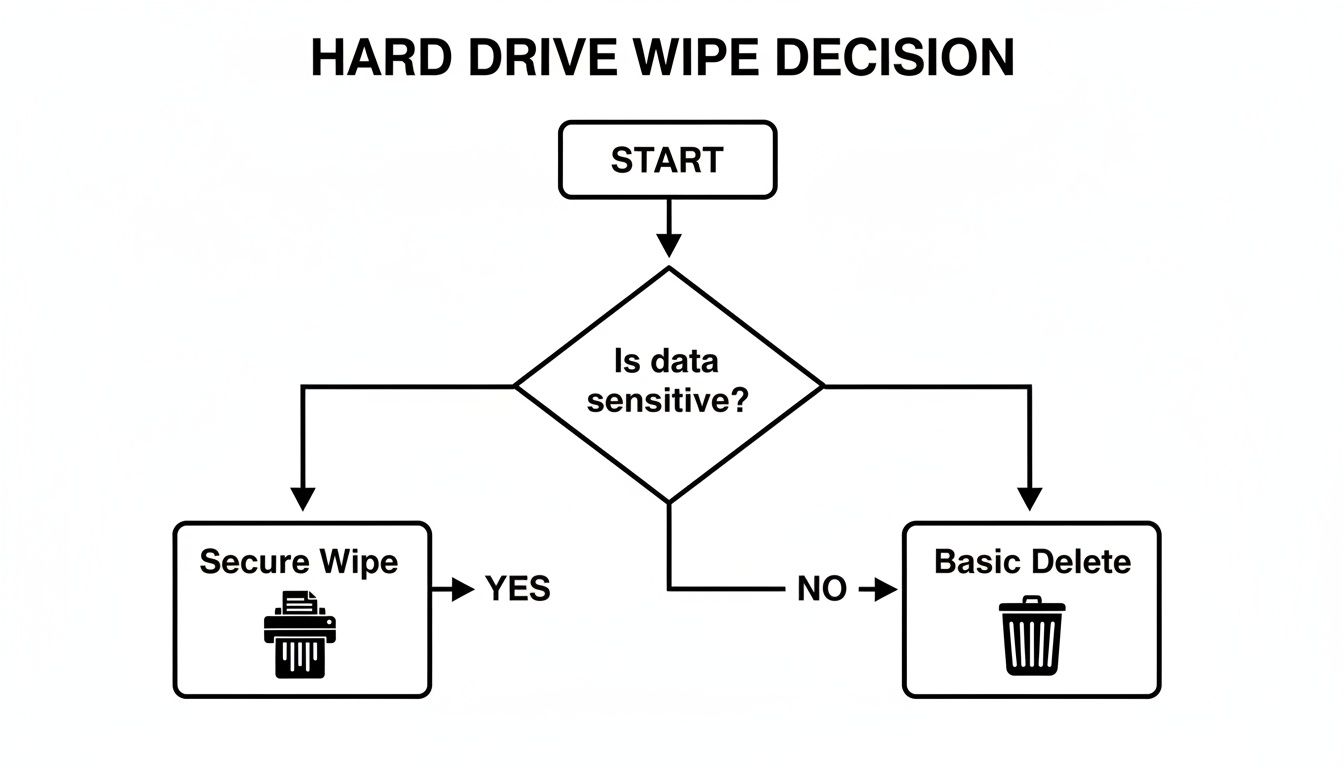
The takeaway is simple: the more sensitive the data, the more rigorous your destruction method needs to be. No shortcuts.
Comparing Data Destruction Methods
Once you know your drive type, you can weigh your options. Each method has its place, depending on your security needs, compliance rules, and the condition of the hardware. To give you a clearer picture, here’s a quick rundown of the main approaches available nationwide.
| Comparing Data Destruction Methods | |||
|---|---|---|---|
| Method | Drive Type | How It Works | Compliance Level |
| Software Wiping | HDD & SSD | Overwrites the drive with random data, often in multiple passes (DoD 5220.22-M). | High (when done correctly) |
| Degaussing | HDD & Magnetic Tape | A powerful magnet neutralizes the drive's magnetic field, instantly erasing data. | Very High |
| Physical Destruction | All Types | The drive is shredded into tiny, unrecognizable pieces, making data recovery impossible. | Highest (Guaranteed) |
Let's dig a little deeper into what these mean for you.
- Software-Based Wiping: This is your go-to for functional drives that are being repurposed or resold. It uses specialized software to overwrite the entire drive, leaving the hardware intact but the data gone for good.
- Degaussing: This method is only for magnetic media like HDDs. A degausser emits a powerful magnetic field that scrambles the drive’s platters, instantly destroying data. The catch? It also renders the drive completely unusable afterward.
- Physical Destruction: When a drive is dead, outdated, or holds extremely sensitive information, shredding is the only way to be 100% certain. The drive is physically ground into small fragments, making data recovery impossible.
Remember, the goal isn't just to erase data but to make it irretrievably gone. For any business handling client or patient information, proof of destruction is just as important as the act itself. This is where professional services make all the difference, offering local and nationwide coverage.
For situations demanding the highest security—especially for failed drives or media containing protected health information (PHI)—physical destruction is the gold standard. You can learn more about what's involved with professional hard drive shredding services and see how they help organizations meet strict compliance mandates. Making the right choice ensures you protect your data and have a clear, auditable trail of its secure disposal.
In-House Methods for Wiping Hard Drives
Thinking about handling a hard drive wipe yourself? For non-critical gear or devices that never held sensitive data, a DIY approach can seem like a practical choice. Both Windows and macOS have built-in tools designed to reset devices to their factory state, and they're easy enough to access. But it's critical to understand what they don't do before you start.
These built-in functions are really designed to give a computer a fresh start, not to meet strict data destruction standards. They perform a surface-level format, which is fine for personal use but falls way short for business or compliance needs. The biggest problem? You get zero verifiable, auditable proof that the data was securely destroyed.
Using Windows Built-In Reset Tools
If you’re on a modern Windows machine (like versions 10 or 11), the main tool you'll use is the 'Reset this PC' feature. When you kick off this process, you’ll face a critical choice that completely changes the outcome.
You absolutely must select the 'Remove everything' option. Choosing 'Keep my files' is not a wipe—it does exactly what it says and leaves your data right where it is. After that, Windows will ask if you want a quick removal or a more thorough one that "cleans the drive." For security, the second option is always the one to pick.
Still, even the "thorough" method has some big limitations:
- No Certification: The process won't give you a Certificate of Destruction.
- Compliance Gaps: It doesn’t meet the overwriting specs for standards like DoD 5220.22-M or NIST 800-88.
- Varying Effectiveness: How well it works can depend on the drive type (HDD vs. SSD) and even the specific version of Windows you're running.
This approach is perfectly acceptable for a personal laptop you plan to sell on eBay. It is absolutely not a compliant solution for a workstation that once held patient records or corporate financial data.
Wiping a Drive with macOS Disk Utility
For the Apple crowd, the go-to tool is Disk Utility. It's a powerful application that comes standard with macOS. The right way to do it is to boot your Mac into Recovery Mode. This lets you access the utility without the main operating system running, which is what allows you to erase the startup disk.
Once you’re in Disk Utility, you can select the drive and choose the 'Erase' function. Here’s the important part: you have to click on 'Security Options' to define how securely the data is removed. The options range from a fast, basic erase to a multi-pass overwrite that gets much closer to real security standards.
Crucial Takeaway: The default "erase" in most operating systems is not a secure wipe. You must actively find and choose the most secure options available, which usually means overwriting the disk multiple times with random data.
Even with the most secure settings, this method shares the same core problem as its Windows counterpart: no auditable proof. You can't just hand an auditor a screenshot of a completed progress bar and call it a day.
This is where professional services become non-negotiable. For any situation demanding absolute certainty and compliance, the only real path forward is exploring services that offer comprehensive and secure data destruction. It’s the only way to get true peace of mind.
Ultimately, while these DIY methods can remove data on a basic level, they are no substitute for professional, certified data sanitization. When your organization’s reputation and legal standing are on the line, relying on consumer-grade tools introduces a risk that most businesses just can't afford. A documented, certified process is the only foolproof solution.
Meeting Demands for HIPAA and DoD Compliance
When you're working in healthcare, government, or finance, knowing how to wipe a computer hard drive isn't just about good IT hygiene—it's a legal requirement. Compliance is the bedrock of your organization's integrity. Getting it wrong can lead to crippling fines and a public relations nightmare that takes years to fix.
Take Protected Health Information (PHI) under the Health Insurance Portability and Accountability Act (HIPAA). The rules are brutally clear: you must make PHI on electronic media "unusable, unreadable, or indecipherable to unauthorized individuals." Simply deleting files or formatting a drive is a direct violation, leaving you wide open to severe penalties.
The Gold Standard of Data Sanitization
This is where proven, repeatable standards become non-negotiable. The DoD 5220.22-M standard, created by the Department of Defense, has long been the benchmark for thorough data sanitization. It outlines a multi-pass process that overwrites a hard drive with specific patterns, essentially shredding the data at a digital level.
While newer standards like NIST 800-88 are now common, the DoD method is still widely recognized for its aggressive approach. Following a recognized standard shows you've taken deliberate, provable steps to destroy sensitive information—a cornerstone of any solid compliance strategy.
The real issue isn't just deleting data; it's proving it's gone forever. From a compliance perspective, if you don't have an audit trail, the wipe might as well have never happened.
Creating an Unbreakable Audit Trail
An unbreakable, auditable trail is your absolute best defense during a data security audit. It's more than just a single receipt. It's a complete, documented story of every asset's journey from active duty to final disposal.
Your documentation must include:
- Serialized Asset Reports: A detailed inventory listing every single hard drive by make, model, and unique serial number.
- Chain-of-Custody Logs: A record tracking who handled the assets, when they handled them, and where they went, from the moment they leave your control.
- Certificates of Destruction: This is the most crucial piece of the puzzle. It’s a formal, signed document confirming that the data on specific serial numbers was destroyed according to a particular standard.
Think about a hospital decommissioning a fleet of old diagnostic machines. Each one has a hard drive packed with years of patient PHI. A documented process ensures every drive is inventoried, securely transported, and sanitized using a compliant method. The final Certificate of Destruction proves the hospital met its HIPAA obligations, shielding it from massive liability. This level of detail is a must-have for any modern IT asset disposal strategy.
The High Cost of Cutting Corners
The consequences of getting this wrong are staggering. Time and again, research shows how simple mistakes—like donating unwiped computers or recycling servers without verification—lead to major data breaches. According to IBM, the average breach now costs a company $4.88 million, and incidents involving malicious insiders drive that number up to $4.99 million.
There's a reason the secure data destruction market, valued at $3.72 billion, is projected to hit $5.64 billion by 2029. It's driven by strict regulations in healthcare and government that demand irreversible data erasure.
For any organization, whether you're in Atlanta or operating nationwide, failing to meet these standards is a gamble you can't afford to take. A single unwiped drive can destroy years of trust you've built with patients and clients. Making sure every device is wiped clean according to HIPAA or DoD standards isn't just an IT task—it's a fundamental business imperative.
Partnering with a Certified Data Destruction Expert
Let's be honest: when compliance is on the line and your organization’s reputation is at stake, wiping a hard drive stops being a simple IT task. It becomes a major strategic decision. While DIY methods might work for an old home computer, they just don't cut it for any business handling sensitive data.
The only way to get real peace of mind is to partner with a certified data destruction expert. This turns what could be a massive logistical headache into a secure, fully documented, and surprisingly straightforward process.

It doesn't matter if your lab is in Atlanta, GA, or your data centers are spread across the country. A professional service takes care of every single step. They start with secure on-site asset collection, where trained technicians handle everything from de-installation to logistics. This ensures a clear, unbroken chain of custody from the moment your equipment leaves your building.
A Dual Approach to Total Data Security
One of the biggest advantages of working with a certified vendor is their ability to deploy a dual strategy for data destruction. This flexibility is key, because a one-size-fits-all approach is useless when you have a mixed bag of IT assets. No drive gets left behind.
- Multi-Pass Wiping for Reusable Drives: Got functional hard drives that might have some resale or redeployment value? Experts use compliant software to perform multi-pass wipes, often following the DoD 5220.22-M standard. This method overwrites the drive's entire surface multiple times, making the original data impossible to recover while keeping the hardware intact.
- Industrial Shredding for End-of-Life Media: Not every drive can be wiped. If a drive has failed, is obsolete, or is physically busted, software-based wiping is off the table. In these scenarios, industrial shredding is the only guaranteed solution. The drives are physically annihilated, ground down into tiny, untraceable fragments.
This combination of wiping and shredding guarantees that 100% of your data is verifiably destroyed, no matter what condition the media is in.
Beyond Wiping: Sustainability and Responsibility
Bringing in a certified expert also solves another critical piece of the asset disposition puzzle: environmental responsibility. After your data is securely destroyed, the job still isn't done.
A reputable vendor will ensure that all decommissioned assets are processed through certified e-waste recycling partners. This commitment keeps tons of electronic waste out of landfills, makes sure hazardous materials are handled safely, and allows valuable commodities to be recovered for manufacturing. You can see how this responsible approach works by exploring professional IT equipment recycling services. This focus on sustainability isn't just about meeting corporate responsibility goals; it also reinforces a positive brand image.
The real value of a certified partner is how they seamlessly blend security, compliance, and sustainability. You’re not just wiping hard drives—you’re putting a complete, end-of-life asset management strategy in place that protects your organization from every angle.
The entire e-waste industry is shifting toward professional data destruction. The secure data destruction market is projected to jump from $3.35 billion to $5.45 billion by 2029. What's driving this? Exploding data volumes and tough regulations like HIPAA that demand undeniable proof of data sanitization.
For medical labs and government agencies, knowing how to properly wipe a computer hard drive isn't just a best practice—it's a matter of survival.
Ultimately, outsourcing this critical function gives you a secure, documented, and fully compliant solution. It eliminates the risk of in-house mistakes and provides a solid audit trail that proves your commitment to data protection. You can finally get back to focusing on your core operations with confidence.
Common Questions About Wiping Hard Drives
When it comes to data destruction, there are a lot of questions and—frankly—a lot of bad advice floating around. Whether your facility is right here in Atlanta, Georgia or you’re managing assets across the country, knowing the right way to wipe a hard drive is essential for security and compliance.
Let's clear up some of the most common questions we hear every day.
Is Deleting Files and Reformatting a Drive Good Enough?
Absolutely not. This is probably the single most dangerous assumption a business can make about its data.
Hitting 'delete' or running a standard reformat only removes the directions your computer uses to find the files. The data itself is still sitting there on the drive, plain as day, just waiting for someone to recover it with basic, widely available software.
If you're dealing with any kind of sensitive information—business records, patient data, financial reports—this method is completely useless. Real data sanitization means overwriting every single sector of that drive with random characters, sometimes multiple times, making the original information impossible to get back.
What Exactly Is a Certificate of Destruction? Do I Really Need One?
Think of a Certificate of Destruction as your official receipt for proper data disposal. It's the auditable, legally-recognized document proving that your company's data-bearing devices were securely sanitized or physically destroyed. For any organization under regulations like HIPAA, this isn't optional; it's a cornerstone of your compliance strategy.
A proper certificate will always include key details like:
- The unique serial numbers of every hard drive wiped or destroyed.
- The specific method used, like a DoD 5220.22-M wipe or physical shredding.
- The date and location where the service was performed.
- A formal statement confirming the transfer of custody and confidentiality.
Without this piece of paper, you have zero proof you did the right thing. In an audit, that's a massive, costly liability.
Can You Wipe Data from Broken or Dead Hard Drives?
No, you can't. Software-based wiping needs a working hard drive. The drive has to power on, spin up, and communicate with the software to complete the overwriting process. If it's physically damaged, has a fried controller board, or just won't respond, software wiping is off the table.
This is an incredibly common scenario. When a drive is non-functional, physical destruction is the only foolproof solution. Any professional service will immediately flag these drives and send them straight to an industrial shredder. There's simply no other way to guarantee the data is gone forever.
Is Wiping an SSD the Same as Wiping an HDD?
Not exactly. You can sanitize both, but they're built differently and need different approaches. A traditional hard drive (HDD) stores data magnetically on platters. An SSD, on the other hand, uses flash memory.
SSDs have complex "wear-leveling" features that spread data writes around to prolong the drive's life. If you use a standard HDD wiping tool on an SSD, you can easily miss data remnants hidden in these reserved areas.
The correct software method for an SSD is to issue a built-in Secure Erase command, which tells the drive's controller to reset all the memory cells. That said, for high-security environments like a medical lab or financial firm, physical destruction is still the most trusted and reliable way to ensure 100% data elimination on an SSD.
When you need absolute certainty that your data is gone for good, trust the experts. Scientific Equipment Disposal provides certified, compliant data destruction services for businesses, labs, and healthcare facilities throughout the Atlanta area and across the nation. We offer DoD 5220.22-M wiping, physical shredding, and complete, auditable documentation to ensure you're fully protected. Learn more about our secure and sustainable solutions at https://www.scientificequipmentdisposal.com.