What to Do with Old Monitors A Guide for US Businesses


Knowing what to do with old monitors is more than just a task for the facilities team—it's a critical business decision. For companies across the United States, from Atlanta to Austin, that stack of obsolete equipment in a storage closet represents a hidden financial, environmental, and data security risk.
It's a problem that demands a professional solution. Let's be clear: improper disposal isn't just wasteful—it can be incredibly costly.
Your Old Monitors Are a Hidden Liability
That collection of outdated monitors gathering dust is more than an eyesore; it's a ticking clock of potential problems. For businesses nationwide, a simple office-wide tech refresh can quickly turn into a massive logistical headache. The issue isn't just about freeing up space. It's about responsible asset disposition, a process that balances regulatory compliance, data security, and sustainability.

Here’s a real-world example we see all the time: a Chicago-based healthcare provider upgrades 200 workstations. Their old equipment includes standard displays and all-in-one PCs that once handled sensitive patient information. Tossing them in a dumpster simply isn't an option.
Doing so would violate EPA guidelines and could lead to a catastrophic HIPAA breach, resulting in crippling fines and irreversible damage to their reputation. This scenario isn't hypothetical; it highlights the very real stakes involved for businesses everywhere.
The Growing E-Waste Problem
The sheer scale of electronic waste is staggering. In 2022 alone, the world generated 62 million tonnes of e-waste—an 82% jump from 2010. Monitors made up a huge chunk of this, accounting for about 6.7 million tonnes.
With e-waste generation growing by 2.6 million tonnes every year, the problem is only getting worse. Yet, a shockingly low 22.3% of this waste was properly collected and recycled.
This is exactly why a structured, professional approach is non-negotiable. Shifting your mindset from "disposal" to "asset management" is the first and most important step. For any organization, understanding this is key to managing risk. The right corporate e-waste solutions can turn a potential liability into a securely managed, documented process.
By treating old monitors as a controlled asset rather than simple trash, you protect your organization from legal penalties, safeguard sensitive information, and uphold your commitment to environmental responsibility.
Key Risks of Improper Monitor Disposal
Getting this wrong exposes your business to some serious heat. It’s crucial to understand these vulnerabilities before you make a move.
- Regulatory Fines: Federal and state regulations, including strict EPA rules, govern e-waste. Non-compliance isn't a slap on the wrist; it can lead to substantial financial penalties in states like California, New York, and Texas.
- Data Breaches: Don't forget about all-in-one computers or monitors with integrated storage. They can hold confidential company or customer data. Without certified data destruction, that information is a sitting duck.
- Environmental Damage: Older monitors, especially the bulky CRT models, are full of hazardous materials like lead and mercury. If they end up in a landfill, these toxins can contaminate soil and water.
- Brand Reputation: In an era where corporate social responsibility matters, a photo of your company's assets in a dumpster can cause lasting damage to your public image and customer trust.
How to Properly Audit Your Monitor Inventory
Before you can figure out what to do with a pile of old monitors, you have to know exactly what you’re working with. Kicking off with a thorough inventory audit is the first real step—it’s what separates a smart, cost-effective project from a compliance headache waiting to happen. If you skip this, you’re essentially flying blind, and that can cost you in more ways than one.
Don't worry, this doesn't have to be some overly complicated process. A simple spreadsheet is your best friend here. The whole point is to capture the key details for each monitor so you can decide if it's a candidate for resale, donation, or recycling. Think of it as a quick triage for your IT assets.
Categorizing Your Equipment
First things first, let's get these monitors sorted into some logical groups. This initial pass helps you wrap your head around the scope of the project and what kind of special handling each type might need.
Start with the basics of the technology itself:
- CRT (Cathode Ray Tube): These are the old, heavy, boxy monitors from another era. They’re packed with hazardous materials like lead, have zero resale value, and certified recycling is their only responsible destination.
- LCD (Liquid Crystal Display): Your standard flat-panel displays. Many of these might still be perfectly functional. Their value really comes down to their age, size, and overall condition.
- LED (Light Emitting Diode): A more modern and efficient version of LCDs. Newer LED monitors, especially larger ones, often still have some life left in them for resale or donation.
Next up is a hands-on condition assessment for each unit. This is probably the most important factor in determining if a monitor can be reused. I recommend a simple grading system in your spreadsheet—something like "A" for excellent condition, "B" for minor scuffs but works perfectly, and "F" for anything that’s broken or badly damaged.
A detailed audit isn't just about counting heads; it's about understanding the specific value and liability tied to each piece of equipment. This data empowers you to make informed, compliant, and cost-effective decisions.
Identifying Devices with Stored Data
Now for the most critical part of your audit: spotting the difference between a simple monitor and an all-in-one computer. It's a common mistake with serious consequences. A standard monitor is just a display—it doesn’t store any data. But an all-in-one has a full computer, hard drive and all, built right into the monitor's casing.
These all-in-one units are a huge data security risk if they aren't handled with care. If you mistake one for a regular monitor, you could accidentally let sensitive company information walk right out the door.
Your inventory sheet absolutely must have a column to flag these devices. For any unit you identify as an all-in-one, secure data destruction immediately becomes the top priority. This is a non-negotiable part of any professional IT asset disposal strategy.
By taking the time to meticulously audit your inventory—looking at type, condition, and whether it holds data—you're building the foundation for a smooth and successful disposition project. This clarity ensures every single monitor goes down the right path, whether that's to a new owner, a non-profit, or a certified recycler.
Choosing the Right Path: Reuse, Donation, or Recycling
Okay, you've audited your entire monitor inventory. Now comes the decision-making part: what do you do with each of these screens? The choice you make for every single unit—whether it's reuse, donation, or recycling—has real consequences. Getting it right protects your company from liability and helps you squeeze every last drop of value from your old assets.
This quick decision tree can help you visualize the sorting process, moving from a monitor's condition and type to the final data security check.
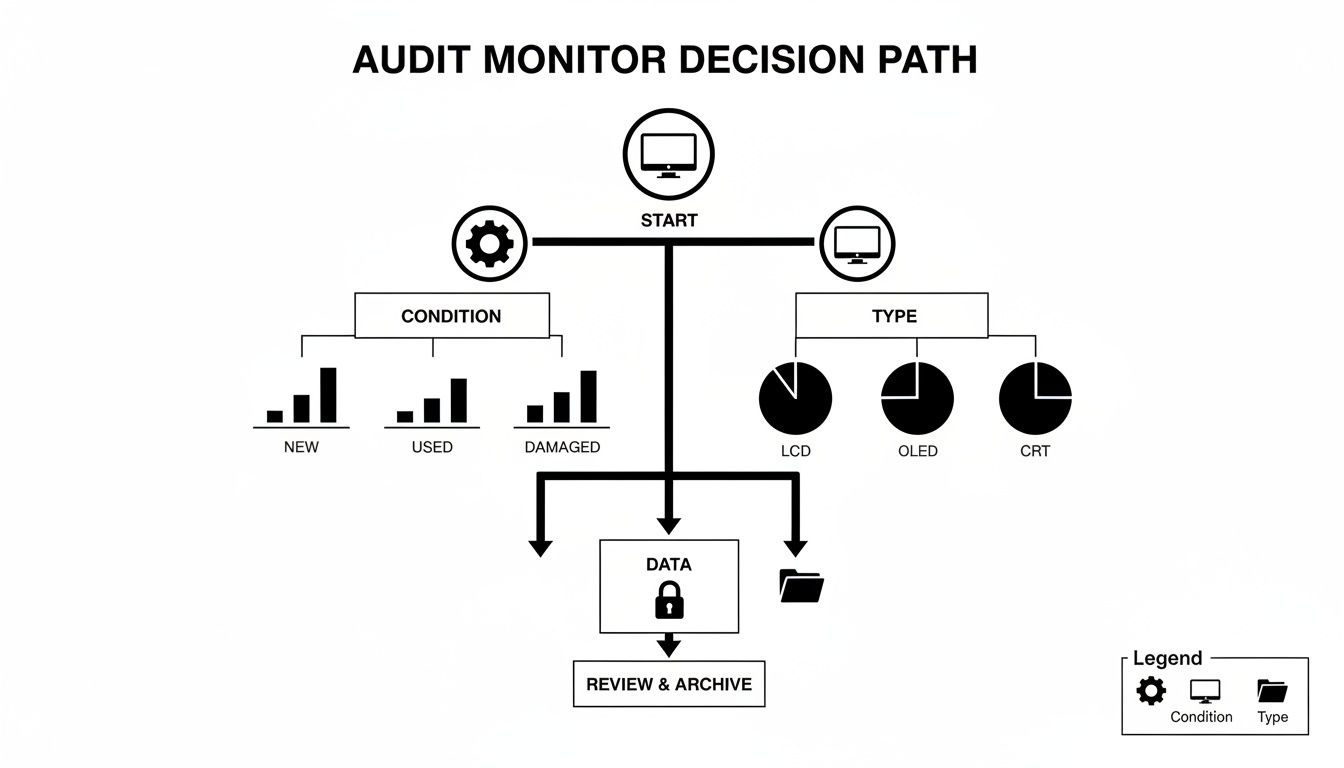
As you can see, it’s a straightforward sequence. First, check the condition. Next, identify the monitor type. Finally, and most importantly, perform a data review to ensure no sensitive information gets missed.
The Case for Reuse and Resale
For functional, relatively modern monitors—we’re talking mostly newer LED models—reuse is your best bet, both financially and environmentally. Extending a device's life is always the greenest option. If your own organization can't use them, you might be surprised what the secondary market will pay.
A great way to reuse a perfectly good monitor internally is to add it to an existing workstation. Learning how to set up dual monitors is a simple way to boost productivity and keep perfectly good hardware out of the disposal pipeline.
Donating Your Old Monitors Responsibly
Donation is a fantastic way to support local schools or non-profits in your community, but you have to do your homework. This isn't just about offloading old gear; your company's reputation is attached to every piece of equipment you donate.
Before you hand anything over, make sure the charity:
- Can actually use the equipment. Don't just dump your problems on them. Obsolete CRT monitors, for instance, often become a disposal burden, not a benefit.
- Has a clear data security policy. If you're donating any all-in-one units with storage, you need to ask how they handle data destruction.
- Partners with a certified recycler. What happens when the equipment they can't use breaks down? You need to know they have a responsible end-of-life plan.
Donating electronics isn't just giving away old gear; it's transferring responsibility. Ensure your chosen partner upholds the same high standards for data security and environmental compliance that your business does.
Why Certified Recycling Is Often Necessary
Let's be realistic. For most businesses, especially those dealing with a large volume of older, damaged, or simply non-functional monitors, certified recycling is the only compliant way forward. This isn’t just about being eco-friendly; it's a critical risk management strategy.
Old monitors pack a serious environmental punch. Screens and monitors contributed 6.7 million tonnes to the global e-waste total in recent years. For US-based hospitals, research labs, and corporations, this is an urgent problem. Improper disposal means toxic heavy metals like lead and cadmium can contaminate local soil and water. The cost is staggering, too—the Global E-waste Monitor reported that managing e-waste hit $37 billion worldwide in 2022.
This is why working with a certified partner is non-negotiable. They provide a documented, auditable paper trail proving your monitors were handled according to all federal and state laws, including EPA regulations. That documentation is your proof of compliance and your shield against potential fines. To see how a professional process works, learn more about certified IT equipment recycling.
Getting Your Monitors Ready for a Safe and Secure Handover
You've made the call on what to do with your old monitors. Now it's time to get down to the nitty-gritty of preparation. This is the crucial bridge between your plan and a smooth, secure handover, and skipping this part can lead to a world of logistical headaches, security breaches, and unnecessary disruptions.
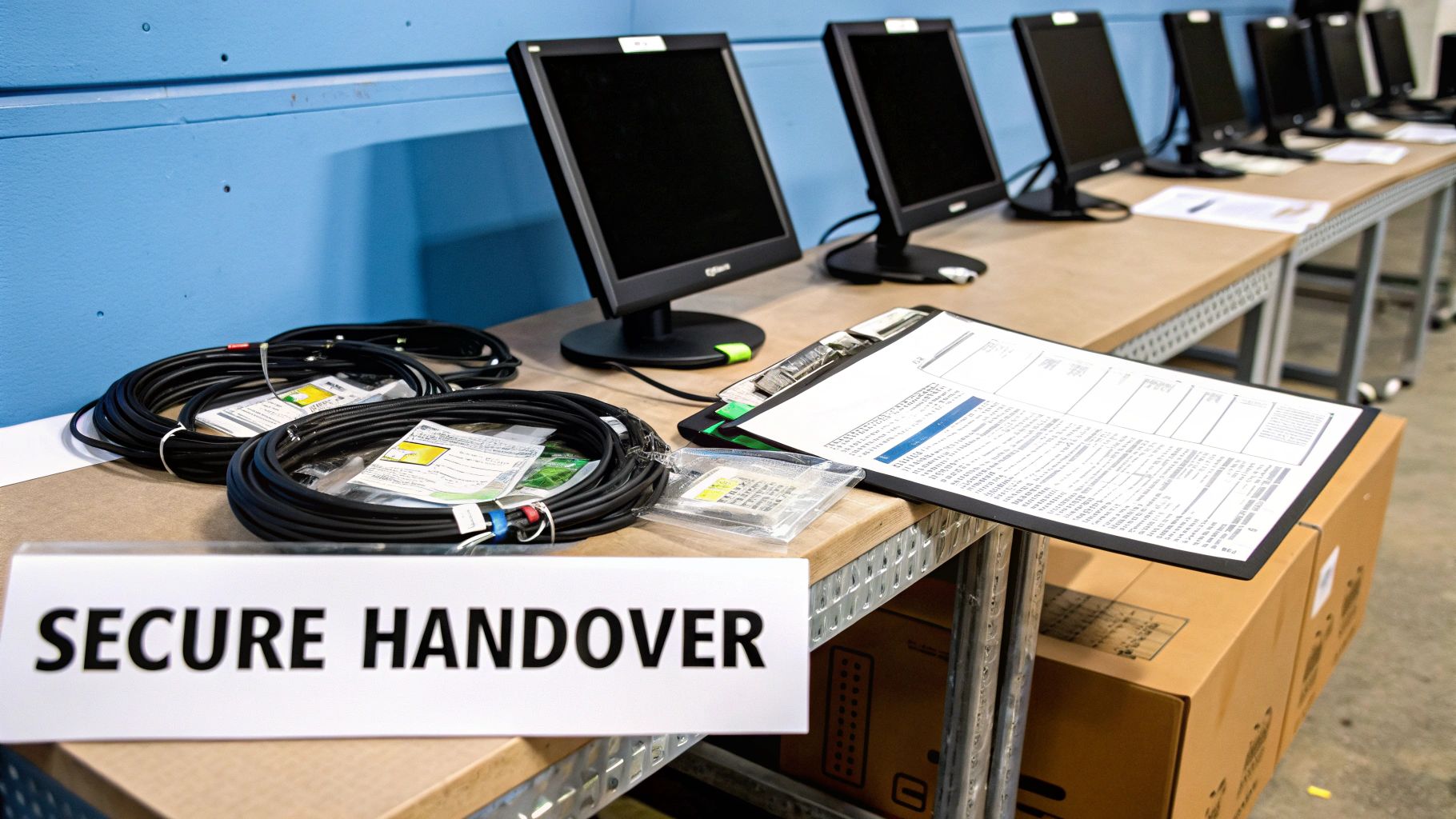
The goal here is really twofold. First and foremost, you have to make absolutely certain that no sensitive data walks out your door. Second, you need to get the physical equipment prepped and ready for a seamless pickup by your chosen partner.
Data Destruction: The Non-Negotiable First Step
While a standard monitor itself doesn't store information, those all-in-one computers you flagged during your audit are a different story entirely. They’re a significant liability. These machines have hard drives, and just hitting 'delete' on a few files is nowhere near enough to protect your company's private data.
This is where industry-standard data destruction methods are essential. We're talking about processes like DoD 5220.22-M 3-pass sanitization. It's a software-based approach that overwrites the entire hard drive with random characters over and over, making the original data practically impossible to get back. For any drives that are dead or just too old, physical destruction via an industrial shredder is the only guaranteed solution.
A professional e-waste recycler will always give you a Certificate of Destruction when the job is done. This document is your official, auditable proof that your data was handled correctly and in line with regulations like HIPAA.
Your recycling partner should handle the actual destruction, but it’s on you to make sure every single all-in-one unit is clearly marked and kept separate from the standard monitors before they show up. It's a simple organizational step that prevents catastrophic security mistakes. It's also a good idea to understand what a proper certificate of destruction template looks like, so you know you're getting the right documentation.
Physical Prep for a Smooth Pickup
Once data security is squared away, the focus shifts to logistics. A little bit of organization on your end makes a huge difference, making the pickup faster and safer for everyone involved. A well-prepped staging area means less disruption and lets your recycling partner get in and out efficiently.
Here's a practical checklist to help your team get everything ready:
- Designate a Staging Area: Pick a secure and easy-to-access spot, like a spare storage room or a loading dock, to gather all the monitors. This keeps the removal team from having to weave through active office spaces.
- De-Install Safely: Unplug everything. Carefully disconnect all monitors from power and workstations. Make sure your staff is using proper lifting techniques, especially with those old, heavy CRT monitors.
- Organize Cables and Peripherals: Loose cables are a tripping hazard and a mess. Grab some zip ties or rubber bands and bundle the power cords and video cables with their monitors. Keeping things together just makes sense.
- Stack and Palletize Properly: If you have a large number of monitors, stack them neatly on pallets. We always recommend placing cardboard sheets between layers to protect the screens from cracking. Then, use shrink wrap to secure the whole pallet for transport.
Taking these steps shows your recycling partner you’re a professional outfit, and that goes a long way in building a good working relationship. More importantly, it ensures this final step is handled safely and without a single hitch.
Finding a Compliant E-Waste Recycling Partner
Choosing the right partner is hands-down the most critical decision you'll make when dealing with old monitors. This isn't like calling a standard moving company. You're handing over equipment that holds sensitive company data and carries significant environmental liability. One wrong move here can come back to haunt you, so doing your homework is absolutely essential.
Your search should begin and end with certified recyclers. Here in the United States, two certifications are the gold standard for electronics recycling: R2 (Responsible Recycling) and e-Stewards. These aren't just logos they slap on a website; they represent rigorous, third-party-audited standards that prove a recycler is serious about environmental safety and data security.
An R2 or e-Stewards certification should be non-negotiable. It’s the best assurance you can get that your old monitors won't be illegally shipped overseas or dumped in a landfill, and that every single data-bearing device is properly sanitized.
Key Questions to Ask Potential Vendors
Once you have a shortlist of certified providers who service your area, it's time to dig in with some pointed questions. How they answer will tell you everything you need to know about their transparency and the integrity of their operation. A reputable partner will have no problem giving you clear, confident answers.
A great place to start is understanding the full scope of what they can do. For instance, when looking for a partner to handle your old monitors, it's worth asking about comprehensive offerings like office furniture installation and disposal services. A vendor that can manage broader decommissioning projects often has the logistical experience to handle large-scale electronics removal smoothly.
From there, get into the nitty-gritty of their process:
- "Can you detail your downstream process?" You need to know where your assets go after they leave your building. A transparent recycler will map out their chain of custody, showing you how different materials—plastics, metals, circuit boards—are handled by their vetted downstream partners.
- "What are your specific data destruction methods?" They should immediately talk about industry standards like DoD 5220.22-M 3-pass sanitization for wiping hard drives and physical shredding for anything that can't be wiped. Always ask if they provide a Certificate of Destruction.
- "What kind of documentation will we receive?" At a minimum, you should expect a Certificate of Recycling that inventories every single asset they processed. This paperwork is your legal proof of proper disposal and is crucial for your own internal records and compliance audits.
Making the right choice here is fundamental to a successful and risk-free project. For a deeper dive into vetting providers, take a look at our guide on selecting the right e-waste recycling company. It breaks down even more of what to look for.
Common Questions About Monitor Disposal
When the time comes to figure out what to do with old monitors, a few questions always pop up. Getting these practical concerns sorted out from the start helps your business handle the final steps of an e-waste project with confidence.
Can Our Business Just Throw Away a Few Old Monitors?
Absolutely not. For any business, tossing even a single monitor into a dumpster is a serious compliance risk. In fact, it's illegal for businesses in many states, such as California, Illinois, New York, and Pennsylvania, to discard electronics in standard municipal trash.
There’s a good reason for this. Monitors, especially the older CRT models, are full of hazardous materials like lead, mercury, and cadmium. When they end up in a landfill, these toxins can seep into the soil and groundwater. The only safe and legal route is compliant recycling through a certified partner to dodge hefty fines and protect your company’s reputation.
What’s the Real Data Security Risk with an Old Monitor?
It's true that a standard monitor doesn't store data, but relying on that fact is a huge mistake. Many modern offices use all-in-one computers, where the monitor and the computer—hard drive included—are a single, integrated unit. These devices are often packed with sensitive company, employee, or customer information.
Without certified data destruction, all that information is just sitting there, completely exposed. A professional e-waste partner will ensure the data is permanently wiped out using methods like DoD-compliant wiping or physical hard drive shredding. For any organization that has to comply with regulations like HIPAA, this step is non-negotiable.
How Much Does It Cost to Recycle Old Monitors?
The cost of recycling really depends on a few key things:
- Monitor Type: The old, bulky CRT monitors are more expensive to process because of their hazardous components. Modern flat screens are usually cheaper.
- Total Volume: Like with most services, the price per unit often drops when you have a larger quantity.
- Included Services: If you need on-site pickup, de-installation, or certified data destruction, those services will naturally affect the final quote.
Don’t think of recycling fees as just another expense. See it as an investment in risk management. The cost of compliant disposal is tiny compared to the potential financial fallout from a data breach or a regulatory fine for doing it wrong.
What Paperwork Should I Get After Recycling?
Proper documentation is your ultimate safety net. Once your monitors have been processed, you absolutely must receive official paperwork that serves as your legal proof of compliant disposal.
At the very least, you should demand a Certificate of Recycling or a Certificate of Destruction. This document will detail exactly what was processed and confirm it was handled according to all environmental and data security laws. Think of this paperwork as your shield—it provides an auditable trail that is critical for internal compliance and protecting your business from liability.
Navigating the complexities of monitor disposal requires a partner you can trust. Scientific Equipment Disposal offers certified, secure, and documented e-waste recycling solutions for businesses nationwide, ensuring your old assets are handled responsibly from pickup to final disposition. Learn more about our services.